

Buy anything from 5,000+ international stores. One checkout price. No surprise fees. Join 2M+ shoppers on Desertcart.
Desertcart purchases this item on your behalf and handles shipping, customs, and support to UAE.
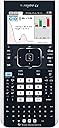
📊 Elevate your math game with the TI-Nspire CX — where power meets portability!
The Texas Instruments TI-Nspire CX is a cutting-edge graphing calculator featuring a sharp 3.5-inch full-color display (320x240 pixels, 16-bit color), a rechargeable battery lasting up to two weeks, and robust memory (100MB storage, 64MB RAM). Its sleek, lightweight design and intuitive touchpad make it ideal for students and professionals who demand mobility and advanced functionality, including 3D graphing and seamless document transfer between devices.


| ASIN | B004NBZAW0 |
| Batteries | 1 Lithium Metal batteries required. (included) |
| Best Sellers Rank | #220,396 in Office Products ( See Top 100 in Office Products ) #70 in Graphing Office Calculators |
| Brand | Texas Instruments |
| Color | Black |
| Customer Reviews | 4.5 4.5 out of 5 stars (2,003) |
| Date First Available | February 10, 2011 |
| Is Discontinued By Manufacturer | No |
| Item Weight | 7 ounces |
| Item model number | N3/TBL/1L1/J |
| Manufacturer | Texas Instruments |
| Manufacturer Part Number | N3/TBL/2L1 |
| Material Type | graphing |
| Number of Items | 1 |
| Product Dimensions | 11.8 x 7.25 x 2 inches |
| Size | Standard Packaging |
J**T
Outstanding
So the time has come to send my oldest to middle school. His school requires the use of one of two calculators in his math class...the TI-84 Plus OR the TI-Nspire. After doing a LOT of research I settled on the Nspire. Why? Well.... At first glance the TI-84 would have been the better choice. It's based on a platform that was first introduced in 1996, and twenty years later the market has had a lot of time to embrace this calculator. Indeed, there's a vast amount of resources out there to support the TI-84 and having all of that would seem to make the case that it is the best choice. The lower price point is also another factor. But then my research started showing something. The updates for the TI-84 had been doing a commendable job at beating back the clock, but the reality is the hardware is aged and can only do so much. While it may have been the best calculator in the world ten years ago, the reality is that was ten years ago. In other words, it is now limited and will always be limiting going forward. Add to that TI's loving attention to the Nspire, and it becomes clear that the Nspire is the new platform. Equipping my son with yesteryear's technology would be, I think, to put him at a disadvantage with his peers. So the Nspire it is. Sadly the school outright prohibited the use of CAS calculators in their list. More's the pity, as the CAS version offers some very compelling features and abilities at a trivial price increase. If it weren't forbidden, my son would have received the CAS version of this calculator. On the other hand, this particular model will serve him well into college, so buying this platform today means I don't have to buy it for him in six+ years. And if the need for CAS becomes acute then, well, the CX CAS will be waiting. Using this handheld (it's really not a calculator, but a mini computer) has addressed a lot of the nonintuitive quirks of the TI-84. You work with documents, you can interact with things directly via the touchpad, and so on. Regular OS updates ensure that this platform has a LOT of life in it. Too, the Nspire has capabilities that are simply impossible for the TI-84 to have, like 3D graphing. On the other hand, since math teachers tend to be a staid and Victorian lot, you'll still see the TI-84 hanging around schools longer than I think is wise. Since TI stopped selling the TI-84 keyboard attachment for the Nspire, it's clear that TI is committed to forcing the issue. Better to, I think, learn the platform of the here and now vs the old one. What put me over the edge was a brief survey I took of the engineers in my office. To a man (and woman), they agreed that the Nspire was the way to go. So that's why I bought this, and the support from TI in addition to the software tools (the PC application, document transferability, etc) has made that decision a wise one. I firmly believe this is the best, most flexible handheld calculator device on the market today. I armed my son with this, a couple of tutorial books, and let him play...and he's taken to it quite well. It's an outstanding device.
C**S
Intuitive, nice delivery time, but slightly bad packaging
The packaging was a bit deformed, but it is more likely the problem of shipping than the seller. The calculator itself was intuitive and easy to use (if you used a GDC for the first time). For those who are used to TI-84, it may take some time getting used to, but the result is worth it. Graph processing, inputting functions, calculating definite integrates and so on uses 50% less time than the TI-84, and is much easier. The UI clarifies numbers, and the better LED screen really helps me to lessen my mistakes of copying wrong values through the use of a more natural font. SAT, AP and IB all approves this model, along with others. I highly recommend this calculator, because the time you spent typing those chunky expressions (made faster through the mini keyboard) will be saved dramatically, giving you that much-needed extra two or three minutes to finish off that last crazy hard math problem. (Not to mention the ability to "cheat" by using the graph to derive vertices directly from a given function, rather than going through the standard process of algebra) it helps you to kill all those easy questions in seconds. There are several problems though. The 3D modeling component is a bit less intuitive and hard to manipulate, and lacks certain features (though if they allowed, they will be banned from being used in high school level tests) It is hard to delete certain features (as required by IB) In some schools, you may have a hard time learning how to use your calculator if TI-84 is the standard used by teachers. That happened to me, but I was able to catch up within a week, and me being faster than my classmates helped push me to being top in mathematics (seriously, I got 10 more marks than the second SIMPLY because I had more time to do the harder questions because of the calculator)
S**8
Excellent for any math or science course (AP courses and most college courses as well)
This is an excellent device, and although it takes getting used to, it is much more intuitive than the TI-84 and others like it. While other calculators offered by TI also have color LCD panels, this one seems to match the aptitude of this calculator, finally putting all the power and functionality under the hood. It offers plenty of space for documents and pictures, which can be helpful in graphs and determining geometry. It doesn't stop there, though. I'm a high school sophomore in Precalculus and AP Statistics, and this is more than enough to get me through these classes, because it offers a much more computer-like intuitive workspace rather than the often obscured environment on the TI-84. I find it handy to be able to type in my operators, especially in Precalc, because experience with this has let me type much quicker. If you have never used one of these, I found it handy to have a "study buddy" who knows or is learning how to use this. I would also recommend finding a "scavenger hunt" like activity from TI's website to learn the basics of what your calculator can do. Then, experiment with it in your free time. Create a new document and play with the various functions. The great thing is, if you mess something up, you can just delete the page or even the entire document. Many of the key combinations that work on PCs also work on the TI Nspire, like Ctrl+C for copy, Ctrl+V for paste, Ctrl+I for new page and Ctrl+S for save, which helps the learning curve.
J**A
Great buy! Just like seller said, works perfect for college!
I found this TI-Nspire CX calculator on Amazon for only $49 used! It was just like the seller described, even with the charger! You can tell it's been used (some small marks on the back and cover), but it works perfectly! I just had to charge it once, and now it lasts really long. The battery is great! The colorful graphing feature is awesome, too, making it super helpful for my college classes. Overall, I'm super happy with this purchase! It's a powerful and affordable calculator, perfect for students. I highly recommend it!
F**2
TI Revamp is spot on
EDIT/UPDATE: If you are taking any math beyond pre-algebra or algebra 1 you will need at a minimum the TI-Nspire CX-CAS and NOT the TI-Nspire CX. The other version is better for algebra 2 and beyond. I typed in the command to extend a ploynomial and the TI-Nspire CX had a pop up that said, "try the TI-Nspire CX-CAS" It's a great calculator all the same, I really wish I had known it was not advanced enough when I bought it about 3 weeks ago. I have my second math exam tomorrow and will have to familiarize myself with the TI-Nspire CX-CAS tonight. Thanks to Amazon's same day shipping it's only a minor set back. Immediately worth it. Many years ago, I was loaned a TI 81/82/83 to use in school. I never bought one. It never occurred to me that a newer version would make that much of a difference. I thought, "I can use my phone for graphing and stuff or a computer program." I never gave much thought to a futuristic TI-Nspire graphing calculator. I had a scientific calculator and was mostly a C student in math, until now. Now I'm in college algebra at Thomas Edison State University and I saw my math score go from the 80% range to the 90%+ range. I became an A student with this calculator. Having the right tools for education make all the difference in the world. I absolutely recommend investing in your future with a good graphing calculator and for college students this is a must have. I was completely floored by the trackpad style cursor button! It was pretty easy to use. I haven't used a graphing calculator in 12-ish years, but I picked this one up and it was familiar enough that I could immediately graph and perform algebraic calculations. It came just in time, despite our Nor-easter storm. I used it today for my first college algebra test, graphing, functions, systems and all that fun stuff. I love that this calculator is the perfect blend of the classic TI calculators with some futuristic feeling features that make it a little more zazzy than the older non-backlit 8 bit pixelated clunky calcuators. This one is light and holds a charge and can work for a long time off a single charge. No more eating batteries the way the old ones did. It's also super light. I was nervous about the purchase at first but it is 100% worth it.
R**T
Score one for Dad!
I bought this calculator for my daughter who is in ninth grade. Ninth grade! I was a bit shocked when I heard the graphing calculator requirements so early. Maybe that's a good thing, I thought. Maybe she'll be cranking out high-level mathematical graphilicious graphs of doom. With the power of this TI Nspire CX Graphing Calculator in her hands, my daughter could one day rule the world. Okay, that's not really how it went down. In truth, I was miffed. I just spent a few hundred dollars in school fees and now I was being asked to purchase an expensive calculator for a class I was sure wouldn't be using it to the full potential. At best, I figured maybe some brainiac would show the other kids in the class how they could script little games and build funny functions of prepubescent bliss. I guess tech familiarization under the guise of math isn't the worst thing we've got going for us, so I bought in. I pulled up Amazon and started pricing the requested models. The TI-Nspire CX was at the top of the range, but I found a used one for a killer deal. The description indicated the device had only been used one semester by a college student and the pictures looked good. A swift discount and a click to buy later and we were both happy campers! My daughter got props from the teachers for showing up with such a nice calculator with its fancy color screen. And I got the cool dad points for getting a kick butt calc for the price of the standard lower end comparables. I love you, Amazon.
P**S
Very Comprehensive Calculator, however the User interface is quite confusing.
I originally wrote a review for this calculator that rated it at only 2 stars, but I deleted that review and decided to write this review that now gives it 3 stars. As a comprehensive versatile calculator it deserves 5 stars. However if you are looking for a calculator with an easy to use intuitive interface, this is not it. It does have a lot of extra buttons such as the Alpha keyboard at the bottom which is easier and better than most every other advanced calculator. The problem at least for me is the actual operation and navigation of the calculator can be entirely confusing and frustrating if you don't understand what button addresses what menu. This is the problem there isn't just one comprehensible hierarchy menu system. There are several different menus related to different things you want to do, and you can literally waste hours trying to figure it out. Eventually I had to call the TI Customer support line 3 different times to finally learn how to easily navigate the scattered menu system. For starters its not even easy or intuitive to figure out how to turn it off once you turn it on, at least the 1st time you turn it on. Eventually I did figure it out, but it was not without a lot of consternation and frustration as it took me a minimum of 1/2 hour to finally realize that you have to use the <ctrl> button just prior to <On> in order to shut it off. Now you might wonder how could something as simple as this seem so difficult? Isn't that how all calculators sort of work? I have 5 different advanced calculators: the Casio fx-115ES PLUS, which is a great scientific calculator for under $20.00. Somehow it's much more obvious that the <Shift> key is used with the <AC> key to turn it off. It seems the layout of the buttons is just more intuitive and it's easier to figure out that the Off button is not the same button as the <On> because it's clearly labeled above each key, and it's pretty obvious that all the labels above the keys are "shifted" functions. On the TI-Nspire it's not so obvious. While there is an "off" label above the <On> key, it's not at all obvious that the "off" refers to the <ctrl> key, not what I was at the time thinking. I assumed that the <On> button was also the <Off> button. Think of almost any light switch in your house or on a home appliance. Almost everything I can think off uses the same button to turn something "On" or Off" This is what one comes to expect when the procedure is so ubiquitous. Not so with the TI-Nspire, and this is just the beginning of one of many frustrations. In the interest of brevity, I'll include more of my frustrations as comments to this review, but for the moment just trust me that this calculator takes an extraordinary amount of effort and research to get to the point where you can actually address some of the more advanced features and start using it as a production tool.
J**S
Quality product
Good quality calculator that will last you for years to come. This calculator has lasted me from high school math up until the end of my college year (still works like a champ with no issues, but I just don’t have much of a use for it anymore). I bet it could last another ten years. High quality product and easier to use than some of the other graphing calculators available.
B**N
Commande calculatrice
Très satisfaite. Mon colis est arrivé le jour prévu et en parfait état
M**S
Ottimo prodotto
La calcolatrice è arrivata nei tempi previsti ed è dotata di una custodia rigida + 1 caso USB + 1 cavo mini USB, utilizzati per la ricarica delle batterie (presumibilmente anche per lo scambio dati ma non ho ancora provato la comunicazione fra la calcolatrice e il pc). Interessante la licenza software per studenti che permette di scaricare un software che emula in tutto la calcolatrice fisica sul proprio pc di casa. Alla prima accensione ho potuto configurare il linguaggio italiano, mentre i manualetti su carta sono soltanto in lingua estera fra cui inglese. Per la navigazione del menù e la normale operatività si deve usare un touch-pad che fa perdere un po' di tempo, uno schermo touch-screen sarebbe stato il massimo. La calcolatrice arriva con una custodia rigida a slitta a copertura della parte superiore, mentre la parte inferiore, sempre rigida, è fissa e fa parte del corpo della calcolatrice stessa. La custodia rigida ripara sicuramente da eventuali graffi e/o danni allo schermo e ai tasti, non saprei dire quanto può essere utile in caso di caduta accidentale. Per un prodotto di questa fascia, mi sarei aspettato in dotazione anche una custodia morbida esterna che invece deve essere acquistata separatamente. Agevole la tastiera alfanumerica. Data la grande varietà di funzioni della calcolatrice, è richiesto un po' di addestramento per sfruttarne al meglio le potenzialità. Complessivamente un ottimo prodotto.
A**I
TI-Nspire
Great to save documents and pics but it takes alot of time to read it. Computer transfer, but does only support .tns documents so thats not so good. i think its a really good calculator have many functions. but they should make it faster in document reading.
M**H
Excelente producto
Funciona justo como se describe. Muy útil para estudiantes de la carrera de ingeniería o aquellos que trabajan con funciones especiales.
R**Z
Works great and has features that old TI calculators don't have ...
Works great and has features that old TI calculators don't have like say an auto conversion to fraction or an easy typing keyboard for note taking and a huge list of things you can do to basic stuff like graphing, finding x-intercept, fractions to finances and matrixes, document typing, network connections and even classroom logins (but you gotta forget everything the teacher said since they are talking in ti-83 and 84 language so if you buy this, you must accept the responsibility to go research on how to use your calculator)
Trustpilot
3 weeks ago
1 month ago