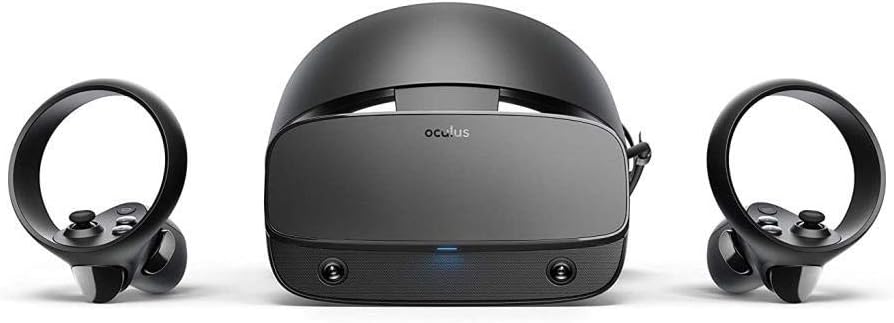



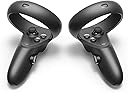
Oculus Rift S PC-Powered VR Gaming Headset
Product ID: 115304967
🎮Top VR game library, 100+ titles
🎯Inside-out tracking, no external sensors
👓Next-gen optics, reduced screen-door effect
Desertcart purchases this item on your behalf and handles shipping, customs, and support to UAE.
🚀 Step into the future of VR gaming—where every move counts and every moment thrills!
The Oculus Rift S is a PC-powered VR headset featuring a vast library of over 100 games, next-generation optics for vivid, sharp visuals, and inside-out Oculus Insight tracking that eliminates the need for external sensors. Its ergonomic halo design with a quick-fit wheel ensures comfort during extended play, while updated Oculus Touch controllers provide precise, intuitive hand tracking. Designed for seamless setup and immersive experiences, the Rift S is a top-tier choice for professional gamers and VR enthusiasts seeking cutting-edge performance and value.


| ASIN | B07PTMKYS7 |
| Batteries | 4 AA batteries required. (included) |
| Customer reviews | 4.2 4.2 out of 5 stars (18,325) |
| Delivery information | We cannot deliver certain products outside mainland UK ( Details ). We will only be able to confirm if this product can be delivered to your chosen address when you enter your delivery address at checkout. |
| Is discontinued by manufacturer | No |
| Item model number | 301-00178-01 |
| Language | English |
| Product Dimensions | 27.8 x 16 x 21 cm; 140 g |
| Rated | Not PEGI rated |
| Release date | 21 May 2019 |
L**1
Worth Upgrading from CV1??
I did alot of research before I took the plunge on this, being that I already have a CV1. Would it be worth the upgrade? My main doubts before upgrading were, 1. Will my IPD be OK? Mine sits at 61mm and after setting the software to match I have had no issues here, everything is crystal clear and no eye strain. Ideally you want to be at 63.5mm but 2-3mm either side of this and I don't think you will have a problem. However this is subjective to the individual. 2. The black levels, being this is an LCD panel and not OLED. Omg the black levels are amazing! I was very surprised just how good ALL the colours are, definitely on Par with the CV1, maybe slightly better! 3. Tracking, coming from outside in to inside out. This is better than what my 2 sensor set up was. Again if you put your hands behind your back you'll loose tracking but this was always the case for me. Unfortunately when you draw say a bow, you will loose tracking if you put the controller too close to your face but you can adapt to this. I feel overall the tracking is better than 2 sensors but not if you have 3. 4. God rays and screen door effect? Without a doubt a thing of the past! 5. Resolution is only a small bump up on paper but WOW the LCD panels pixel density is far better which is also why the screen door has all but vanished. Text is VASTLY sharper! 6. Sound quality. The sound quality is actually surprisingly good but it's not quite got the base of the CV1 headphones, but still good overall. You can still plug in a 3rd party solution via the headphone jack. 7.Comfort. The CV1 was very comfortable I found but again so is this, it's just different and takes a bit of getting use to the halo design. It's also actually nice NOT having ear phones pressed against your ears. 8.Value for money. This is where I feel this really shines. When you compare it to the price of the Valve index, touching close to £1000 for the full setup or the HP Reverb at the £500-£600 region. I feel this Headset hits the sweet spot for being both good value for money and a good all rounder in the specs department. 9.Lastly Software. I've always loved the Oculus software, very polished and easy to use especially when you compare to Windows MR. The new pass through cameras are great for having a peek into the real world. When you step out of your Guardian boundaries this kicks in. UPDATE... I'm getting alot of tracking issues where the tracking stops working completely! Also I'm getting an intermittent black screen usually on first boot of the PC. You can fix this by replugging in the USB but it's not ideal. Also I've noticed an intermittent flash of static, if you blink you can almost miss it but this occurs at least every 5-10 mins. I hope this all gets fixed with future updates. Unfortunately the way I see it this should have all been working properly from day one as I never had problems with the DK2 or CV1. I have returned it for a refund. I'm sure one day they will sort these issues via a firmware patch. When they do this will be a good buy which is why I've given it 3 stars and not 1. Originally with my first impressions after an hour of use I gave this 5 stars with my review. But now after 12 hours of play I have started to notice more issues. UPDATE!! As of now September 2019 with recent updates the Rift S is now fixed of all its issues that I mentioned.
S**M
Good visuals, decent comfort and mostly good tracking for a decent price
After a short experience with the HTC Vive sold me on VR, I started looking at getting a second hand Vive. Eventually, though, I decided to get a Rift S when it was on sale for £350, and I'm glad I did. Setup is pretty quick and easy, aside from the Oculus software forcing you to sit through health and safety videos, the firmware update I had to do not pushing to the controllers so it was asking me to pair the controllers again when what I actually had to do was leave the configuration and update the controllers separately, and it not working with anything outside the Oculus store until you enable the "Unknown Sources" option. Visuals are good, just make sure to warm the headset up before putting it on so it doesn't steam up. No issues with ~66.5mm IPD, it does get a bit blurry towards the edges of the FoV but that's not IPD related, and it's still better than the Vive was. Haven't got any light bleed, but I can imagine it being an issue with smaller noses than mine. Also, while the lower refresh rate of 80 Hz might be a downgrade over the Vive and Rift, lower persistence means that there's less motion blur so it actually ends up being clearer and might even be better at preventing sickness. Speaking of sickness, that was an issue for the first couple of days, but after a week of short sessions that I stopped once I started feeling ill, it hasn't come back. Your experience may differ. The headset's decently comfortable if you take a few minutes to adjust everything. It's not going to feel weightless, and it will definitely press in on your head slightly, but you quickly forget about it until you take it off 3 hours later and see the small imprint it leaves around your eyes. Tracking is mostly fine. Haven't had the headset lose track of the room, but the controllers will occasionally fly off-screen under quick movements, or get stuck by your side/behind your back. It's infrequent enough that I can't complain much, but still something worth mentioning. And finally, the controllers. They're fine, only issue is needing to change the batteries every couple of weeks. I'd recommend a pair of AMVR grips so you don't have to hold onto them constantly, but then you won't be able to fit them back in the box and may want to buy a case/stand to store (the headset fits pretty much perfectly in PSVR cases). All in all, worth every penny.
H**S
Probably the best entry level VR headset for PC
In terms of simplicity and excluding the mobile VR headsets, the Rift-S is probably the simplest to set up and get using as everything is contained in the headset. There aren't any tracking sensors you need to set up around the room and there is very little calibration that needs to be done to get started other than setting up the floor level and the play area boundaries. One downside is that the pupil distance is only software adjustable meaning some users outside of the optimal range may experience slightly blurrier image quality - I am just inside this range so its close but not too bad. The game library is pretty good and it is compatible with Steam VR. The audio quality on the headset is really nice and the unit itself is pretty light. The sensors are able to pick up the controllers even in low light, but it is best used in a well lit play area. My main issue with this headset/Oculus in general is that as it is Facebook/Meta owned you are constantly prompted to connect to or make an account, this is fine if you have one but quite irritating if like me you don't use social media - This doesn't have an effect on any gameplay though. In terms of usage, I bought this on launch and I've had many hours using this and have thoroughly enjoyed it. It is very fun for social or arcade style games like Robo-Recall but it really shines with titles like Half Life: Alyx or the immersion of something like Elite Dangerous. If you have a high end machine and are really into your VR, id probably opt for the Valve Index, but for someone looking to dive into VR on pc and have a bit of fun, this is a good start.
H**R
The best VR headset if you have a PC, patience and prepared to spend money to buy a few extra pieces
I've been using this headset for under two months and after the initial hurdles it gave me, I can finally say I love this product. Before I talk about my experiences I would like to highlight some important things you must keep in mind and some issues I initially faced. First off, after my first VR session I faced the issue of having to restart the oculus software before every session in order to temporarily fix a bug which was caused by my mobo USB ports not generating enough power. This was permanently fixed after I changed motherboard and reinstalled windows during my PC upgrade. Another issue you will likely face will be with the microphone of the Rift S, which in itself doesn't offer very good audio quality, but will likely either present you with phases of working normally to then sound like very cheap mic for a minute before it goes back to normal. I didn't experience this specific microphone problem, but mine just died on me after about 3 weeks. This promoted me to invest in a wireless ModMic which I attach to my bluetooth headset, and I'm very glad I decided to go with it. This was my first VR headset ever. I had never experienced VR before and the Rift S would be my ticket to the exciting world of VR. I didn't set my expectations too high but I was hyped. When I first hopped into VR, the Rift S worked out of the box after plugging it in and installing the desktop software. I was absolutely mesmerised and kinda just stood there looking around and throwing stuff in the tutorial area. After the tutorial and a few impressed family members, I decided to set up SteamVR and purchase Beat Saber. Beat Saber provided me with around 30 minutes of fun but really I was just trying to test it out. I then was invited to jump on VRChat with an irl friend who had been teasing me about it since like 2018. He showed me the ropes and I was hooked. Getting the Rift S was one of the best choices I have made, I must however admit that I only really use it for VRChat as it's helped me better my social skills and make new friends. The Rift S also works with the Vive trackers and base stations through SteamVR and space calibrator to offer full body tracking and I've had no issues with it so far. I can therefore recommend the Rift S for full body, although this is an expensive route. Overall, I can confidently say that I have no plans to upgrade from this headset to any more premium option like the index because I don't see the need to spend extra money when the Rift S is already a solid VR headset. You may ask, why do I give the Rift S a 5 star review after the issues it has? Because after I have resolved all the problems, I have now a very solid headset which provides me with everything I need to have a great VR experience.
O**G
Easy set up
I got this because it's an inside out system (no lighthouses) that's easy to set up. I had a problem at first when my comp crashed during a firmware update, afterwards it wouldn't detect the dp connection. I downloaded reinstalled and no joy, I skipped instalation and the oculus app had detected my rift s and asked me to update the firmware again. I did so without any mishaps and I was away. So even with a bit of ball ache it was less than an hour and I was away. When I first put it on (this is my first VR experience) I was taken back by the sense of depth and spacial awareness. I originaly got this for the head tracking in flight simulators but it's much more than that. I went through the training for Star Trek: Bridge Crew, an intensely tedious task on my pc+monitor but on the oculus it was awesome, and that's not an overstatement. Also the Rift S was detected by Steam VR and set up without a hitch. In short, for the £350 I paid this is well worth it, pc gaming just went to a whole new level. Are there better VR headsets out there? Sure, but as far as bang for your buck goes it's Oculus Rift S for me. EDIT: I starting getting a problem where my controllers freeze in mid air every 5-30 minutes, they retained roll and pitch but lost full 6DOF. I jumped through hoops but finally solved the problem by purchasing a powered USB hub from amazon. It's also possible to solve the problem by unplugging my mouse and headset but the usb hub causes less trouble, aside from that the Rift S is holding up perfectly. Nearly a month later I'm still happy with my purchase.
B**L
Well advertised, poorly executed
I have now used the Oculus Rift S for about a year now and feel that I can put a fair and decently structured review of this product and we will start off with the design... So the design of this headset is very simple but gets the job done, sleek and robust in structure... However, it's pretty front heavy, it has issues with heat and trying to melt your face, the plastic is cheap, the foam padding to protect your face from the plastic falls apart after some use (the foams protective fabric fell off after 3 weeks of use for me but may vary on how much the headset is used) and the plastic clip that is meant to protect your display wires from pinching snaps way too easily which then leaves the wire dangling procariously and risking damage to said wire or the headsets display point. Then we have the Oculus Touch controllers, they are light and pretty easy to get a handle on using except they have an issue with controller drift, pretty bad controller drift for that as dust and other gunk can get under the stick and mess with the censor, even with constant cleaning like I did. Next we will talk about the software, Oculus uses it's own system called well... "Oculus" this has to be installed to your C: drive and is 15gb~ to install (before driver updates), once you have all that installed you must merge a facebook account too the app in order to use the device plus it seems to not really allow people to create new accounts and just add them to the app it has to be an older account but I cannot confirm this as I used my main account i had for 11 years, once all that is done you go through ur unskippable health and safety video which isn't much an issue and after all that, a small vr tutorial and ur free to play as you please, but be very wary of driver updates for your graphics card as the headset has a tendency to brick your graphics card if it is plugged in while you update it, this can only be fixxed by uninstalling and reinstalling the graphics card through your device manager on ur pc and also I have a issue currently where the vr is operating fine but refuses to detect the tracking (no idea how to repair this yet) which makes play on the headset impossible as it will not even bother loading you into the vr space. If you are wanting to use your steam games and account (just like 90% of the playerbase does) then you must stress your PC or Laptop more by running both Oculus and SteamVR at the exact same time which is a horrific waste of pc resources and causes pretty bad performance issues if your device is lower end, Ovulus will also sometimes refuse to open SteamVR or even acknowledge that the program is open, what causes this I do not know but it can be pretty annoying as if it doesn't fix from closing and reopening SteamVR then you must unplug and replug in your headset which if your pc is in a difficult to reach spot like mine is it can be extremely annoying to deal with... The support... Oh no the support... Honestly you would get better support throwing a fish at a wall expecting it to fly... Though they do try their best they are just terrible at fixxing the issue and seem to have an issue when you try to use your warranty to repair things and trust me... You are going to be using that warranty for a few things as this headset seems to have a heavy track record of messing up quite spectacularly. In my conclussion to my experience to this headset, I would strongly suggest steering clear of this device and possibly the Quest though I cannot say anything for the Quest and spend the extra money on an index or a vive, they both also have problems but they are a million times better than this conpanies products are as far as I can currently gather.
T**S
Amazing WHEN it works... Oculus you need to sort out your drivers/software
It's such a shame, this headset when everything is working is fantastic. Unfortunately it's let down by catastrophic software/device driver failures. I returned mine after about a week of it deciding repeatedly not to work after either I took the headset off my head or rebooting my PC. Everytime it decided it wanted to work it was FLAWLESS ! Tracking was spot on, image quality was great, even the audio was ok (not great) but I still enjoyed playing VRCHAT, Vader Immortal and Blade and Sorcery with no issues. Issues only arose when I took it off or turned off my pc. When I tried again the headset would either appear to be connecting and disconnecting itself repeatedly, give a black screen with the orange dot LED or show 3 dots on a black screen indefinitely. I was using the USB 3 PCI card recommended by Occulus: Inateck Superspeed 4 Ports PCI-E KT4001 I tried it with the latest Inateck drivers, which don't work with the RIFT S drivers. It gives code 31 in device manager (Unable to load drivers ) and a yellow warning triangle. So you have to manually use the Microsoft USB Hub drivers in the device manger for the 2 x RIFT S devices. Device Manager > Universal Serial Bus Controlers > Update Drivers > Browse My Computer for Drivers > Let me pick from a list > Then select the Default one listed Worked fine for a couple of days then the issues above started. There was no change to Hardware/Software or updates. Pc was shut down and I tried it the next day and the issues started. So I tried different USB 3 ports on the card. Same issues. Reboot repeatedly. Unplug/plug back in. Checked the Camera privacy settings were ON. Tried all combinations of USB legacy/handover settings in BIOS. Made sure Nvidia drivers were up to date and overlay/shadowplay was disabled. Made sure power management on all the USB devices had the option to allow the PC to turn off the device to save power disabled. Enabled/Disabled Beta software/drivers in Occulus software. Reinstalled Oculus software. Then I got it to work by changing the drivers in the device manager again: Inateck USB 3.0 Card - Fresco Logic xHCI (USB3) Controller FL1100 Series > USB xHCI Compliant Host Controller Rift S devices x 2 - xHCI Hub > Rift S So this time it worked with the USB 3.0 card using default Microsoft drivers and the Rift S using its Occulus drivers. Worked fine for an evening with NO issues during gameplay. But as soon as I shut down and started it up again, the same issues started. Kept disconnecting and reconnecting itself. Black screen with orange led or the 3 dots that just stay there. This time none of the aforementioned driver settings worked. The device just kept connecting and disconnecting itself. I don't think it's a cable issue otherwise it would've stopped working mid-game in the 14+ hours I got out of it. It just seems to not want to work for a few hours and then decides to start working (at least until you take it off or turn off your pc). I think if they got the drivers to work then Oculus would take over the market because it's cheap and works damn well when you can get the driver/software stars to align. Such a shame.
A**R
A must have VR headset
I was a non believer in VR. I thought it was a gimmick. Never really experienced VR until I watched a video of my favourite Youtuber (Callmekevin) Play Superhot and I was sold at that moment. I waited for Black Friday. Bought the Oculus Rift S (first time round got dog food but a week later I got the replacement) and Oh boy. I cant play 2d games the same anymore. I have ascended in gaming and honestly its amazing. The Oculus Rift should be everyones choice for their VR on a budget. (If you want to spend the money go for Index) People like to shut this headset down because its by Facebook. But this piece of tech is amazing and once its on your head, you’ll forget the world around you. My only downside is the audio but its not as bad as people make it out to be. (And there is an audio port that fixes this problem) I mostly play with the audio from the rift s and it just as immersive for me as using headphones (except in music games like Beatsaber) Another downside is the the fact that this headset is locked in terms of IPD. (I have the perfect distance of 64.5 so no issue) And also I want to point out that this screen isnt OLED but LCD. (But the index is also LCD and thats $1000) It makes the screen sharper and better than being able to see a better black. I have played elite dangerous on the Rift and honestly Ill take the better detail over OLED. Id honestly pick this over WMR (due to support for WMR in games arent that great) and the Vive (which is outdated and more expensive) The tracking is phenomenal with 99% accuracy and the fact you dont have base stations but cameras instead makes setting this bad boy up so easy and going into VR like as easy as going to bed. Set up took 10 mins and that was it. Great piece of tech and would 100% reccomend this headset to anyone and everyone
M**Y
Brilliant escapism
The item arrived much faster than the estimated day which was a good surprise. I have only been using it for a few days and am in love with it. I'm new to VR so it can feel a bit scary and weird. And I'm still exploring and figuring out what it can do. I'm thrilled in beat saber right now. I suspect in time technology will advance so the wire won't be an issue. (For the most part it's not, but sometimes in the passion of a game you feel the long wire attachment getting in the way). I love this equipment.
D**B
L’Oculus Rift S
Plus : Qualité d’affichage améliorée : L’Oculus Rift S offre une résolution de 2560 x 1440 (1280 x 1440 par œil) avec un écran LCD à 80 Hz, réduisant l’effet de grille par rapport à l’Oculus Rift original. Les visuels sont nets pour la plupart des jeux VR. Suivi sans capteurs externes : Le système de suivi Insight avec cinq capteurs intégrés permet un tracking précis à 6 degrés de liberté (6DoF) sans avoir à installer des capteurs externes, facilitant l’installation. Confort pour les longues sessions : Le design du bandeau en halo, conçu avec Lenovo, est ergonomique et répartit bien le poids, rendant le casque confortable pour des sessions prolongées. Bibliothèque de jeux solide : Compatible avec la vaste bibliothèque Oculus, incluant des titres phares comme Beat Saber, Half-Life: Alyx et Asgard’s Wrath, offrant une expérience VR riche. Facilité d’utilisation : Configuration simple via le logiciel Oculus, avec un seul câble (USB 3.0 et DisplayPort) pour se connecter au PC, idéal pour les débutants en VR. Moins : Écran LCD moins vibrant : Comparé aux écrans OLED du Rift original, l’écran LCD du Rift S offre des noirs moins profonds et des couleurs moins éclatantes, ce qui peut décevoir dans les jeux sombres. Taux de rafraîchissement limité : À 80 Hz, le Rift S est en deçà des 90 Hz ou plus offerts par des concurrents comme le Valve Index, ce qui peut causer une légère sensation d’inconfort pour certains utilisateurs sensibles. Suivi des contrôleurs perfectible : Bien que le suivi Insight soit pratique, il peut perdre la trace des contrôleurs dans des angles morts (près du visage ou derrière la tête), ce qui peut gêner dans des jeux rapides. Confort variable selon les morphologies : Certains utilisateurs trouvent le bandeau en halo moins adapté à certaines formes de tête, et le rembourrage facial peut être inconfortable sans accessoires tiers. Dépendance à un PC puissant : Nécessite un PC avec une carte graphique performante (minimum GTX 1060), ce qui peut être un frein pour les utilisateurs sans configuration adaptée. Support discontinué : Depuis l’arrêt de la production en 2021, le support officiel d’Oculus est limité, et les pièces de rechange (comme le câble) sont difficiles à trouver. Verdict : L’Oculus Rift S est un excellent casque VR pour les débutants ou les joueurs PC souhaitant une expérience immersive sans complications d’installation, avec un bon rapport qualité-prix à son époque. Cependant, son écran LCD, son taux de rafraîchissement et son suivi imparfait le rendent moins compétitif face à des casques plus récents comme le Meta Quest 2 ou 3. Idéal pour ceux déjà investis dans l’écosystème Oculus, mais les nouveaux utilisateurs pourraient préférer des alternatives autonomes ou plus modernes.
O**R
Also Oculus Officially Discontinued it, but this VR is still unique and special !
Line Summary: If you know what you are buying buy it definitely, if you are new to VR then Oculus Quest 2 is a more friendly Option given you buy an ergonomic headstrap for it. Point Summary: - Excellent device for Laptop user who like to control everything while sitting. - Not compatible with Most regular Laptop/Non-gaming laptops and need a special Display port to USC-C adapter for it (a specific one). - Oculus Quest 2 is more general user friendly. - Oculus Rift 2 have now less support or market due to fact that Oculus have discontinued it. Advantages: > The Display port compared to USB means that no extra processing or video/image encoding done by your laptop gpu/cpu. So better performance also the camera detect controller movement field better than quest 2. > No need to buy any ergonomic headstrap or battery etc.. like the Oculus Quest 2... > To me the experiance of motion and games (not quality of image) is better than the Oculus Quest 2 and more fluid dynamic (but again that depends on your PC/Laptop). > You can literally have like 360 monitors around you and a mouse and keyboard and multi-task at it best opening multiple windows and seeing them all as each windows is like a large Cinema moniter. > No battery or charging hassle, as in the oculus quest 2 you can't use it 24 hour straight even when plugged to power source evenly battery drain out on heavy use while charging... But on Rift S no such issue as no battery to charge and can be kept connected to laptop 24/7 with no to little resets (device setup from time to time on windows updates). Disadvantages: > You become hooked to a cable all the time (compared to Oculus Quest 2) [not a big deal as if on Laptop you will also be hooked in the Oculus Quest 2 for high end graphic games that can't be rendered from Quest 2 built in Hardware). > You do need a powerful gaming laptop ideally a Lenovo Legion one (as it is designed for the LEGION Specially since LENOVO was partner with Oculus and it have a Mini-Display Port compared to other laptops)
M**D
Get it and live the VR world
Must get don't think too much be sure you have display port in your GPU and 3.1 usb port and you run VR test application before you buy it ... Sadly no Oculus Rift S Optical Cable replacement in market
J**N
bem legal
bem legal e em perfeito estado
Trustpilot
2 weeks ago
3 weeks ago