Buy anything from 5,000+ international stores. One checkout price. No surprise fees. Join 2M+ shoppers on Desertcart.
Desertcart purchases this item on your behalf and handles shipping, customs, and support to UAE.
🚀 Cut the cord, speed up your life with D-Link DOCSIS 3.0!
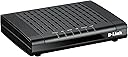
The D-Link DCM-301 is a DOCSIS 3.0 cable modem delivering up to 320 Mbps downstream via 8-channel bonding, compatible with major US cable providers like Comcast and Time Warner. It offers a cost-effective alternative by eliminating rental fees, supports IPv6, and provides reliable, high-speed internet connectivity for both residential and professional use.


| ASIN | B004UGG5KE |
| Best Sellers Rank | #158,636 in Computers & Accessories ( See Top 100 in Computers & Accessories ) #418 in Computer Networking Modems |
| Brand | D-Link |
| Built-In Media | Cable modem - Gigabit Ethernet |
| Color | black or white |
| Compatible Devices | Personal Computer |
| Connectivity Technology | wire |
| Customer Reviews | 4.3 out of 5 stars 712 Reviews |
| Data Transfer Rate | 320 Megabits Per Second |
| Global Trade Identification Number | 00790069330032 |
| Internet Service Provider | cox, optimum, spectrum, xfinity |
| Internet service provider | cox, optimum, spectrum, xfinity |
| Item Type Name | D-Link Systems D-Link DCM 301 - Cable modem (DCM-301) |
| Item Weight | 8 ounces |
| Manufacturer | D-Link Systems, Inc. |
| Maximum Downstream Data Transfer Rate | 320 Megabits Per Second |
| Maximum Upstream Data Transfer Rate | 120 Megabits Per Second |
| Mfr Part Number | DCM-301 |
| Model Number | DCM-301 |
| Modem Type | Cable |
| Number of Ethernet Ports | 1 |
| Number of Ports | 3 |
| UPC | 776457581514 790069330032 |
| Unit Count | 1.0 Count |
C**T
Get this modem instead of renting
Decided to buy a modem instead of renting one and this was on the approved list of cable modems from my provider. The unit is nice and compact compared to the one I was using from the cable company. I also like that there are no flashing lights only solid green LED that let you know the unit is on and connected. Getting up and running took a bit of effort not because of the unit but the customer service rep I had to call to get it registered kept mixing up the numbers and kept asking me for another S/N since it wasn't accepting it. Turns out they had to input it was a retail modem and not a company modem. Did a speed test and this modem gave me faster download speeds and webpages pop up quicker which is a nice bonus since both the old modem and this one are both Docsis 3.0. I can't say as to the longevity of the unit since I just got it but I am happy with my purchase and would buy again. Update...Two years later and still going strong. Solid connection. Speed is at the top of the range with my provider (Cox). The number of times I had to reset the unit I can count on one hand. I see the price has dropped. I would buy again if I ever needed to replace the current one.
A**Z
So far so good, but is there a conspiracy?? Dunn Dunn DUNNNNNN! ;-)
So far it works great. I've had it for three days. When I did a speed test I actually got an insane speed compared to my cable modem from Time Warner I'm sure they will adjust that though. I was barely getting 30 megabytes per second and it went 50+ each time I tested it on the first day. I noticed a theme though. I do wonder if Time Warner Cable sends out some little signal to make these not work after a while. The common theme here, and it doesn't matter the brand, everyone who does complain about their modem is that it does not work after some time. It is ironic that when you get a cable modem usually from the cable provider you can end up with a cable modem for years until they upgrade and you never really have issues with the modem itself I mean. Maybe once in a while. But my experience has been pretty smooth over the years at home using the modem provided by the cable company. If this one goes out in 3 to 4 months or within the year, I can't help but think that the cable company does something to ruin them. It's not in their best interest for you to save monthly especially when they have millions of subscribers. Anyways I got the SquareTrade warranty on it so we'll see how it goes. I could just be crazy, but at the same time there is that glaring fact, no matter the brand, so it's worth noting. Also why only ones they approve of? If a manufacturer makes a modem and its FCC compliant and can handle the cable internet as stated, you should be able to use whatever modem you want just like an oil filter aftermarket or an air filter aftermarket in your vehicle. As long as it's built to code it should be perfectly fine. They shouldn't dictate which ones you should be able to use as long as it does what it claims. So is TW an evil and greedy cable company that makes billions a year profit (like Verizon) and wants you to pay that modem fee, or are some simply having an innocent mishap with their cable modem? We'll see.
S**Y
It just works.
All I had to do was plug it in and it started working (after a while). Instructions are simple and there's no configuration software or web page to fiddle with. I took off one star because even though it's not needed for setting up, the manual (and online docs) don't provide the default user name and password for accessing this device's web setup, and that info isn't online anywhere either. But just in case you want it anyway, here it is (thanks to Harold Kirby): user name=admin, password=password. And the web address is 192.168.100.1 As the manual mentions, I did call my provider (Comcast) and give them the MAC address (which is on a label on the bottom), but I'm not sure it was necessary - the Comcast rep I spoke to seemed somewhat clueless, and even after they had the MAC address, it took about ten minutes for the modem to begin working properly - at first no matter what web site I tried, I would always end up at a Comcast activation page (which didn't work when I followed its instructions). It's also worth mentioning that my 4 year old Linksys wifi router running DD-WRT wasn't very happy with this modem; it had been working fine with the old Motorola modem, but once I switched to this new D-Link, the Linksys router got slow and unreliable. Since it was time to upgrade anyway, rather than going crazy fiddling with settings, I swapped the old Linksys for a new dual-band Asus router and that solved the issues.
T**S
Solid if not sexy
But modems usually aren't very sexy, are they? I am not an expert on them, but this seems to be doing the job perfectly well. I bought it to save money on my cable bill - it is listed as one of the acceptable devices by Time Warner Cable - and I also prefer to own, rather than rent, basic technology like modems. At least when I made the purchase, it cost a little less than the Motorolas did (they seem to be the more popular brand). I do notice that the price of these devices has gone up in the last couple of years. So far, the performance has been fine, but it was good with my old RCA modem also.
G**S
Seemless intergration.
Bought the D-Link DOCSIS 3.0 Cable Modem (DCM-301) of $30 as the price was right and I had nothing to lose. It was simple enough to connect the ethernet cable and the coaxial to the back and plug it in. I phoned Optimum (I reside in the Bronx, NY) and gave them the MAC address. The customer service representative asked me for the brand of the modem and if it is a DOCSIS 3.0. I confirmed both and confirmed the unit was plugged in and turned on. The rep seemed a little surprised that he was able to connect to the modem instantly and restart it right away. With small talk included the entire set up took less than 5 minutes. The modem intergraded seamlessly with the Optimum wireless router, and all of the wired and wireless devices in my home. I do not notice a difference between the Optimum branded Arris TM822 modem I was paying $4.95 a month for and this D-Link modem. It has a small footprint, is sleek, low profile and hardly noticeable compared to the Arris it replaced. I recommend this modem.
G**N
Worked okay for a couple months. Now it's awful and I hate it. Want to return, but outside window.
I bought this modem for Xfinity in June. It is now September. That's three months. The modem worked fine at first. I was getting 60mbps upload and 6mbps down. Then all of the sudden I tired to use it and the up speed dropped off a cliff. Now I'm lucky if I get 1mbps up. Xfinitity sent out a technician and with his modem, he was able to get 30mbps up! He then looked me dead in the eyes and said it was my D-Link DOCSIS 3.0 Cable Modem (DCM-301). I called D-Link and they told me the device was defective and to return it to the company I bought it from. I've clicked around Amazon, but to no avail. I can't return it. Now D-Link is going to charge me shipping to return it. Life's lived in a cold dark world with no happiness anywhere.
A**W
Great Product! Easy Plus and Play setting.
Great Product! Easy Plus and Play setting. I plugged it in and after calling the cable company to give them the MAC address it was up and running. And it performs better (faster in terms of ping and response time as my bandwidth is capped) than the Cable Company's cable model which I used to pay $15.00 per month for... I later logged on to the device to see what I can customize.... there is very little to change and customize on this device... It simply works and I think that is awesome... Instead of buying a combination cable-model + Router device I have learned it is much smarter to buy two separate devices. In that case if/when I move or if one of the two devices stops working or gets old I have more flexibility... The companion wireless router I purchased to work with this device is NETGEAR N300 Wi-Fi Router with High Power 5dBi External Antennas (WNR2020v2) That one is super easy to setup and it has a powerful radio with two large external antennae... For $21:00 you can't find a better brand name wireless router....
N**8
Excellent modem! Very fast! Easy to install! No computer science diploma required.
Installed yesterday. It took about 10-15 minutes to complete. You do not need a computer science diploma to do this. Just connect the coaxial cable, the ethernet cable, and the power adapter. On your computer monitor, you would enter your cable account info and the MAC number, which is located underneath the cable modem. In a few minutes, you are back in business, faster and more economical. I am with Optimum. That is the only choice in my community. I have been paying $5 per month renting their modem for over 20 years. I have paid 1200+ dollars for renting a trouble prone modem! What a waste! Their modem also rated as 300+ mbs. However, once connected, I found my new modem performs much faster. All 4 computers, 2 cell phones, and a TV are faster. I already returned the rented old modem to Optimum. Can't be happier!
A**R
now not in use because wanted rj11to coxial
now not in use because wanted rj11to coxial convertor
Trustpilot
2 weeks ago
1 month ago