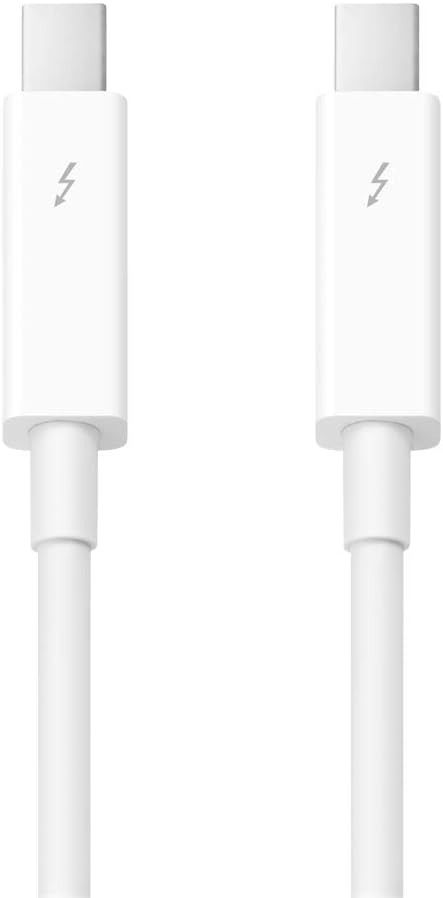

Apple Thunderbolt 2 Cable (0.5 m)
Product ID: 15213589
Details
- BrandApple
- Cable TypeThunderbolt 2
- Connector TypeOther
- Special FeatureHigh Speed
⚡20Gb/s max transfer speed
📏2.0 meters length for flexible setups
🔗Dual-channel Thunderbolt 2 bonding
Buy anything from 5,000+ international stores. One checkout price. No surprise fees. Join 2M+ shoppers on Desertcart.
Desertcart purchases this item on your behalf and handles shipping, customs, and support to UAE.
⚡ Connect faster, work smarter — don’t get left behind!
The Apple Thunderbolt 2 Cable (2.0 m) delivers ultra-fast 20Gb/s data transfer speeds by bonding two independent 10Gb/s channels. Designed specifically for Thunderbolt-enabled Macs, it supports high-performance tasks like system migration and target disk mode. With a flexible 2-meter length and Apple’s trusted build quality, this cable is a must-have for professionals demanding reliable, high-speed connectivity.
| ASIN | B00WVDGZM6 |
| Date First Available | November 1, 2018 |
| Is Discontinued By Manufacturer | No |
| Item Weight | 1.6 ounces |
| Item model number | MD862LL/A |
| Manufacturer | Apple Computer (Direct) |
| Product Dimensions | 4.2 x 4.2 x 6.7 inches |
H**R
Sturdy, reliable and easy to use
The Apple Thunderbolt Cable (0.5 m) is a popular choice for anyone looking for a high-performance cable to connect their Apple devices together. This cable is designed to provide fast speeds and reliable connectivity, and it does an excellent job of both. There are a number of pros to using the Apple Thunderbolt Cable (0.5 m), including its high-quality construction, fast transfer speeds, and compatibility with a wide range of devices. However, there are also a few cons to keep in mind. For one, this cable can be quite expensive compared to other options on the market. Additionally, some users have reported issues with the cable breaking or failing after extended use. Overall, if you're looking for a high-quality Thunderbolt cable, the Apple Thunderbolt Cable (0.5 m) is definitely worth considering, but it may not be the best choice for everyone.
T**B
Does what it's intended to do
What I liked best about the purchase was I was able to get a cable I needed in one day...on sale... and one I know will be durable for at least a reasonable period of time. Apple cables may not always be the most durable but they are a known quantity and get the job done. Other review criteria; Durability? Who knows I've only used it for a week and was asked for a review. Value for the money? Apple cables in general seem to be over priced but I could get it in one day...and it was on sale. So yes, I got a reasonable deal on it. Sturdiness? Everything wears and falls apart in time but I've only had it for a week so time will tell. My experience with Apple cables is if you don't treat them like a teenaged kid they will last at least a couple years.
R**Y
Extremely High Quality; Extremely High Price; Make Sure You Need them before you Purchase Them
These are far too expensive. But it is the price you pay for using the latest technology for high-speed transfer. You can use these to connect two Apple computers together, or for connecting your Apple computer to a Thunderbolt-enabled external drive (which is my primary use for them). They are very high quality like most Apple items are, but they come at an eye-watering price. You can attempt to console yourself with the understanding that these cables are not "just" cables: if you were to physically destroy the end caps and look inside, you would find the electronic controller components that facilitate the technology. So, you are not just paying for a cable, but also for the controller that is hidden inside the cable's end caps. The cable quality, too, is exceptionally high, and they should last a very, very long time if they are not abused. It's hard to give them a five-star rating because of their cost, but in actuality, they are indeed a five-star product, and if you are using Thunderbolt, I would recommend them over non-Apple brands. HEADS UP! "Thunderbolt" is a subject that carries much confusion. These are *NOT* the same as Mini Display Port cables, which are used to connect high-resolution monitors to computers. If you are unsure of the difference, do some research on "Thunderbolt and Mini Display Port" to understand the difference. It's confusing because the physical connectors of "Thunderbolt" and "Mini Display Port" cables are exactly the same, and have the same physical (i.e., size) specifications. But these two technologies perform different tasks and are NOT universally interchangeable. Research before you purchase so that you purchase only what you actually need.
S**A
The real deal!
Boxed original Apple product. Perfect!
F**.
Me gustaría fuera un poquito mas largo para el precio, pero des pues, super como siempre en Apple
S**D
This is It: the Short One! Best for Data Transfers
A a professional Mac IT Consultant, I always carry little bag of data transfer cables, which, for the last year or so, has included two Thunderbolt cables of standard 2 meter lengths which are handy for awkward connections between stationary computers. However, I've found for the most part that I really wanted a shorter cable, and when I sold one cable to a customer for the target display mode connection between her iMac and her MacBook Air, I decided to purchase this shorter cable, which takes up less space in my bag. I tested it, and it works well, being a genuine Apple cable. At this point even a bit less bulk is better. This cable is also hard to find - I have never seen it stock on a retail store shelf. Pros: • Genuine Apple Cable - works well • Short and compact for carrying Cons: • Pretty expensive for a short cable
R**N
Exactly what I needed
I’m a DJ and I keep a backup MacBook with all the exact music on it (essentially a clone) from my main MacBook. A few months back my backup died on me so I had to go through the process of transferring all the music over once again. The main way I do this is via AirDrop. It works most of the time but at times some files for whatever reason aren’t able to be transferred this way. So I had to just only grab the stuff I absolutely needed and take the time when I had it to gradually transfer everything over. It got exhausting especially when I have 35K+ tracks to transfer. After a little research I found out you can do large data/files transfers via Thunderbolt. Once I got the Thunderbolt Bridge setup I simply went to my music folder pressed CMD + A and selected all my music then dragged it over. It transferred all my tracks to the new backup MacBook. The only caveat was that it took over 24 hours to complete (probably because of the 35K+ tracks) however I didn’t need to do anything. I just make sure that my Mac wouldn’t put the HD to sleep and it just transferred everything on it own. Aside from the time consumption it was a very easy process. All my files are on both now and I can confidently DJ knowing that my backup is ready to go when needed. I would say make sure you have free time or don’t need to use the Macs for a day or so if you need to do some massive file transfers. Worth every penny! Not an exaggeration!
R**C
Apple products. Apple quality. Top
A**L
Thought it was C compatible, but was not
M**D
Did exactly what it said it would do. It is a little short, but I was working with 2 laptops moving files back and forth so no issue there. If I were working with 2 desktops it would have definitely required a longer cable.
M**S
It worked better than anticipated. Was used to access data on old laptop having lost video.
S**R
Solved my problem with a broken Thunderbolt cable on my Thunderbolt display. It was cheaper at the Apple Store but I got it delivered faster and this was a reasonable trade-off.
Trustpilot
2 weeks ago
3 days ago