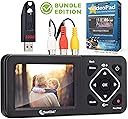
![ClearClick Video to Digital Converter 2.0 (Second Generation) - Record Video from VCR's, VHS Tapes, AV, RCA, Hi8, Camcorder, DVD, Gaming Systems (Bundle) [Requires Working VCR/Camcorder & Tapes]](https://m.media-amazon.com/images/I/91CPlELVE8L._AC_SL3840_.jpg)


Desertcart purchases this item on your behalf and handles shipping, customs, and support to UAE.
🎞️ Preserve your past, power your present.
The ClearClick Video to Digital Converter 2.0 is a second-generation device designed to effortlessly convert analog video sources like VHS, VCR, Hi8, camcorders, DVDs, and retro gaming systems into digital MP4 files. Featuring a large 3.5" preview screen, direct recording to USB or SD card, improved audio/video sync, and convenient pause/resume functionality, it requires no computer or software. The bundle includes a 32GB USB flash drive and VideoPad editing software, backed by a 1-year warranty and US-based tech support.


| ASIN | B083PZTDS9 |
| Best Sellers Rank | #279 in Video Converters |
| Brand | ClearClick |
| Brand Name | ClearClick |
| Compatible Devices | VCR |
| Customer Reviews | 4.5 out of 5 stars 1,145 Reviews |
| Global Trade Identification Number | 00850012969020 |
| Interface | RCA, USB |
| Interface Type | RCA, USB |
| Item Dimensions L x W | 7.05"L x 3.5"W |
| Item Weight | 6 ounces |
| Manufacturer | ClearClick |
| Maximum Supply Voltage | 5 volts |
| Minimum Supply Voltage | 4.75 volts |
| Model | Video2Digital Converter 2.0 |
| Mounting Type | Tabletop |
| Number of Channels | 2 |
| Number of Items | 1 |
| Number of Packs | 1 |
| Number of Pins | 7 |
| Part Number | Video2Digital Converter 2.0 (Bundle) |
| UPC | 850012969020 |
| Unit Count | 1 Count |
J**Z
Buy it! It'll make your life easier....really!
Before buying this ClearClick Video to Digital Converter 2.0 I had used an older video capture device (made by Honestech), as well as a "generic" converter I bought on Amazon about a month ago for around $20. Both of the aforementioned items worked "just ok". The Honestech product was just too old and clunky; the newer capture device was OK, but took a lot of work to get it to work in the way of using a third-party capture program. I spent a number of weeks capturing and editing from my mini DV, Hi8, and standard 8 camcorders using a number of very highly rated free programs, including OBS Studio, MiniTool MovieMaker, etc. I was able to get them to work, and they seem to do a good job with the capture card I was using, but there seemed to be something missing in the way of detail in the picture quality. So, I tried one of the video capture services on Amazon that charges you $12 to convert a tape to MP4 format. I paid the $12, paid $8.40 to ship the mini DV via USPS, and included a check for $6 to get the company to ship back my tape to me. So all-in-all, it cost me $26 to "test" the quality of what a professional company can do vs what I could do using the previously mentioned capture programs. The programs allowed you to set FPS, sound quality in bits, bit capture rate of the video, etc., etc., etc. Countless possible combinations to try to find the "best" or even optimal capture quality for my tapes. I literally WASTED countless hours capturing and converting, using various FPS, quality/noise reduction algorithms, etc, etc., hence my desire to "test" a professional capture service to see how they would do. I eventually got a link to download my professionally captured video, and guess what: it was "marginally" better than what I had been doing on my own, testing many trial-and-error capture and conversion possibilities. So I decided to try the ClearClick device since it had a "Free Returns" policy. I figured, what do I have to lose. Well, long-story-short, as the saying goes, the ClearClick video capture did just as good, if not better than the professional service did for the $12 per tape. And, it is SUPER EASY TO USE!!!! It is saving me a lot of time because all I do is put the USB in, press play on the camcorder, and then after a second press Record on the ClearClick, and it captures perfectly in ready-to-go MP4 format. It also captures in 720x480, which is the mini DV standard, whereas the Amazon video capture service captures in 640x480, which is OK for Hi8 or below, but not for mini DV, which is the higher 720x480. But you have to use an S-Video cable (which I also got on Amazon specifically for this purpose; get the $20 Monster cable, not a generic $6 one since you're already spending money to capture and archive valuable memories). So ClearClick is as good as, or better than a professional video capture service. It's cheaper in the long run if you plan on doing at least a dozen or so tapes. And it's super easy to use. The only thing I would like, as others have mentioned, is the ability to set a SPECIFIC automatic record shutoff time for the recording to stop. I have 1 hour tapes that will sometimes run two to three minutes over, and two hour tapes that'll do the same thing. I do not want to set the time for 60 minutes or 120 minutes and have the last few minutes not captured. Nor do I want to use the "schedule recording function", as their technical support suggested to me when I inquired about a possible firmware update they could use to allow setting an exact record Stop function. I'd like to be able to set EXACTLY 64 minutes stop recording time, for instance. If they had this feature, I'd give it 6 stars if AMZN allowed. Nonetheless, the product rates a solid 5 stars and my highest recommendation. As far as the "bundle" software, which is VideoPad Video Editor: it is very good and easy to use, on a par with other products, I suppose. It doesn't capture, just edits and saves to MP4 in the same size or smaller file, whereas for some reason, the free products, like OBS, etc., end up saving an edited file in a larger size, even if all you did was delete/shorten the video...makes no sense whatsoever, since you're shortening a video and saving it in the same MP4 format at the same exact resolution and sampling rate. The 32 GB USB that comes with it is a SanDisk Ultra USB 3.0. Buy the ClearClick; you'll save a lot of time and will easily capture your old tapes.
J**O
Extremely pleased with this purchase! Highly recommended.
I have a large library of VHS tapes of home movies going back all the way to the late 1980s. Last year I decided to start copying them to digital files to preserve them. I used a Easy VHS to DVD capture device to connect from my old Sharp model VCR to the USB port in my laptop. Using free software I was able to get the videos in digital form on my laptop, but then I would need to run filters through the videos to de-interlace them (remove those lines you sometimes see on old videos) and use other filters to optimize the videos. This took a long time for each video, but the really big pain was that the audio/video sync would be off for every video despite all the settings I tried in the video capture software. That would mean I would have to manually align the video and audio tracks of each and every video using video editing software. With frustration, I gave up on that project last summer and decided to just buy a refurbished VHS to DVD recorder to copy the VHS tapes to DVD and then convert those DVDs to MP4 video files, hoping that the audio/video sync issues would be gone. Well, do you know how much a refurbished VHS to DVD recorder is? Most of the ones I found were around $300. I had been debating whether or not to purchase this device. Some of the reviews on Amazon were positive, and some were negative. However, I saw where the issues that people were complaining about had been fixed so I decided to go ahead and purchase it. I got the bundle package that includes the 32 GB USB drive and the video editing software. On my first few attempts to copy a VHS recording of a trip my wife and I took to Las Vegas in 1998, the video was mostly fine (and the audio and video synchronized perfectly). However, in some places the video was very jittery, especially when the camera would pan from side to side. This was definitely not good news and I thought I was going to have to purchase a refurbished VCR after all. I emailed ClearClick Support about this and actually got a response from Tyler at 10:13 PM Central Time. He said that the jerky/jittery video is due to bad time coding on the part of the tape through the composite (red, white, and yellow) video connection from the camcorder. S-Video signals do not depend on time coding so that type of connection should fix the issue. I don't have an S-Video out on my old Sharp VCR, but he recommended that I purchase this cable to convert the RCA signal to a viable S-Video: https://www.amazon.com/C2G-27965-Bi-Directional-S-Video-Composite/dp/B0002J28KO. I purchased the cable and hooked it up and my old VHS videos now look fantastic (well, as good as they can be for decades old VHS recordings) and no jittery video. I cannot recommend this device highly enough. It is extremely easy to use and does everything I need it to do. I pop in a videotape, double-check the tracking, and hit the Record button. If I need to pause the recording, I hit the OK button. If I need to un-pause, I hit the OK button again. When I'm done recording, I hit the Recording button again. Then I take out the USB drive, stick it in my latop, and move the MP4 files to my external hard drive to be saved for editing at a later date. I would also recommend getting the RCA to S-Video cable if you don't have an S-Video out on your VCR, just in case you have jerky/jittery videos like I did. Finally, it's best to use a VCR where you can manually change the tracking of the videotape. My old Sharp VCR has channel up-and-down buttons on the front that I can push to adjust the tracking if there are fuzzy static lines at the top or bottom of the video. I also have an old Sony Digital-8 Handycam with many more videotapes that I am looking forward to copying to MP4 files using the ClearClick Video to Digital Converter 2.0. I don't write product reviews on Amazon very often but this is one review that I'm very glad to write for such an excellent product! If you are looking to preserve your old recordings, I cannot recommend the ClearClick Video to Digital Converter 2.0 highly enough.
C**E
Did the job, but a few aggravations
Had about 40 VHS tapes I wanted to convert and store before they deteriorated or no longer had a VCR that worked. Bought this in February 2021 and now have 3 left to go through. This unit clearly does the trick and saved me hundreds of dollars for a service. Nearly all tapes are now either on my PC, an external drive, or in cloud storage. Links can be sent from there to family members to enjoy. Several points to remember: you need a working VCR; this unit does not record to external drives other than specified thumb drives. This package provide a 32MB stick that worked fine but limited space; it will take a 128MB that should be adequate; every time the unit is unplugged, the recording date goes away. It has to be reset each time it is plugged in; the record button is a bit sensitive and may result in only snapshots without recording; if the button is hit correctly, there will be a running clock of recorded material showing; Each recording is initially assigned a random number; If you do not rename the files after recording, you could get lost with what you have; the storage process requires you to remove the thumb drive from the unit, plug it into your PC and copy/move the files from the thumbdrive to files on your PC. From there, copy files to wherever you wish. ( Of course, if the thumbdrive is large enough, that may be all the storage process you need ). I did not use any provided software. Overall, once you are aware of the finepoints, its quite easy and effective to use.
A**.
Preserving Precious Memories - ClearClick Video to Digital Converter 2.0 Shines!
The ClearClick Video to Digital Converter 2.0 (Second Generation) Bundle Edition has been an absolute game-changer for preserving our family's cherished memories. With a collection of old VHS tapes gathering dust, I decided it was time to digitize them and ensure these precious moments could be enjoyed for generations to come. Setting up the converter was incredibly straightforward, and the bundle edition came with everything I needed to get started. From VCR's to camcorders, AV, RCA, Hi8, DVD players, and even gaming systems - this converter handled them all flawlessly. It provided a seamless way to transfer the content from these outdated formats to a digital one without any loss in quality. The process was surprisingly quick, allowing me to convert multiple tapes in a single sitting. I was thrilled to see our family's memories come to life on my computer screen in a digital format, making them easily shareable and accessible. The converter's intuitive design and user-friendly interface made the whole experience hassle-free. I was able to navigate through the settings with ease, ensuring that the final digital recordings were of the highest possible quality. In conclusion, the ClearClick Video to Digital Converter 2.0 has become a cherished tool in our household. Preserving our family's memories has never been easier, thanks to this remarkable device. If you have a collection of old tapes that hold sentimental value, this converter is an absolute must-have. I can confidently say that our memories are now safe and secure in digital format, ready to be enjoyed and shared with our loved ones forever. A resounding 5 stars for this invaluable product!
J**S
Best Analog to Digital Converter on the Market!!
Holy cow!!! I wish I could give this product 100 stars because of what it’s allowed me to do for my friends and family. There is truly not enough wonderful things I can say about this product!! I don’t normally write reviews for Amazon products, but this little device has been such a blessing, I can hardly express it in words. To begin, I have a background in Editing and Information Technology, so I’m fairly capable of working with both products. But I still could not get any of my editing systems to consistently connect to the VCR and MiniDV deck that I recently purchased from eBay to try and save some ancient movies. Adobe Premiere Pro removed their ‘Log and Capture’ feature years ago, when everything moved to Solid State Drives and Memory Cards. I tried Final Cut Pro X, but I wasn’t able to get the MiniDV Deck to connect consistently. It would connect one time, but not the next. So trying to get an Analog signal into a current NLE system was an extremely frustrating experience. So I decided to look around Amazon for some other options - and that’s when I found this ClearClick device. Because it was so inexpensive, I decided to give it a try. At first, I seriously doubted their claims of how easy it would be to capture video. I was almost certain it was going to be more challenging than they suggested — but holy moley!! This device is the REAL DEAL. It’s so dang simple! You connect a camera or deck to the ClearClick using the included RCA cables - and the small onboard screen displays your image. Next, you place the included 32GB Flash Drive (which is pre-formatted) into the USB slot - and all you have to do is play the source material and press the ‘Record’ button on the ClearClick —> and you’re good to go! Then when you finish your recording, all you have to do is pull the Flash Drive out and place into a computer - and voila! All of your movie files are right there as easily playable MP4 files. Unreal!!! Because of this tiny little device, I was able to recover and save PRICELESS home videos that included my father’s childhood from the 1950s, my wife’s father’s home movies from the 1960s, videos from my own youth from the late 1990s, and so much more. And I’ve been able to share these with my friends and family - who were equally as touched as I was at recovering their precious memories!! So wonderful!! I was also able to upload all of these MP4 files to my YouTube page — where they’ll be safe forever!!! (In theory). So seriously, if you’re looking for an easy and cost-effective way to recover analog media from VHS, MiniDV, HIgh8, etc. —>> This little device is the best product on the market (provided that you have a VCR, or camera to play the source material). I truly cannot say enough wonderful things about it. Do yourself a favor - and pick this little guy up! You’ll thank me later!
E**O
Used to convert a bunch of old VHS and Hi8 tapes to digital
Hardware performs well, but included PC software for editing has an unfriendly installation procedure. I'm still giving it a full five stars because it accomplished what it claims with good AV quality. I bought this to convert a box full of old tapes (mostly S-VHS and Hi8) to digital. When I purchased it, I incorrectly assumed it would have to be connected to a PC to work; I was wrong, it's an entire stand alone device that records to an SD card or thumb drive. It has a screen and even a small internal speaker to monitor audio. For my purposes it was relatively easy to use and worked well. I have no way to objectively measure video quality, but it certainly seemed to extract the maximum "fidelity" available from my old NTSC recordings and I couldn't see any digitization artifacts. Pro tip: The device has an S-Video input, which in theory should provide better picture quality than the composite video input. It had been so long since I had used an S-Video cable that I forgotten that (unlike HDMI) only video is carried; I finally figured that I had to connect a couple of RCA cables to record the sound, d'oh. The sound records well and is in perfect sync with the video in the final output digitized files. However, an unexpected quirk is that the sound from the internal speaker of the device was not in perfect sync with the sound from the television set that I connected as a monitor DURING conversion. This creates a slight echo effect while you're watching the recording in progress and listening through the TV speakers. I'm not sure if it is an artifact of my TV or the device, but it ultimately had no impact on the recorded files. As some other reviewers have noted, the record button can be hair trigger and would benefit from improved switch debouncing. After you press it, watch the display for a second and make sure it's actually recording video by verifying the appearance of the timer on the display. I didn't have a big problem with this. I downloaded and installed the editing software but haven't actually used it, so no comment on its functionality or usability. HOWEVER, as an annoyance, the impolite installation puts two icons on the Windows desktop without asking, and one of them is basically a link to the manufacturer's catalog of products. On this basis, you have an alternative for video editing, I recommend skipping the software.
D**E
Excellent Device
I needed this device to digitize numerous family video tapes including many that were dubs of 8mm movies and some that were PAL encoded. The device is simple to operate and, while it doesn't have a lot of settings that can be tweaked, the digitized video looked better that the originals in most cases. It certainly has proven easier to get much better results that the myriad of other capture devices I have used over the years. Most of my previous devices required specific software to function and often times it proved impossible (at least for me) to get that software to do what I wanted. I often ended up with teeny-tiny videos that were impossible to watch. Since there is NO external software with this device, that is no longer an issue. Of course there are many different video editing software packages that can be used to work on the videos once you have captured them. I find the results with this device to be perfectly adequate for my needs. I would certainly recommend this device to anyone wanting to digitize family videos.
M**E
Amazing Product! Easy To Use! FANTASTIC CUSTOMER SERVICE
TLDR: Buy this if you want convenience and things to just work. Customer service is great like others have said. It is expensive but consider all that you get. Most important the software they bundled with it is great and not garbage like most other devices. Before trying this product, I tried SO MANY different combinations of devices & programs to convert my old VHS to digital format and did a lot of research. There was always something amiss and I was getting flustered. This product has been a saving grace, it just simply works and does what it says it will do in an easy to use fashion. I will admit that I was having issues with the video output at first, but their customer service is top notch and sent me some adapters (free of charge) that fixed the issue. This may at face value appear expensive but it is easily worth its price. There is not one VHS to DVD software I found that actually has a good, user friendly video editor included (which you will need unless you are lucky enough to have filmed everything perfectly the first time). The software you are getting is really one of the better ones, and if you consider its standalone cost, the bundle actually turns into a steal.
S**N
Verkeerde stekker
Ik heb een amerikaansetekker bijgeleverd kan ik niet gebruiken in Nederland
B**N
Tolles Gerät
Das Gerät ist große Klasse. Die Videokassetten ließen sich leicht auf den mitgelieferten Stick überspielen. Echte Kaufempfehlung 👍
A**M
Love it!
I like this tool. It has enabled me to transfer several hi-8 tapes into digital format. It's pretty simple to use. Only issue was finding the right cord to attach to my video camera and would be better if it would give more options for stopping.
T**H
Simple to use.
The Software was easy enough to install and is high quality. The transfer from VHS tapes and camcorder tapes to digital has been a very easy process. The quality is very clear. Now my family are digging out their old tapes for me to transfer them also.
M**D
Easy transfer from video to digital
At last am easy way to transfer old videos across to my MacBook. Brilliantly simple
Trustpilot
1 month ago
2 months ago