Buy anything from 5,000+ international stores. One checkout price. No surprise fees. Join 2M+ shoppers on Desertcart.
Desertcart purchases this item on your behalf and handles shipping, customs, and support to UAE.
⚡ Upgrade your WiFi game—speed, range, and power in one sleek adapter!
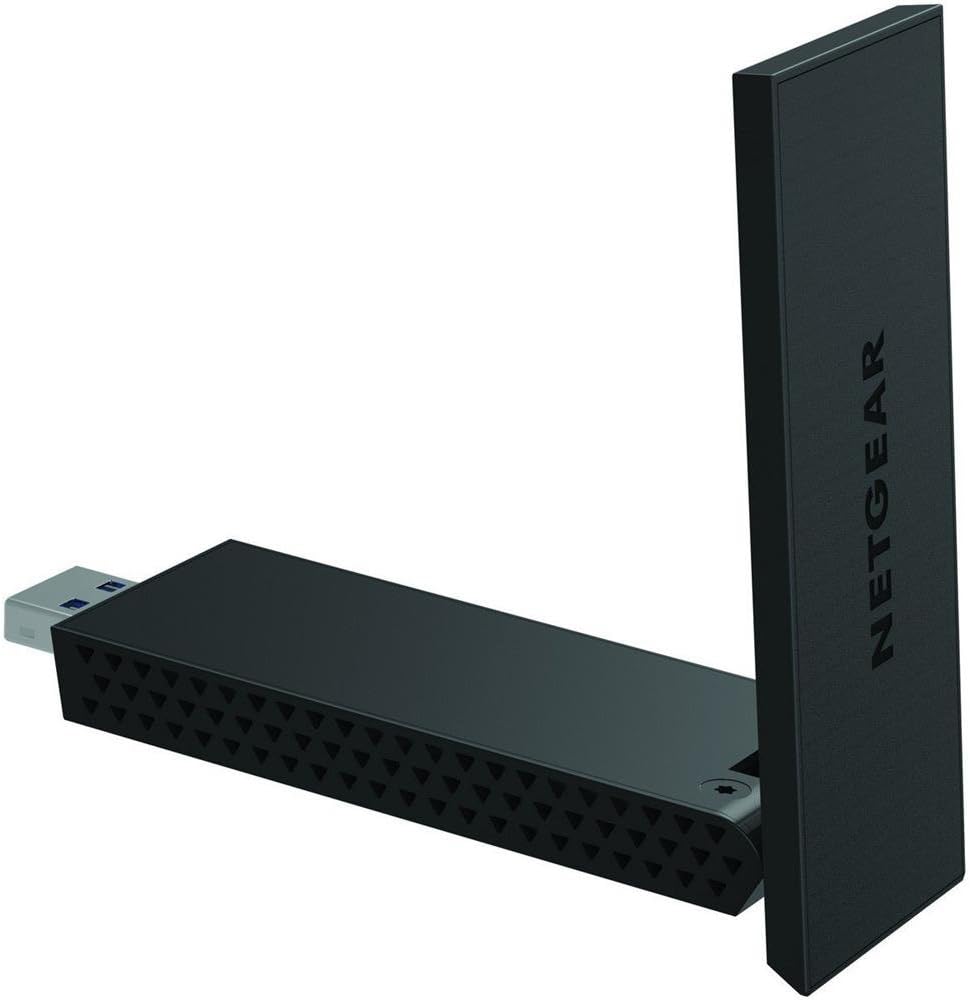
The Netgear AC1200 High Gain WLAN Adapter delivers dual-band WiFi speeds up to 867 Mbps on 5 GHz and 300 Mbps on 2.4 GHz, leveraging the latest 802.11ac standard. Equipped with USB 3.0 for rapid data transfer and high-gain antennas with beamforming+ technology, it ensures extended range and stable connections. Compatible with Windows and backward compatible with older WiFi standards, this compact adapter is the perfect upgrade for faster, more reliable wireless networking.
| ASIN | B00OT586RQ |
| Best Sellers Rank | #2,645 in USB Computer Network Adapters |
| Brand | NETGEAR |
| Compatible Devices | Laptop |
| Compatible Operating System Family | Windows |
| Customer Reviews | 4.2 out of 5 stars 3,278 Reviews |
| Data Link Protocol | IEEE , IEEE 802.11g, USB |
| Data Transfer Rate | 867 Megabits Per Second |
| Global Trade Identification Number | 00606449103328 |
| Hardware Interface | USB, USB 1.1, USB 2.0, USB 3.0 |
| Item Dimensions L x W x H | 0.57"L x 1.24"W x 0.57"H |
| Item Weight | 28 Grams |
| Manufacturer | Netgear |
| Mfr Part Number | A6210-PES |
| Minimum Required Operating System Version | Windows 10 |
| Model Number | A6210-100PES |
| Product Dimensions | 0.57"L x 1.24"W x 0.57"H |
| UPC | 606449103328 |
| Unit Count | 1.0 Count |
N**N
Netgear A6210 (AC1200) Wi-Fi USB 3.0 Dual Band Adapter replaces internal adapter
Some laptops face a peculiar problem with the internal network adapter working intermittently when used with Windows 10. Replacement of the adapter may not solve the problem. The Netgear device comes in handy. It can be plugged to an USB port and is easy to set up.. No need to open the laptop and experiment. The signal strength is stronger than the internal one and more reliable.
D**I
Disconnects often
The connection is often lost. This is a common problem with this model.
A**S
Fout
De verkoper vergist zich in het type adapter.
R**Y
Works great
Easy installation and very good connectivity!
S**S
Superb! + Can confirm working with Windows 10.
I built myself a new desktop PC a few days ago, finally moving back from laptops/all-in-ones, mainly for work purposes. I got an affordable WiFi adaptor and found my internet right down at standard Broadband speeds (5Mbps or so), which was frustrating. After upgrading to this thing, though, it shot up to the kind of speed I'd expect from my fibre connection, and about a third faster than any of my laptops or all-in-one computers reached. If I use the dock and cable and sit this thing on my desk, I get around 35Mbps from speedtest.net. That's right - it comes with a desktop dock, so you can move it away from all the interference your computer will cause and get maximum results. In desktop mode it also unfolds and extends if you need to squeeze a little extra speed out of it. I keep it folded up as it looks much nicer and tidier on my desk that way, but unfolding it does grant me a couple of extra Mbps if I'm in a squeeze (let's be honest, that's not often). If you're using a laptop and don't want to use the desktop dock, unfolded it'll sit at a decent distance from it to cut down on interference, but to be fair most laptops have built in WiFi these days, so you're more likely going to be using this on a desktop. To be honest, you need to use the desktop dock, because it's a little wideand plugged into a tower you'll find it ends up pointing sideways and obscuring the neighbouring USB ports, but the option is there if you really don't want it to be sitting on your desk. Sorted out all my WiFi problems and then some! Nice one guys! Also, I can confirm this is working like a charm on Windows 10 - UPDATE! After just under a month of use, one day I turned my PC on and it just didn't want to connect to the internet. After a lot of trial and error and frustration, the solution was to completely remove all traces of NetGear's drivers and just let Windows 10 do it's thing. In other words - IF YOU WANT THIS THING TO WORK WELL ON WINDOWS 10, DO NOT INSTALL THE SOFTWARE! JUST PLUG IT IN AND LET WINDOWS DO THE REST. NetGear's own software can cause conflict in Windows 10, but Windows 10 already has its own drivers etc to handle it for you.
Trustpilot
2 weeks ago
1 week ago