Desertcart purchases this item on your behalf and handles shipping, customs, and support to UAE.
🛫 Elevate your flight sim game with pro-level control and comfort—no cockpit required!
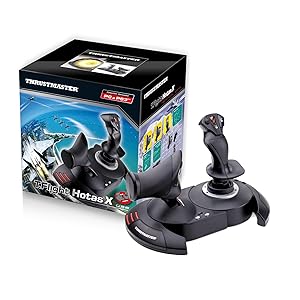
The Thrustmaster T-Flight Hotas X is a USB flight stick and throttle combo designed for PC gamers seeking an ergonomic, fully programmable HOTAS setup. Featuring 12 customizable buttons, 5 axes, and a detachable real-size throttle, it offers flexible cockpit configurations and precision control with adjustable joystick resistance. Preconfigured for plug-and-play ease, it supports instant profile switching and saves your custom settings, making it an ideal entry-level flight sim controller that balances performance, comfort, and affordability.


| ASIN | B001CXYMFS |
| Additional Features | Ergonomic |
| Best Sellers Rank | #1,418 in Video Games ( See Top 100 in Video Games ) #5 in PC Game Flight Controls |
| Brand Name | Thrustmaster |
| Button Quantity | 12 |
| Color | Black |
| Compatible Devices | PC |
| Compatible Video Game Console Models | Sony PlayStation 3 CECH-4012C |
| Connectivity Technology | USB |
| Controller Type | Flight Stick |
| Customer Reviews | 4.4 4.4 out of 5 stars (8,292) |
| External Testing Certification | Não aplicável |
| Global Trade Identification Number | 03362932913535 |
| Hardware Platform | Desktop, Laptop |
| Included Components | Instructions manual & flightstick |
| Item Dimensions | 10.39 x 9.53 x 10.43 inches |
| Item Part Number | 2960703, 4160543 |
| Item Type Name | Flight Stick |
| Item Weight | 4.3 Pounds |
| Manufacturer | Thrustmaster VG |
| Manufacturer Part Number | 2960703 |
| Model Name | THRUSTMASTER T-Flight Hotas X Flight Stick |
| Model Number | 2960703 |
| Package Quantity | 1 |
| Power Source | Corded Electric |
| UPC | 071030532366 088021805026 887166196026 012301871210 080000259578 151902985152 611101218685 088020767042 080000350657 021112254617 088020980311 084007483189 962327424283 071030530522 780320052803 080000327369 021111317245 086000368937 071030174641 803246208427 675904128305 079532181464 115971251358 132017947938 105221984143 644535525814 001910723973 071021143250 707003244966 021113169415 0129515960… |
| Warranty Description | One year |
S**D
A great price positioned joystick/throttle combo that won't break the bank
I have looked at Thrustmaster sticks over the years with envy, to me they represented an elite level in joysticks. While I really like flight and spaceflight simulations, I could never quite warrant spending the big bucks on Thrustmaster or Saitek joysticks. Logitech and others had reasonably priced sticks for my level of gaming. For the past several years I have been on consoles so joysticks were not a big option. Recently I stepped back into PC gaming and I purchased one of the "Elite" space combat games. Even in the video for the game, the character used a stick combo that was very similar to a Thrustmaster setup...clever subliminal marketing? Maybe so because after trying somewhat unsuccessfully to fly on just a keyboard and mouse, I was looking for a stick I thought about going with one of the Logitech sticks, like what I had before, then I saw this setup. Where it would be asy to close in on or surpass 400.00 US on Thrustmaster sticks, here was both for a very very reasonable price. Was it discontinued? An inferior model or refurb? Nope, it is just a specific model that Thrustmaster produced to solicit a niche of bargain PC gamers and PS3 gamers(Yes! The stick works on PS3!!! I find out AFTER I have moved on to the PS4( I have yet to see if it works on PS4, but even if it does there are not many games that call for a stick like this)) The T-Flight is a great stick for the price-point. It is not going to be the same quality as the 200.00 individual components, but that is not to say this is not a quality device...Au Contraire... This is a great bang for the buck. The unit arrives together in the box but not connected. You have the option of screwing the throttle and the stick together via installed screws in the base. There also is an allen wrench included in the base, complete with its own snap in nook. This is good because the screw heads are of a star type. That being said, you should put them together to see if you are comfortable with them being that close together. Maybe you have space limitations...who knows. I tried it and personally felt it was a little close together for me and how I was using it, so I opted to separate the stick and throttle. The cord that connects them is about 3 feet long and will wrap up in the base of the throttle if you choose to connect them. True to good quality sticks like Thrustmaster, there are many buttons and they are programmable. Additionally there is an tensioning adjustment under the flight stick, but it didn't make a great bit of difference to me. All in all the joystick has a good feel to it and responds well. With one exception which I have seen in several reviews, I will add in mine as well. The throttle has a middle or neutral spot if you will and I guess in lieu of making a spring based solution, they mad moving out of this spot a little hard. It's almost like it sticks, you definitely will feel it and it can affect what you are trying to do, especially thrusting forward. I believe in time, with a good amount of usage, the stick should wear sufficiently to be more smooth but for now it is almost certainly a hindrance. For many it can be lived with, others it could be the straw that breaks the camels back in deciding on this stick. If you can put your hands on one before buying, I think that would help you formulate a better decision. A joystick or gamepad can be 10$ and feel perfectly right for you or a 200.00 professional model and still not quite cut it. It really comes down to how it feels to you. In the end, I think this is a fantastic stick, especially for the price. It has many features, very programmable and feels really good with the exception of the throttle mid point. For me, I can overlook it given how I use the stick and the frequency.
M**W
T-Flight Hotas X
I was looking for a decent joystick at a low price to play some new titles (A-10C Warthog), and some of my older favorites (Freespace). This was the only stick I found with detachable throttle for under 50$ that looked good. I was not expecting anything great from it for 35$, but decided it was better to try this out first and if I felt it was inadequate I could upgrade at a later time and not have wasted too much money. (edit: I see now Amazon has put it back at 50$, I'm glad I got it for a low price while I could). Having tried it out I am very pleased with it overall, especially for the price. The construction is solid on this stick. While the materials used are not high end (lots of plastic), for 35$ you can't expect higher grade material. They work and they won't break on you any time soon. There are lots of buttons on the stick and throttle that you can map. I can't imagine needing more. The dead zone is pretty good on this stick. When I fired up my first game I was unimpressed with the way the stick handled and what I thought was a horrible dead zone. Moving the stick in any direction slightly resulted in no movement on the screen. I felt like I was having to push the stick half way in any direction just to get some movement. I can assure you that if you are experiencing this in any game, it's the game / game settings that are causing it. To test, install the latest windows drivers from the Hotas website for this stick. Run the device information tool and watch the graph on the screen as you move the stick in any direction. This will show you what is being detected when the stick moves. I noticed this tool was detecting more movement than the game was. In my case, I found settings for dead zone in the games settings and set it to 0 which resolved the problem I was having. Cable length on this stick is great. I had read some other reviews saying the cables between the stick and the throttle are not long enough. I'm not sure what people expect, but I can assure you they have a lot of length between them. I was able to fit a full size keyboard with number pad and media keys between the stick and the throttle. + Construction is solid + Very minor dead zone + Long cables + Lots of buttons that can be mapped - Lots of plastic +/- Unsure how this stick will hold up over time. For 35$ if I can get 1-2 years out of it I would be happy.
A**N
Very good introductory product- perfect if not for noticeable dead zone and sensitivity issues.
Overall, this is a very solid product for a very very reasonable price- at least when compared to other similar products. I originally ordered this product when I first began playing games such as Elite: Dangerous and Star Citizen, when a keyboard and mouse just wouldn't cut it. Everything worked well out of the box, and the included instruction and user manuals covered many of the important aspects of the stick and throttle. You can customize the buttons to do whatever you want, and as I purchased it mainly for Elite: Dangerous, I was happy to see that they had a pre configured key mapping for this particular model. One important thing to note is that you will probably want to change the axis mode from 4 to 5 by hitting central button on the base of the throttle (I believe it glows red when it is in 4-axis mode, and it glows green when it is in 5-axis mode). Having the t-flight in 5-axis mode allows you to use the slider on the back of the throttle independently from the twisting motion on the stick. (Sorry if my terms are a little basic, I don't really know many of the proper names or anything). It is compatible with many versions of windows (including windows 7, 8, 8.1), and has plug and play technology, only requiring a compatible USB port and OS. Configuring it is fairly intuitive and instructions can be found both on the Internet and in the manual, however- at least in my experience, the plug and play features were not quite what I hoped they would be, and I chose to manually download the latest drivers and configuration software from the thustmaster website, which a quick search for "Thrustmaster T-Flight X Drivers" will most likely bring up. Having to look up the separate drivers, and the fact that the stick has a rather large dead zone and is not as sensitive as I like are the reasons I rate this product 4/5 stars- but for an introductory level product, it works very well and I would highly recommend it.
T**K
Will 100% fill your needs in Elite: Dangerous & other simulators -- **IF you download the community-made profiles**!
first off, let me say that I wasn't sure if a good flight stick setup could be had for anything less than a fortune; look at some of the $400 setups and you'll know what I mean. However, I really miss the 'glory days' of flight / space sims -- they were one of my favorite genres. Especially when it came to PC games, titles like Wing Commander, Tie Fighter, Falcon 3, US Navy Fighters -- those were some wonderful games. I always had a flight stick, and even at one point had a very expensive Thrustmaster F-16 Falcon flight stick that cost well over $100 at the time. Thankfully, with the re-emergence of hard-core flight / space sims like Star Citizen & Elite: Dangerous, it seems like simulators are making a comeback. And while they are playable with an Xbox 360 controller, etc -- it's just not the same...and having a keyboard along for the ride becomes a necessity. Without breaking the bank, I really was wanting to jump back into a control setup that felt more "context genuine", and that also might liberate me from keyboard reliance! Let me say that, yes -- this has completely filled all my needs! In Elite: Dangerous, I no longer need the keyboard at all while playing. I keep it close by just in case, but I haven't needed it at all. This is, however, due to a COMMUNITY MADE CONTROLLER PROFILE for the game. I hate typing in caps, but this is key to this unit receiving all 5 stars, since the default control scheme in Elite: Dangerous doesn't map the buttons in an efficient enough way to cover all the main usages. It's easy to do you -- you just drop it into the folder that is mentioned, and it will show up in the game. Otherwise I do not feel this setup would have had enough buttons to map everything to. I'd type in the site where I downloaded the profile, but I think that amazon typically takes out the links. Just google the name of this stick + Elite: Dangerous and you will likely run into a forum post really quick mentioning it with a download link and a button reference photo. Basically what it does is assign three button on the throttle to 'modifier' keys (shift, ctrl, etc) to where you hold one down, and all the others buttons perform 'flight-based' operations. Hold down another & it will fulfill all 'combat' based functions, etc. This essentially triples the buttons on the system -- though you do have to get used to using the modifiers. Again, I couldn't be happier with the setup. At the end of the day, this will likely fulfill your needs: it can be used as one or two pieces (I use it as one due to how I am situated), is highly flexible with profiles, and is solidly enough built to feel fully functional. It's not the most robust system out there, but you get an incredible amount of value for the money. If this hadn't fulfilled my hopes, I would have returned it -- but that has never crossed my mind. :)
G**9
Best Flight Stick I've Had To Date
My first flight stick (or joystick) was the Microsoft Force Feedback Pro which was a very good stick - it had some 'slop' in it which eventually got so bad that it was no longer tolerable. It was rugged and comfortable to use, but Microsoft quit making them & also quit supporting them in many flight Sims & newer games. I then had two Saitek Cyborg Evo Joysticks. The first one developed a problem after 11 months with little use, when it went out of calibration and the rudder output stuck in 50% left rudder position and couldn't be fixed by recalibration so it was replaced under 1-year warranty. Within 10 months switch #5 quit working on the second or replacement joystick so at this point I decided to look for a different manufacturers joystick because by now I had lost faith in Saitek being able to make a reliable joystick. I am seventy years old and I take good care of my equipment - I don't abuse my joysticks so if they don't last for me I doubt that they would last for anyone. I searched Amazon reading joystick reviews and came across the T-flight Hotas Stick Pc PS3. This joystick had the features I wanted and was rated very high - almost 5 stars even though at the time it had only five reviews - so I ordered it. This joystick can be used with either a PC or PlayStation 3. It has a PC-PS3 switch so you can select which one you use. It came with the throttle and joystick separated so I decided to try it this way for a while. I've had this joystick now since the first week in August 2009 and I really like this joystick. PRO: 1. It comes in two parts, the throttle & joystick, separated by an interconnecting cable approximately 18" between them - but, they can be mounted together as one assembly if desired as the necessary wrench is included and the throttle & joystick are designed to be mounted together as one unit. I like them separated as it is more realistic - with the throttle on my left and the joystick on my right. 2. Very simple to connect to your computer. You connect the joystick to the USB port on your computer via the integral USB cable & connector - that's it! No separate power supply or adapter is required because this joystick gets its power from your computer through the USB cable/connection. 3. No installation CD included or required as once you connect this joystick to your computer it is automatically recognized and calibrated - a plug & play joystick - they don't get any simpler than this! 4. The throttle & joystick are very comfortable to hold & use. Together they have twelve programmable switches which are very easy to use on both the throttle & joystick. There are four programmable switches on the joystick module and eight on the throttle module. The joystick can be twisted left-right for the rudder control - the throttle module has a slider switch which can also be used for rudder control if so desired. Also there is an eight-position hat switch located on top of the joystick - this is normally used for 'looking around' in flight simulator programs. Both modules are quite robust & heavy enough so they don't move around much unless you really give them some pushing around. 5. So far this joystick is performing excellent & a great buy for the money. CON: 1. None that I know of so far - except maybe it would be nice to have the interconnecting cable between the joystick & throttle modules be longer & have connectors that can be unplugged in case of damage they could be replaced. Also I'd like to be able to move them a little further apart. UNKNOWN: 1. How long will this last before something goes wrong? Only time will tell. T-flight Hotas Stick Pc PS3
O**N
great HOTAS
this works great, made elite dangerous 100000% better to play. there is only about 18" of cord between the stick and throttle though. with some effort it can be extended (there are lots of examples on the internet)
B**N
Decent, for the money, but it's cheap and you will know it every time you use it.
We've entered a simultaneously great, yet bad time in sim hardware. There is some incredible sim hardware out there, like stuff from GoFlight and the TM Warthog, but the least expensive of those options is $500, which is a lot of money unless you're really hardcore. Unfortunately, the good middle ground used to be Saitek, but pretty much everything they make is terrible now and so you have to choose between cheap and ultra-expensive. And you will notice that this thing is cheap. It works, and it's accurate, but it feels like a toy and the throttle action is terrible. There's a big notch right in the middle (which is dumb in the first place, as it should be toward the back end of travel to simulate thrust reversers while still leaving you most of the travel for normal throttle), and when I say it's big, I mean it's huge. This is like a flaps detent, and it's made worse by the fact that the rest of the travel is very loose. There's no friction drag at all on the throttle travel, so until you get used to it you tend to fling it from idle to 50%, then stop, press harder to overcome the detent, and then slam it straight to 100%. The throttle base button placements are dumb because that's where the heel of your hand hits when you take it off the throttle so that you don't accidentally move it since it's so loose, and so you end up spamming 1 to 3 commands. The stick itself is actually very comfortable - it reminds me of the old Logitech Wingman Extreme stick. You could use this thing for hours without your hand getting tired. Unfortunately, the button placements are awkward - if you're in the habit of safing your trigger finger by resting it above the trigger, you're going to hit an overly-large button. The overall theme of this stick is that buttons tend to be where you don't want them to be, and they tend to not be where you do want them. The other main problem with the stick is that while you can separate the stick and the throttle, which is good, the cable between them is entirely too short. Unless you have a very small keyboard, you won't be able to put the two on either side of it. You certainly won't be able to put the throttle where it should naturally be, which is slightly outboard of your shoulder. They need to make the cable at least a foot longer to give decent separation between the two.
E**V
Perfect for getting into flight symulators
Perfect product for its price! Couldn't find other HOTAS (not only stick) with a better price. Only problem is that I Couldn't find a way to configure the "mappinh" and "preset" button, It doesn't register them on DCS and I couldn't find any app or something to configure them outside of it. I'm new to flight symulators and this product was a great way to start it, way better then using the keyboard while cheap enough to invest in without regreting it if you don't end up enjoing flight sym too much. I gouss ther are a lot of way better options for HOTS but for beginners thats perfect.
M**Y
Brilliant! and smooth controls
I love it. Smooth faultless operation, comfortable to handle, strong construction and most importantly works exceptionally well. I use it primarily with Flight Sim X Gold edition on Windows 10. Tip for those having problems using FS X on Windows 10 with registration problems is: To over-come the registration problem run FS X in "Administration" mode and registration confirmation is obtained.
G**C
Flight Stick mit Gashebel und toller Präzision
Da mein alter Joystick (einfache Ausführung, ohne seperaten Gashebel) vor einer Weile den Geist aufgab, musste ein Ersatz her. Ich entschied mich für den T.Flight Hotas Stick X und bereue den Kauf bisher nicht. Nach einigen Flugstunden mit dem Microsoft Flight Simulator X (dabei "queerbeet" Jets geflogen wie A319, A320, A321, B738, B744 und A388), kann ich folgendes zu dem Stick sagen: Die "Installation" könnte nicht einfacher sein - einfach das USB-Kabel (mit über 2 m Länge mehr als ausreichend, auch wenn der PC ein Stückchen weiter wegsteht) einstecken und losfliegen. Lediglich die individuelle Belegung der einzelnen Knöpfe muss noch vorgenommen werden, ansonsten kann direkt und ohne weitere Einstellungen oder Treiberinstallation losgeflogen werden. Super! Sowohl Stick, als auch Gashebel liegen sehr gut in der Hand und wirken wenn auch aus Plastik und nicht wirklich hochwertig aussehend robust. Eine super Sache sind die vielen Knöpfe an Stick und Gashebel, die man ganz nach Wunsch belegen kann. Ich nutze sie z. B. für Klappen ein-/ausfahren, Reverser, Autopilot ein/aus, Fahrwerk ein-/ausfahren, Sicht verändern (am Gashebel) und Autobrake ein/aus, Bremsen, umsehen, sowie Kommunikationsfenster öffnen/schließen am Stick. Der Widerstand, mit dem der Stick bewegt werden kann ist an der Unterseite einstellbar. Der Stick reagiert bereits auf kleine Bewegungen und ist dadurch unglaublich präzise. In der Zeit zwischen defekt meines alten Stick und Ankunft des neuen, flog ich gezwungenermaßen mit Tastatur. Nun im direkten Vergleich Tastatur - Stick, dazwischen liegen Welten. Natürlich gab es auch vorher mit dem alten Stick schon einen riesen Unterschied zum fliegen ausschließlich mit Tastatur, doch alleine schon dass man bei diesem Gerät einen seperaten Gashebel hat, gibt noch einmal ein ganz anderes und realistischeres feeling. Dazu kommt die Präzision des Stick - einfach wunderbar. Der seperate Gashebel kann entweder mit der Basis des Stick verbunden werden, sodass aus beiden eine Einheit wird, oder beide können getrennt voneinander aufgestellt werden. Möchte man möglichst realitätsnahe fliegen, wird der Stick auf die rechte und der Gashebel auf die linke Seite gestellt, so wie es auch in Flugzeugen auf der Seite des Co-Piloten ist. Der Gashebel lässt sich von Nullstellung bis 100% flüssig bewegen. Bei 50% ist eine "Stufe", bzw ein kleiner Widerstand eingebaut, der aber mit schwachem Druck überwunden werden kann. Sehr gelungen sind wie bereits oben erwähnt die zusätzlichen Tasten, die ganz nach belieben belegt werden können. Leider kann beim Gashebel nicht eingestellt werden, wie leicht- oder schwergängig er sich bewegen lässt. Eine weitere Sache habe ich beim Gashebel zu bemängeln: In der Nullstellung wird in Microsoft FSX 1% Schubleistung angezeigt. Hier sollte logischerweise wenn der Hebel auf 0 steht auch keine Leistung vorhanden sein. Schiebt man den Hebel auf 100%, werden nur 99% Leistung angezeigt. Auch mehrfaches kalibrieren konnte daran nichts ändern. Es ist zwar schade, dennoch sehe ich das ganze nicht so eng, da es lediglich 1% Abweichung ist. Auch darf man nicht vergessen, dass es sich hier um einen Stick für knapp 40 € handelt und nicht um ein hunderte Euro teures Simulatorzubehör. Aufgefallen ist mir noch, dass das USB Kabel, bzw. der Stecker der in den Stick führt m. M nach ein wenig Spiel hat und etwas "locker" wirkt. Vielleicht soll das auch so sein und der Anschluss hat einfach ein wenig mehr "Bewegungsfreiheit", wodurch er flexibler ist. Bleibt zu hoffen, dass dies keine Schwachstelle ist und kein Defekt auftritt. Insgesamt finde ich den Stick samt abtrennbaren Gashebel sehr gelungen. Beides funktioniert nahezu perfekt in Microsoft FSX. Mit diesem Gerät macht das fliegen erst richtig Spaß - vor allem dann, wenn man wie ich übergangsweise rein mit Tastatur geflogen ist. Von mir gibt es eine klare Kaufempfehlung.
Q**T
Realista, barato, comodo, ocupa poco.
Ha sido mi primer kit de vuelo ya que llevaba tiempo interesado en este mundillo y me decidí iniciar con este hotas que tenia muy buena valoración, y encima estaba en ofertas de prime day y me lo pille por 50 euros. ✅ Lo bueno - Muy barato (Me valió mas el juego que el hotas) - Fácil de configurar - Fácil de usar. - Buena calidad. - Perfecto para principiantes. ❌ Lo malo - Hay unos pocos botones que son algo difíciles de alcanzar y no se ni para que son, pero eso es cosa mía principalmente. En general es un hotas perfecto para iniciarse en este mundillo de la simulación de aviación, es totalmente recomendado, y si te lo encuentras en ofertas esta casi regalado, cuesta menos que el juego en si. Aunque el juego consume mucha potencia, si tienes un ordenador barato no te va a correr, mira si tu ordenador lo soporta primero y luego ya decides, además esta a punto de salir la versión del 2024 en noviembre, así que a lo mejor espérate un poquito.
P**I
ottimo prodotto dall'imbattibile qualità/prezzo
Questo joystick-hotas da volo è da un po' in catalogo ed è stato aggiornato in versioni specifiche per console più recenti (il mio è quello per PS3) ma per PC/Mac nulla cambia per cui questo "vecchio" ha un prezzo estremamente favorevole. Qualità eccellente in generale, accuratamente costruito con buoni materiali, ha una miriade di tasti e un asse anche davanti alla manetta della potenza motore che può essere configurato come timone - molto pratico. Ricordate di fissare le due parti (base joystick e base manetta) tra loro con le viti a brugola da sotto (apposito chiavino fornito sotto la base stessa) perché all'inizio non mi era così evidente di doverlo fare e i due pezzi, pur incastrandosi reciprocamente, ogni tanto tendevano a... liberarsi. Utilizzato sia con PC (Win7) che con Mac (iMac 27'') con X-Plane 11 che ne prevede la specifica configurazione. Se sul Mac non sapete come calibrarlo (non ho trovato l'apposita utility), e quella dell'applicazione non basta, a me ha funzionato farlo sul PC (con l'apposita utility ThrustMaster) e poi una volta riallacciato al Mac lo si ritroverà... stabile (evidentemente memorizza internamente la configurazione). Ottimo, confido che duri!
M**N
A kalite
Çok iyi
Trustpilot
1 month ago
1 month ago