

🌟 Elevate Your Gaming Setup with Style and Performance!
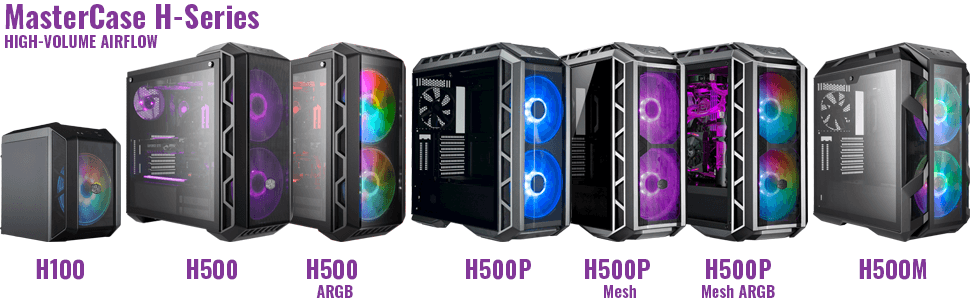
The Cooler Master MasterCase H500 ARGB is a mid-tower PC case designed for gamers, featuring dual 200mm ARGB fans for optimal airflow, a tempered glass side panel for showcasing your build, and versatile compatibility with various motherboard sizes. It includes a magnetic filter for easy maintenance and an accessible I/O panel for convenient connectivity.



| ASIN | B083FLCWT2 |
| Antenna Location | Gaming |
| Best Sellers Rank | #143,394 in Computers ( See Top 100 in Computers ) #1,113 in Computer Cases |
| Brand | Cooler Master |
| Case Type | Mid Tower |
| Case type | Mid Tower |
| Color | ARGB |
| Colour | ARGB |
| Compatible Devices | PC |
| Cooling Method | Air |
| Customer Reviews | 4.6 out of 5 stars 306 Reviews |
| Enclosure Material | Tempered Glass |
| Fan Size | 200 Millimeters |
| Global Trade Identification Number | 04719512095256 |
| Hard Disk Form Factor | 3.5 Inches |
| Internal Bays Quantity | 2 |
| Item Dimensions D x W x H | 54.4D x 24.2W x 54.2H centimeters |
| Item Type Name | Computer Case |
| Item Weight | 9.22 Kilograms |
| Light Color | [Any Color] |
| Manufacturer | Avisa |
| Material | Tempered Glass |
| Mfr Part Number | MCM-H500-IGNN-S01 |
| Model Name | H500 Iron Grey |
| Model Number | MCM-H500-IGNN-S01 |
| Motherboard compatability | Extended ATX |
| Number of Fans | 6 |
| Number of Items | 1 |
| Other Special Features of the Product | 2 x 200mm ARGB intake fans |
| Power Supply Maximum Output | 500 Watts |
| Power Supply Mounting Type | Rear Mount |
| Recommended uses for product | Gaming |
| Supported Motherboard | Extended ATX |
| Total Expansion Slots Quantity | 9 |
| Total USB 2.0 Ports | 2 |
| Total USB 3.0 Ports | 2 |
| Total Usb Ports | 4 |
| Unit Count | 1.0 Count |
P**H
Nice case, easy to build in and good quality...
Purchased as a replacement case for an existing i7 build to improve airflow and future proof for a planned upgrade later in the year. Moving the existing components into the case was an easy process, and there is plenty of space to work in and to get a nice tidy finish. Noise levels are fine with the 200mm fans and a tower air cooler on the CPU. If you are replacing an existing PC/case just check the overall dimensions as it's on the larger side compared to a lot of old pre-built systems, make sure it will fit where you plan to put it! The mesh front is working well to keep dust and pet hair out and is easy to clean off as it's flat and there are no bars or fancy details to get in the way. Very pleased with this and would recommend. Just need more RGB to go inside when I do the upgrade later in the year.
J**S
Buena caja
Grande, de forma que puedes organizarlo todo bien. Los cables quedan escondidos en la parte trasera, tambien tapa la fuente. Los ventiladores muy silenciosos y airea muy bien
M**N
Excellent boîtier
Le boîtier et parfait, passage de câble, rack pour les disques, fixation pour les SSD, riselant pour attacher les câbles et les gros ventillo Rgd de 200mm sont super silencieux. Vitre en verre donc gaffe aux traces de doigts !! Que du bonheur !
G**N
Gute Qualität nur die Original Lüfter sind Laut
Sehr gutes Gehäuse,die Original Lüfter sind sehr Laut, ich habe sie durch noctua 200mm ersetzt. Viel Platz für Grafikkarte. Der Griff oben ist praktisch zum Transportieren.
Z**P
Master Case H500 ARGB tanto spazio, tanto bello, tanta roba.
Bello, spazioso, robusto, comodo e grande. Arrivato puntuale nello scatolone originale. Appena si apre lo scatolone spunta fuori il frontalino in plexiglass che può essere sostitutivo di quello preinstallato in metallo traforato. Le immagini rendo poco, ma il case è veramente bello e grande, lo spazio per ordinare i cavi gli HDD/SSD PSU è tanto. Le ventole sono silenziose performanti ed hanno dei bei colori, la ventola posteriore è nera senza led da 120mm le 2 anteriori sono da 200mm ARGB inserite insieme in uno splitter da1 a3 sia PWM che ARGB da collegare alla scheda madre (in caso di mobo serza rgb/argb si deve usare il controller fornito col case). Tutte le viti sono imprigionate quindi si svitano ma non si tolgono. A distanza di qualche mese posso aggiungere alcune cose che spero servano a farvi risparmiare tempo e denaro. Il pannello frontale si estrae abbastanza facilmente ma si deve avere cura nel toglierlo perchè a me si è rotto uno dei perni che serve a bloccarlo al telaio, la plastica usata non è delle migliori evidentemente. Le ventole da 200mm non sono rimpiazzabili con le Noctua 200mm perchè non ci stanno, questo vale anche per altre marche. Si possono sostituire con cooler master sickleflow da 200mm che sono molto più performanti, ma difficili da trovare negli store europei. Sul top è consigliabile non mettere ventole aggiuntive perchè non si hanno benefici (anzi), eventualmente si può installare 1 da 120mm che immetta aria sul dissipatore della cpu, ma si recuperano pochi gradi e non vale la spesa. Nella parte frontale non conviene sostituire le 2 ventole da 200mm con 3 da 140mm, serve soltanto per cambiare il look. Per quanto riguarda i dissipatori per cpu, la scelta è ampia sia AIO che ad aria. Sul top entrano soltanto AIO da 120mm, 140mm e da 240mm (forse anche un paio di modelli da 280mm, ma vanno adattati, sicuramente no si adatta l'ARCTIC Liquid Freezer II 280), sul retro 1 AIO da 120mm e nella parte frontale 1 AIO da 360mm (consiglio la parte frontale di lasciarla con le 2 ventole da 200mm). Dissipatori ad aria ci stà un Noctua NH-D15 con tutte le ram a basso profilo, io ho un Enermax ETS-T50A-FSS T50 AXE Silent Edition ed ho qualche millimetro di spazio libero dal vetro laterale.
Trustpilot
2 months ago
1 month ago