


Buy anything from 5,000+ international stores. One checkout price. No surprise fees. Join 2M+ shoppers on Desertcart.
Desertcart purchases this item on your behalf and handles shipping, customs, and support to UAE.
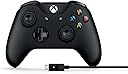
🎮 Level up your PC gaming with Xbox’s wired & wireless controller combo!
The Microsoft 4N6-00001 Xbox Controller + Cable offers a versatile gaming experience with wired USB connectivity and enhanced wireless range up to 40 feet. Designed for Windows 7, 8.1, and 10, it features a textured grip, custom button mapping, and a 3.5mm headset jack. Its durable construction and removable 8-foot cable ensure long-lasting, lag-free gameplay, making it the go-to choice for serious PC gamers seeking reliability and comfort.


| ASIN | B01LPNKGGI |
| Additional Features | Wireless |
| Best Sellers Rank | #10,634 in Video Games ( See Top 100 in Video Games ) #13 in Xbox One Game Joysticks #168 in Xbox 360 Accessories #254 in Xbox Accessories |
| Brand | Xbox |
| Brand Name | Xbox |
| Button Quantity | 17 |
| Color | Black |
| Compatible Devices | Windows, Xbox One |
| Compatible Video Game Console Models | Microsoft Xbox One, Microsoft Xbox One S, Microsoft Xbox One X |
| Connectivity Technology | Cable|Wireless |
| Controller Type | Gamepad |
| Customer Reviews | 4.4 out of 5 stars 9,825 Reviews |
| External Testing Certification | ANATEL: 08294-20-01569 |
| Global Trade Identification Number | 00889842121964 |
| Hardware Platform | Xbox 360, Xbox One S,Xbox One,PC, xbox one |
| Item Dimensions | 2.76 x 1.97 x 2.32 inches |
| Item Type Name | Xbox Controller + Cable for Windows |
| Item Weight | 231 Grams |
| Manufacturer | Microsoft |
| Manufacturer Part Number | 4N6-00001 |
| Model Name | MICROSOFT CORP/LICENSING |
| Model Number | 4N6-00001 |
| Package Quantity | 1 |
| Power Source | Battery Powered,Usb Cable |
| UPC | 889842121964 |
| Unit Count | 1.0 Count |
| Warranty Description | 1 year limited manufacturer warranty |
J**S
Plug-&-play for PC and Bluetooth brought me here.
Still pretty new to getting this 4N6-00001 Xbox Controller with Windows Cable, so will follow up with a performance update if needed. Feels nice and sturdy. I do not have an Xbox One and the last time I played an up-to-date Xbox console was 2013, so my review is going to be focused on the PC side of things. I picked this controller over other budget controllers for PC because I wanted something that will last and can withstand up to action/intense gaming while still delivering quality results. Since Microsoft makes Xbox and they need durable console controllers, was a no brainier. Pros: - Cable can be used to plug-and-play on Windows 10 with no problem. Have not double-checked if any drivers need updated. If they do, runs nice out of box. - If you just use the cable to connect to PC, you don't need the batteries. I kid you not, and still haven't installed any. - Instructions say it is Bluetooth compatible (Xbox link on packaging says only for Windows 10 and certain Android devices) and also works on Xbox One. - Sturdy controller construction and feel. Currently withstood about 10-15 hours of total action gaming time and seems durable. - Has an audio jack (have not tested) - Has not slipped while holding it at all during my few hour gaming session. After all, had to test it for extended game play, comfort, and durability. - USB cable is 8 ft long. This is a huge, huge plus right there. - I do not find the light from the Xbox logo distracting while gaming (I know this has been a frequent complaint with other light-logo or LED PC controllers). Cons: - The D-pad is only 4-directional. I know some prefer a round pad that allows for an 8-directional navigation, but I think this D-pad is standard on Xbox controllers - Usually I have more cons for products, but I can't think of any right now. Currently very satisfied with this purchase.
E**E
One of the best controllers for your PC
I was reluctant to buy this controller for my PC because I had an X-Box 360 controller I had gotten used to (which had subsequently broken), and this seemed to have a somewhat different form factor. Since Microsoft doesn't make the 360 version anymore, I thought I'd give this one a shot. The first one had a finnicky "A" button, so I returned it and the replacement I got works perfectly. Controls are tight and responsive, the analog sticks are definitely different than the 360 version and took a little getting used to, but I can see why so many people like these ones better. I almost took a star off for not being closer to the older form factor, but I decided that would be unfair, and honestly this controller feels more comfortable every time I use it. It's less bulky and more streamlined. There are a few major advantages you're gonna have with this controller-- to start, being a Microsoft controller, you KNOW it'll be compatible with the vast majority of PC games, esp. games on Steam; so there's no need to worry about downloading external drivers like with the PS4 controller, or hoping whatever off-brand controller you've bought is compatible with all your games. You plug this thing in, it works. Period. And tons of modern games are designed with an X-Box controller in mind anyway. No fuss, no hassle. Second-- hallelujah, the D-Pad on this thing is actually USABLE. I even prefer using it to the analog stick for some games, shockingly. The D-Pad on the 360 controller was trash; really only good for selecting weapons/options for your character and stuff like that. This new one, while not as good as say your typical Nintendo or Playstation controller, is pretty darn decent. Third -- and this is important -- the cable connecting your controller to your PC is removable. The reason I trashed my old 360 controller is because there was some kind of break in the controller wire, which meant it couldn't reliably keep a connection with my PC. Seems like that should be a relatively small problem, but my controller was well out of warranty, and I didn't know how to fix it or remove and replace the cable myself (looking up how-to videos on youtube showed me it would have been WAY too much hassle). But guess what? That'll never be a problem on this controller since if the controller wire ever did break, it takes all of 3 seconds to unplug the broken cable and plug in a new one. So unless Microsoft stops making USB wires for this thing, you should be golden. One less potential issue to worry about. Overall I highly recommend this thing. Without going into a higher tier like the Elite series, you're likely not going to find a better controller for your PC for the money.
N**S
10x Better than keyboard/mouse for MSFS2020 and actually available!
I bought this for MSFS2020 on my PC and just opened it a few hours ago, so this review will not cover durability. This is my first flight simulator, so I naively bought the program thinking my mouse and keyboard would be sufficient. After crashing about 30 times in the traffic pattern training module before starting to land (only sometimes, and very badly), I decided to follow the advice of literally every Youtube review/comment and get a real controller. I considered a joystick, a HOTAS or even a fancy yoke/throttle/pedal setup, but realized I was late to the party and all online stores were sold out or triple the price. I decided to try this Xbox controller and was blown away by how much easier flying is now. I have a Nintendo Switch and the quality of those controllers is noticeably inferior to this one. The Bluetooth connection was easy to set up and there is no lag time; the program reacts instantly to my movements. I'm still getting used to what the buttons do since I already memorized the basic keyboard controls, but the "yoke" joystick and rudder buttons are very intuitive. The trim and flap controls are also on the controller. I'm still using the keyboard for throttle, but so far that has been perfectly adequate. I'm hoping I can reduce the sensitivity somehow, but just out of the box, this is a huge improvement over the mouse/keyboard. I recommend it to any FS2020 beginner because it works so well, is reasonably priced and is, quite literally, the only option out there for the moment.
L**E
An Excellent Controller For Games On PC
It's a really solid controller, but there a couple of issues I encountered, one of the two not being the controller itself. The overall build quality is pretty good, however the triggers do tend to get lose fairly quickly. This unfortunately is something that has happened on every Xbox controller I've used. I ran into an issue with Bluetooth on Windows 10 where most of the time I would need to pair the controller again if I restarted my PC. I believe this was a bug on Windows 10, that likely is fixed by now. If you do use Windows 10 though and you notice this happening at least you'll know what the cause is. The controller worked on many gaming clients I used it on where the game had controller support. Here's the list of clients I used it on: Steam, Epic Games Launcher, EA's Origin, Ubisoft Connect(formerly Uplay), Bethesda Launcher and Arc(Perfect World Entertainment's client).
B**Y
Perfect With Windows 10 and Bluetooth
If you are running Windows 10 and have Bluetooth connectivity on your PC the cable is not needed. Simply turn it on, push the pairing button on the front and pair it in PC Settings / Devices / Bluetooth & other devices. Click on the + tab and select the first option (Bluetooth). Your controller should show up almost immediately. Once paired with your PC it will stay paired until you remove it from your devices list. By default it connects as an Xinput device. If you use an Xbox controller often, a rechargeable battery option is a big plus. You can spend the extra money up front on a rechargeable battery solution or continue to toss AA batteries in it for years to come. I think these are the best and most durable game pads for PC available to date. If you buy one and your PC does not have Bluetooth connectivity, adding an inexpensive USB dongle is WELL worth the cost to be wireless. You will find plenty of high quality Bluetooth dongles right here on Amazon at fair prices. Don't let the lack of built in Bluetooth stop you from enjoying this fine controller. It's my number one "go to" controller for gaming on PC. I've tried a lot of other wireless PC controller options with varying degrees of success. This one beats them all. There are other brands of wireless controllers that work well with PC but I think the Xbox One Bluetooth controller is the best at this time. It may cost a bit more than some other brands but it's well worth the price.
B**E
The OFFICIAL controller for PC gaming - Totally worth it!
The absolute best controller for the PC! Wireless, passes audio(so you can plug your headphones into it and listen) and just feels right in my hands. The best part is, since the Xbox controller IS the official controller for PC gaming, every game has it pre-set and ready to go! No messing around with dumb drivers to get the PS controllers working, or suffering through whatever that Steam Controller is trying to be; just works just like it would on the Xbox series of consoles...
R**B
This equipment was designed for xbox but works great as a pc controller (Windows 10, Steam)
I ordered this for my pc after not being able to satisfactorily use my ps4 controllers or a crappy aftermarket wireless controller I bought on it. It's designed for Xbox, but works better than ANYTHING I've tried on pc (every other controller I have tried loses connection and lags) I have been gaming since the Atari joysticks of the early 80's, and this is a fairly solid build. (feels like it'll survive well under normal use) Personal criticisms are all ergonomic (these are ALL based on personal preference and opinion - I have played primarily on Playstation controllers since there were such things, and am not generally used to xbox controllers): The grip on the controller is different than what I'm used to. If you're moving over from Playstation tech, expect some adjustment time. The menu keys aren't casually in reach like they are on a PS controller... some games would be easier if they were. The left thumb knob is out of place if you're used to a ps controller. Gives my thumb cramps, but I'm sure it's, again, a personal adjustment issue. It is NOT wireless out of the box, but comes with a very long cable. There is a wireless transmitter (around $18) that you can buy for it if you have dogs or kids that trip over your cables, or some other reason why a 15 foot cable won't do the job. I have not yet purchased said transmitter. The only game I've played on it, so far, is Cyberpunk 2077, which plays an awful lot like Grand Theft Auto if I may say so.
B**S
Don't expect it to last you a year. Cable is made to go.
Comes with a fragile micro USB adapter that breaks with abrasive jostling during play. Probably brushed my lap a few too many times- never an issue I thought I'd have to consider with these things. Prospective buyers- make sure not to touch the point where the cord enters the controller, and make sure not to shake the connection. This can happen if it brushes against your lap too much, your table if the cord goes under your table or aside a surface somewhere, etcetera. Unlike with Nintendo Micro USB to USB designs, there's no reinforcement or stability where the cord connects to the controller at all, and you will eventually break the connector with enough jostling. It's practically supported by the point of connection itself rather than with any plastic. It doesn't matter how many replacements you buy, they're going to eventually break quite quickly, because all the stress is placed upon the connector itself. I bring up Nintendo designs because they quite thoughtfully have a plastic brace around that area so the controller itself endures the stresses of gravity and movement during play. It might not be an intentional design on Microsoft's part but it's a short-sight that helps them sell a lot of replacement cables regardless. What this means for you is that the controller will slowly start losing power intermittently before breaking for good after enough use- if you still want to use it while it's on its way out. Now, this isn't the end of the world if it does happen. Since it uses an interchangeable micro-USB cord, you can buy a replacement from Microsoft. They cost a little shy of twenty bucks. Mine lasted me seven months of sporadic use. I'd have some months where I'd do very little gamepad gaming at all. This device didn't see much use before its USB connector went. From here on, I'm going to assume your USB cord will last you anywhere from five to ten months. Again, mine lasted seven, and I only used it a handful of times each month. If you get yourself a replacement cord right now, this purchase'll run you around 80 bucks altogether. This is taking into account the fact the stick might drift after a year and a half of use, so you probably won't want two or three cords (and if you did, that'd run you the price of this controller itself!). You'd want to just replace it after the sticks begin to drift. Considering the lifetime of other controllers- and their cords- on the market, your money's probably better spent elsewhere. If you must stick with Microsoft, get this and the replacement cord right away. That should last you a year and a half until the rest of the controller starts going. I don't know if their more expensive controllers are better designed, but between you and me, I feel like Microsoft's the kind of company to prey on the rich and ignorant. I also recommend checking out third party and seeing if they're any better- that's what I'm gonna be doing next. Totally not going back to Microsoft for XBOX ONE stuff. Not unless the third party market's a disaster, somehow. Since a stock 360 controller is structurally similar and might only begin to drift after a year or two, I'd consider that way more bang for your buck- if you can put up with the worse dpad. Still serviceable. My 360 controller even still works as far as the cord and buttons go, but the sticks have begun to horribly drift. This is also my second XBOX ONE controller. The upper right trigger on my last one broke. If you're a PC gamer, go with Microsoft's 360 controller, or go with Nintendo's Pro controllers. I haven't tried Sony yet, but I hope their designs aren't as seemingly malicious as Microsoft's. Myself? I'm not getting a replacement cord unless I'm desperate. I'm just gonna see myself out and see what the third parties have to offer for both XBOX 360 and XBOX ONE. I've been let down by a few third party suppliers before, where the sticks or triggers broke within one year. Still, that at least took a year. Microsoft starts askin' you for more before the one year lifespan is up! Here's to hoping the Nintendo controllers I have don't succumb to sudden extreme stick drift after I've praised them in this review for at least not sneakily breaking the cord on me.
A**R
Five Stars
You don't need this one, just order the wireless controller and attach a USB cable, that's it.
M**X
Happy Hubby
Bought as a present. The fella was happy with it, as he wanted an official microsoft one. Came within 24 hours of ordering.
F**E
Très bien
Correspond parfaitement à la description
C**O
É tudo o que eu queria!
O controle é original, com um acabamento e precisão IMPECÁVEIS!! Super prático de usar (é só conectar e ir jogar) e excelente para suas jogatinas. Vale super a pena quando você consegue desconto ou promoção, além disso eu recomendo comprar uma capinha de silicone para proteger o controle e aumentar ainda mais o tempo de vida do controle. No mais, 10/10 o controle!
J**E
Una sola palabra GENIAL!
Vamos a empezar por lo mejor, el precio. Encontré el control remoto con descuento; al parecer era seminuevo, pero inspeccionado y garantizado por amazon a un excelente precio; $637 pesos mexicanos con envío gratis (prime). Cabe mencionar que la apariencia del control es prácticamente de un articulo nuevo; llego en su caja impecable con todo lo que debía contener, al día siguiente del pedido y en perfectas condiciones. El uso que le he dado al control es para jugar en mi laptop Alienware 15R3 video juegos mediante la plataforma Steam. Antes de utilizar este control jugaba con un mando del Xbox 360 el cual conectaba a mi computadora con un adaptador USB para poder usarlo de manera inalambrica; el cual dejo de funcionar tras varios años de servicio. Lo mejor Lo que más agrada de este control es que no es necesario el adaptador USB para conectarlo a la computadora, este control puede conectarse directamente a la pc (con Windows 10) mediante el bluetooth, solo basta encenderlo y presionar el botón superior de emparejar para que la computadora detecte que esta el control disponible y te permita jugar sin tener que instalar drivers ni nada, asi que el cable USB que viene incluido sale sobrando. Las áreas de oportunidad El control puedes utilizarlo con baterias AA de toda la vida, ya sean las de tienda de un solo uso o recargables y es aquí en donde encontramos el único punto que podrían mejorar; ya que las baterias recargables no se recargan al conectar el cable micro USB (incluido) y tienes que utilizar un cargador independiente para hacerlo. Entiendo que es un tema de marketing ya que microsoft vende su propio set de baterias especiales para este control, aun así el rendimiento de mis baterías recargables energizer de 1500 mAh (que dicho sea de paso ya tienen un par de años) ah sido muy bueno y me permite jugar por varias horas sin tener que volver a cargarlas. En general es un muy buen producto, la calidad de los botones y del plástico no tiene comparación, son geniales y característicos de los mandos de Microsoft, esperemos que este control me dure los 4 o 5 años de servicio que me dio el anterior modelo.
Trustpilot
2 weeks ago
3 weeks ago