

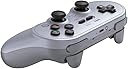

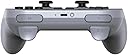


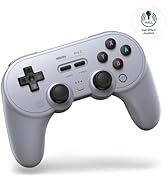
8BitDo Pro 2 Bluetooth gamepad (Gray edition)
Product ID: 359258704
🎮Ergonomic pro-grade design
📱Seamless multi-device Bluetooth
🔋20+ hrs wireless play
🎮 Level up your mobile gaming with pro-grade wireless control!
The 8BitDo Pro 2 Bluetooth Gamepad (Gray edition) is a lightweight, ergonomically designed wireless controller offering over 20 hours of Bluetooth gameplay. Compatible with Android, iOS, and multiple platforms, it features responsive controls and a sturdy build, making it a top choice for mobile and tablet gamers seeking professional-grade performance.







| ASIN | B08XY8H9D5 |
| Batteries | 1 Lithium Polymer batteries required. (included) |
| Country of Origin | USA |
| Customer Reviews | 4.5 4.5 out of 5 stars (3,109) |
| Item Dimensions LxWxH | 15.4 x 6.5 x 10.1 Centimeters |
| Item Weight | 227 g |
| Item model number | 6922621501725 |
| Language | English |
| Manufacturer | 8Bitdo |
| Product Dimensions | 15.4 x 6.5 x 10.1 cm; 226.8 g |
| Rated | Not PEGI rated |
| Release date | 15 March 2021 |
A**H
Sturdy and smooth controller
This easily connects to Android and iOS devices. Fairly easy to connect and use. Serves my purpose of using this to play games on mobile and ipad.
J**I
Excellent Product
After long research, found this product which is compatible with my ipad pro 12.9.
B**T
Best controller at this price range
Picked this over the xbox controller, no regrets
D**.
Very good controller and genuine seller
The controller is very good for my Nintendo switch and the seller is authentic and genuine MICROMINI .... I am satisfied
B**K
Great controller
Works well, one of the best TP controllers. Initially was in the market for xbox controller only, bought this after a friends suggestion, worth it.
A**R
Perfect Controller
Premium Quality.
S**Z
😎
Her(Apple denemedim) cihazla ve sistemle çalışıyor. Rpi, x86 w11, x86 debian, x86 red hat tabanında ve android 13'te denedim. Sorunsuz. w11 için sitesinden araç indirip firmware güncellemesi yapmak gerekiyor. Olduğu gibi kullanırsanız trigger bazen atlıyor.
S**H
Very decent product
I would highly recommend this nostalgic looking controller, I would loved it more if it had wireless wake-up for the Nintendo Switch but they clearly mentioned this in the description/reciews, so take note of that. Otherwise this is great.
D**Y
Excelente calidad
Se siente resistente y no es muy pesado, se conecta perfecto a mis dispositivos, mi computadora no tiene bluetooth, pero con el cable funciona bien, mi switch y el telefono se conectan facil. el anterior control que tenia se volvio inutilizable debido a la pila, pero en este la pila es cambiable e incluso caben baterias normales.
K**S
Very nice
Love the retro look and works well with switch
M**N
The best PC game pad you can buy, but still not perfect
I had one of the the original 8BitDo SN30 Pro+ game pads and loved it, so when the Pro 2 came out, I eagerly bought one. It still has everything that was good about the old version. It's comfortable to hold, you can use it wired or wireless, the analog sticks and triggers are very precise, the d-pad is accurate and feels good, and it's got a very respectable (>20 hour) battery life with a rechargeable, replaceable battery pack. The most useful feature the Pro 2 adds for me is the ability to program multiple profiles into the game pad. If you play PC ports of console games or if you play games from other regions, you're probably used to games swapping which buttons are used to confirm/cancel, and so I like having profiles I can use to switch the positions of the X/Y and A/B buttons so they always match what I expect. The Pro 2 also adds two paddle buttons underneath the control, which would be useful... if I could do anything with them. Much like the "Star" button on the original Pro+, which is still here, this button can only be configured in 8BitDo's software to copy another button on the controller or to enable/disable turbo mode, or to execute macros that replicate pushing several other buttons in sequence. Copying buttons isn't useful for me, and macros would be useful if I played fighting games and wanted to cheese command sequences, but... I don't. Pushing one of them to execute a macro also interrupts and cancels any other button you were pushing on the controller, so you can't use them while you're moving with the sticks, for example. I would love to be able to map the star button and paddles to arbitrary key presses; let me use them to take a screenshot, record a video, or display a custom overlay. All of those would be great, but they're not possible right now. They don't even show up as buttons in the operating system's control panel, so nothing else can use them even if you wanted to use other joystick mapping software. My disappointment with that aside, this is still my favorite PC game pad.
Trustpilot
1 month ago
2 weeks ago