Desertcart purchases this item on your behalf and handles shipping, customs, and support to UAE.
⚡ Power Your Desk, Own Your Day
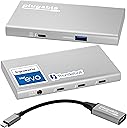
The Plugable 5-in-1 Thunderbolt 4 Hub is a premium USB-C expansion device engineered on Intel’s Goshen Ridge chipset, certified for EVO. It supports up to 40Gbps data transfer, dual 4K or single 8K displays, and delivers up to 60W charging to your laptop. Compatible with the latest Apple M1-M5 silicon and Windows Thunderbolt 4/USB4 systems, it includes a USB-C to HDMI adapter and offers driverless plug-and-play convenience, making it the ultimate productivity hub for modern professionals.


| Additional Features | Fast Data Transfer, Pass Through Charge, Plug and Play |
| Asin | B09NQPVZF3 |
| Best Sellers Rank | #6,056 in Computers & Accessories (See Top 100 in Computers & Accessories) #435 in Laptop Docking Stations |
| Brand | Plugable |
| Color | Grey |
| Compatible Devices | Windows (10+) with Thunderbolt 4 / USB4, macOS (11+), and Thunderbolt 3 or USB4 Macs (M1 Macs are limited to one display) |
| Customer Reviews | 4.4 4.4 out of 5 stars (395) 4.4 out of 5 stars |
| Data Transfer Rate | 40 gigabits_per_second |
| Enclosure Material | Aluminum |
| Hardware Interface | Thunderbolt |
| Item Dimensions L X W X H | 8.35"L x 5.59"W x 2.17"H |
| Item Weight | 0.87 kg |
| Manufacturer | Plugable |
| Mfr Part Number | USB4-HUB3A |
| Minimum Required Operating System Version | Windows 10 |
| Model Number | USB4-HUB3A |
| Number Of Items | 1 |
| Number Of Ports | 4 |
| Operating System | macOS |
| Total Usb Ports | 4 |
| Unit Count | 1 Count |
| Upc | 819927012597 |
| Warranty Description | 2-Year Limited Parts and Labor |
User
Works with my Thunderbolt 4 Chromebook
I have an HP Elite Dragonfly chromebook and I wanted an adapter that could do host charging, USB and dual displays with different resolutions, 4k and 2.5k. An adapter capable of doing this was surprisingly hard to find, but Plugable 5-in-1 is perfect for it.I've tried a couple of adapters from other vendors and neither worked. The cheapest one didn't actually having 40gbps of bandwidth such that it couldn't drive two displays. It said it was Thunderbolt-4 *compatible*, but that's a tricky way of saying that it isn't thunderbolt 4 in capability. The mid-priced one was true thunderbolt 4 with 40Gbps of bandwidth, but it was cheaply executed with just one logical Thunderbolt 4 video stream using MST (multi-stream transport) to simulate two displays on that one port. ChromeOs couldn't deal with two different resolutions and the adapter would shut down after trying to initialize the displays for a few seconds.*This* adapter is thunderbolt 4 and there are 2 independent video streams so that each can have its own monitor at its own resolution and refresh rate (supporting up to two monitors.) It's more than twice the price of my last one, but it *works*. One nice side-effect of its implementation is that the monitors independently negotiate resolution, etc. such that they all wake up fast when I wake up the chromebook. From what I understand, the Intel Goshen Ridge Chipset is the magic sauce that makes that work, allowing for Thunderbolt/USB4 tunneling as opposed to just MST.I just set this up and wrote this review since I'm so happy to finally get an adapter that works. The adapter has been running for 30 minutes and is generating moderate noticeable heat, 15F above ambient. My laptop was already charged so it isn't putting a lot of power through the host charging circuitry; it may get hotter when that happens since it may need to convert voltage from its brick supply to what the host laptop wants. The adapter has an aluminum case so it should be able to dissipate heat well.The biggest downside is the size. This thing has a huge power brick that powers both the device and allows for the host charging. Not the best if you want to travel, but this adapter is specifically for my home workstation, so it's fine for me.
User
I am delighted with this great product - it just works.
TL;dr it works great, no setup, plug and go. Just buy one and be happy.First and Foremost; do NOT even think about using ANY TB4 device without a genuine Intel Certified TB4 cable. In this case Cables Matter and Plugable supplies the correct one (plus the correct TB4 to HDMI as well)Like me, you are probably reading all the TB4 Hub reviews before purchasing and this is my experience.I looked long and hard at the Caldigit Element and the Plugable hub. I debated the cost, the size, the power cube, over thought and considered every little detail over and over again because, well because.I concluded that whichever I bought I’d regret not buying the other, so I ended up with the pluggable.Take it out of the box, it comes with a high quality TB4 cable and a big power cube. So lets talk about the elephant in the room, or on the floor. I somehow doubt that pluggable (or Caldigit since their power cube is the same size) are into power supply manufacture so they OEM’ed someone else’s. Given a choice between this power cube that lives on the floor with all the other *)*@%(& power cubes or paying more for a smaller one that will still be on the floor with the others, I’d pay less every time. So it sits on the floor with the others, it doesn’t even get warm.The actual hub on the other hand *does* get warm during use but then my laptop does too.Does it work? Yup, just plug it in and as advertised it just … works. I have a USB 3.0 (plugable) hub hanging off the USB 3.2 port and that’s where all my angst kicked in.Is it better to get the Caldigit Element with it’s FOUR builtin USB 3.2 ports or this one with one USB 3.2. Wait, what? Exactly how many 1050Mbps devices do we actually have? Like, seriously.TB4 can only(?!!!) support 40Gpbs which is a mere FORTY 1Gbps (1050Mbps) devices. There aren't enough ports for all of those so….. ok, ok, you want to daisy chain but guess what! You’re still limited to the 40Gpbs from the laptop to the Plugable or Caldigit. But wait you say, not all devices will max out at the same time so you can attach more devices. Well that’s what I’ve done via the USB 3.2 Gen-2 (10Gbps) port to the daisy-chained hub and:Attached to the Plugable:Samsung T7-1TB SSD (1050Mbps ) USB CSamsung T7-2TB SSD (1050Mbps ) USB CSamsung T5-1TB SSD (500Mbps) USB CUSB 3.0 Hub (via the USB 3.2 Gen-2 port)Attached to the USB 3.0 HubWD 5TB driveWD 5TB driveand a couple of other things that don’t make a difference.All this is attached via the TB4 cable to a Surface Pro 8 with 2 monitors running of the MS Dock. OK, ok, I know I need more storage and am looking at another monitor but here we are.Results? I can’t shovel disk data from the SP8 to keep up with the capacity of the USB-C drives and the USB 3.0 drives. I just can't max out the 40Gbps TB4 port so everything else is just moot. All that *would* change if I ran the monitors off the Plugable (but then ALL TB4 hubs have that problem).The T7’s are slightly faster than the T5 and the T5 is slightly faster than the WD HD’s.Now when it comes to data processing the T7’s win every time but in terms of overloading the Plugable, I’m nowhere close to being able to do that in normal use.I’m going to plug another T7-2TB into the plugable and move the T5 to the hub (since they are 500Mbps bandwidth matched) and see how I can overload things.Conclusion?I love the plugable, it just does it’s job without fuss and doesn’t occupy a ton of space; it’s about as small as it can be.Do I regret the decision?Actually, no. I can’t think of a reason why I’d need 4 USB 3.1 ports and 3 TB4’s in the same box. Other people will though and the Caldigit will be worth the extra $50 or so.Will I buy another Plugable?Actually yes, I might get that 3rd monitor going :-D :-) :-D (The Surface Pro 8 has two TB4 ports)
User
Works great with M1 (Pro) MacBooks Pro and Thunderbolt 3 AIC
I've tested this device alongside a CalDigit USB-C SOHO hub for a barebones docking station with DP1.4 output, and the combo works great with both my 16-inch MacBook Pro w/ M1 Pro and my wife's 13-inch MacBook Pro w/ M1. My chief complaint is that the power brick is quite large relative to the hub's paltry 60W charging capacity.I also have an older PC in my office with an ASUS ThunderboltEX 3 add-in card (AIC) based on Intel's Alpine Ridge (TB3) host controller. This PC runs Linux and hosts a variety of virtual machines/appliances and other niche use-cases that require certain kernel command-line options. Unfortunately, these requirements don't play well with the AIC; in particular, it breaks hot-plugging on the TB3 port, even with simple USB devices.I was interested in answering the following questions:* Can I use a Goshen Ridge (TB4) device controller downstream from a Alpine Ridge (TB3) host controller?* Will the Alpine Ridge host controller delegate some duties to the Goshen Ridge device controller such that it fixes hot-swapping for USB devices? for TB devices?* Can I get everything working in Linux??I'm happy to report that—in my case, for the most part—the answers to the above questions are YES. After enrolling the Plugable 5-in-1 hub via boltctl I was able to hot-swap USB devices on the Type-A port as well as the Type-C ports, and hot-plug a TB device. I was actually able to hot-plug a TB3-to-TB2 adapter with a downstream TB1 device, and that got me nerding out a bit. I'm running Ubuntu Desktop 22.10 (kinetic) and there's even a GUI for authorizing devices these days.Unfortunately, the long-standing issue(s) with hot-UNplugging TB devices in Linux are still present. I was able to use the suspend-to-RAM trick to clear out disconnected devices. It's an imperfect solution but that has absolutely nothing to do with the Plugable 5-in-1 hub; I only mention it for the sake of completeness.One other note: I ordered two of these in new condition and one of them came in open-box condition (very clearly so). Even though this appears to be a fulfillment issue on Amazon's side, Plugable support has been responsive and helpful, which is great to see. Again, nothing to do with Plugable other than to highlight their excellent customer service team.
User
It works, but be sure your Laptop MFGers port labeling is correct
So I'm up to 3 Docks I tried, and until this morning, none of them worked correctly.My the laptop maker tech support said, yup need to use the TB4 port for it to work.If not working, call the makers of the dock.I sent back the first one (from another company), factory tech support said, either not compatible, or broken, we aren't sure.only 1 monitor, ethernet would constantly disconnect. No charging.So back it went.Others had the same complaints, so figure, get a refund and move on.So bought this one from Plugable.My laptop "maker" sent me the graphics of where the TB4 port was/which one, and no it didn't work correctly.Only 1 monitor, but ethernet did, charging didn't.Updating drivers, new cable, nothing worked.After sitting back, I finally tried the USB-C 3.2 port that is not s/b to work (according to my laptop "maker").But it did. Called my Laptop "maker", and finally the one tech support worker sent me the motherboard manual, and my laptop "maker's" info of what port is which and what did what was WRONG!What they called TB4 port, was really the USB-C 3.2 for power and for 1 display.port.Which did gave me ethernet and 1 monitor via the dock.What they called the USB-C 3.2 for data use, no power... gave me the 2 displays the dock promised, ethernet and power.. I was happy about the 2 displays and ethernet... charging too was a bonus. (I was originally told by my maker, ok, so it's not, to be expected with powerful laptops.)In the middle of banging my head against the desk, I bought a lower model from plugable from amazon, it now works too.Plugable tried to help me, no one questioned the port, I shared the laptop companies port designation.So not their fault. Plugable tried a few things, one reason I bought the lower cost dock of there, get another one of their OEM TB4 cables which was suspect.So lesson is, if its not working, really have to dive deep into the ports and what they do, and which one is which.
User
Mostly good, works with most, but not all devices.
Seems to mostly work very well. I plugged a few different external hard drives into it including an external NVME drive in a USB 4 40Gbps enclosure and did some speed tests and achieved the same speeds (about 3800 MB/s) that I got when I plugged that same drive directly into my computers USB 4 40Gbps port, which is good. I tried various other devices including DVD writer, etc. and most worked fine.However, for some reason, it didn't seem to like my USB 5 Gbe ethernet adapter plugged into any of the USB-C 4.0 ports on the back of it. It wouldn't even power it on. Yet that same USB ethernet adapter, using it's USB-C to USB-A cable instead of it's USB-C to USB-C cable, worked fine plugged into the front USB-A port. For the record, my USB ethernet adapter does work totally fine plugged directly into my computer's USB 4 port directly. Obviously, this is not a huge deal as I will just leave my ethernet adapter plugged into the front USB-A port but I was trying to keep everything looking neat by having everything plugged into just the USB-C ports on the back.All in all, I'd still recommend it. Just keep in mind that it might not work as expected with ALL of your USB devices.
User
Versitility, Includes USB-C to HDMI adapter, toght connections, daisychaining, TOUGH AND DURABLE
This is one of the best thunderbolt hubs a thunderbolt 4 and USB4 hub. It is compact extremely versitile in that I can daisy chain it to my caldigit element hub and it works incredibly and gives many extra usb 4 or thunderbolt 4 hubs. I connect through a thunderbolt cable male to male into one of the ports on the element hub and it is perfect everythime I can use it the way I described or by itself. I love it 💗 worth every penny. It like most thunderbolt 4 anything is downcompatable so will work with anything previously thunderbolt 3, etc any usb-c works of course host if thunderbolt 4 will benefit by all speed capabilities but its fast just the same. I use it daisychained or by itself between my Samsung note 20 5g ultra phone and thunderbolt 4 laptop i use a usb4 extension cable by LEIRUI 2.62 ft. All I do is swith from phone to laptop if I want and all 7 drives always appear in a good file manager like solid explorer, xplore, etc. Great to use your phone to access all your hard drives I use westernn digital my passport ultra usb-c, sundisk usb-c, Adata etc the drives offer usb adapters too. GREAT GREAT PRODUCT and never gets hot. Each offers 40Gbps bandwidth and 15W charging power.These ports are very flexible, and you can use them for all sorts of devices.You can attach external displays using this hub without needing an adapter if the monitors have a USB-C connection. If your display instead has HDMI or DisplayPort connections, you’ll need the relevant USB-C adapter to attach via the dock.Plugable includes a USB-C-to-HDMI 2.0 adapter with the hub, which is a nice.
User
RAID 0 drives go too slow
The main reason I bought this HUB was to array my NVME drives.I tested with 2 USB-C NVME drives setup as RAID 0.When both drives are plugged to the HUB, the result isabout 950MB/sec (see photo + screenshot)When one drive is on the HUBthe other is connected to a TB3 port directly on the Mac, the result isabout 1600MB/sec (see photo + screenshot)And of course, when both are connected to two Mac TB3 ports the speed is also about 1600MB/sec as expected.I did test the HUB with a TB3 NVME enclosure, as a standalone drive it worked at full speed around 2700MB/sec.I tried making a mixed RAID 0 with one USB-C and the TB3 enclosure,the speed was slower than expected, around 1600MB/sec.So apparently the HUB is unable to handle two drives in RAID 0 correctly.Disappointed.No point in my keeping the HUB if it can't do what I need it to do.* also, the power brick is bigger and heavier than the HUB, kinda excessive for mobile use.Returning.
User
Solid thunderbolt dock for your M1 Macbook Pro
The tough problem I see with most thunderbolt docks is they try to balance all the potential ports you might need, trying to find the right mix of everything. And I just couldn't find something that suited my needs without costing 2-3 times what this dock costs.This dock allows you to get what you need out of it in whatever way you need it. It's not going to fast charge your M1 MBP, but it'll run it without a problem. I can, then, decide what the Type-C/Thunderbolt ports do for me. Yeah, there's not a lot of ports to work with, but I really didn't need a ton to begin with.This thing keeps it simple. As a result, it's small and easy to stash away. If you need more, thanks to Thunderbolt, you can daisy chain them, or plug a second dock directly into the MBP's second Thunderbolt port. If you don't need more Type-C ports, you can get a basic hub to plug in to the Type-A port that's available.I ended up not using the included HDMI adapter. I've not been able to find a USB-C to HDMI dongle that works correctly with my ultrawide monitor. This one included. It might do 4K or 8K in a more common display format. I couldn't tell you, though.For me: Mouse/keyboard in the Type-A port, DisplayPort to Type-C cable in another of the Type-C ports, external storage for Time Machine in another Type-C port, Anker conference bar in the last Type-C port. All ports are occupied, and I have a single cable going into the MBP providing all of this and power.It's light enough and small enough that I ended up mounting it under my desk with some 3M Dual-Lock.
User
Lo que buscaba
Estoy contento con su rendimiento hasta ahora.
User
Vale o investimento.
Excelente investimento para voce que está precisando de mais entradas. Intuitivo e rapido.
User
The best
I think this might be the best USB4 docking/hub. Great quality and small.
User
Solid as a rock
A simple, elegant solution to the "lack of ports" need. Stuck three NVMe SSD (in external chassis) on this hub and it worked flawlessly. Buyers have to note the technical specs and requirements and everything will work as intended.Wished it had a tiny light to indicate when it is active.
User
It was what I needed
After years of trying to deal with Apple's limited ports, even on my brand new M3 MacBook Pro, I finally bit the bullet to buy a proper hub. This hub is enough to power my Macbook due to its stand-alone power supply (I don't need the Apple charging cube anymore), and I am able to run all of my peripherals, with what I can already see is blazingly fast transfer speeds.This hub is pricy, but I'm glad I bought it, my cord situation is so much better now.
Trustpilot
5 days ago
2 weeks ago