Buy anything from 5,000+ international stores. One checkout price. No surprise fees. Join 2M+ shoppers on Desertcart.
Desertcart purchases this item on your behalf and handles shipping, customs, and support to UAE.
🚀 Scan Smarter, Work Faster, Stay Ahead!
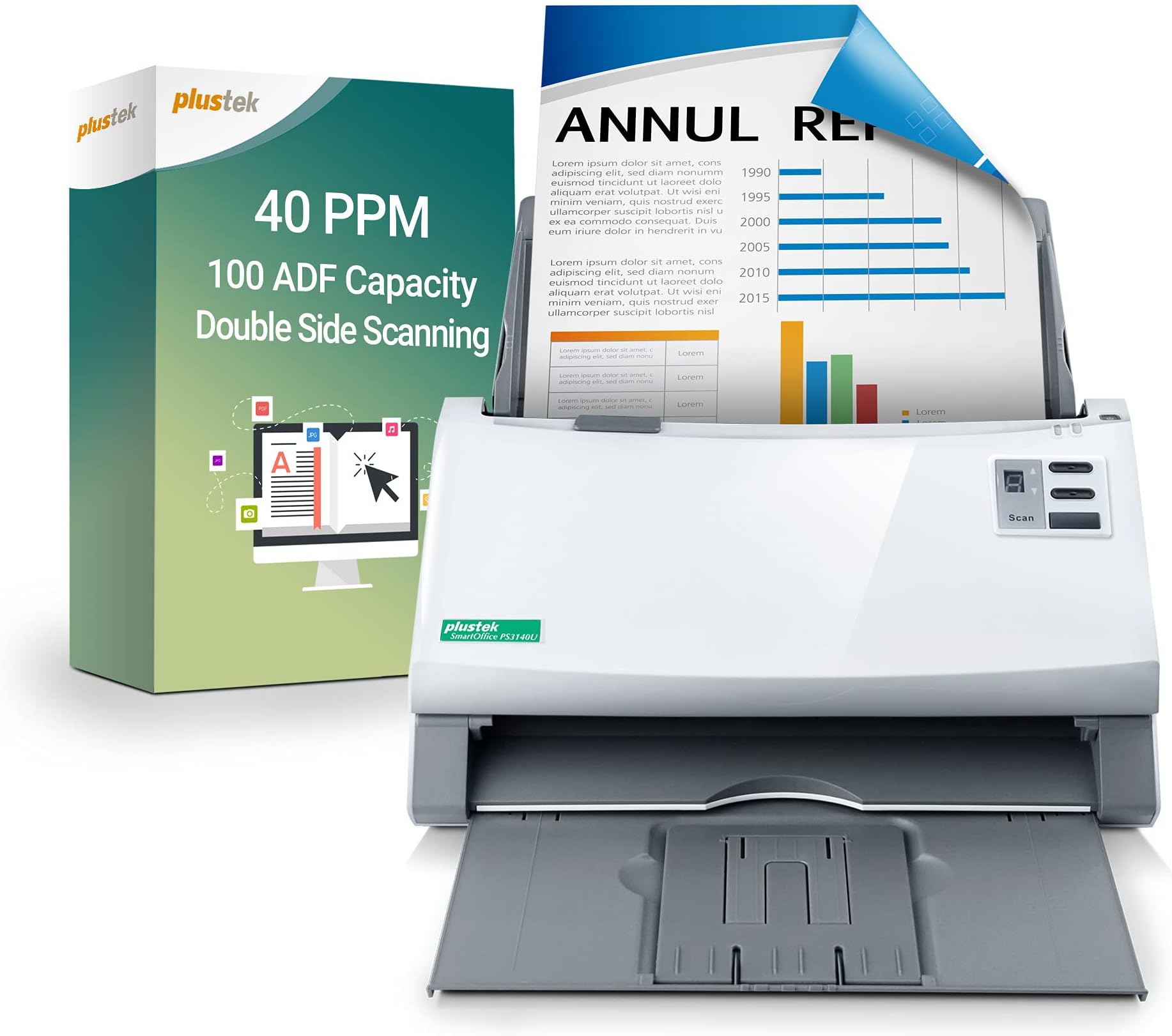
The Plustek PS3140U is a high-performance duplex document scanner designed for busy professionals and small businesses. It handles up to 100 pages per batch at a rapid 40 pages per minute, supports long documents up to 200 inches, and features intelligent image optimization for flawless scans. With one-touch customizable workflows, reliable paper feeding with double-feed detection, and broad software compatibility including OCR, it transforms paper clutter into organized, searchable digital files—perfect for streamlining your office productivity.


| ASIN | B0972M74CL |
| Best Sellers Rank | #322,799 in Office Products ( See Top 100 in Office Products ) #365 in Document Scanners |
| Brand | plustek |
| Color Depth | 48 Bits |
| Connection Type | USB |
| Customer Reviews | 4.0 4.0 out of 5 stars (37) |
| Item Dimensions D x W x H | 9"D x 12.6"W x 9"H |
| Item Weight | 9.1 Pounds |
| Light Source Type | LED |
| Manufacturer | Plustek |
| Media Type | ID Card, Paper |
| Minimum System Requirements | Windows 7 |
| Model Name | PS3140U |
| Optical Sensor Technology | CIS |
| Paper Size | 8.5 x 11 Inches |
| Resolution | 300 |
| Scanner Type | Document, ID Card, Photo |
| Standard Sheet Capacity | 100 |
| UPC | 783064709675 |
| Wattage | 18 watts |
S**Y
Great for a small business owner ....
I needed an upgrade from my older document scanner and was happy to come across this. Running a small business generates a lot of paperwork and being able to scan the documents into my computer makes it easy to access old paperwork easily. This scanner does not have wireless connectivity but for my application (only use with one computer) it isn't an issue. It would be a nice feature as I have so many things hooks up via USB already. The scanner will scan pretty much anything .... receipts (long and short), legal paper, folded paper (be sure to try to flatten as much as possible or it does sometimes get hung up). I like being able to put a stack of papers in the feeder and have it directly dropped into a file for those particular papers. Makes it quick and easy to scan many things. Scans fast and clear with the options of having it scanned in a variety of formats (color, grayscale, etc). A must have for a small business or home office. Highly recommend! 5 STARS
P**R
A good scanner, but with limitations in connectivity.
I received this item free as an Amazon Vine reviewer and this is my honest review. I only request items I will actually use, and use I do, prior to writing a review. Like many small businesses, and I have been in business for over 20 years, we have banker boxes full of paperwork. Mostly receipts, invoices and billing statements that we keep because at some point, maybe, we would need to reference them again. It is a cumbersome process to find something stored away in a box not to mention the space needed to physically store the boxes of papers. So I thought a page scanner would allow us to archive certain documents and better categorize them for future reference. This unit looks and feels well built. It connects via USB cable, which works though does mean you need to have it fairly close to your PC. A wireless connectivity option, like Bluetooth, would be a better design in my opinion. It’s funny, the description says “Workgroup-class Professional Duplex Scanner”. I guess s long as your “workgroup” is just one person, or you don’t mind carrying this unit around to different PCs, having to then plug the USB into each, you could consider this workgroup usable, but I think that statement is a bit misleading. This unit does scan quickly though I did experience some feed issues with documents with creases, like a tri-folded billing statement. They seemed to want to double feed, but once flattened out better, fed OK. A big plus to me is the fact that this unit is designed to scan a continuous length of paper, up to 200 inches as the description states. Receipts are a large percentage of what we archive, and I like the idea of being able to scan them as thermal paper tends to breakdown and fade over time. So, you can scan over 16-feet of continuous paper and archive those receipts if needed. The software is good, the interface is simple to use and provides a lot of features such as one touch scanning to a certain folder. We setup and “paid invoice” folder, loaded a stack of 70 or so, hit the scan to button and within a few minutes all the invoices were digitized and in that folder. You can set how you want each document saved in that particular folder (what format) as well as resolution and in color or greyscale, which is handy. If you are looking for a straight scanner, that duplex scans in black and white and color, this does work. If you need wireless connectivity, you will be disappointed. Add a Bluetooth or Wi-Fi connection option and I believe this will be a more usable unit for some. I dinged this one star solely for the lack of a wireless connectivity option. As I do at the end of all my reviews, I ask myself if I would actually purchase this item. I might look for a unit that has Wi-Fi (and a network sharing option) or at least Bluetooth connection if I had that need. But, for my particular need, with using this on just one PC, this unit does a good job.
M**.
Good But Limited
This Plustek SmartOffice PS3140U High-Speed Duplex Document Scanner with Auto Document Feeder is good for scanning substantial amounts of documents efficiently. I would say that it would've been a huge improvement to scan directly to one of the major cloud drive providers or scan to a network connected device, but this is limited to solely a hardline connection through USB. One of the features I feel is good but feels similarly limited is the custom scan buttons, this would be excellent to have it setup to scan to a remote folder on the network, which is something I currently have setup with OCR software watching the folder for documents to be scanned in to be processed, that isn't possible here, unless you are directly connected to whatever device you have that folder, which in my case is a homelab server that runs headless and isn't easily accessible to connect to USB. Will this be replacing my current document scanner? Absolutely not, it is too limited in this day and age to accept the lack of connectivity provided here. Being limited to a physical USB connection is a deal breaker for me and I think I'm not alone in feeling that way. This does work well when you are scanning large amounts of the same exact kind of papers, meaning like being a letter sized paper or a receipt type of paper, and it is able to do one much better than the other. Autofeed will accept 100 pages at a time and will quickly scan those documents but if they aren't aligned or aren't the same kind of paper it will require some intervention to get through good quality scans of your documents. Overall, this is a good document scanner that feels highly limited by the lack of connectivity features and the user experience is vastly inferior to a network connected document scanner. 3/5 stars.
M**Y
In December 2008 (according to the box shipping label) I spent a kings ransom on a Plustek OpticBook 3600 scanner. It's a specialist scanner which removes the spine shadows when I need to scan historic books. A scanner, which now used with VueScan, that is still working in 2024! So, when this scanner arrived, in it's easy to recycle cardboard box, I knew two things. Firstly it would look like something from the 1980's. But the build quality would be stunning and I wasn't disappointed there. A happy feeling that only improved when learning about the specs. It has hardware that can natively scans at 600dpi and can extrapolate to 1200. Whereas many all-in-one-combos only have a native 300dpi with extrapolated 400-600dpi. It can also scan colour at 48bit and output 24bit colour, while many recent ones only scan at 32 bit colour. Plus with 16bit input and 8bit output for B&W, it's more than good enough for photos and accurate OCR. Even better is I can load it with upto 100 A4 or US letter sized sheets and this can scan upto 40 B&W pages per minute (PPM) According to the manufacturer, easily super fast and reliable enough to achieve 4000 sheets per day. An onerous task made a lot easier by the inclusion of some very unique very powerful software, especially DocAction. This software (which is included) allows you scan documents and automatically save them in numerous formats, such as JPEG, TIFF & fully editable PDF's. File that can be automatically OCR'd and/or sent directly to a Printer, Email, Folder, or even over FTP. Even more amazing is all this can be done by a single button in the software! Obviously you have to set this function up, but you'd don't need any programming skills. Instead it's all done by a simple easy to use software. Plus you've also got other software including ABBYY FineReader (OCR software) and the DocTWAIN driver on a DVD in the box, so no need to download anything. The latter allows you to scan from any Windows application that supports TWAIN. Software such as Photoshop or GIMP, VueScan or NAP's. So you've always got full functionally with this. Even if the maker of your O/S decides otherwise in the future. Overall ? Yes this isn't cheap and it does look like an old fashioned big grey brick. But what it does is brilliant and it does at super high speeds. Which makes perfect it for so many places, from offices, home, art and photography studios.
A**I
I've been using the Plustek SmartOffice PS3140U in our office for a few months now, and it has been a game-changer! Here's a detailed breakdown of my experience: **Pros:** - **Fast Scanning:** The 40 pages per minute (ppm) scanning speed is impressive. It quickly handles our daily document loads without any hiccups. - **Duplex Scanning:** The ability to scan both sides of a document simultaneously is a huge time-saver. No more flipping pages manually! - **100-Page ADF:** The auto document feeder can handle up to 100 pages at a time. This feature is fantastic for large batch scans, allowing me to set it up and walk away. - **Easy Setup:** Setting up the scanner was a breeze. It works seamlessly with both PC and Mac, which is great for our mixed-device office. - **One-Touch Scanning:** The one-touch scan and save function is incredibly convenient. With just a single press, I can scan documents directly to preselected folders or cloud services, streamlining our workflow. - **Great Software:** The included software is user-friendly and offers excellent tools for document management and image processing. It has made organizing and editing our scanned documents much easier. -** Quiet & compact **Cons:** - **Initial Cost:** The scanner is a bit pricey, which might be a consideration for smaller offices. However, the efficiency and time savings it provides make it worth the investment. - **No Wireless Connectivity:** The lack of wireless connectivity is a minor drawback, as it limits where we can place the scanner in the office. -** can only save to PC (no Bluetooth or cloud or wireless). **Build Quality:** The build quality is solid and durable. It fits nicely on our desk without taking up too much space, yet it's robust enough to handle heavy daily use. **Overall:** The Plustek SmartOffice PS3140U has significantly improved our office's productivity. Its speed, duplex scanning, and large ADF are standout features that have streamlined our document management process. If you're looking for a reliable and efficient document scanner, I highly recommend this one! But at this price (just under £300, I'd expect printer & photocopier as well, especially not being a brand).
S**R
Right away out of the box you will realise just how big this scanner is, comparable to a multi feature scanner/printer product you can find. But this is designed for bulk scanning, and in that, it excels. For years I have been working through various medical conditions, receiving both Hospital appointment letters, test results and GP findings. I wanted to have them all electronic for faster searching and collating and this scanner was perfect. Very easy to setup on both my Work from home PC and my laptop, it made the process take only a few hours to scan everything collected from nearly 4 years with ease, operation was also quieter than expected. However, there is a big caveat with this in that the price is very expensive, this is designed for an office and unless you are scanning multiple documents often, there are far cheaper options on the market that will facilitate the same process, though this does do it exceptionally well, the price maybe off-putting.
S**E
My partner and I and both self employed and try to keep both of our businesses paperless (you wouldn't believe the amount of paper that builds up when you're self employed - and there are two of us!) We scan all receipts and invoices, destroy the original and keep electronic copies in the cloud. They tally up with accounts that are also done and kept in the cloud. A month's worth of invoices for one business can be an inch thick and scanning them with our old flatbed was an onerous task we both absolutely hated. We have been using this machine for a couple of months now and it really is a game changer. We just put them in date order and can scan about 20 invoices at a time - in total it takes bout 5 minutes (before it would take an hour or more). My video shows 24 sheets being scanned, front and back - it takes about 24 seconds. The Plustek software collates all the invoices for one month into one PDF. You can keep each scan as a separate file if you want, but some of our invoices are double sided or multiple pages - we set the Plustek software to ignore blank pages (so it only scans if the invoice is genuinely double sided) and it makes a "book" that is easily manageable and easy to save to our accounts in the cloud. Our accountant loves this and it has made her job much easier as well - we actually get a smaller bookkeeping bill form her!! We use Linux Ubuntu to run the admin for our businesses and this scanner appealed to me because it has a .deb (ubuntu) software installer. The software has a few minor glitches (like some modal dialogues are the wrong size and you can't see the [OK] button), but all in all it works seamlessly well. I expect the issues will be sorted out in due course (we're running the very latest Ubuntu 24 so I imagine the Plustek software hasn't caught up). The software allows us to save all kinds of file types for the scans, change all quality and resolution settings and control the scanner generally. The scanner itself is a serious bit of kit - quite diminutive, but don't let that fool you - it's sturdy, feels very well made and would suit an office environment. We have accidentally scanned stapled documents and folds and minor tears or dogears don't phase this machine. Occasionally we see the "multiple sheets detected by scanner" error (several sheets have slipped in together) but we just tap the paper back into a neater stack and try again - 99 times out of 10 it works properly after that. Everything works intuitively and seamlessly out of the box and I have yet to consult any kind of manual or instructions. I really can't praise this machine highly enough. If you run a small business, have a lot of paperwork, or in any way work in accountancy you really need one of these machines!
A**Ė
This scanner came very well packaged and in perfect condition. The scanner is not too big to occupy your space at home or office, it seems to have good quality, it is not very heavy, it is practical and easy to use. The scanner is powerful, has a good speed, it scans 40 pages per min, the feeder holds up to 100 pages in it, you can scan the payments from both sides and it works with Pc and Mac. I got this scanner to use it for the documents that I may need to do at home and I like how it works, that it is not complicated and the fact that it does not have wireless connectivity does not disrupt my work, as I just need to connect it to my computer and scan it, but I will not recommend it for large offices that want to connect more PCs at the same time and that want to print a lot of documents. It is great and does a good job for me but as for the price, I think it is a bit pricey.
Trustpilot
3 days ago
1 month ago