Desertcart purchases this item on your behalf and handles shipping, customs, and support to UAE.
⌨️ Elevate your workspace with the click that commands attention
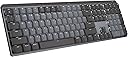
The Logitech MX Mechanical Wireless Illuminated Performance Keyboard Clicky is a premium full-size mechanical keyboard featuring 110 low-profile tactile clicky switches, smart backlighting that adapts to your environment, and multi-device Bluetooth plus Logi Bolt USB connectivity. Designed for ergonomic comfort and sustained productivity, it offers up to 15 days of battery life on a single USB-C charge and incorporates recycled materials for a sustainable edge. Compatible across major OS platforms, it’s the ultimate tool for professionals who demand precision, style, and seamless workflow integration.


| ASIN | B09LJWWX4Y |
| Additional Features | Illuminated |
| Antenna Location | Office |
| Best Sellers Rank | #23 in Computer Keyboards |
| Brand | Logitech |
| Built-In Media | Logi Bolt Receiver, Master Series MX Mechanical Wireless Illuminated Performance Keyboard, USB Cable, User Documentation |
| Button Quantity | 110 |
| Color | Graphite |
| Compatible Devices | PC |
| Compatible Operating System Family | ChromeOS, Linux, MacOS, Windows |
| Compatible Tablet Computer Models | AAUB P30 |
| Connectivity Technology | Bluetooth, USB-C |
| Customer Reviews | 4.4 out of 5 stars 921 Reviews |
| Enclosure Material | Information Not Available |
| Generation | 1st Generation |
| Global Trade Identification Number | 00097855174550 |
| Hand Orientation | Ambidextrous |
| Item Dimensions L x W x H | 20.5"L x 6.4"W x 1.02"H |
| Item Type Name | Keyboard |
| Item Weight | 2.5 pounds |
| Keyboard Backlighting Color Support | Single Color |
| Keyboard Description | Mechanical |
| Keyboard Layout | QWERTY |
| Manufacturer | Logitech |
| Mfr Part Number | 920-010549 |
| Model Name | MX Mechanical Master |
| Model Number | 920-010549 |
| Number of Items | 1 |
| Number of Keys | 104 |
| Number of Packs | 1 |
| Number of Sections | 7 |
| Power Source | Battery Powered |
| Recommended Uses For Product | Office |
| Special Feature | Illuminated |
| Style Name | Clicky (satisfying click) |
| Switch Type | Tactile |
| Theme | Office |
| UPC | 097855174550 |
| Unit Count | 1 Count |
| Warranty Description | 1 Year Limited Hard Warranty |
K**K
Truly hits the perfect balance for key feel
Incredible overall feel while typing. I'm seriously writing this review in part because it's so enjoyable to type on this keyboard. The sound of the click is exactly right. It's just loud enough to be distinctly audible with each keystroke, but not any bit louder beyond that. And the tactile feedback of the keys is just enough as well -- there's exactly enough feedback -- just enough to always help you register the keystroke, but not so much where it gets hard to type accurately after a while without lots of effort and unnaturally added focus. The setup was also basically instant. Turn it on and laptop helps you connect it to bluetooth. Incredibly straight forward. Very high quality materials on the frame, key covers, and also the USB charging cord. Overall well worth the money. I had to return the Keychron K10. Hoping to get away with a $70 keyboard, but the difference between this keyboard and that is really truly night and day. There's a reason why this costs more than double. Gladly willing to pay this premium for a product that I use this often.
F**Z
A solid mechanical replacement for my MX Keys
Love it! It replaced a Logitech MX Keys as my daily keyboard. Love the mechanical sound and feel and the battery must be bigger than the Keys because it go much further on a charge. I like the backlit keys but my only minor gripe is these could be a bit brighter, but it’s not enough of a complaint to take off a star.
A**Y
It scratches the brain
For my first mechanical keyboard, I went with Logitech since I’ve used their products for years and can trust their versatility and reliability. Yes, other companies have way better options. And yes, Logitech also has other mechanical keyboards like their Gaming Keyboards, that are marketably better. But personally, this keyboard is honestly such a good option and checked all my boxes. I chose the Clicky option, which is Logitech’s version of the blue switch. I preferred the physical “click” of the keys, unlike the red switch or Linear. And wanted an audible sound, unlike their brown switch, Tactile, which is more “thonky” or muted. If that helps anyone in their decision making. From my few days of using this keyboard; My Pros: - The backlighting’s “hand awareness” is such a nice little detail. - Versatility with 3 device options to switch seamlessly to made easy. — Window/Mac compatibility unlike Logitech G keyboards (only windows compatibility), that allow me to use a Windows laptop, MacBook and iPad without issues. (only this model specific, Logitech has an only Mac option!) - Customizable buttons using the Logi Options+, which is free to download via Logitech’s website. My Cons: - It is a fingerprint fiend! The plastic matted keycaps attract so much oil and it is so noticeable. - From my knowledge, you can’t change the keycaps or the switches like other mechanical keyboards. But don’t quote me on that! - Because of the “hand awareness” mentioned in the Pros, the backlighting doesn’t stay on for ambient lighting like other RGB’s. All in all, it’s a great option. But like I said before, there are so many other great options out there too. It’s a big market! Personally, I went with something I’m comfortable with and know that I can rely on. But it took a lot of research on my part. I can’t speak for anyone about their shopping habits or purchases but I do want to say, research your options before buying! And if possible buy it, then return it if it’s not your style.
V**T
Highly recommend this clicky keyboard to anyone looking to transition
Great keyboard, set up was so easy took no time at all, Bluetooth connection was great. Love the click sound it makes. Not to loud, just right and super satisfying. The reason I love this so much is because the key set up is exactly how the keyboard was that my work provided so there was new new learning where certain keys were. The transition to using this keyboard was super smooth highly recommend.
J**O
good (but not great) portable keyboard
Overall, I like this keyboard. The keypress feel is decent - not as good as my favorite Cherry MX Blues, but decent. They do not have as sharp a feel as the Blues, and they are a bit less stiff. The software is decent. It works fine on my personal laptop, but does not install on my work laptop due to reduced permissions. This means that the programmable keys are not programmed when used on my work laptop, and since the keyboard removes some standard keys, this can be annoying at time. I totally dislike some of the keyboard layout. Specifically: 1. Lack of spacing between Function key groups. On a full-sized normal keyboard, there is extra space between F4 and F5, and again between F8 and F9. This keyboard just munges them all together, which I truly dislike. They did this so that they could add dedicated volume up and volume down buttons to the right of F12. Personally, I would have preferred a roller/rocker instead of the dedicated buttons, which would have left space for extra space between Function key groups. 2. Print Screen, Scroll Lock, and Break have been replaced with 3 KVM connectivity buttons. If you don't use them (and I don't), this means you lose the Print Screen, Scroll Lock, and Break buttons if you cannot remap them to other keys - remember, the software does not work on my work laptop. 3. There are 4 programmable buttons added above the numpad. The default functions are calculator, minimize all, search, and lock computer. Without the ability to use the software, you cannot change these (again, work laptop). Since they removed 3 keys (see #2), it would have been ideal for them to have put those functions here - especially Print Screen. As a result of this, if you cannot run the software, you have no Print Screen function and have to use a utility instead, which is fine 95% of the time, but 5% of the time is a real pain in the butt. This keyboard is way better than any laptop keyboard I have used, and a great portable keyboard when you want that mechanical keypress feel. It holds a charge for at least 3 weeks of work-use. Unfortunately, without the software, you cannot see the keyboard charge state... If you buy this keyboard, I recommend you get some sort of wrist rest.
D**N
Premium Feel, Compact Form – Logitech MX Mechanical Mini
This keyboard delivers the perfect blend of mechanical key feel, wireless convenience, and premium build quality. The clicky switches are satisfying without being overly loud, and the compact size frees up desk space without sacrificing functionality. Pros: Excellent mechanical switches — tactile, responsive, and consistent. Compact layout saves space while keeping essential keys. Backlit keys with adjustable brightness for low-light use. Multi-device pairing works seamlessly across macOS, Windows, and more. Solid metal top plate adds a premium, sturdy feel. Great value and portability versus other top mechanical keyboards. Cons: None so far — performs exactly as promised. Notes from Use: Paired it with both a MacBook Pro and a Windows desktop — switching between devices was instant. Typing is a joy, with satisfying feedback and no missed keystrokes. The backlighting adapts well to different lighting conditions, and battery life has been excellent even with illumination on. The smaller footprint leaves more room for a mouse, which is great for tight workspaces. Verdict: A top-tier choice for anyone who wants a compact, wireless mechanical keyboard without compromises. Perfect for both productivity and casual use. 5/5 stars. Photos/Videos: Side profile highlighting low-profile switches. Backlit keys in a dim room. Desk setup showing the compact footprint.
W**S
AVOID - It Sounds Great, But Will NOT Work Like Advertised
I've been using this piece of absolute garbage for a while now. I wanted it and the MX Mouse to avoid having multiple keyboard/mouse combos as I run three desktops (2 macs and a Windows machine). From the specs, this seems perfect, and would be perfect if Logi had a staff of remotely competent engineers and software engineers to drive all the features it's supposed to have out of the box. But they clearly don't. Whoever designed this along with the Logi Options+ (LO+) software is either completely incompetent, or Logi has absolutely hobbled it with corporate interference BS. Physically, this keyboard is awkwardly heavy. It takes a little effort to move, especially since the idiots built it with very little bezel along the sides and keys that are so sensitive I'm guessing a strong breeze would press the button. So this equates to accidental keypresses ALL THE TIME. Particularly the numpad "enter" key as it's right on a corner, and hitting "enter" on random windows, as you can imagine, leads to a lot of problems. The software is almost too numerous in issues to detail. The overriding message though: None of the features it's supposed to have work 100% of the time. If the LO+ software isn't crashing your computer, or going haywire, it'll be ignoring all your settings, or completely erasing your settings. There's a new terrible update so often, you actually need to open the software each restart so you have at least partial command over your keyboard and mouse and to make sure Logi didn't completely erase everything you had setup before. Huge fails: The mouse is supposed to move between desktops, the keyboard is supposed to follow the mouse. So if I move from System 1 to System 2 with the mouse cursor, the keyboard should automatically follow, but my brothers and sisters: THIS DOES NOT RELIABLY HAPPEN AND IT WILL ABSOLUTELY DRIVE YOU CRAZY. Mostly, the cursor gets stuck on a screen when you want to move, but when you don't want it to move screens, and say you're near the edge of the screen to minimize a window - this Temu-garbage software will abruptly kidnap your cursor to the next screen. And because it doesn't work when you want it to, you spend the next minute running the cursor against the edge of the screen trying to get it back. You'll likely give up on getting it to do what it's supposed to do and have to manually hit the system selector button on the bottom of the mouse. Other times you'll move your cursor to System 2 from System 1 and go to type on System 2 but, surprise, the keyboard is still on System 1, and you've just destroyed whatever you had on that screen with whatever you just tried to type on System 2. Then you'll again, need to use the keyboard system selector buttons to manually get the keyboard to the right screen. This manual switching isn't hard manual labor or anything, it's just an interruption in workflow that's NOT SUPPOSED TO BE NECESSARY with this system - yet it is absolutely necessary, quite frequently. This isn't user error; all components are properly set up, all troubleshooting has been reviewed, this is just a VERY, VERY POORLY DESIGNED/IMPLEMENTED PRODUCT. I promise if you ignore these warnings, and you're aiming to use this like I use it, you WILL spend time being extremely frustrated. You're not going to get your money's worth. And in the end, it may end up destroyed, as you may experience a strong urge to bash the keyboard against a brick wall.
M**E
Nostalgic Tactile Feel with Modern Wireless Flexibility
The Logitech MX Mechanical (Clicky) delivers the perfect blend of old-school tactile feedback and modern convenience. The clicky switches are just right - satisfying without being obnoxiously loud - and the low-profile design is surprisingly comfortable for long typing sessions. I’ve been using it with a MacBook Pro, and the multi-device switching works flawlessly. Pairing across three systems is seamless, and switching is as simple as tapping a function key. It’s also great to see USB-C charging - even with a lower-output charger, it tops off fairly quickly. The aluminum top plate adds a premium touch, even though the body is mostly plastic. It feels sturdy, well-weighted, and nicely textured overall. I do like the smart backlighting, though I usually keep it off to preserve battery life. Speaking of which, battery life is decent - but if you're on your computer all day, you’ll want to be in the habit of turning it off after use. Overall, I give this keyboard 5 stars. It’s ideal for typists or anyone who misses the tactile feel of classic mechanical keyboards, but wants something that’s slim, wireless, and versatile enough for modern workflows.
B**M
Best Mechanical Keyboard so far
Few things I like about it: 1. Easy connectivity to switch between devices 2. Minimalistic Design 3. Good battery life. 4. Personally, I like the feel of the clicky switches. Switches are ultimately a preference choice. Personally, I tried all three of the switches and these are my recommendation If I were to rank them based on typing feel, it would be Clicky -> Linear -> Tactile Quiet. Clicky: Best typing feel of them all, can accurately feel that I have pressed the button, noise is a bit loud so make sure to check with people around you before you decide to purchase it. Linear: Feels like a normal keyboard, instead of a mechanical one. However, it is very smooth and nice to type as well, noise is the smallest. Tactile Quiet: The weirdest feeling out of them all, this is supposed to be a compromise between the two so maybe that's why it feels weird, it's not mechanical enough that you get that satisfying feel and noise every time you press a key. So sometimes I am not sure if I have pressed it. On the other hand, it is not smooth enough to have a normal keyboard feel.
D**P
Got a keyboard which was not as in the picture
The leftmost “shift” key is smaller and there’s an unexpected key between “shift” and “z” keys, which makes difficult to type fast.
B**G
i received keyboards but its not clicky switch
on this keyboard there is no Clicky Switches.its not good
L**T
Awesome keyboard, using it everyday
I use this keyboard as my main driver every single day for multiple hours and it has never failed me. I charge it once every 2 months and it holds charge very very well in the meantime. The wireless dongle works at lightspeed and the Bluetooth connectivity is very good, especially with the ability to connect to 3 different devices at the same time. Finally, the clicky version has a very satisfying and not annoying clickiness to it that makes typing on it very interesting and enjoyable. Overall a great keyboard which I would recommend to anyone without a doubt.
L**G
Take Your Typing to New Heights!
This Logitech MX Mechanical Wireless Illuminated Performance Keyboard is amazing! The clicky switches provide an ultra-responsive feel that I just love. I also appreciate the backlit LED for a custom look, plus the wiresless logi bolt secure Adapter makes it feel like direct USB connection. also having the ability to pair multiple devices to the same secure adaptor also makes it incredibly convenient to use. It’s a fantastic way to get the best out of my gaming setup. Highly recommend!
Trustpilot
5 days ago
3 days ago