Buy anything from 5,000+ international stores. One checkout price. No surprise fees. Join 2M+ shoppers on Desertcart.
Desertcart purchases this item on your behalf and handles shipping, customs, and support to UAE.
🚀 Upgrade Your WiFi Game — Stay Connected, Stay Ahead!
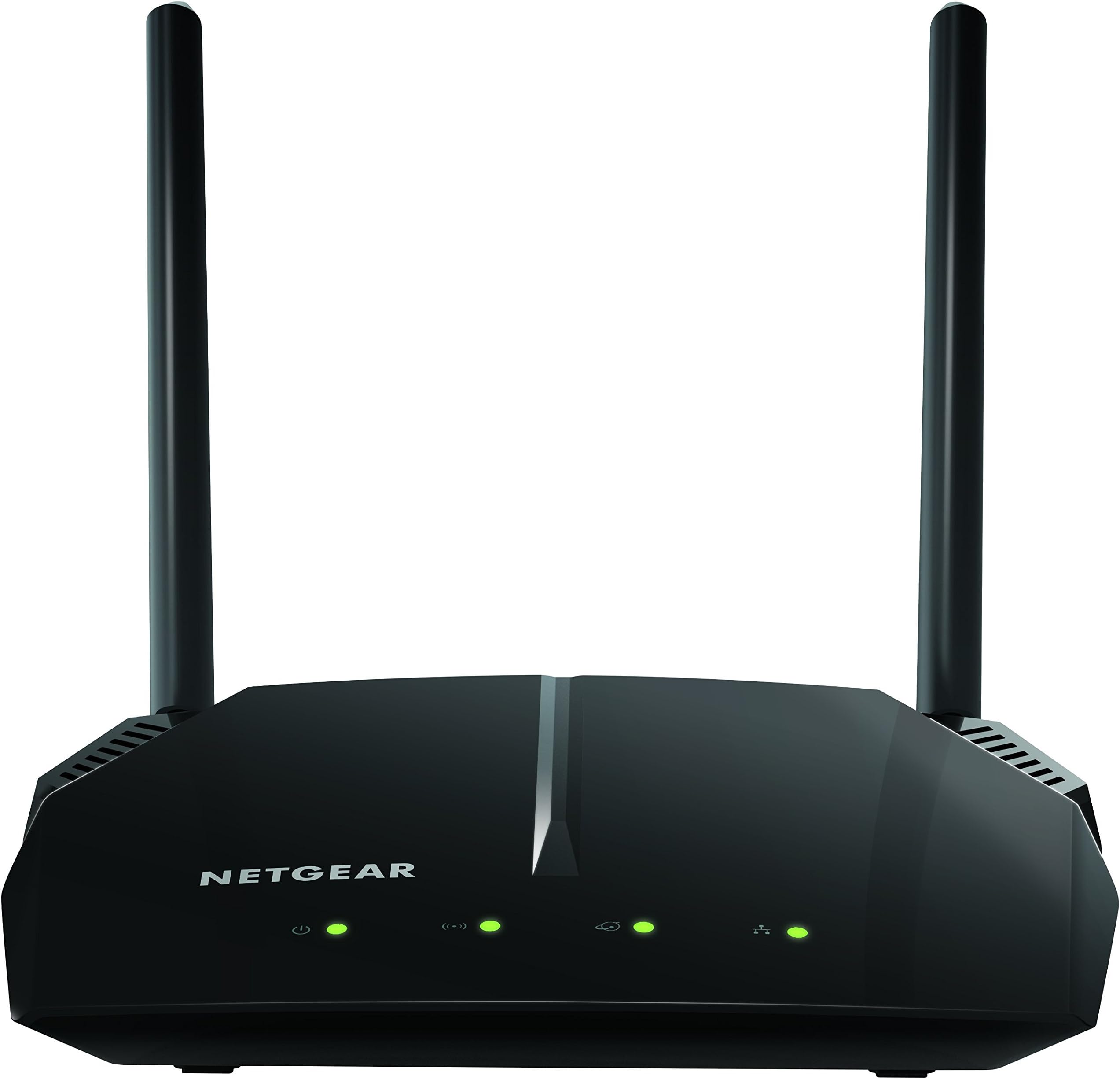
The NETGEAR R6120 AC1200 Dual Band WiFi Router delivers fast, reliable wireless speeds up to 1200 Mbps and covers up to 1200 sq ft, supporting up to 20 devices simultaneously. Equipped with 4 Ethernet ports and a USB 2.0 port, it offers versatile connectivity options. Enhanced security features and easy app-based management make it an ideal choice for modern smart homes and professionals seeking seamless internet performance.


| ASIN | B072Z68KJ4 |
| Antenna Location | Home |
| Antenna Type | Fixed |
| Best Sellers Rank | #107,516 in Electronics ( See Top 100 in Electronics ) #743 in Computer Routers |
| Brand | NETGEAR |
| Built-In Media | AC1200 Smart WiFi Router (R6120)^Ethernet cable^Quick start guide^Power adapter, localized to country of sale |
| Color | Black |
| Compatible Devices | Gaming Console, Laptop, Smartphone |
| Connectivity Protocol | ethernet, wi-fi |
| Connectivity Range | 1200 Square Feet |
| Connectivity Technology | Ethernet, Wi-Fi |
| Control Method | App |
| Controller Type | App Control |
| Coverage | 1200 square feet |
| Customer Reviews | 4.2 out of 5 stars 2,279 Reviews |
| Data Transfer Rate | 900 Megabits Per Second |
| Frequency | 5 GHz |
| Frequency Band Class | Dual-Band |
| Global Trade Identification Number | 00606449120073 |
| Has Internet Connectivity | Yes |
| Has Security Updates | Yes |
| Is Modem Compatible | No |
| Item Dimensions L x W x H | 8.62"L x 4.29"W x 7.05"H |
| Item Type Name | Netgear R6120-100NAS AC1200 Dual Band Wi-Fi Gigabit Router |
| Item Weight | 0.55 Pounds |
| LAN Port Bandwidth | 10/100 megabits_per_second |
| Manufacturer | NETGEAR |
| Maximum Upstream Data Transfer Rate | 600 Megabits Per Second |
| Mfr Part Number | R6120-100NAS |
| Model Name | R6120-100NAS |
| Model Number | R6120-100NAS |
| Number of Antennas | 3 |
| Number of Ports | 7 |
| Operating System | Microsoft ® Windows 7, 8, 8.1, 10, Vista ® , XP ® , 2000, Mac OS ® , UNIX ® , or Linux ® |
| Other Special Features of the Product | WPS |
| Router Network Type | dual-band |
| Security Protocol | WPA2-PSK |
| Smart Home Compatibility | Smart Home Compatible |
| Special Feature | WPS |
| UPC | 606449120073 |
| Unit Count | 1.0 Count |
| Warranty Description | 1-year warranty |
| Wi-Fi Generation | Wi-Fi 5 |
| Wireless Communication Standard | 802.11ac |
| Wireless Compability | 802.11ac |
D**K
Works Well, Easy Setup, Solid WIFI Connection, A Good Value
I set up my internet connection at my new apartment and wanted a router that would just work. I decided that a separate modem and router combination was better than getting an all-in-one gateway based on my research. I have COMCAST/XFINITY service and in conjunction with the ARRIS SURFboard SB6183 Modem I paired with it I have stable WIFI in my apartment. Setup was easy using the web interface via WIFI. There is a basic menu and an advanced menu for getting things configured. It receives the internet signal from my modem automatically. All I had to do was to change the admin password (you must do this), name the 2 networks (2.4GHz and 5GHz) and set the security keys aka wifi passwords. I did upgrade the firmware using the built in firmware update checker/updater and now I'm current. It's optional but you can download a WIFI utilty app to your phone and check which channels have the least amount of traffic where you live and set your 2.4 and 5GHz frequencies to use those channels. That was easy to do using the web interface. Both the 2.4GHz and 5GHz frequencies work with my computer and phone. I have a Brother laser printer also hooked up via WIFI and there's no problem printing from my laptop or phone. This router is probably best for a one or two bedroom apartment and if you have a house you'll probably want something a little more powerful/faster, but for myself it's perfect. I haven't had any problems connecting or maintaining a connection after a month straight of use. I only get 25Mbps download from my ISP which is about 3MBps (big "B" or Bytes) and I get max 3.5 MBps on certain downloads so the router can handle that no problem. So along with the ARRIS modem this Netgear WIFI router does its job quietly and I can enjoy wireless internet with no problems. There is a USB slot in the back for using a USB memory stick as a sort of network drive, but I haven't tried that yet. But nice to know I could if I wanted.
K**0
Excellent router for not much money
This is a nice router at a decent price. Range seems good, and it sets up easily enough. With Netgear Genie it is easy to monitor what is connected and fix problems as they arise. That qualifies for 5 stars in my view.This is a nice router at a decent price. Range seems good, and it sets up easily enough. With Netgear Genie it is easy to monitor what is connected and fix problems as they arise. That qualifies for 5 stars in my view.This is a nice router at a decent price. Range seems good, and it sets up easily enough. With Netgear Genie it is easy to monitor what is connected and fix problems as they arise. That qualifies for 5 stars in my view.This is a nice router at a decent price. Range seems good, and it sets up easily enough. With Netgear Genie it is easy to monitor what is connected and fix problems as they arise. That qualifies for 5 stars in my view.This is a nice router at a decent price. Range seems good, and it sets up easily enough. With Netgear Genie it is easy to monitor what is connected and fix problems as they arise. That qualifies for 5 stars in my view.This is a nice router at a decent price. Range seems good, and it sets up easily enough. With Netgear Genie it is easy to monitor what is connected and fix problems as they arise. That qualifies for 5 stars in my view.
G**L
Truly great router
This router has blown all my expectations away. I previously had a D-Link Dir-615 for my large house. Considering it was a budget router, it did so so. Recently, I noticed the WiFi connection kept on dropping down to under 1mbps with no explanation. No one was downloading anything and I was the only one in the house. After diagnosing it was the router’s fault, I bought this bad boy from Netgear. Has to be the most simple installment of a router ever. Needs zero knowledge of networking to get set up. The DLINK Magician software is like calculus while Netgear’s app is PEMDAS. The range is quite spectacular. I can connect to the WiFi about 20 feet away from my house which is 3 stories tall with a small drop in speed (router is on the 3rd floor). No random drops at all when normally connected to the WiFi. Be mindful your WiFi will still drop if someone is hogging the network by downloading 100gb files. Seeing it is just $20 more than the Dlink Mlr-615 while being significantly better, I greatly recommend this router. Also, this router does not support WEP. I bypassed this by opening up a guest WiFi connection without a passcode.
J**L
No installation instructions sent with the product
Six years ago I installed a Netgear N150 router at home to direct wifi to my iMac and to other receivers in my home. It has worked beautifully all these years. Recently it hasn't been able to send a strong enough signal. Thus, I ordered a Netgear 6120 to upgrade my wifi. I received the unit, but there were no instructions about how to install it. I went to the website as directed and found directions on how to download installation instructions to an iphone or ipad. I couldn't use them because I do not own a smart phone. There were no installation instructions or phone number on the website. I finally decided just to connect and plug in the unit because that is what I did with my old unit 6 years ago. That did not work and I lost my internet access completely. With the help of my grandson I was finally able to connect the new router, total time involved 2 hours. It works beautifully and is easily strong enough for wifi in the desired places. It seems to me that it wouldn't cost the Netgear people much to supply installation instructions with the unit or, at least, for viewing on their web site.
L**Z
Disappointing at best.
Update: Did in fact hear from the tech team at Netgear in record time (kudos on that part). They verified that the range I get is "normal" for this product. It was terribly fascinating to watch him look at the other routers/WiFi APs in my neighborhood (I live in the country, each house is around 300 feet away). The Netgear Genie found all the tp-link routers around me, even one 900 feet away. Sadly, their signal strength was not much below this Netgear located a mere 10 feet away. Kind of a strong hint that other vendors have much better range. I've since added an extender, which solves the immediate problem. But unless you are working in the same room with this access point, my feeling is you need to look elsewhere. Wouldn't be quite so irritating if the page I purchased it from on Amazon didn't say "Ultimate Range." I guess that's some new and different definition of "ultimate" with which I'm unfamiliar. BTW, had to put the extender less than 20 feet away or it too couldn't keep up a connection..... Original: Have to agree with the review by Stephan. Range is under 30 feet. Much, much worse than the 7 year old Apple unit it replaced. Updated to current release of firmware with no change. Devices not in the same room frequently drop connections. Just to put it in perspective, I was a network engineer for 40 years. I had no difficulty configuring it, and the configuration changes do what they say they will do. But the WiFi element is abysmal. Giving it a couple more days and then asking for return information. Dropped a note to Netgear, but not hopeful for a solution.
C**X
Fast router. Highly recommended. Setup can be tricky.
This is a huge improvement from my former Netgear router. Internet is provided by my building (with a provided modem) and with my old router, the internet was SO slow. My internet tech engineer came to check on the internet in my apartment and he recommended I get a dual-band router. HUGE improvement. I previously had a more standard Netgear router which initially gave me sub-par internet speeds, and after 2 years of use, my internet hardly worked, even when using a device within 10 feet of the router. This router provides lightening-fast internet, even in distant rooms throughout my concrete-walled apartment. Setup was sort of confusing. It took about 30 minutes to setup (including time to update the outdated firmware on my new router), but I’m not a whiz at this. I don’t know if this was necessary, but I downloaded the Netgear setup app. It requires me to login every time I attempted to access a different menu in the app (it still requires login every time I use it even after I set up my router). The app is pretty handy otherwise though: you can block internet access to certain connected devices (I.e. for parental control), easily change the network name/password, and send a code to guests so that they can easily connect to my WiFi when they come to my apartment. There is also a customer service link in the app. I recommend this router if you’re having internet speed/reliability troubles with non dual-band routers. Huge improvement and definitely worth the ~$50.
T**R
Updated old WiFi router with this new Fast WiFi Router
So this was a huge update from what I had. My old router was a bit outdated. About 10 years outdated! At the time when I first set it up I wasn't never big into the whole WiFi thing but now so many devices can use it. With everything I was running on my old setup it wasn't enough and I was taxing it out. So I needed something that could put a strong signal out and allow for several devices at the same time. The Nighthawk NetGear app is ok for basic stuff but I'm a real advanced user and like to customize my network. So I got onto my computer and logged on to the router directly so I could change the settings I wanted and get it running how I needed it. Talk about fast! No one in the house is complaining now! Great stuff! It did take me a minute to figure out the IP address for the new router but after that it was really easy. If your new into networking it's got a basic tab and will guide you through the setup too. For advanced user you can click over to the other tab and go to town. Very nice!
O**R
I've use this router for 2 years then .......
The product worked well and lived up to it's specifications until recently. I always downloaded the most recent firmware update for the produce, but I noticed that during the last two updated, performance degraded and most recently, began dropping the wifi connection frequently. I read through reviews of several of the different models on a couple of different platforms and product problems in several of the reviews seemed to point to firmware upgrades as an issue. After trying to try backing out of the two most recent updates without good results, I went all the way back to version V1.0.0.58 and behold, the router is performing as new. This leads me to believe that Netgear hired some new coders who don't quite have the hang of things and that Netgear doesn't really test these updates thoroughly before releasing them. It's been suggested to me that since mine is a less expensive unit, that they don't pay as much attention to these as they do the high end units, but I read a lot of reviews and firmware upgrade issues are mentioned in reviews in the most expensive routers as well. My advice would be if any of the Netgear routers are working well when you install them, be very cautious on accepting firmware upgrades. If you have an issue, they you can go to their site and retrieve an earlier version of the firmware and re-install it. Netgear (and other companies) claim the upgrades are necessary for security reasons, but that's what your anti-virus programs are do. You can isolate your router from the rest of your system with a good anti-virus program.
M**E
Usually netgear has no problems
Had to return, stopped working properly after a week which is very surprising for a Netgear product. This one might of been a lemon.
A**N
regarding the signals range .. Not getting what is written in specification.
Speed is good
A**N
Better
Working perfectly. Previously was using MI router, which needed to be configured if power went off suddenly 2-3 times before proper restarting whereas there has been no such issues with Netgear router. Satisfied.
M**.
Netgear is the gold standard
Easy to install. Good range for a house. I also get a signal through many walls. Nice and unobtrusive design. Highly recommended.
A**A
Good
No issues, range is also good
Trustpilot
1 day ago
2 weeks ago