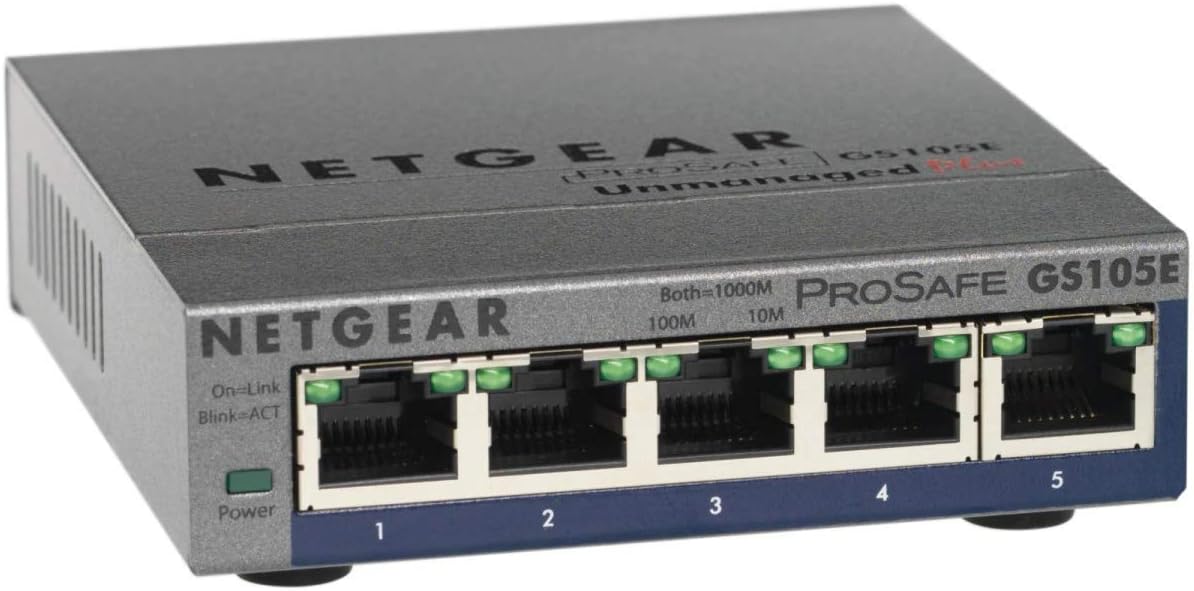

GS105E
Product ID: 47939623
Details
- BrandNETGEAR
- ColourGrey
- Compatible devicespc
- Included componentsPower Cord
- Number of ports5
⚡5 Gigabit RJ45 ports
🤫Silent, low-power metal casing
🛡️Managed switch with IGMP snooping & DoS prevention
Buy anything from 5,000+ international stores. One checkout price. No surprise fees. Join 2M+ shoppers on Desertcart.
Desertcart purchases this item on your behalf and handles shipping, customs, and support to UAE.
🚀 Elevate your network game with silent, smart, and speedy switching!
The NETGEAR GS105E is a 5-port managed Gigabit Ethernet switch designed for home and small office use. It delivers full 1Gbps speed on all ports simultaneously, enhanced by advanced features like IGMP snooping, loop prevention, and Auto DoS protection for network stability and security. Its plug-and-play design ensures easy setup, while management options allow VLAN and traffic prioritization. The compact, silent metal case supports desktop or wall mounting, making it a reliable, low-noise solution for expanding and optimizing your network.


| ASIN | B002YPJ8KM |
| Best Sellers Rank | 4,232 in Computers & Accessories ( See Top 100 in Computers & Accessories ) 31 in Network Switches |
| Box Contents | Power Cord |
| Brand | NETGEAR |
| Brand Name | NETGEAR |
| Case Material Type | Metal |
| Color | Grey |
| Colour | Grey |
| Compatible Devices | pc |
| Compatible devices | pc |
| Country of Origin | China |
| Customer Reviews | 4.8 out of 5 stars 532 Reviews |
| Data Transfer Rate | 1000 Megabits Per Second |
| Global Trade Identification Number | 00606449101539 |
| Included components | Power Cord |
| Interface | RJ45 |
| Item Dimensions L x W x H | 10.4L x 9.4W x 2.8H centimetres |
| Item Weight | 0.25 Kilograms |
| Manufacturer | NETGEAR |
| Manufacturer Part Number | GS105E-200UKS |
| Model Number | GS105E-200UKS |
| Number of Ports | 5 |
| Number of ports | 5 |
| Platform | No Operating System |
| Product Warranty | 1 year |
| Product dimensions | 10.4L x 9.4W x 2.8H centimetres |
| Switch Type | Managed |
| UPC | 606449066395 606449101539 |
| Unit Count | 1.0 count |
| Upper Temperature Rating | 50 Degrees Celsius |
A**S
Superb small router for home and small office
Bought to provide an extra four ports in the living room to accommodate TV, amplifier, BD player and media player, with the fifth port acting as an uplink to the core switch in the house (a Dell). There shouldn't be compatibility issues between switches, and of course there were none. Whilst neither switch is "high-end", they are cheaper then Cisco, or HP and Netgear's managed devices, whilst still retaining management functionality; ie the ability to access the switch itself, and configure it for precise needs (in my case, VLANs and traffic prioritisation). If you simply want to add more ports to a common "home" network (ie, plug in, switch on, add devices) then this is a good choice, and certainly performs better than the cheaper switches from the likes of D-Link, Zyzel, and various "no-name" or never-heard-of brands. Performs better? Yes, the switch is capable of handling 5 streams of gigabit traffic with no slowdown, unlike cheap brands which although can handle 1 or 2 devices at gigabit speed, become swamped when all ports are handling full-speed traffic. The way to determine this in advance of buying is to look at the "fabric speed" of a switch, it should be at least equal to half the sum of all the ports (ie a 5 port gigabit switch should have a fabric speed of 2.5gb), better still the sum of all ports, and the best twice the sum (5 ports operating at 1gb full duplex = 5 x 1gb x 2). Apologies for the egg-sucking. Small, unobtrusive, low power and low noise, does the job and does it well. Easy to use (plug and go) or easy to manage; power on, install Netgears software to find the switch and set the IP address, then use a browser to access it (and uninstall the netgear software).
N**G
Excellent - years of solid reliability achieved with multiple items
Excellent product. Please note - This is not PoE compatible, if looking for PoE devices you need the Netgear ProSAFE GS105PE or similar, but in the case of that example, it only extends an existing PoE network. Do your homework. For a normal Ethernet network this has been a great buy and having bought multiple items I can confirm that they have been powered continuously for years without issue. I only recently noticed a very small in-line switch on the power lead when the network connection was lost, so if it does not light as expected when initially powered - check that switch is on. For those that are not technical, this is a switch and not a hub. A switch is preferred because it specifically routes traffic directly to the intended device, where as a hub will broadcast the communication over all ports. Because it is direct communication, the switch is preferred primarily because all traffic on your network gets the full speed. A hub would share bandwidth between all devices. Being a Gigabit network device, this is fast and well worth the cost. More and more end devices such as your PC achieve this speed now.
G**B
Cheap and good
nothing bad to say, quality guaranteed.
W**5
Works very well, good software provided also.
Works very well, the software provided also does a good job of allowing you to customise the switch and set specific settings. The Switch also has a built-in cable tester function which will test the Cat 5/5e/6 cables connected to it to determine if the cable is faulty and if so at approximately what length the cable becomes faulty. (i.e 2metres). Only thing i can't get to work is trying to login online. You browse to the IP address of the switch, and you are greeted with a "This page requires login credentials" screen. It asks for username and password, i've tried the normal default passwords (pass123, password, password123, admin, administrator, 1234 etc) and can't seem to get this to login. Even when i use the password set for the switch itself I can't seem to get it to login, it asks for a username on the web interface of the switch and there is no username listed anywhere on the device.... Administrator and Admin as username don't seem to work for me. The switch can still be configured and adjusted through the nicely designed software, you can change the duplex settings, the speed settings, and various other goodies. Other than the minor annoyance of not seemingly being able to login to the web interface it's a pretty good product.
S**T
Would highly recommend!! Great product.
I currently have an Ethernet socket setup in my lounge behind the TV. This is weird directly from the router. I required multiple Ethernet sockets behind the TV as I was having some issues with the Wi-Fi connection on my TV and Sky Box. We found that downloading and streaming content was taking a while or constantly buffering. I set this up, my TV, Xbox and Sky Box is now hard wired, I have no issues with the connection at all! not had to restart or disconnect to date and has now been setup for around a month. Really easy to setup, just plug and play. Would recommend that you have decent cables to go with the box.
K**L
Work as great as usual!
Had been using Netgear switches for more than a decade. For a small implementation this works as great as usual. If you're thinking of Netgear routers, depends on which aspects, you may have a different perception of their quality. But for a quick implementing switch, this is so cost efficient and a perfect piece of gear for the job!
M**S
Useful for Ethernet diagnostics
GS105E 5 port 'enhanced'. A managed switch can be configured with extra settings, an unmanaged switch just does what works for nearly all cases. Most people seem to be putting these behind their tellys; an unmanaged switch is fine for that. I wanted something for capturing network traffic. It looks like it does that very well; a cheap way to do port mirroring (copy all traffic to one port for monitoring e.g. Wireshark) and it also does simple VLANs, where you can separate ports so the traffic does not cross between the two groups. The configuration utility wasn't brilliant; it complained about the Adobe Air version, would not upgrade firmware in the switch, and felt clunky and forgotten about. However it worked well enough to do the simple setup I needed. Light enough to add to my kit bag even if I don't think I'll use it. PSU is UK plug and only 200-240V so no use on weak supplies e.g. USA.
I**N
This device is great for people wanting to learn more advanced Networking knowledge ...
My current set up. Virgin router V Wifi Extender V This product. V 2 Consoles, TV and Raspberry PI plugged into this switch. It was all plug and play as the router just assigned all the IP's without any manual intervention. Once you log into the Web Based GUI there is individual port monitoring. Helped my identify an old Cat5 cable amongst my Cat6. This device is great for people wanting to learn more advanced Networking knowledge without spending a fortune on a fully managed switch. It just works and has many advanced features used on business switches / routers. Such as VLAN's, Port Limiting, Port Mirroring and more. Would Recommend.
P**S
... and effective manner that in the end made me happy about customer service from gadgetland
A problem arise that was handled in the proper and effective manner that in the end made me happy about customer service from gadgetland. Thank you
Trustpilot
1 month ago
2 days ago