Desertcart purchases this item on your behalf and handles shipping, customs, and support to UAE.
🖱️ Flow through work like a pro—anywhere, anytime.
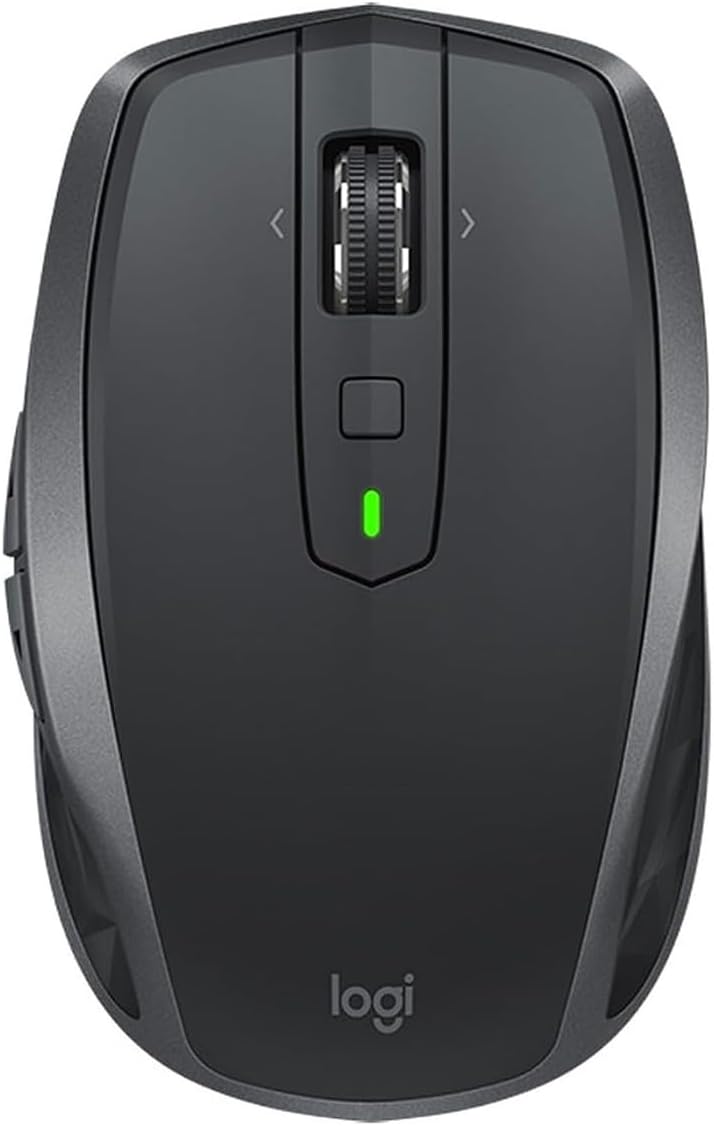
The Logitech MX Anywhere 2S is a compact, wireless Bluetooth mouse designed for professionals on the move. Featuring a high-precision 4000 DPI Darkfield sensor that tracks on virtually any surface, it enables seamless control across up to three computers with Logitech Flow technology. Quick charging delivers a full day’s use in just 3 minutes, and a full charge lasts up to 70 days. Customizable buttons and ergonomic design make it ideal for multitasking across Windows and Mac devices, boosting productivity wherever you work.


| Antenna Location | Gaming, Office |
| Are Batteries Included | Yes |
| Are Batteries Required | Yes |
| Asin | B072BG9Z8W |
| Battery Average Life | 24 Hours |
| Best Sellers Rank | 3,793 in PC & Video Games (See Top 100 in PC & Video Games) 322 in PlayStation Legacy Systems 433 in Mice |
| Brand Name | Logitech |
| Button Quantity | 7 |
| Colour | Black |
| Compatible Devices | Laptop, Mac, Personal Computer, iPad |
| Country Of Origin | China |
| Customer Reviews | 4.5 4.5 out of 5 stars (811) 4.5 out of 5 stars |
| Enclosure Material | Plastic |
| Global Trade Identification Number | 05099206073050 |
| Hand Orientation | Ambidextrous |
| Hardware Platform | [OMIT] |
| Included Components | Batteries |
| Item Dimensions L X W | 10.1L x 6.2W centimetres |
| Item Type Name | Logitech MX Anywhere 2S Wireless Bluetooth Mouse for Mac and Windows - Graphite |
| Item Weight | 3.74 Ounces |
| Manufacturer | Logitech |
| Manufacturer Part Number | 910-005153 |
| Model Name | MX Anywhere 2S |
| Model Number | 910-005153 |
| Mouse Maximum Sensitivity | 4000 Dots per Inch |
| Movement Detection | Laser |
| Network Connectivity Technology | Bluetooth, USB |
| Number Of Batteries | 1 Lithium Polymer batteries required. (included) |
| Operating System | Microsoft Windows, Apple Mac OS X |
| Pattern | Mouse |
| Power Source | Battery Powered |
| Product Features | Wireless |
| Product Finish Type | Matte |
| Product Warranty | 2-year Limited hardware warranty |
| Range | 10 meters |
| Style Name | MX Anywhere 2S |
| Theme | Computer Accessories |
| Unit Count | 1.0 count |
User
Very good
A great product. I really do not understand folks that mark this down because it is apparently too small or light ... it's a TRAVEL MOUSE and advertised as such.Great ergonomics, build quality and software/functionality.I use both the Master 2S and this for business 4k Video editing. The Master is substantially larger and better if you spend the whole day on a station. Click action is slightly firmer and the scroll wheel/raster action a tad more precise but only in direct comparison plus it is too large for travel. This portable version is good for a few hours a time, no problems and I have large hands. The Master also has the middle click so many seem to miss on the Anywhere but it took me all of a minute to get used to the button above it, it really is no hardship.The Anywhere has most of the functionality of the Master but lacks the programmable thumb rest/button and physical side scroller. However, it also has the side scroll function through the main scroll wheel and thus is superb for editing time lines and similar productivity tasks.Some have commented on the scroll wheel feeling loose on the Anywhere ... it isn't. What you have to remember is the scroll wheel works in four directions. On the Master it works in two. It feels smooth and precise in use on both mice.I use Windows 10 Pro on a Dell XPS 2019 and I had no issues with bluetooth connectivity or latency. - I can't vouch for Mac.Both were nearly £100 when launched. Whilst I would not call a £60 mouse cheap , if you use the functions available for design and editing work, these versatile, programmable mice are creators dreams and I have not seen anything better.Highly Recommended
User
Confortable and slick mouse
OverviewI bought this mouse for my partner as she constantly switches between the work laptop and the personal one. She needed a solution to operate 2 computers at the same time. Fortunately, the Mx Anywhere 2s turned out to be a great product (Much better than my https://www.amazon.co.uk/Logitech-Optical-3-Button-Wireless-Windows/dp/B00MWR5IVA/ref=sr_1_1?ie=UTF8&qid=1537822591&sr=8-1&keywords=m280)Packaging & ContentsThe item came in a nice box (instructions & specs written on it). The box contains:- the mouse- usb cable for charging- dongleIn ActionThe mouse is really comfortable, it has 2 buttons on the side and the scroll wheel can move in 4 directions. Under the scroll wheel you have another button which can be programmed to do a variety of functions. In fact, the Logitech Flow software allows you to assign any action to these buttons. Somebody asked about closing the tabs in the browser with the scroll button. I can confirm that it's quite hard to push on the scroll wheel, hence the reason why that action is already assigned on the button below it. The scroll wheel is actually very easy to spin (Hyper-fast scrolling technology).You can use the mouse on one computer via blue-tooth and have the other computer connected via the dongle or you can use blue-tooth on all of them.The prosYou can program any button. Battery seems to last well. Software is not intrusive and it's easy to use.The consBattery is built in (I'm a little bit old school and I would have preferred an AA battery solution).Scroll wheel maybe a little too easy to spinConclusionI would totally recommend this mouse to anyone that travels and needs a portable solution for multiple devices.UPDATE: after using the mouse for a couple more days I discovered that once you push the scroll wheel, it enables a free spin mode where you basically spin once and the bearing of the wheel continues to spin for ages. This mush be great for scrolling though long pages.
User
so far so good
I have been using this for a couple of weeks now for both my work laptop via bluetooth and my home PC via the provided USB adapter. Both connects quickly and without issues, no dropouts so far. A simple click on a tiny button on the base of the mouse switches between 3 registered computers. Incidentally it works on Android too.The mouse is rechargeable, and one charge lasts for a very long time. It's been over a week since the last charge and it's still showing as "good" on the Logitech windows app. That's after using it for 9+ hours a day every day.Ironically the one feature that attracted me to the mouse isn't really working so well. That is the ability to free-spin on the scroll wheel. One press of the wheel, it releases the notch mechanism, and you can scroll through a long document in a single action. That part works very well. Unfortunately, it's when you stop the wheel when it doesn't work so well. With the notch off, the tiniest movement will cause the wheel to start scrolling, so whenever you stop the wheel after a free spin, you are bound to nudge it a bit and it scrolls the screen a few lines up or down. I found this random scrolling so annoying, I stopped using the free spinning feature altogether.Another unexpected effect of the scrollwheel feature is that the wheel no longer acts as the middle button. You have to use the little button behind it for the middle button, which isn't as well positioned and it's a fiddle to click it. The little button can be set up to understand mouse gestures too, but it's bit of a gimmick than any real use.The size of the mouse fairly small, and it feels ok for my small hands, but I'd imagine would be quite uncomfortable for people with large hands to use for long hours.All in all, it's a very good mouse, but I wish it was a bit bigger, and that the free spinning scroll wheel didn't have the annoying quirk. Well, I liked it enough to be using it as my main mouse for two different computers.
User
Best mouse so far
Really smooth & precise, really does work on almost any surface, comfortable, not too bulky, lots of configurable buttons.A really nice upgrade from the similarly priced apple magic mouse.On a mac you can configure all 7 buttons and the wheel to do a huge variety of things - although the default forward/back, side scrolling and mission control all work pretty well.The wheel can be made to be smooth or clicky by pressing it in. It's just a physical setting with no other effect that I can see. I set it smooth and will leave it like that forever.By default the square button on the top is configured as a gesture button, hold it down and move the mouse up/down/left or right to trigger different actions. Out of the box it's set to switch spaces left or right or open mission control etc - the same as the 3 finger gestures on the trackpad or 2 fingers on the magic-mouse. In practice this button is a little hard to reach and the gesture movements have to be really big so it's not perfect. (But then the gestures on the magic mouse were never that good either imo). I might forgo the side scrolling on the wheel and use that to to switch spaces instead.Logitech could make it perfect by making the gesture movements much smaller, and making the wheel into a press-able button (for gestures) instead of switching between clicky and smooth scrolling modes.
User
Amazing multitasking and great battery life! A must have!
I searched the internet for desktop mouse reviews and found most cool devices were for gaming and the reviews were mostly aimed at that. Even looking at the Logitech MX Anywhere 2S the reviews had a hint at gaming and not so much for multitasking. I took the plunge and purchased this mouse as I needed a portable mouse for multitasking at home and on the go. It turned out that this was my best mouse purchase in more than a decade.The multitasking feature "Flow" allows you to work with two or three computers by just dragging the mouse towards the edge of the screen only to end up on my laptop situated next to my desktop. Its amazing and I do not even need to flip the switch under the mouse to change my workstation. I would however need to flip that switch once I work with one computer only which is fine. Not only is this a great multitasking mouse it also has amazing battery life, even though I only tried it for a short period of time. The surface I use the mouse on is an old wooden table with a rugged surface and there is no issue with the connection and movement on the screen, flawless! The shape and buttons sit perfectly and I had no problem reaching everything. I do have large hands.If you are looking for a multitasking mouse on the go, get this one!
User
The best mouse I have ever owned
Whilst I didn't get the product off Amazon in the end, I thought i'd do a quick review for this mouse. I owned the old MX anywhere 1 mouse and it was stellar. It was comfortable and compact and lived off AA batteries. When I knew Logitech made a second generation, i knew I had to bite.Darkfield technology was what made the first generation so good - you could track the mouse on clear glass and it would still work (not like the oldschool mice of the past generation). These things, stand out.The MX Anywhere recharges using its own in built battery, and as such if you ran out of juice, you'd have to plug it in. fortunately you can find a cable and you can charge it whilst in use so there is no issue with break in usage. I have found the battery life to be above average for a mouse of its size. It connects well using the unifying receiver and you have to make sure you connect the two before use.The scroll wheel can be switched from smooth to notched, a great feature of the mouse to help with speedy or accurate scrolling. I use this with both my mac (connected via bluetooth) and my work laptop (connected via unifying receiver). Both work just as well. It has a button on the bottom that allows you to switch between the two laptops, which is super handy.I have also been able to customise what all the side and top buttons do. This is very handy when you want to change it to and from mac commands like launchpad and also being able to scroll back on a website to a prior page.A super mouse that will last for years, i'd give it more stars if i could. Fantastic product.
User
I love this mouse
I bought this mouse for use mainly with my laptop (Dell XPS 15, but I'm sure performance with most other windows laptops would be identical).The mouse came packaged nicely, with the mouse, a USB receiver and a USB to micro USB cable in the box. The mouse itself is compact, but fits nicely in the hand and is comfortable to use, even with larger hands.Setup was incredibly easy - I went into bluetooth settings, turned on the mouse, and then clicked on the mouse when it showed up. Probably took all of 10 seconds to connect and I have had no issues with the signal since. Compatibility wise, I have tried this on both a Windows 10 desktop, and my laptop, booted both into Windows 10 and Linux (Ubuntu 18.04) and have had issues with none of them. I can't comment on using it with a Mac.The software for the mouse is well designed and non-intrusive. I have not used all of its features, but it is simple to use and switching button functions has not been difficult.I love the switchable smooth scroll wheel, making scrolling through long websites, documents and spreadsheets a breeze. It's great how you can connect up to three machines and then switch between them with a click of a button. The mouse glides effortlessly over most surfaces and makes the mouse a pleasure to use. I have done some casual gaming using the mouse, but nothing serious. For this, it performed well, but I'm not sure that I would recommend it for serious or competetive gamers.Overall, this is a great mouse for productivity and portability.
User
Still the best Bluetoth mouse money can buy
I've been buying this mouse in its many iterations for years. I started off with a Razer Orochi, as the original MX Anywhere took batteries and would not work wired, but since the release of the MX Anywhere 2, and then the 2S, the mouse works wired when the battery is charging, and the shape and button placement have not changed. To my mind this is hands down the best Bluetooth mouse on the market. You can pair it with up to three different devices, you can pair as many of them as you want to, to the one device. There is no need to carry or fit a wifi dongle into the side of your laptop (although they do supply one if you insist on not using Bluetooth - but then if you're going to have a dongle sticking out the side/back of your laptop, then you might as well look at the whole gamut of non-Bluetooth mice on the market too.As someone who travels a lot with his laptop (or at least he did until March 2020, lol) and uses the mouse maybe 12-14 hours a day, this mouse lasts. The one I just bought replaces the exact same model that has been in daily use since the summer of 2017, and the microswitch in the offside button gave out. For £50 I'd rather just buy a new mouse than mess around trying the replace the microswitch.Logitech's software is useful, but not essential. I use it because it allows me to programme the button clicks as and throws up warnings when the battery is low, but the default button functions work without Logitech's software installed. My only wish would be for the other colour options to be available at a reasonable price.
Trustpilot
2 weeks ago
2 weeks ago