Buy anything from 5,000+ international stores. One checkout price. No surprise fees. Join 2M+ shoppers on Desertcart.
Desertcart purchases this item on your behalf and handles shipping, customs, and support to UAE.
🛫 Elevate your flight sim game with precision, power, and pro-level customization!
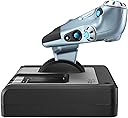
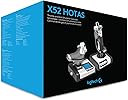
The Logitech G Saitek X52 Flight Control System is a professional-grade HOTAS joystick and throttle combo designed for immersive flight simulation. Featuring 282 programmable commands, a multifunction LCD display, and a 3D twist rudder with lock, it offers precise, customizable control. Its ergonomic adjustable grip and progressive throttle with tension adjustment ensure comfort and accuracy during extended sessions. Compatible with Windows PCs via USB, it’s plug-and-play ready with advanced software for tailored profiles, making it the go-to choice for serious sim pilots seeking durability and performance.


| ASIN | B01M9EWQ2W |
| Best Sellers Rank | 23,133 in PC & Video Games ( See Top 100 in PC & Video Games ) 74 in PC Joysticks 136 in PlayStation Accessories 150 in Xbox One Controllers |
| Brand | Logitech G |
| Brand Name | Logitech G |
| Button Quantity | 23 |
| Colour | Black/Silver |
| Compatible Devices | PC |
| Compatible Video Game Console Models | Microsoft Xbox One, Microsoft Xbox One S, Microsoft Xbox One X, Nintendo Switch, Sony PlayStation 2, Sony PlayStation 4 |
| Compatible devices | PC |
| Connectivity Technology | USB |
| Connectivity technology | USB |
| Controller Type | Joystick, Pedals |
| Controller type | Joystick, Pedals |
| Customer Reviews | 4.3 out of 5 stars 1,164 Reviews |
| Global Trade Identification Number | 05099206069923 |
| Hardware Platform | Desktop |
| Item Dimensions | 17 x 17 x 27.8 centimetres |
| Item Dimensions D x W x H | 37D x 26W x 23H centimetres |
| Item Weight | 1.76 Kilograms |
| Manufacturer | Logitech |
| Manufacturer Part Number | 945-000006 |
| Model Name | x52 flight |
| Model Number | 945-000006 |
| Model name | x52 flight |
| Package Quantity | 1 |
| Power Source | Corded Electric |
| Product Warranty | 2-year Limited hardware warranty |
| Special Features | Ergonomic |
F**S
Great, non-FFB Joystick&Throttle combo - decent size and sturdy build. Highly recommended for those who are into flight sims.
Having built a custom rig this last month, what was required as a decent controller to use for my sim games and this was the choice I went with. I have previously owned the G920 steering wheel & pedals, but found (for my smallish home anyway) that they simply took up too much space. This I use for my various flying games, for which ideal, and the odd driving game (euro truck sim 2, forza racing game). I found the stick extremely responsive and accurate/precise. The number of buttons which can be customized to do anything in these sorts of games is great, there are several axis controls which is great for any simulator where control surfaces / engines aren't just an "on/off" thing: Joystick X/Y (and Z - twist motion/rudder etc) Throttle lever 1 slider on throttle lever (where left thumb would sit - on the right handed version anyway, which this is) 1 dial on the top of the throttle lever (where your index finger would rest) the throttle and joystick setups are obvious, but in say euro truck, i dont use joystick forward/back for throttle/brake - i use the throttle lever for 'gas pedal' and the thumb slider for 'brake pedal'. Before I got trackIR - i used the twisty joystick to "turn my head" left/right to check for traffic etc. again - you can setup any axis/button to do any command in any game that has a controller/setup page, which 99.9% of games do. I like that the main trigger has 2 stages, good for firing missiles etc, as a part pull you may setup to try get a radar lock on your enemy, and once you hear the buzzer confirmation, you pull all the way, the 2 steps are quite far apart, certainly far enough that you can't accidentally pull trigger all the way, when you only intended for the initial half-pull. A good idea really, as there is every chance you are ducking and weaving and diving and you don't want to waste a precious limited resource in such a situation due to a dodgy trigger!!! I used windows 10 and on the machine I made, once I plugged this in, it was fully working within 10 seconds at the most. I didn't bother installing the DVD software, but i'm sure there may be some settings or something on there, but it's irrelevant for most uses as the thing just works. There is no force feedback of any kind on this model, so be aware that if you want the stick to shake, or go stiff when flying at higher speeds, you need something else. If you dont care for that, but want a high quality, nice to feel, comfortable and above all precise and accurate controller for your PC that's as easy to setup as plugging in a USB cable and waiting 5 seconds for the driver to autoload - then this won't let you down. I saw a review by someone saying the throttle was "too stiff" - there is an adjustment to loosen the throttle, but if he had already loosened it all the way, I can only guess either he was doing it wrong, or had a faulty model, because mine only needed a little bit of loosening to get the throttle to how I like it, and I had plenty of loosening to go.
R**S
Comfortable and sensitive
Only had it a few hours, but i would say for budgeting? It's definately is the way to go, saying that, logitech have aways product value for money, the seller was prompt and very precise on what you are getting, fast packed well and value for money, I cannot fault the product, I'm use to joysticks, i would say it handles very well. Solid and by far not flimsy. I'm surprised at the price. It gets a 5 star from me.
M**E
Great hotas with some issues
I really like this hotas, the joystick feels great and has loads of buttons and hats etc. The throttle is a bit stiff and the suckers can't hold it to the desk when using it. I'm using windows 10 and most functions work but in games the mouse nub doesn't work even though it does on the desktop. The profile software is confusing, it won't load the profile files downloaded from Logitech. They are in the wrong format for the software for some reason. The 64bit driver is also years out of date, there is a 32 bit version but I'm using win 10 64bit so unsure which drives to use and the Logitech site is no help whatsoever. It does have loads of LEDs that look cool and asthetically it looks great. So nice hotas but sub par software.
A**A
How to possibly fix the drifting.
For anyone experiencing the drifting issues where it's pulling forward, this may be a possible fix for you. The stick is unbalanced due to the handguard and will pull forward slightly which is enough to make contact with the sensors. There is an easy fix, though. Go to Logitech, download the X52 software and drivers from their support section, and install. Open the Windows control panel and search for "Set up USB game controllers". Open the control panel for it. Make sure the X52 is selected and click the Properties button, and select the Deadzones tab. Look in the Y Axis box and there should be a red line that's flicking left to right very subtly (not much movement). If not, gently nudge the stick forward (red line should move) and then let it recentre, and see if it starts flicking. If not then this solution will not help - sorry. Underneath this line there will be two slider boxes pointing upwards, so move them until they're outside of the range (you'll see a shader appear to indicate where the deadzone will be). Click apply and then OK and exit out. This should fix the issue. All you've done is reduce the sensitivity slightly. Installing the drivers will also activate the mouse nub and mouse 1 button on the throttle. If this starts pushing your mouse around then do the same for the mouse X and Y sliders in the deadzone control panel. Hope this helps.
S**E
A very nice middle range H.O.T.A.S. (Edited 27/05/2020)
So then, first impressions. Delivered next day with Prime in a box larger than life as per usual. Just for the record I was delivered the rebranded version and supposedly improved 'Logitech G' model, over the original Saitek version. This is obvious as the packaging features all Logitech branding in the new blue and black box. When first picking up the box I was surprised how heavy it was. 2.2 kgs, probably aided by the dense recyclable packing material that Logitech use for all of their flight simulation products. After removing the throttle and stick from the box I was amused by the weight of the individual units, something I'll talk about in a bit. The feel of both the units in my hands felt remarkably nice. The soft touch material is very satisfyingly smooth. While being on the large side, the stick is adjustable with the nut at the back in order to move the palm rest up about an inch; something I found very useful to aid my small hands reaching all the buttons. Speaking of buttons, wow. Unlike some other H.O.T.A.S. units the throttle does not have many buttons but the stick makes up for that. All of the buttons seem to be using a decent quality switch and are all reachable. Other than the two on the back they all light up with blue LED's, something which comes in particularly useful at night. Moving down the stick is a small switch allowing you to lock the twist function, something very useful if you use rudder pedals like myself. Unfortunately this is not very effective as there is still a fair amount of play in the stick with the stitch pulled out. However it is still better than not having it I suppose. Now my least favourite thing about this throttle. The tension or lack there of. Unlike some pricier H.O.T.A.S units, the tension spring is un-adjustable. This means that the stick is very easily moved and I found myself having to turn down the sensitivity in game to stop myself sending the plane pitching up 20 degrees when I pulled back the slightest amount. I suppose that if you are playing some fighter simulators such as DCS or even Elite Dangerous this wouldn't be such a problem, put for more accurate flight such as the Flight Sim Labs A320 in Prepar3D v4, it is a little sensitive. Using an adjustable tension system probably wouldn't have cost much more and would be a nice addition. Moving on to the throttle unit then. The biggest disappointment of the unit would have to be the 'multifunction display'. Other than a stopwatch and displaying what mode your in (which is also displayed by and LED colour on the stick) makes is completely pointless. The throttle itself is nice and fluid and its tension can be easily adjusted with the knob on the side, something I like. Again, more of the soft touch material is used and is nice to use for long durations of time. Lots more buttons to the same level of quality as the stick. There is an indent at 0%, 50% and 100& throttle which is also a nice touch. The only problem I have with the unit is its weight. The lack of substantial weight means that on a high tension setting you end up throwing the unit around the desk. To be honest I would have been more impressed if they just placed some lead plates in the bottom. It seems that Logitech are aware of this issue though as their are mounting holes in both the units and also a pack of suction cups included with the unit. Unfortunately these are useless for me as I use an extended mouse pad and obviously these do not stick to a cloth surface. Lucky they are removable. If you are considering purchasing this unit I would definitely recommend NOT using Logitech's software. It is VERY buggy at best and mapping the buttons is a nightmare. I was quick to uninstall it and found that on every game I have tried so far, I am able to map key binds in game, a much better solution, particularly with FSUIPC/XFSUIPC being a great free tool for flight simmers. So then what's the verdict? If you are looking for something a bit better than the £50 'H.O.T.A.S' units but don't want to cough up £400+ for the higher end products this is a great choice. It has its draw backs but as they say you get what you pay for. It is much nicer than I expected and look forward to using it for many flights in the future. EDIT - 27/05/2020 Throttle unit stopped working, defective buttons on the joystick, display failed all together. Waiting for warrenty refund/replacement. Avoid.
B**E
Does the job
Bought for MS Flight Simulator. Buttons are programable. The Joystick is a lot bigger than it looks. Fits well and has rubber suckers included if you want them. Great for helicopter sim and planes also. It comes in two parts the joystick and a separate throttle control. Both have many buttons. Love it.
A**N
Used flight controls.
Used product in excellent condition.
M**S
Great Stick if all working.. Not great build quality though
Got this exclusively for Elite Dangerous and found it to be great for it. There's enough buttons and config options for anyone using VR to play and it feels great to use...Just be careful how you store it when not in use and make sure you register it in case you have to claim on Logitech's 2 year unlimited warranty. Because... The build quality is a bit shoddy. I had my first one a month and the PS/2 socket on the stick became loose and it stopped working. Logitech support sent a new one as part of unlimited warranty without huge fuss but would have preferred not to have had to do that. Recommend that, if you buy this and feel able, you do some fixing and make it hardwired rather than relying on PS/2 cable and sockets. It will invalidate your warranty but it gives you piece of mind about what is otherwise a really good HOTAS.
X**X
Primera experiencia
Como pone en el titulo de esta opinión, es la primera vez que toco un joystick en este caso el x52 de Logitech y mi opinión no podría compararla con otros. Como primera vez me ha parecido un joystick fantástico, con una respuesta bastante buena, con poco que lo muevas ya reacciona, solo lo he jugado en el DCS World, y en un futuro al Microsoft Flight Simulator 2020. Antes de nada hay que instalar los drivers obviamente que se encuentran en la pagina de Logitech de manera muy fácil, reiniciar el ordenador, conectarlo y ya esta listo para jugar, en el DCS al menos todos los controles de dirección vienen por defecto y no tienes que tocar nada y solo tienes que configurar los botones extra que trae el joystick para las diferentes funciones del avión. Alguna pega que le puedo poner, la palanca de gases me parece un poco dura, pese a tener regulador de dureza por mucho que lo cambie no noto la diferencia. Otra mas, es que la rueda de los 3 modos posibles que trae el joystick lo tengo configurado para los modos Aire/Aire y Aire/Tierra y Navegación, pues cuando desconecto la palanca y la vuelvo a conectar se desconfigura y no lo detecta como botón el propio juego, y por ultimo, el precio me parece un pelín pasado si estuviera a 120-130 seria perfecto, aun así es por sacarle alguna pega mas. En resumen, me parece una palanca muy buena, con muchos botones configurables al igual que joysticks que son muy útiles.
O**P
joystick pour les fan de simu aérienne
Vous voulez prendre de la hauteur ? alors ce joystick est fait pour vous ! Je passe des heures sur les simulateurs de vol avec ce joystick !
M**I
المنتج خرب بعد استخدام شهر بس
يتحرك ويشتغل بس الازرار الي على الجويستك ماتضغط ما انصح فيه ابد
E**Z
X plane 11
Imac ile sorunsuz kurulum ve çalışma.
E**O
Ben fatto, ottimo per un prezzo da 100 euro
Usato molto in varie tipologie di simulazione aerea. Sicuramente sul mercato sono presenti molti prodotti di qualità superiore, ma a questo prezzo direi che si tratta di un prodotto davvero ottimo. La qualità mi sembra buona, molte parti sono in plastica, ma si tratta di un plastica molto resistente, che restituisce comunque solidità. I controlli sono morbidi, non ottimo per chi ama molto la sensibilità, ma adeguabili sicuramente settando per bene il simulatore o gioco in cui se ne fà uso, non immediato come un plug n play, ma chi sceglie prodotti di questo genere, smanettare con le impostazioni è un solo un passaggio obbligato. Un buon acquisto e lo rifarei anche con il senno di poi.
Trustpilot
1 month ago
5 days ago