Buy anything from 5,000+ international stores. One checkout price. No surprise fees. Join 2M+ shoppers on Desertcart.
Desertcart purchases this item on your behalf and handles shipping, customs, and support to UAE.
🤖 Drive the future of coding—one programmable adventure at a time!
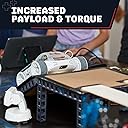
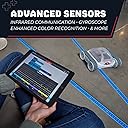
The Sphero RVR+ is a fully assembled, programmable robot car designed for kids and teens to learn coding from beginner to advanced levels. Featuring rechargeable batteries, multiple real-world sensors, and compatibility with Raspberry Pi and micro:bit, it offers a modular platform that grows with your skills. Accessible via the Sphero Edu app across all major devices, RVR+ blends STEM education with hands-on creativity, making it an essential tool for aspiring coders and makers.


| ASIN | B0BLF8CLQF |
| Best Sellers Rank | #322,098 in Toys & Games ( See Top 100 in Toys & Games ) #419 in Remote- & App-Controlled Robots #3,675 in Kids' Electronics |
| Brand Name | Sphero |
| Customer Reviews | 4.7 out of 5 stars 34 Reviews |
| Global Trade Identification Number | 00810876026017 |
| Included Components | RVR |
| Item Dimensions | 1.97 x 1.57 x 874.8 inches |
| Item Type Name | electronic robot |
| Manufacturer | Sphero |
| Model | 940-0601 |
| Part Number | 940-0601 |
| UPC | 810876026017 |
| Unit Count | 72.0 Ounce |
S**E
Unbox the fun!
Sphero never disappoints. This robot car was intuitive and fun straight out of the box. I was nervous that it may be too challenging but was pleasantly surprised to find it was really easy to program. What a great way to make learning fun!
C**G
Great for beginners but not for advanced and overpriced
Great for basic programming but for the price the usage cases are limited and for more advanced coders who want to use raspi you need to bring your own cables to connect and your own standoffs which are hard to find in the U.S.
M**.
Grandson loves it
One of our grandsons is really into robotics and he loves this. It’s a little pricey for us so we shared the cost with other relatives for a Christmas present. It seems to have the flexibility to keep him involved with new ideas and projects.
R**N
Such a cool expandable car...
I've reviewed a few robots and electronic kits similar, but I picked this one because it seemed higher quality. More importantly, it seemed it was easier to learn and there was more documentation and it's true on both accounts with this car. First off, it is a very well, high quality car. You expect better for the price and you get it. Once it's in your hands you can appreciate how nice it is. Every piece of it is high quality. I also picked this one because it seemed easier to expand and it had better expansion options, true again. Of course it comes already assembled, love that. Slide in the battery, install the app and it's ready to use. Like 10 minutes tops, it does update the software, and I was driving it around the house. I can tell you the cat does not like it. I would have chased him around the house more, but I need to work on my driving skills. Driving it with the app is okay, but it would be much better to have a controller, which sadly it does not include. I have not dove too deep into it, but I am looking forward to hooking up a Raspberry Pi or an Arduino. I checked, they have a tube channel with a playlist just for this car. Quite a few things they show you how to do. Will be checking out all the videos. While it's a great car, there are just a couple things... first off, the only way to change it, far as I've seen, is by removing the battery and plugging in a USB-C cable into the battery. Not a huge deal, but sure be nice if you could just plug in the car to charge. Also, it take a bit to get to the app. They include a quick start guide but it's not much, could be so much better. There is also a QR code, but that only takes you to their main website. They need to have a QR code that takes you right to the app. Easy little things that could be improved. Overall, it's a very nice car. Love the expandability. It might seem pricey, but you get what you pay for, plus they seem to have a pretty good learning center. I love it and would gladly recommend.
S**I
Great robot platform but no Bluetooth API
Sturdy fast unit. Unfortunate they did not expose Bluetooth API that their own app uses, so students/inventors can easily create their own apps!
F**N
Not a Toy, but a Serious Robotics and Computer Science Learning Tool
I took my time with this review, because there is a lot of depth to the Sphero RVR+ device. The car itself is very well made, and is as nice as any top name consumer device you're used to using. The plastic, fit, finish, and heft of the device are all five stars. Even though it is a well polished finished good, it can still be upgraded and tinkered with, by accessing the provided ports when they are exposed. Out the gate, you can program the device with a Raspbery Pi computer and the GPIO header to use Python commands, to control the robot, and if you are not ready for that, you can use a graphical programing interface to get started with simple tasks like moving the treads at different speeds for different amounts of time, reading the sensors, and setting the lights. Making a "follow the line" robot, that can follow pieces of color tape on the ground, can be done in a couple of hours, starting from scratch, if you're good at following directions. The Sphere SDK web page has a great many projects that you can do, for a variety of skill levels. You can even use the robot as the mobility stage for another robot or mechanism you construct on top of it, and you can use a single Raspberry Pi to control both the Sphero and your constructed device. What makes this very appealing to a young learner is that you can get started right out of the box. There is no lag to getting gratification, no long slog through a building process, or having to study a bunch of material before you can use any of it. The Sphero RVR+ lets you take baby steps, and build up your knowledge and skill, while still providing value even once you've graduated to more complex builds. This device isn't cheap, but it isn't a toy. It is a serious learning tool, and if the recipient enjoys science, robots, and computers, then they are sure to love the Sphero RVR+. Five Star Robotics Learning Tool I Wish I had When I Was a Boy
I**!
Perfect for beginners and those more advanced
This programmable car is a bit on the pricey side, but let me tell you, it's worth every penny. We've tried cheaper programmable items in the past and they just didn't cut it. So, we decided to give the Sphero RVR+ - Programmable Robot Car a shot. And let me tell you, it did not disapppoint. The quality of the materials used is top-notch, and the fact that it comes already assembled is a huge plus. All you have to do is pop in the battery and download the app - easy peasy. This car is packed with features that cater to both beginners and more advanced programmers. It's designed for everyone to have a blast playing and exploring. The possibilities with this robot are endless. You can find great lessons on the website. Sure, it might be a bit of a splurge, but if you've got a budding programmer in your life (young or old), this would make an awesome gift.
T**N
If you want to be a game coder, this is a fun way to practice
The RTR+ is a fun look into the process of software development. The first step is to install the Sphero Edu app (the RTR+ is not compatible with the Sphero Sphero Play app). I like that you are not forced to create an account to use the RTR+, but you can if you want to. The vehicle is controlled by your phone or tablet over Bluetooth. It works pretty well—just as well as you'd expect using a Bluetooth game controller with your game console. It's fast and responsive. While you can control the RTR+ just like a typical RC car, the real draw is the programmability. You can construct programs visually using the app in "blocks." For example, I created a program that uses a sine wave (using the built-in sin function) to rotate the RTR+. The result is an alternating left/right roll loop based on the speed and angle I specify. I also applied the same sine wave to the back LED, so the RTR+ rotates and flashes the LED in sync. The programming blocks (layers, basically) are executed in sequence. You can create all kinds of elaborate moves using the math functions. It's super cool. The battery has the charger built into it, which is cool. All you need to do is plug in a USB-C charger. Unfortunately, one wasn't included, but a USB-A to USB-C cable was. My only gripe is I would have preferred brushless motors. This would have made the motions much smoother. Overall, this is really fun and I could spend lots of time building complex movement patterns. If you've got a kid interested in math or coding, this is a great way to give them a taste.
Trustpilot
1 day ago
1 month ago