⚡ Upgrade your PC game with instant, secure file transfers!
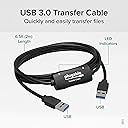
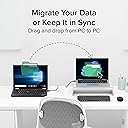
The Plugable USB Transfer Cable offers a fast, secure, and network-free way to transfer files between two Windows PCs. Compatible with Windows XP through Windows 11 (32/64-bit), it includes Bravura Easy Computer Sync software for seamless drag-and-drop syncing. With USB 2.0 speeds up to 0.48 Gbps and no file size limits, it’s the perfect tool for professionals upgrading or syncing multiple machines while protecting sensitive data.
| ASIN | B005OTPVMY |
| Best Sellers Rank | 104,709 in Computers & Accessories ( See Top 100 in Computers & Accessories ) 10,721 in USB Cables |
| Brand | Plugable |
| Cable Type | USB |
| Cable type | USB |
| Colour | black / black |
| Compatible Devices | Personal Computer |
| Compatible Phone Models | No Compatible Phone Models |
| Compatible devices | Personal Computer |
| Compatible phone models | No Compatible Phone Models |
| Connectivity Technology | USB |
| Connector Gender | Male |
| Connector Type | USB Type A |
| Connector type | USB Type A |
| Customer Package Type | Standard Packaging |
| Customer Reviews | 4.4 out of 5 stars 6,019 Reviews |
| Data Transfer Rate | 0.48 Gigabits Per Second |
| Ethernet Cable Category | Cat 5 |
| Frequency | 480 MHz |
| Global Trade Identification Number | 00649241924487 |
| Included Components | 1x Six-foot (2-meter) USB 2.0 Transfer Cable |
| Indoor Outdoor Usage | Outdoor |
| Item Length | 6 Feet |
| Item Shape | Round |
| Item Weight | 2.3 Ounces |
| Manufacturer | Plugabke |
| Manufacturer Part Number | USB-EASY-TRAN |
| Maximum Voltage | 525 Millivolts |
| Model Name | FBA_USB-EASY-TRAN |
| Model Number | USB-EASY-TRAN |
| Number of Items | 1 |
| Number of Pins | 2 |
| Other Special Features of the Product | Data Transfer, High Speed |
| Recommended Uses For Product | Transferring data between two Windows computers |
| Special feature | Data Transfer , High Speed |
| Specification Met | USB-IF |
| UPC | 649241924487 |
| Unit Count | 1.0 count |
G**M
Plugable Windows transfer cable. Excellent
Upgraded from a Windows XP machine to a Windows 10 machine. They are sitting next to each other but I had to transfer thousands of files from the old to new machine. I couldn't get the transfer working via my WiFi router so I looked for a cable connection. There are a number of USB to USB cable transfer cables online but I bought the Plugable one following reviews and the software that came with it. It is excellent. Quick to install on both machines and then to start the process I opened the software on both machines and plugged in the cable. Nothing happened at first (I realise now it was looking for the other computer) but then up came a 'connected' dialog and the main Tools page. It gives the option to sync both ways, or just one way (old to new or new to old.) Drag and Drop and also the ability to look into the other computer. I brought up my new computer's desktop via that button. I wanted to sync My Documents which took some time as I have over 7000 files in hundreds of folders but when finished there was an exact copy of my old My Documents folder on my new machine. I used USB 2. Would probably work with USB 3 but my XP machine doesn't have it. If you want to drill down the My Documents folder into a sub folder just click the add folder button and a dialog similar to Windows Explorer opens and you can navigate to the folder you want to sync. I then exited the program and switched the cable from the USB2 connectors on the motherboard (recommended but I have other things plugged into those) and reinserted it via hubs and it also worked a treat. Going via a Hub is not recommended however. I am very pleased with this device and the software is first class. It does what it says on the tin - it just works.
J**Y
This is just as it says "Easy"
As a silver surfer with not too much knowledge of computers I bought this product to move my files from my old laptop Windows 7 to a new laptop running Windows 8. I downloaded Bravura's app that came with it first, which was completed in a few minutes. Using Windows Easy Transfer program my files were transferred within 20 minutes, they included many photos and a few home videos and what I liked most, all my settings for email, internet etc came too so that I didn't have to set up everything again, which was very important for me.It was all so easy to follow and do and nothing was left behind. Programs themselves are not moved but a list of them are in the report at the end of the transfer and those must be installed either from your discs or from the internet. I am pleased I decided to buy this product as moving all the files using discs would have taken a great deal of time and much more work. I have the Bravura app should I want to move any thing else later using the drag and drop method. Plugable Technologies kept me updated as to delivery, which was very fast to Germany and offered help should I need it - their after sales service is very good indeed.This cable is definitely worth buying and I recommend it for anyone who is not a computer "whiz"as it does what it says and makes life easy and that's what it is all about!
K**T
Cable OK, software not OK
Cable worked as required, but associated software didn't - couldn't seem to connect the two computers. I was transferring files from Vista machine to Win7 machine so maybe this was problem. Anyway, used Windows own "Easy Transfer" with this cable and all went fine.
T**N
Fantastic! ---- Plugable USB Easy Transfer Cable
Delivered in two days!!!! Works perfectly and the optional downloadable software is excellent and a must have. This is the only 3rd party software available for easy transfer cables and it provides full two way drag and drop file transfer. This can be done from either computer. I transferred files from a 32bit windows 7 starter machine to a 64bit Win 7 home premium machine. The same product key can be used for installs on all your XP, Vista and Win 7 machines. The product is very easy to use and the option to use the Microsoft or the downloadable Bravura software jumps on the screen as soon as you plug the cable in. The cable does not operate like a networked connection as it is intended for file transfer only but it will sync selected folders so they are the same on each computer.
O**E
I took a punt on this piece of software and the kit and it came up trumps for me! 5 stars so far!
Yes I could have used one of my external hard drives as an intermediate holding point when transferring over 100GBs of data, but what a pain that would be. I have only used this the one time, but it all went quite smoothly, from installing to transferring. The one little bugbear that arose were warnings regarding missing files that weren’t there to transfer, and of course I came back to the PCs hanging until the message was acknowledged. This occurred several times (about 5 times) so was a bit of a pain and thus made the transfer in effect a little longer overall. However on the other hand I would rather a warning message than no message at all. I haven’t looked into the messages received yet, and I’m still wondering whether these files were even there. I have checked the sending and receiving files and everything appears intact (I didn’t use copy but cut so I can’t say for certain) but I can only guess that they were possibly files that were originally there and were deleted but still showing up on the MBR for some reason. Like I said, I’m only guessing. If that is the case then this is one clever piece of software and therefore has in-built security for your peace of mind. if not then I’m in the dark as I wasn’t expecting these messages. If the seller/maker can enlighten me a little further regarding these messages then that would be really helpful??
D**K
Didn't do what I wanted
The cable itself is good, and a decent length allows the two computers to be on different tables. The Windows software which transfers the files I didn't find configurable enough - despite setting this to transfer mostly the document files, the software also re-arranged my 'desktop' which I didn't want it to do. It didn't have an undo button but I could have used Windows restore. So, it wasn't for me, but that's not the cable, it's Windows software.
N**A
A really great product
I've just installed this product and used it for the first time. My decision to purchase it was based on the other reviews and I have to say that I'm not disappointed! The transfer cable and software are fantastic and make copying files form one PC to another so easy. Yes you can copy files to a thumb drive or external hard drive and then copy them back to another PC but it's far more hassle and nowhere near as fast when you consider the two stage process you have to go through. I use the drag and drop feature in the software which gives you an explorer window for each PC, one above the other, and it's a very simple matter to copy files across. What I also like is that you can leave the cable connected and copy files across as and when you think about them. This is my first review of a product on Amazon (yes, I should do more!) and I can honestly say that I think the product and the software are awesome. If you want to copy files across from one PC to another then buy this, you won't be dissapointed.
G**B
Should Have Got One Before!
The cable arrived on time with a licence for additional transfer software and outline instructions to use Windows Easy Transfer. I just used Windows Easy Transfer (for access, click on Windows Start button and type easy transfer into the search window) on both Windows 7 machines and can only say it was the most straightforward process. The standard transfer copied all my photos, music, video and documents across without any need for me to be involved. I seem to recall it is possible to pick and choose what files are transferred but a quick visit to Easy Transfer will verify that? Naturally, it did not transfer programs but it did transfer files created using programs (music and video projects etc.) so that they were picked up when I reinstalled the programs on my new pc, the exception being games where everything went back to the beginning. I had about 250GB of data to copy and it took a couple of hours but it did the job I asked of it without any hitches. I just wish I had bought one before, it made light work of what can be a difficult task.
P**U
"cut the middle man" transfer direct entre ordi
Ca marche parfaitement bien pour transférer ses données entre deux ordis sans avoir à passer par un Disque dur externe ou autre. Il suffit de lancer l'appli Easy Transfer incluse dans Windows à qq part dans le panneau de config et suivre les instruction de branchement, puis on pour Windows XP, 7, 8, ... mais pas 8.1, ah ben non ca serait trop simple ... et puis il y a le "Cloud" qu'ils veulent nous enfoncer par tous les trous, avec le Cloud tu donnes toutes tes données à Microsoft et autres filiales de la NSA, donc pourquoi voudrais-tu faire une sauvegarde chez toi : qq chose à cacher ? Pour Windows 8.1 il faut installer l'appli de Plugable, je n'ai pas essayé mais j'ai confiance. Procédure perso sous Easy Transfer pour le transfert de fichiers perso 1. Connecter Cable 2. Ouvrir l'utilitaire Easy Transfer . Lancement automatique sous Windows 7 sur chaque ordinateur connecté. . Sinon par la commande Menu Start > Command Line (= Search Box) > Taper "Windows Easy Transfer" ("Transfer de Fichiers et Param. Windows") > Wizard window 3. Choisir "ancien ordi" sur l'ordi source et "nouvel ordi" sur l'ordi de destination. A partir de là travailler sur le nouvel ordi uniquement, l'ancien suivra. 4. Easy Transfer recherche automatiquement les éléments transférables des comptes Utilisateurs, tout décocher. . Pour info les Utilisateurs sont : <votre nom>, DefaultAppPool, Public (Eléments Partagés) 5. Personaliser (Sous n'importe lequel de ces Utilisateurs) > Avancé > Cocher les fichiers de l'ancien ordinateur à transférer, tout le reste doit être décoché. 6. Options avancées > Tab Mapper les lecteurs > Vérifier que . "Lecteur sur l'ancien ordi" contient la taille correspondant à la sélection. . "Lecteur sur le nouvel ordi" est bien sur le bon lecteur de destination. 7. Transférer 8. Vérifier ce qui a été transférer, fermer les fenêtre. 9. Ejecter le cable sur chaque ordinateur et débrancher le cable.
T**G
Make sure you NEED it before you buy!
It is not really a Plug and Play device like a Mouse, need to install soft ware first; had a hard time doing that. AND you use it one time, then put it away! How often do you transfer data between PCs?
M**Z
Buena velocidad de transferencia y compatibilidad
Funciona con puerto USB 3 a velocidad razonable (mas rapido que 1Gb ethernet) tanto con el programa que viene (Easy Computer Sync) como con LapLink PcMover.
M**U
Works well and is easy to use, but incomplete instructions
I just got a new computer and wanted to transfer all my documents and settings. I know I could have transferred everything to a hard drive and then transferred those files to the new computer, but a friend recommended this highly so I thought I would give it a try. WHAT I LOVE ABOUT IT: 1. Very easy to use. Just plug the cable in the old computer and then plug the other end into the new computer and follow the very simple instructions on the computer (but, wait...didn't you say incomplete instructions??? Wait...I will explain later!) 2. Transferred not only the files but the settings as well. I had a lot of shortcuts on my old computer and they were in the same location on the desktop on the new computer. Basically, the old desktop and the new desktop have the same exact shortcuts in the same place. 3. Didn't transfer old programs (I knew that already), but told you what programs you needed. 4. Entire iTunes library tranferred without a hitch. A couple of years ago when I bought my old computer, transferring my iTunes library from the even older computer was a real hassle and I lost alot of music.....using the easy transfer cable made it hassle free. 5. Plugged it in overnight and in the morning (I had almost 500 GB of files to move), everything was transferred.....nice, nice, nice. 6. Before you transfer the data from one computer to another computer, the program allows you to choose which files and folders you wish to transfer. There are even advanced settings that allow you to migrate programs (I actually migrated a few free utilities with success!) EVERYTHING WAS SO EASY....... BUT--- It comes with a free download of Bravura. I was confused as to whether I needed to download it. They provide incomplete information (even on their website). I didn't download Bravura and am still unsure as to what Bravura does....I wish they had more detailed information. But still, a fantastic product--so simple and easy to use. I wish this had been around the last time I upgraded computers. Definitely worthy of five stars!!!
M**R
Something so simple does an amazing job.
Bought a new computer that had Windows 10 and my old computer had Windows 10 so i thought there was a program that could just transfer everything over but after much googling i found out that Microsoft removed that program in Windows 7 which i was very pissed off because just spent over $750 on a computer and you want me to pay so i can have all my documents and pictures and etc on my new computer. I wasn't happy but after my rant and thought i would google a transfer cable or device and found this very quick. I personally didn't believe in it because something so simple would work? but i decided to purchase it and see if it would work. Shipping was quick, 3-4 days and was in front of my door. I opened the packaging and comes with a CD which didn't use as i already downloaded the program from the website. It is actually very simple: 1. Download the program on both computers, from the website or using the CD. 2. Connect the cable to both computers 3. Follow the prompts and choose what you want to transfer. Personally mine took 25 minutes to transfer everything but i guess the more you have the longer it will take but there is no size limit and you can use this as much as you want. I couldn't believe this worked, something so simple work amazing and i couldn't believe it. It was well worth the money, and i would defiantly purchase again if i had to because this is just so simple to use and transferred everything i wanted over with ease. Would HIGHLY recommend!
Trustpilot
1 month ago
1 week ago