Desertcart purchases this item on your behalf and handles shipping, customs, and support to UAE.
🎮 Cut the cord, not the experience — Puppis S1 powers your wireless VR like a pro!
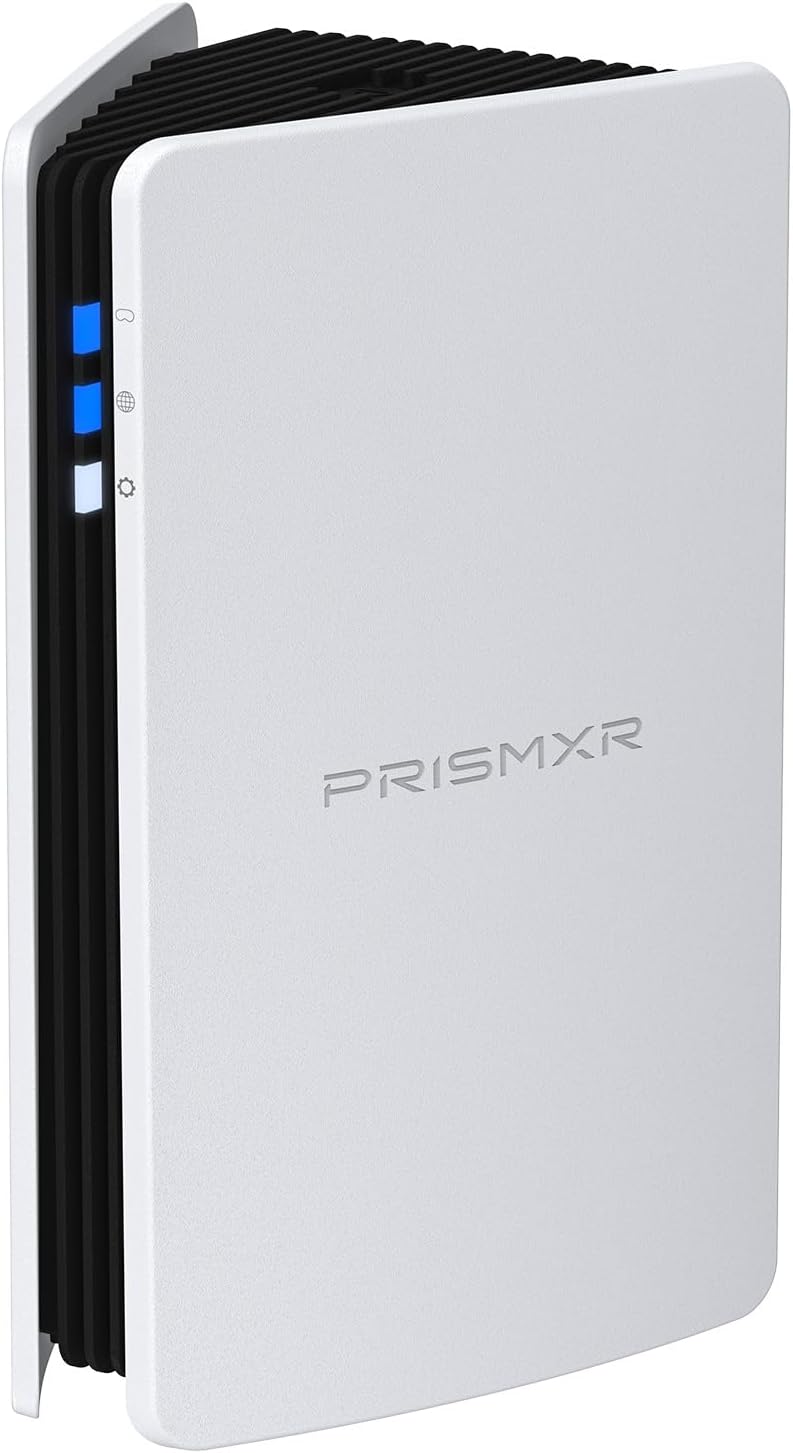
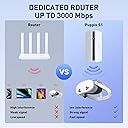
The PrismXR Puppis S1 is a compact, dedicated WiFi6 router designed specifically for PC-VR streaming with Meta Quest 3/3S/2 and other major VR headsets. Featuring a powerful 1.3GHz dual-core chipset and advanced beamforming, it delivers ultra-fast 3000 Mbps speeds over a stable, interference-free wireless link. Its PrismXR Desktop app offers one-click system scans and fixes to optimize performance, while EaseLink technology enables hassle-free Bluetooth setup without drivers. Compatible with popular VR software and Windows 10/11, Puppis S1 transforms your VR gaming with lag-free, high-bandwidth wireless streaming.


| ASIN | B0CFDL5Y7F |
| Best Sellers Rank | #13,674 in Video Games ( See Top 100 in Video Games ) #208 in Standalone Virtual Reality Accessories #3,288 in PC Games & Accessories |
| Brand | PRISMXR |
| Built-In Media | Earbuds, Charging Case, USB C Dongle, 3 Size Ear Tips, USB A to USB C Adapter |
| Color | White |
| Compatible Devices | Personal Computer |
| Connectivity Protocol | Wi-Fi, Bluetooth |
| Controller Type | App Control |
| Coverage | Home/Office |
| Customer Reviews | 4.1 out of 5 stars 1,191 Reviews |
| Data Transfer Rate | 2402 megabits_per_second |
| Frequency | 5 GHz |
| Frequency Band Class | Dual-Band |
| Global Trade Identification Number | 00749752208134 |
| Included Components | Earbuds, Charging Case, USB C Dongle, 3 Size Ear Tips, USB A to USB C Adapter |
| LAN Port Bandwidth | 11000 Mbps |
| Manufacturer | PRISMXR PTE LTD |
| Maximum Upstream Data Transfer Rate | 2402 megabits_per_second |
| Mfr Part Number | P1411 |
| Model Name | Puppis S1 |
| Model Number | Puppis S1 |
| Number of Antennas | 1 |
| Number of Items | 1 |
| Number of Ports | 5 |
| Operating System | Windows 10 |
| Router Network Type | Wi-Fi |
| Security Protocol | WPA2-PSK, WPA3 |
| UPC | 749752208134 |
| Unit Count | 1 Count |
| Voltage | 18 volts |
| Warranty Description | 18 Month |
| Wi-Fi Generation | WiFi6 |
| Wireless Communication Standard | 802.11ax |
| Wireless Compability | 802.11ax |
J**H
Must have PCVR streaming adapter for gaming
A must have if your tired of being tethered by a link cable, in my case the pcvr streaming from this adapter or (vr router) actually looked 5 times better than the physical link cable, it was impressive how well this product worked, somehow this airlink adapter drastically reduced latency with no compromises to latency or image quality as it improved both of those things on top of removing the annoyance of a cable, this product was well worth it and does everything its advertised to do and more, because in my case it more then just removed the cable tethering, it also improved general image quality and just gave me a better gaming experience, the desktop app for connectivity was also a breeze to use, although slightly complex first setting it up.
B**E
A must have for anyone interested in wireless pcvr
I’ll start by saying that I used this with a pico 4 ultra and already tried wireless pcvr. My current router for wifi isn’t bad, I even set up a mesh near my pc to see if that would help. While performance was decent, I’d still get the occasional stutter only present from the network and it would slow down the more people were home. Decided to just go for it and boy am I impressed. Any of those previously mentioned stutters? Gone, it’s just as stable as using a physical link cable. And I swear it’s more responsive. Super easy to setup, just plug in the two usb cables, download the program, and connect your headset to the designated WiFi it send out. Really, it’s the main reason I went for it, because the lite version and a regular router seem to require an Ethernet cable from the home router. You can set it up by using your phone, but I found the app pretty unresponsive and awful. The program on pc is all I’d recommend you use and it’s pretty useful. Oh, and fun thing I found out about it, you technically don’t need to be connected to any wifi for it to work with a headset. I know it should work, it’s a glorified router after all, but I was expecting it to use the home wifi to send signals, so color me surprised when it worked. Would be a great choice for anyone with poor connectivity.
K**I
The Best PCVR Solution for the Quest
Edit: The Prism was working great for about a month. Now it will not connect to the internet via internet sharing and it is unreliable when using the Quest 3. When in a VR session I get a shaking in the headset for about 15 seconds and the link seems to drop out and freezes. I have reset the Prism and tested my internet sharing on my PC with another device. The Prism is a no go now for PCVR. I recommend buying a real router and skipping this low quality device. The Prism XR is the best PCVR solution for the Quest. I have had all three versions of the Quest. I’ve had the official link cable, aftermarket link cables, the VR AirBridge, and a number of different routers. I’ve tried Airlink with Oculus Debug Tool, Quest Link, Airlink, and Virtual Desktop through the years trying to find the best solution for PCVR in the Quest. I finally got tired of messing with my latest router which is dedicated to PCVR only and bought the Prism XR. One caveat with the Prism XR is that you won’t want to use it as an internet WiFi router. The Prism XR excels at being a wireless PCVR router and should be dedicated to just that. Your Quest should be the only client connected to the Prism XR. You need to have an existing WiFi or Ethernet connection for internet to get the best results with the Prism XR. View the purchase of the Prism XR as a VR accessory. The Prism XR paired with Virtual desktop is without a doubt the most reliable and offers the best visual fidelity of any other option for PCVR with the Quest. The Prism XR is very compact, easy to set up, and doesn’t even need an ethernet port. It uses two USB ports and you can just share your internet from your existing WiFi or Ethernet connection.
J**Y
It was a pain to set up but its OK
It was a pain to get setup up the mobile app didnt work all that well and in windows the app sometimes didnt open. Stream quality is good but latency was higher than my home router but more stable. It does work with Linux and it works just as well on Linux as it did with windows and the PrismXR app does work and detects the PrismXR router I ran it under proton via the Heroic Games Launcher. Edit: I forgot to add on Linux (if your using KDE Plasma at least) if you have an Ethernet cable plugged into you PC the PrismXR router also acts and an Ethernet bridge you may need to assign your 2 connections. Under Wi-Fi & Internet setting in the settings app select the connection (Most Likely labled as connection 2 or something similar) and in the wired tab the first option will be "Restrict to device" and for your Ethernet device will most likely be enp42s0 but the PrismXR router will start with "enx" mine is "enx9c69d3393d95" yours may be different select your PrismXR for connection 2 and enp42s0 for connection 1, you can rename it if you want. I would also recommend for the PrismXR router under general to uncheck "Connect automatically with priority" this will prevent the PC from connecting to your PrismXR router automatically you will be able to connect to it with the internet (or Wifi) icon on the taskbar by just clicking connect to that network adapter (I renamed mine to VRLink). The reason why I recommend not letting your PC connect to the PrismXR router by default is you PC may try to use the PrismXR router as its main source of Internet instead of your home network its a problem on Windows too and its kinda annoying on Windows even with the app like to try to default to the PrismXR router by default, but I really don't use Windows anyway.
V**!
THE best way to wirelessly connect your quest 3 to your gaming PC!
This thing really works great. I have to say once you figure it out., which is not really all that hard although I have to say you really will have to get virtual desktop to make it work as good as it can. I can be 2530 feet away with the door closed to the bathroom sitting on the toilet and it runs half-life Alex just about as good as it does when I’m sitting 5 feet away from my gaming PC.. however it did take just a little bit of tweaking some things you have to kind of set up your firewall and stuff and it’s kind of like I don’t know. It’s a little bit confusing for somebody who doesn’t have much knowledge about local area and network stuff or about like how to set up Wi-Fi stuff and what all that garbage means about the different kinds of security and how to route things and all that stuff but once you figure out the fact that all you need to do is plug it into the back of the computer two of your USB 3.0 slots or whatever, and that it is essentially a Wi-Fi six router, with a 5G capable direct to your quest three headset ultra fast high bandwidth channel essentially for Wi-Fi, and that it is only for connecting your gaming, PCs, visual output, and stuff like that to your quest three headset, it’s pretty easy to use. You have to use on your quest three by the way, cause this was confusing to me at first, you have to connect the quest three Wi-Fi connection to the device, and it can be a little bit hickey sometimes in settings and stuff in your computer get changed without you knowing it or like when you download something that changes things, otherwise it’s a freaking fantastic device. I mean it works amazingly well for the price. I got it on sale and I am very happy with it., and by the way, it’s very small. It’s only about the size of like two fists on top of each other., I assumed it would be the same size as my charter cable a little Wi-Fi tower, but it’s like half that size or less, very compact! All in all I would say this is the best way to play PCVR on the quest three, save for a direct link cable. And it’s worth the price( especially when it’s on a big sale and goes down a good $15 or more I price! All in all I give it a 5/5 stars!
T**T
Works GREAT (once setup properly)! Having trouble setting up? This might be your fix
I cannot overstate how great this thing works. It has drastically cut down on my latency and improved function with my Quest 2 significantly. For context, my current setup is a Quest 2 (running Steam Link), 6 Slime VR body trackers, and finger tracking. My router is on the other side of my house and my PC is connected via ethernet. I had to get a wifi extender to be able to run everything. However, I noticed that I'd often have severe latency or loss of connection over the wifi extender since both my headset and my 6 trackers were running through it. My Slime VR trackers also experienced a lot of drifting due to this. After adding in the PrismXR Puppis S1, my latency completely went away and I've experienced far fewer connectivity issues. It absolutely works when installed properly I will say, installation was a bit difficult. You need to download the PrismXR app on your desktop and it might not hurt to have it on your phone as well. When you set up the network, your computer may automatically set the new PrismXR network to be the one that is shared. This WILL NOT WORK. You need to go into Network and Internet Settings, click on Change Adapter Options, turn OFF sharing on the newly created network (it will say something to the effect of "USB to Gigabit Ethernet"), and then turn ON sharing on your actual ethernet network. Once you set up the PrismPulse network (this is how you want it set up if you're using it as a dedicated VR connection directly to your PC), you should be good to go. Another thing to note is that Steam Link will not let you connect your headset unless the PrismXR app is running and you've clicked "click to start". All sorts of little things that make using the Puppis a little difficult, but once it's running, this thing is phenomenal. Highly recommend
A**A
highly recommended, great connection, easy to setup, no lag.
My setup has my desktop far from a wireless access point, I don't have the option of using ethernet in my current apartment like I did in my last one. enter the PrismXR Puppis device. It's easy to setup, especially through the phone application. It took no time at all. the signal doesn't have to reach far, but the strength of the signal, and the speed of the connection to my desktop allowed me to play virtual reality games as well as with an ethernet setup, perhaps better. I don't have back to back ability to test it, but running several games it felt immersive, whereas trying to connect to my wireless access point, a fios router, left it unplayable. the device itself is attractive, it's small, and it's got LED lights to tell you what's functioning and whats not. easily setup on my Windows 11 machine as stated, just the driver, the application, and the phone app, and I was in and able to play. highly recommended.
A**M
A not so perfect solution to a wired problem.
I bought this with the sole intent of transmitting wirelessly to a new Quest 3 headset. The instructions are likely translated into English and written backwards so you'll want to start towards the last step in the process where it directs you to download an app on the PC side. After I realized what I was missing in the overly long setup and troubleshooting process to get it to link up and do its thing, the app was literally a few clicks and 'done'. I was deep into the weeds of my wifi settings and on the PC side looking at creating a 'bridge' and more, all for nothing. This dedicated router took care of it all, again once i realized what was needed. I'd mark it down a star for backwards instructions but the unit itself has been great. I really like that I can have a home wifi router wifi 5 etc. transmitting to my PC, and delivering more than adequate download speeds, while this unit plugs in between the PC itself and the Quest. Apparently, all traffic going out for like game saves etc. is viewed as traveling on top of the more consequential data that involves talking to the headset. Without setting things up correctly, both routers will compete and cause a bottleneck and the top 'blue light' on this device will be red or something. Ultimately showing things aren't connected right. This is where the aforementioned PC app gets downloaded from the Google play store and installed. Suddenly, it just looks at your setup, identifies the new router, configures it for you and the lights are all on like they should be, and the headset has a few internal settings to configure after that. As I play a few feet away from the router, I can't speculate on how it would be across the house or with walls in between, but I've had zero issues with it transmitting, via the much required "Virtual Desktop" and its PC companion which you grab from within the headset itself. It costs around $20. This is a necessary app to make the streaming of PC games out of Steam possible. All without any cabling. My home router is another room. Update (6 mths.): While the overall picture here demonstrates a plug n' play device and in many ways it still does that, I've since run into a host of issues as well. The biggest frustration is that Windows 11 in particular auto assigns priority for the internet to anything cabled, i.e. an Ethernet. What this does then is route the host PC's WiFi, assuming the main router is in another room as in my case, where it forces the incoming internet down to the antiquated 2.4 ghz band as built into this device. This means... if your setup includes a distant router projecting a 5 ghz wifi signal from another room, that maybe gives you 250 mb/s download speeds, connecting to this device (prismxr) will result in PC speeds capping around 70 mb/s. I spent weeks and months wrestling between windows networking settings, digging way deeper than one ought to, just to get things to run correctly and if you reboot the PC, Windows might just shift everything back over again so you lose your refined settings. As to game play, the whole reason for using this device was to work around the issue of not being cabled to a far away router. To be able to use the Quest 3 without any cabling either. Unfortunately, this hasn't worked out so well. Something this device claims to solve but apparently not as well as it would like. Also, I recently learned that I should have spent a little more and gone with a WIFI extender instead. This relies on the Ethernet connection on the back of the motherboard instead of USB 3.0/.2 connections which are also controlled by Windows. The same holds true for the various cables sold for the Quest 3. Thus, I'm purchasing the TP-Link RE813XE to replace the PrismXR (Puppis S1) device. The configuration will incorporate plugging the new device into a wall outlet, and running a cat6a cable to the Ethernet port on my motherboard. The WIFI extender will provide game data over a 6ghz band instead of the usual 5ghz found on many routers, to the Quest 3, while also allowing it to talk to the internet. The PC WIFI will be disabled solving a myriad of issues. The PC will then receive high speed internet directly from the WIFI extender which captures the main (older) router's WiFi signal in the other room. According to research, it should also smooth out judder etc. experienced in the VR headset, while still making use of the Virtual Desktop and Steam VR games. Having it ported over the Ethernet instead not only tells Windows 11 to stop looking for incompatible WIFI and related settings, while increasing game play bandwidth that was also limited by the USB configuration. It also means I have an usable Puppis S1 router, that's now 6 months old. The ideal configuration for the Quest 3 VR headset is to probably have the gaming PC tethered to the home router with high speed Ethernet cabling. The PC then uses its internal Windows managed software to control the USB ports which either incorporate the Puppis device, or a third party cable tied directly to the headset, while consequently limiting the potential for data transfer and resulting in lower quality VR experiences. Hopefully, going the WIFI extender route will solve everything even if it cost me twice the price of the PRISMXR (Puppis_ device.
S**M
Best solution for wireless VR
This device is genius. A dedicated and clear connection with your HMD, no interference whatsoever. All you need is 2 free USB ports, or in my case I used a (separate) usb-c connection. Power and ethernet to the Prismxr via usb. 10-20 minutes and few trial and errors in setting up later you have your wireless pcvr set-up ready. Works better than my 5ghz AP I set-up solely for my Q3. And it was cheaper than buying a new router for this purpose too. Money well spent.
S**I
Fantástico para VR
A pesar de haberme comprado un router 6E para evitar problemas de enlace entre mi PC y mi Quest 3 seguía teniendo el problema de que el PC se conecta con el router via ethernet y los datos que van del router al PC compiten usando el mismo cable para ir al router y emitirse hacia mi Quest 3. Con Prismxr no existe este problema, mi router de fibra se conecta con el PC via ethernet y el PC se conecta con el PRISMXR via USB-C así que el PC puede obtener información constantemente de internet (por ejemplo nuevas vistas mientras juegas al Flight Simulator que se cargan en directo) y no se "tropieza" mandando por el mismo cable las visualización al Quest 3 ni "molesta" al router dandole más trabajo. Tengo una conexión estable con el Quest 3 cuando juego PCVR y ya no tengo caidas de frames ni "mini congelaciones" que me provocaban mareos al moverme y no hacerlo la imagen o no hacerlo con la suavidad suficiente.
A**T
Excellent Small Router
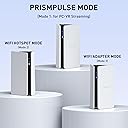
Pros: 1. Mobile App made it easy to set up 2. The connection works and is seamless 3. It does make a difference when connecting meta quest 3 to PC to play PC VR games. Less lagging and less disconnection. 4. Router having feature to switch between 3 modes is helpful. 5. It is very small and compact. It will not take much space. 6. They have support in place via discord which is helpful. Cons: 1. If you don't follow instructions, it will cause confusion during set up. 2. The wire/cable needs to be a little longer for more ease of placement or organizing purposes. So far I do not have any issues yet. Overall, this is great! The customer service from PrismXR is top notch !
A**L
Perfecto
Nunca pensé que wireless PCVR podría ser tan fluido y a tal grado de calidad, no le pide nada a un cable. Literal lo conectas y en 5 min estas listo para elevar tu experiencia en VR
M**N
Sofort kaufen, es sind welten unterschied !
Hallo zusammen, ich nutze PRISMXR PC VR Streaming Link zusammen mit meiner Meta Quest 3 und bin wirklich begeistert. Seit der Einrichtung läuft das PC VR Streaming bei mir absolut flüssig und ohne spürbare Ruckler. Das hat das gesamte Spielerlebnis deutlich verbessert und macht VR wesentlich immersiver und angenehmer. Die Verbindung ist stabil und zuverlässig, sodass ich mich voll auf das Spiel konzentrieren kann, ohne ständig Verbindungsabbrüche oder starke Latenzen zu bemerken. Gerade bei schnellen Spielen macht sich das sofort bemerkbar. Auch die Einrichtung war unkompliziert und schneller erledigt, als ich erwartet hatte. Nach längerer Nutzung kann ich sagen, dass das Produkt genau das hält, was es verspricht. Wer eine Meta Quest 3 besitzt und PC VR kabellos in hoher Qualität genießen möchte, sollte sich dieses Produkt definitiv ansehen. Für mich hat sich der Kauf absolut gelohnt und ich würde es jederzeit wieder kaufen. Klare Empfehlung und verdiente fünf Sterne.
Trustpilot
1 month ago
2 months ago