We remain fully operational. Our teams are working around the clock to ensure your deliveries continue safely.

DOWNLOAD THE APP


Customer Services
Copyright © 2025 Desertcart Holdings Limited
DOWNLOAD THE APP

Buy anything from 5,000+ international stores. One checkout price. No surprise fees. Join 2M+ shoppers on Desertcart.
Desertcart purchases this item on your behalf and handles shipping, customs, and support to UAE.
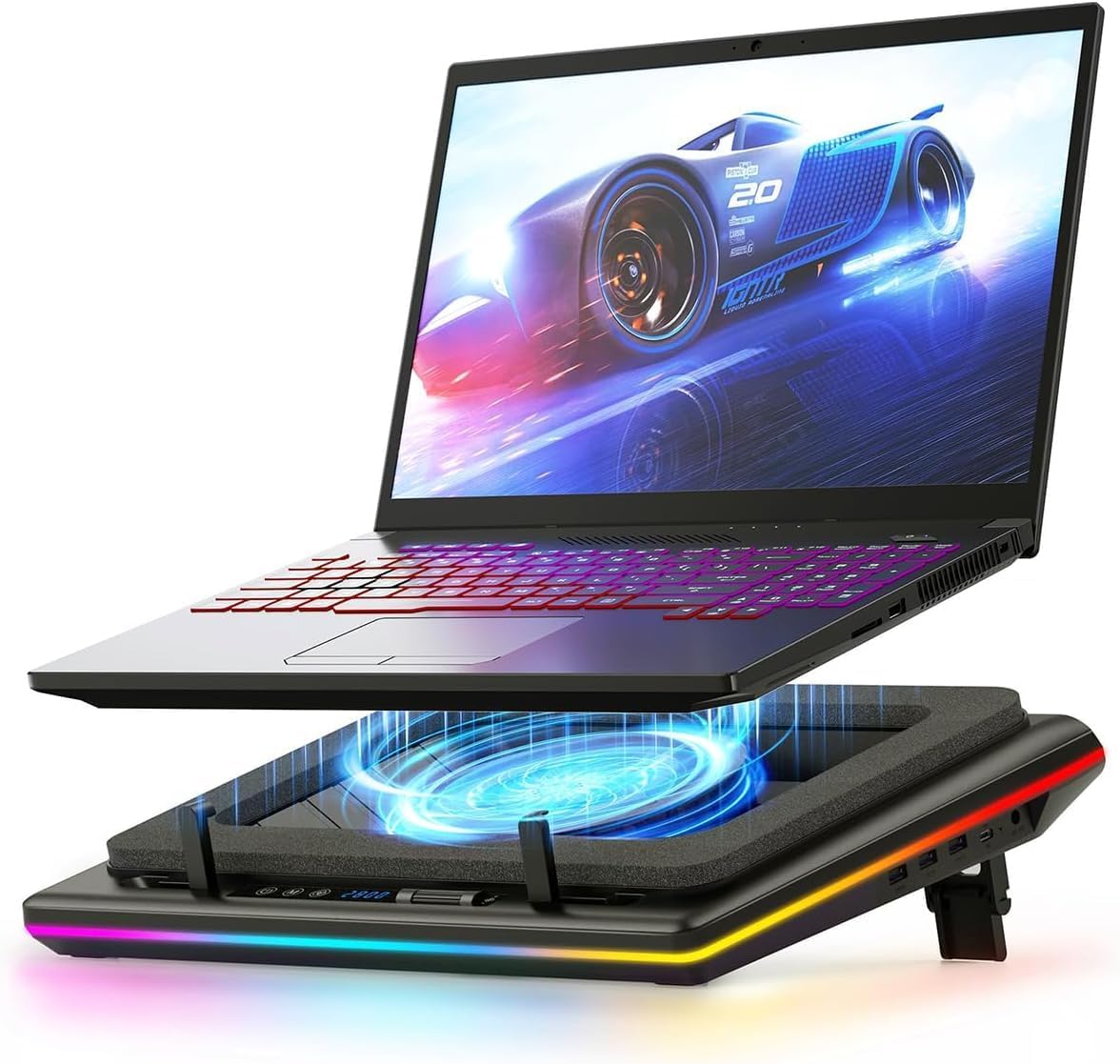
🆒 Stay cool, stay ahead—powerful cooling meets style and control.
The llano RGB Laptop Cooling Pad features a powerful 14cm turbofan with brushless DC motor that reduces CPU and GPU temperatures by up to 44℃ within 90 seconds. It offers infinitely variable fan speeds controlled via an intuitive touch panel with an LCD display, alongside customizable RGB lighting with over 10 colors and 4 modes. Designed for laptops 15-19 inches, it includes a 3-port USB hub and ergonomic features like adjustable height and anti-slip foam for stability and comfort. Ideal for gamers and professionals seeking to prevent thermal throttling and maintain peak performance.


| ASIN | B0C69BVWGB |
| Best Sellers Rank | 5,627 in Computers & Accessories ( See Top 100 in Computers & Accessories ) 1 in Laptop External Cooling Fans |
| Brand Name | llano |
| Colour | blackone |
| Cooling Method | Air |
| Country of Origin | China |
| Customer Reviews | 4.4 4.4 out of 5 stars (2,033) |
| Enclosure Material | Acrylonitrile Butadiene Styrene (ABS) |
| Item Dimensions L x W x H | 42.9L x 32.8W x 6.9H centimetres |
| Item Weight | 1.8 Kilograms |
| Manufacturer | llano |
| Product Warranty | 1 Year |
| UPC | 704444171967 |
T**R
Superb performance. Very Happy
Like everyone else that needs a laptop cooler my end gaming machine was getting far too hot far too quickly and then thermal throttling the performance (i9 13900H 5.40ghz). I had done a lot of research and most people suggested that cooling pads were either totally useless, made heat worse or gave mimimal cooling results but then I came across several reviews and videos for the Llano branded coolers and decided to pull the trigger expecting to return it for a refund. My machine was sitting idle at roughly 65 degrees C with the cooler at full power I was getting a steady 20 degrees C at idle granted with the trade of being the cooler is very loud at full speed, but I was absolutely blown away at more than 40 degrees worth of performance. At lower speeds it still does a great job but of course the lower speed, less noise, less cooling but I have found a sweet spot of 400rpm is acceptable fan noise with decent cooling for normal use and if gaming I can crank it up a bit depending on how long my gaming session is. Asus Zen Book Duo 14 sits well on the foam pad and creates a good seal. All in all takes about 2minutes to set everything up. Sorry not a particularly technical review but take it from someone that had very low hope for this cooling pad I am absoutely delighted with it and wished I had bought it sooner. My laptop no longer feels like a tractor with a Ferrari engine under the hood unable to use any of the performance I had paid for. Very pleased and highly recommended from someone who is a very harsh critic of everything.
J**E
it works well.
quite surprised at the performance of the cooler, before using my temperatures were 81c or slightly above on both cpu and gpu, with the laptops fans working pretty hard to keep it there. HWinfo was indicating throttling on both components (16 core i7 processor/ rtx5070 gpu) when using the cooler its strong enough to bring the temperatures under control quickly at full power and then maintain those temperatures at under half the coolers power. No massive benefit to laptop performance however gpu clocks remain very stable and high when nicely cooled, giving 2-3fps boost generally. its loud but so is the laptop, so theres loud and struggling or loud and under control nicely.
L**R
Simply put, a must have to extend the longevity of your laptop & help it run faster.
Pardon the pun, but this is a game changer! This allows my laptop to sustain higher fps constantly. My preferred level is 1200rpm, it's a good balance between noise and cooling. It's about as loud as the laptops built in fans at this setting. Before, the built in fans kept the 4070 in my galaxy book 4 ultra at 80 degrees average. At 1200rpm with the cooler on, it's a sustained 60 degrees with the highest workloads which is fantastic. I'm a content creator & photographer rendering a lot of video, so this is a must-have for when I travel now. Just goes into the seat pocket in the car. The lights are a little obnoxious, and I'd like the 7 segment display to be red not blue. When I queue up a load of jobs to run overnight, the blue is really bright. I feel like it's a bit pricey for what it is, it has a relatively cheap plastic build but I think all the r&d went into the fan motor & design. I don't like the rgb lighting that's on by default but it's possible to turn them off so that's really not a big deal. Be careful not to block the fan on your laptop with the foam pad or you'll notice little to no difference in temperatures. There is a sweet spot to find depending on what laptop you have, make sure you can feel the air leaving the laptop vents and it'll work fantastically.
M**S
Powerful Cooling, but Mind the Volume – A Gaming Laptop Essential (for Home Use)
The Llano RGB Laptop Cooling Pad is an undeniably powerful piece of equipment, and it lives up to its promise of significant cooling for gaming laptops. However, it's crucial to understand that "powerful" here often equates to "loud" at its highest settings. This is a bulky unit, designed to deliver serious airflow, and its maximum cooling performance definitely comes with a considerable amount of noise. You'll want some good noise-cancelling headphones if you plan to push it to its limits. I personally use this with my 16-inch Lenovo Legion 7i, and it's a perfect fit for the cooler's generous top surface. It does an excellent job of keeping the laptop cool, which is vital for reducing the strain on the laptop's internal fans and, perhaps more importantly, preventing dust from being sucked up into the bottom vents and clogging the system. In my opinion, dust accumulation is one of the biggest long-term cooling problems for gaming laptops, and the Llano's "air chamber" design seems particularly effective at mitigating this. When I'm gaming, I typically find my sweet spot between 300-600 RPM. This range provides a great balance of effective airflow without the fan drowning out the game's audio. At these speeds, the sound is not unpleasant and is easily negligible over game speakers – my partner and I barely notice it. This makes it comfortable for extended gaming sessions without needing headphones purely for noise mitigation. Overall, while this is a pricier cooling pad, I believe it's absolutely worth the investment if you're looking for something truly efficient. The unique "air chamber" design ensures more air is directed through your laptop's cooling system, leading to genuinely lower temperatures and helping to prevent dust ingress. Just be aware that its size makes it less than portable – this is a cooling pad designed for a dedicated desk setup, not for throwing in a backpack. For the serious gamer or power user who values sustained performance and laptop longevity at home, the Llano RGB is a perfect, albeit stationary, companion.
ي**R
I've been using the Llano V12 Cooling Pad for a while now, and it's honestly one of the best cooling pads I've ever tried! The build quality is excellent, and the performance is outstanding—it keeps my laptop cool even during heavy use. The fans are quiet yet very effective. The seller also provided amazing service! I had a minor issue with a part, and when I reached out, they responded quickly and professionally, sending a replacement without any hassle. Truly exceptional customer support that reflects the brand’s quality. Highly recommend this product to anyone looking for effective cooling and top-notch quality! 🔥💻
S**R
تبريدة مره ممتاز لكن عيبة ان القابس مايناسب الي موجود عندنا بالسعودية وغير كذا كان اكبر من الابتوب حقي وهذا غلط مني ما تأكدت منه قبل مااعتمد الطلب ولهالسبب رجعته
C**O
Super matériel, fait le taf, il a calmé les hardeurs de mon i9, chute de 10 degrés. Je le recommande fortement.
C**S
This cooling pad actually works! The Llano V12 Cooling Pad can siginificantly reduce both CPU and GPU operating temperatures, especially under gaming loads. My system: Lenovo Legion 5i Pro 12700K CPU, 3070TI GPU. I was sketpical prior to buying but using this for the past few days has proven it isn't a gimmick. Refer photos and the before and after video showing the reduction in CPU and GPU temps when in game. At full fan speed: 2800 RPM - CPU reductions from 100 degrees down to 79/80. - GPU reductions from 85 degrees down to high mid to high 60s (observed last few days) Average reduction appears to be 20 degrees and above in some cases. Even on lower fan speeds (1200 - 1500 RPM), I see temperature drops up to 10 degrees or more. I have also observed FPS changes in certain games from 30 to 50FPS at times. Unable to confirm 100% if this is from the cooling pad, but I noticed these improvements when the cooling fan is operating at high settings. ONE THING TO NOTE: the higher fan speed setting is quite noisy. This is not really something you can avoid. Noise cancelling headphones will help, but it is still audible on higher settings (1500 and above). It can be a little bit of a challenge to hear subtle footsteps when playing extraction based shooters, or games where footstep audio is critical. Besides that, playing most games won't be an issue and the performance boost is definitely worth the noise.
A**K
Why did I get it? Working 12-14 hours with a gaming laptop (zephyrus duo 16, 6900hx + 3070ti) with that high pitched fan noise makes you go insane eventually. I despised the noise so much I was considering spending an extra 5k rebuilding my desktop tower system and throw my laptop into trash. Does it help reducing gaming laptop temperatures? Yes and no. Yes it does help cool the laptop better by creating a vortex of cool air blowing underneath the chassis, but unless you're in quiet/silent mode the temps don't drop at all. However, it prevents the chips from throttling and instead it unlocks the true TGP. Prior to getting this fan I was barely getting 150w of sustained TGP from cpu+GPU combo. Now I'm getting nearly 250w. Makes you wonder how scummy all those marketing material of laptop makers + Nvidia are that you need an additional fan just to get the advertised performance out of your machine. Raw GPU TGP before: barely reaching 100w as thermal throttling reached After: 130w easy with maximum boost reaching 148w Raw CPU TGP before: I never allowed it to go past 30w due to extreme fan noise of the laptop itself. After: I guess it can use 90w as advertised (Radeon iGPU disabled at system level so it's not even active, all that juice goes directly to CPU) Is it loud? So you can adjust the fan speed by 100rpm increments. Working in Browser + medium creativity tasks I set it to 300/400rpm and I don't even have to wear headphones anymore as the hum of this fan drowns the noise of laptop fan. For gaming, you definitely need a noise canceling headphone as the typhoon noise created by this fan exceeds any noise created by speakers. Was considering getting the Razer fan, but I'm glad I didn't. I'd throw money at razer's competition all day every day. Razer tax + their customer service don't deserve your hard earned money. Even though I bet you anything both of these fans are made in the same factory.
Trustpilot
1 month ago
2 weeks ago