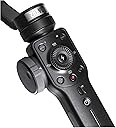
🎬 Elevate your smartphone filmmaking — don’t just shoot, create magic!
The Zhiyun Smooth 4 is a professional-grade 3-axis handheld gimbal stabilizer designed for smartphones up to 210g. Featuring an integrated control panel with focus pull and zoom capabilities, it supports advanced filming modes like PhoneGo for instant scene transitions, time-lapse, and object tracking. With a robust 12-hour battery life and two-way charging, it empowers content creators to capture smooth, cinematic footage all day long. Compatible with iPhone and Android devices (excluding some heavy models without counterweights), the Smooth 4 transforms your mobile device into a versatile filmmaking tool favored by vloggers and social media pros.
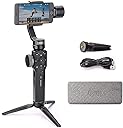
| ASIN | B07BHCC3BV |
| Best Sellers Rank | #218,018 in Cell Phones & Accessories ( See Top 100 in Cell Phones & Accessories ) #330 in Cell Phone Handheld Gimbals & Stabilizers |
| Brand | ZHIYUN |
| Color | Black |
| Compatible Devices | iPhone 12/11 pro/mini【not for pro max】, iPhone 13 pro/mini 【not for pro max】 |
| Customer Reviews | 4.2 out of 5 stars 6,662 Reviews |
| Item Weight | 0.5 kg |
| Manufacturer | Zhi yun |
| Manufacturer Part Number | Smooth 4 Black with EACHSHOT tripod |
| Model Number | Smooth 4 Black with EACHSHOT tripod |
| UPC | 600346554115 |
S**N
1st TIME COMMERCIAL USE Experience & Tech/Usage Insights
Researched many YT videos that compared handheld gimbals vs steadicams. Attempting to use more mobile phone shooting moving forward (instead of my DSLR), and wanting an affordable yet effective unit on my first gimbal, and glad ZY Smooth 4 caught my attention. It beat DJI's Osmo due to price point, functionality and availability. I'm glad I picked up the ZY Smooth 4 about a couple of months prior to my first commercial production with it, which was purely unintentional. My local client, who's a speaker, who's also a very active person, felt uncomfortable/nervous sitting in front of a camera. To give her peace of mind, I suggested a walk on the river, while we talked and I would shoot the video on the gimbal. She loved the idea and settled on a date and early morning meetup at the river so we would have less foot traffic at that time. Both of us preferred this "walk and talk" video style. For her, it was natural to do this as an active person, much like speaking to a girlfriend while out for a walk. For me, I knew this would get her blood flow moving, reduce nerves, and the natural morning light (vs afternoon harsh light) was good for the shoot. Believe it or not, we shot 2 videos (one was a Welcome video, and the other was an About video), both only required 1 take each! LOL! We produced the first video walking the river one way, then turned back and shot the 2nd video going the other way 😁 Here's some insights on the Smooth 4: - The ZY Smooth 4 build is impressive. Has weight in your hands, but not so heavy to strain your hands/arms on a longer shoot. - The ZY company is consistently working on upgrades to the ZY App, which is good to see - ZY does provide information in the booklet on setup and usage, however, I found most value in YT videos from other users showcasing functionality and use cases - Key Tip: Balance your iPhone in the bracket BEFORE powering on the Smooth 4 unit. - Recent News: Filmic Pro app now works well with the Smooth 4. Check out YT for how to use it with Smooth 4. - Battery life is solid and long-lasting. Since my first charge of the Smooth 4 unit, the battery has held strong. In fact, my iPhone battery dies much faster, naturally due to shooting video. If you can, get the lightning cable to connect your iPhone to the Smooth 4, so you can keep your iPhone charged while shooting video. - I appreciate the screw on tripod legs that come with the Smooth 4, for laying on a flat surface. I'm about to get an Insta360 ONE panoramic camera, and I can envision sitting my iPhone in the Smooth 4 phone bracket, and setting the Smooth 4 on a taller tripod, so I can shoot the 360 away and out of sight. This way, I have both my Pano camera, and my ZY for video shooting if the client calls for that added service. Here's some insights on the videoshoot with the Smooth 4: - Until I started playing with the Smooth 4 video quality settings, I didn't clue in that my iPhone 6S could shoot in 4K. - Tried shooting in 4K, but its a storage hog. Will shoot 1080p next time. - The video footage will store in the ZY app, and you'll need to then transfer it from ZY app to your iPhone's media library. As such, I highly recommend dumping as much "stuff" off your iPhone prior to the shoot for more storage room. - In shooting with 4K, I only had room for 2-3 videos before I ran out of room and phone battery. Hence no B-roll in the above videos. - Had troubles exporting from ZY app library to iPhone Photo Library due to space shortage. After dumping more media and apps, I could transfer 1 x 4K video, import to Macbook Air, delete it off ZY & Photo Library, then transfer/import the next 4K video. May also try shooting 1080p next time. Or a bigger capacity iPhone. 😜 - Highly recommend you get the lightning charge cable to continually charge your iPhone while shooting. - Bring along your laptop or external drive to dump footage off your iPhone, so you can continue shooting more footage. Unless you only care about a short shooting window. - My Zoom audio with Sennheisser wireless lav was unusable due to fabric shifting sounds from walking. So what you hear is my iPhone audio, not too shabby. Hope this helps you in your decision whether to grab your own unit of the Smooth 4 :-)
J**R
Iphone X works like a dream!
I just received my gimble yesterday. I have played with it quite a bit already and so far so good. Actually great!! Many if not all of the issues from negative reviews have been taken care of through software updates. Some of the reviews I am sure are because of operator error. It balances very easy. I would suggest that the knob you use to adjust the arm for balancing could be designed as more like the focus knob. A dial to fine tune instead of a unlock. It loosens completely and its time consuming to get it just right. Definately not a deal breaker. I dont expect this kind if reature for this price. It does what it need it to for me and that is to take steady video when on the move. I am looking forward to playing with all the bells and whistles and will update review. My only suggestion would be the instructions. There are lots of great videos on you tube that work well for some people. I am one of those people who has to preform the task to get it to stick. Its a pain and disruptive and time consuming for me to have to stop the video, rewind and replay, pause and repeat. I would prefer a written manual. But, producing that is expensive and I would rather have videos if it means keeping the price point the same. If the instruction videos were all loaded into the main site and indexed as tutorials. It would be a much better experience. You tube can be difficult to navigate bc it is always suggesting other product videos. Sifting through reviews to find instructions is not fun. This would be tremenously helpful for those of us learning to use for the first time. Honestly, I am super excited to do business with a company that cares enough to put out a product that is affordable for anyone, With so many features, made strudy with high quality materials, and also has a record of dedication product improvement and customer service.
V**A
Very smooth stabilization, great for phone video
I bought the Zhiyun Smooth 4 gimbal when I started getting more into video and wanted something to stabilize my phone footage. It made a big difference compared to handheld recording, especially for walking shots and outdoor videos. The stabilization works really well once you get it balanced correctly. It takes a little time to learn the controls at first because there are a lot of buttons, but after using it a few times it becomes pretty easy to use. The build quality feels solid and not cheap, and it holds the phone securely. I mainly used this for travel videos, family events, and some basic content recording, and the footage came out much smoother than I expected from a phone. The tripod that comes with it is also useful when you want to set it down for steady shots. The only downside is the setup can feel a little complicated at first, especially if you’ve never used a gimbal before, and the app takes a little getting used to. Once everything is set up though, it works great. Overall this is a very good stabilizer for anyone doing phone video, vlogging, or just wanting smoother footage without carrying a full camera rig.
T**™
Zhiyun Smooth 4 works perfectly with XS Max (with a lightweight iPhone Case and NO COUNTERWEIGHTS)
I made this INITIAL review to give a personal account on my recently-purchased Zhiyun Smooth 4 gimbal (BLACK) paired with the iPhone XS Max. I am sure some of you are wondering how it fares with a big phone like that. I have heard in some forums/groups that there are some people experiencing some phone balancing issues especially when paired with the iPhone XS Max. I've been using the Gimbal for 3 days now with my iPhone XS Max with an ultra-lightweight crystal case from RANVOO and so far I have not encountered that mentioned issue. (hoping not to have that). What I think is that perhaps the battery must be strong enough as there are motors that are constantly in check and keeping the horizontal balance of the iPhone XS Max (it may or may not be the case). Nevertheless, I will be observing mine and post away here if it happens (again, I'm really hoping not to encounter that!). Anyway, I am excited with the array of controls offered in this gimbal, which is MUCH more than DJI Osmo Mobile 2 -- (BOTH hardware and software-wise). One notable thing that separates it from the competition is the exclusive Zoom/Focus dial control on the left side. Paired with the ZY app, this is perfect for aspiring mobile filmmakers and adds another dimension of control not offered anywhere else. I would say the app is 99+% usable with just a few trivial bugs that I am sure the Zhiyun app devs will address on a future app version update soon. - - - - - - PHOTOS: 1) Zhiyun Smooth 4 Black with mounted iPhone XS Max (with ultra-lightweight iPhone crystal clear case) turned on showing full horizontal balancing. 2) Standby mode 3) Dial for extending the holder for to help to counterbalance big phones like the XS Max 4) Close up shot of the XS Max and case, and how it adheres to the holder grip 5) Sample 3x3 Panorama automatically made using Zhiyun's accompanying ZY app - - - - - - MATERIAL QUALITY (5 stars): Material quality is top-notch and I like the matte mapped texture of the gimbal. The tripod fixture is lightweight with rubber-pad tips for better grip on smooth surfaces. One thing I wish it had is a rubber-like texture on the handle part for superior grip to prevent slipping (i.e. similar to the one on inner sides of the phone holder clamps). BATTERY (5 stars): Battery life is great and rated at 12 hours and should be more than enough for a whole day's shoot. I will post here again if it does not meet this declaration. DURABILITY (5 stars): Pretty sturdy and appears to be well worth the money. PACKAGING (5 stars): Even the packaging is good enough. OVERALL (5 stars): I am generally impressed so far with the Zhiyun Smooth 4 gimbal. If you do not have the time to compare gimbals, this is well worth your money and will not break an arm and a leg. And if there is a need for another gimbal for a project, I would not have second thoughts and get another one like this. TIPS: 1) The gimbal should be balanced well in power off status before use 2) DO NOT turn on the gimbal without manually balancing the phone 3) For bigger-sized phones like the iPhone XS Max, there is a dial at the back where you can extend and this helps in the proper balancing 4) Try to AVOID rough-sized particles like sand to get inside the crevices as it can interfere with the effectivity of the servomotor/s.
S**M
Still loving this!
This is my first gimbal and I am impressed with the built, features and functions. I was going to purchase the Smooth Q until I heard about the Smooth 4 coming out soon. The price is great! Lower than previous model. I am glad that I waited for a few weeks. It is a must-have for all video makers if you record on your smartphone. It feels good in your hands and operating is very simple. The 4 modes provide want I need. It is packaged well in a nice protective lightweight case. One bonus free gift not mentioned in the description but in the box with a note saying to choose a charging cable depending on what phone you have. ( update: I was told that the charging cable is under development and will be sent out once it is available). Just send them a message thru Facebook with your choice of USB Type C or Micro USB or Lightning. I heard some have issues with ZY Play app for Android devices. I have tested this on my Samsung S7 for 2 days and it has worked great. I also have the LG V30 which I will try later. I can not comment on battery life yet since its too soon. I will continue to update my experience once I learn more about its features and capabilities. I want to add that I got excellent support from Zhi Yun team on Facebook. They said for me to notified them when I have any issues. This tells me they really care as a customer and wants their customers to be satisfied with the product and service. Below are photos taken by me. Update: May 2020. Still loving this device. I have switched my phones and have used it on my Samsung S10 (see photo added), Note 10 and Huawei P20 Pro. These phones have better cameras that complement this gimbal. There were some software hic-ups like freezes or app closes but most are addressed with updates. I also received the bonus charging cable by mail. Good quality cable and it was used to keep me shooting longer. Having this gimbal for almost 2 years, I would say it's been great. However, I would like a new model to be smaller and lighter. I like to pack things light as I travel. I can't wait to give that a try.
G**G
BIG PAPER WEIGHT!
**UPDATE - 10/20 - this has become nothing more than a paper weight in my photography equipment. No matter what I did to get the 3x3 Pano or normal Pano to work - it never did. I uninstalled the app over and over - I ran the program to equalize the settings - but nothing ever worked to get the pano settings to work. As a reals estate agent this would have been great to take pictures for listings - but it never worked and getting Zhiyun support to give you any help is a joke. I had great hopes for this device but with the pano never working correctly it was a waste of money and Zhiyun never offered to switch out the device with a new one. Big old paperweight My first review was based on me using an android phone ... fired this up on an iPhone and what do you know... it works as advertised. Sure there will be a learning curve to learn all the tricks but using an Iphone is the answer. I would give full stars but seeing that you have to have an Iphone to really use this to its potential, I can't go all the way seeing I won't be switching phones for a while. But when I do I know this will be a great tool... until then it will be a nice gimble setup. So if you want this set up make sure you are running an iphone not android. I was looking forward to getting this setup - I have another gimble without the bells and whistles... Everything fired up and seemed to be ready to make great videos. Went and downloaded the firmware, did the calibration set up. And that's when everything went sideways ... I try to do panorama or 3x3 and the motors take the camera to where ever it wants - never where I set it to go... Then IF it takes all the pics the panorama is a slim slice of the actual picture yes it's a wide shot but it's like it takes pics of just the middle of the scene. When I go to record video ... it's very jumpy and if it does play back the video is frozen with just audio - when the audio stops the video starts. Getting any customer support from Zhuyin is near to impossible. Starting to think I need to box this thing up and sent it back for a refund and buy something else...
I**.
Not perfectly balance plus limited range for GoPro Hero 5
This is my first gimbal. Based on YouTube reviews, I went with Smooth 4 for its ease of use and dedicated buttons for taking video and pictures. There are plenty of reviews on its functions and operations; hence, I will just focus on my experience with GoPro Hero 5. I purchased a GoPro adaptor to go with the Smooth 4. When I first install it, I was happy that it balances well and I was able to view rear screen. Notice from my pictures that I had to install it ‘backward’ in order for the adaptor plate to reach the base. I am actually OK with that because I can use my thumb to control the triggers. All front buttons and wheel are useless with GoPro anyway. However, I quickly realized that installing the way I did does not give me the full range of gimbal. It only pivots upward to 10 o’clock position looking toward the base of y-axis. It is a usable range; however, gimbal will not be able to track its target if you lower your GoPro too much. I tried to mount the GoPro the ‘right’ way, but its body would be blocked by Smooth 4 mounting plate and unable to balance the GoPro at rest. When powered on, Smooth 4 could support the imbalance weight, but not perfectly horizontal. Besides, it is probably too much load for it to handle for extended period of time. I also noticed that Smooth 4 couldn’t keep GoPro and its adaptor perfectly horizontal, despite it was balance at rest. I had to make a minor adjustment with the GoPro mounting position to compensate. It turns out my gimbal couldn’t give me a perfect horizontal balance even with an iPhone 6. Instead of perfect 90 degree, it will stay at 88 degree, even after I performed 6-axis calibration. I will request a replacement. Hopefully, mine is just defective. All and all, Smooth 4 is really designed for a cell phone and not a GoPro that causes too much weight imbalance even with the counter-weight mounting plate. I consider supporting the GoPro as a bonus, despite its range limitations.
S**B
[-] Certainly better than the DJI Osmo2 at least when it comes ...
[-] Certainly better than the DJI Osmo2 at least when it comes to easily changing between lock mode and pan-follow mode. You can keep a smooth video capture with the easy trigger in the back to toggle these 2 important modes. The DJI Osmo2 STUPIDLY made it so you have to double tap the front mode button with your thumb which causes you to jerk the gimble, in addition to just be awkward to control. The rear trigger for the Smooth-4 is just intuitive, easy, and awesome. [-] The fact it comes with wide & sturdy a tripod is equally as awesome. The included case is sturdy and protective, and can be easily secured shut with a velcro strap around it. [-] I have a Android Samsung Galaxy S8+, and balances well only if removed from the case. I wish it allowed for a little bit more horizontal movement on the adjustment arm so I can keep the case on the phone. [-] I accept that I have to use the native phone app instead of the ZY app if I want a quality video capture (i.e. 60fps). Personally, I cannot tolerate less than 60fps video recordings. Unfortunately this means that I forfeit the two front buttons for taking video and pictures, so I just tap on the phone screen to start & stop the video, no biggie for now. The hardware gimble does an excellent job at stabilization and being controlled with the rear trigger. But, being an Android user, I am sad that I am not able to use some of the cool features the ZY app can do as compared to iOS phones. I was told this was mainly due to a restriction with the Android phone API, and not the fault of the Zhiyun software developers. As soon as Google/Android allows more access through its API, then the ZY app will function great again. [-] Take away: don't judge this gimble based on the ZY software app alone. Judge it by the hardware at at large.
V**E
Ist ganz cool für einen anfänger
Ist sehr nice
A**U
Se averió a los dos días de uso
El Gimbal, no está mal. Me decidí por este modelo, después de mucho leer al respecto. El manual que trae, es muy parco, y hay que mirar en la red, para aprender un poco más. Dicho esto, decepción total, a los dos días de uso, dejó de funcionar, desconozco si fue por la temperatura que había en la calle...... Listo para devolver, me replantearé la compra de otro modelo de gimbal. Había comprado una funda para este gimbal, y ahora me tendré que quedar con ella.
N**C
いい
とても満足しています
I**P
Fantastic device. It's a game changer for smartphone videography
Fantastic device. It's a game changer for smartphone videography. Anyone with a smartphone can now confidently produce high quality professional looking video for vloggers, businesses etc... Great value for the money, there is no competition for this product in my opinion.
F**E
ÓTIMA QUALIDADE
ÓTIMA QUALIDADE, FILMA E TIRA FOTO VOM QUALIDADE SUPERIOR, SÓ QUESTÃO DE APRENDER A MEXER
Trustpilot
1 month ago
1 month ago