

Desertcart purchases this item on your behalf and handles shipping, customs, and support to UAE.
🎮 Level up your game with pro-grade control and comfort!
The Logitech F310 Gamepad is a wired USB controller featuring 14 buttons, ergonomic design, and rumble feedback. Compatible with PC and Android devices, it delivers precise, immersive gameplay with reliable connectivity, making it a top choice for serious gamers seeking comfort and performance.


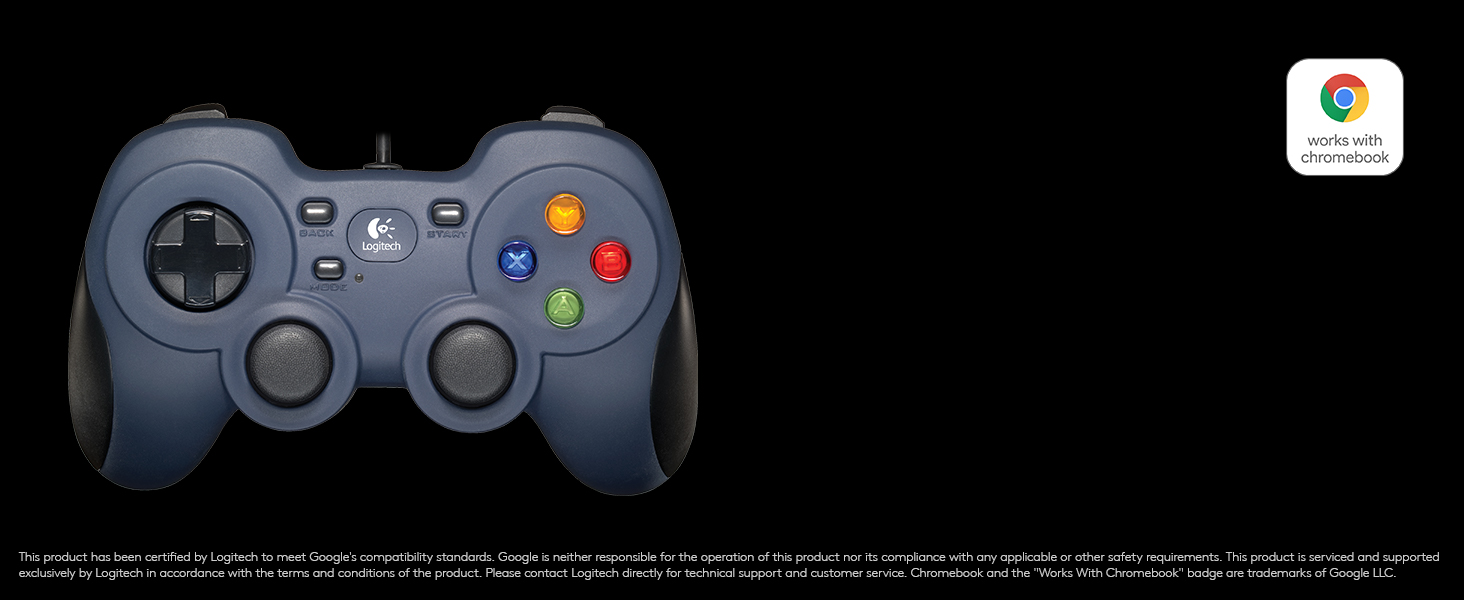
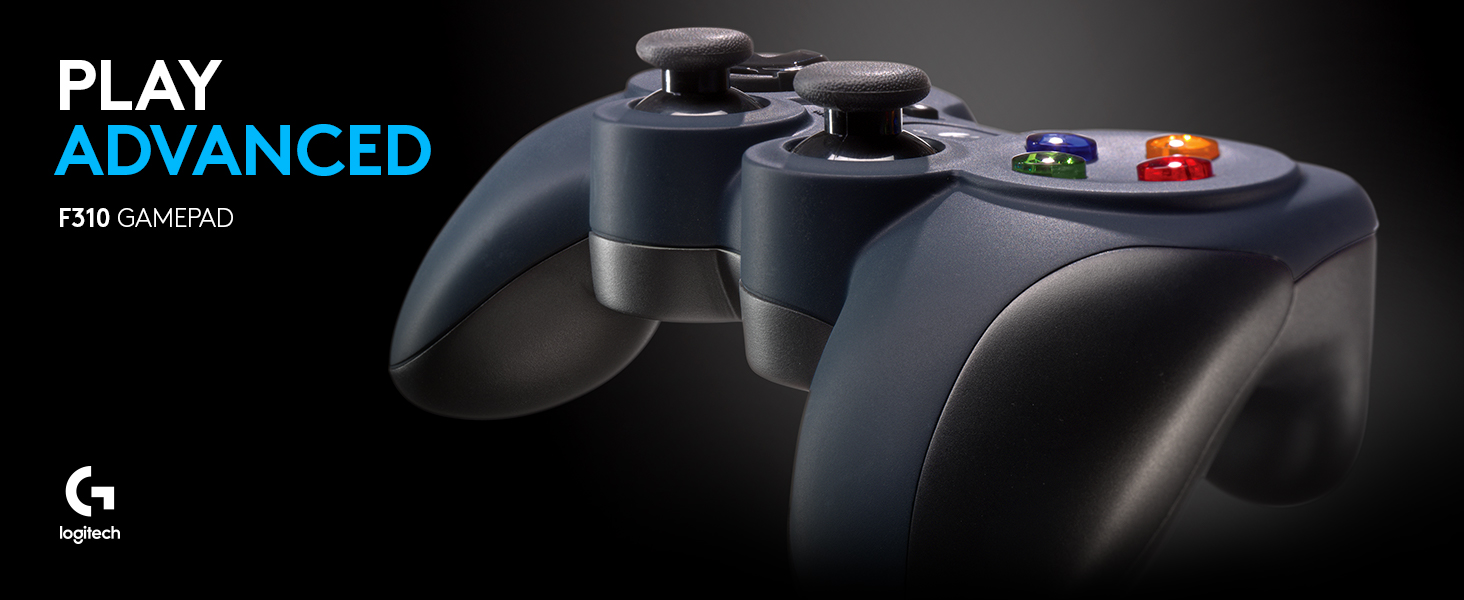
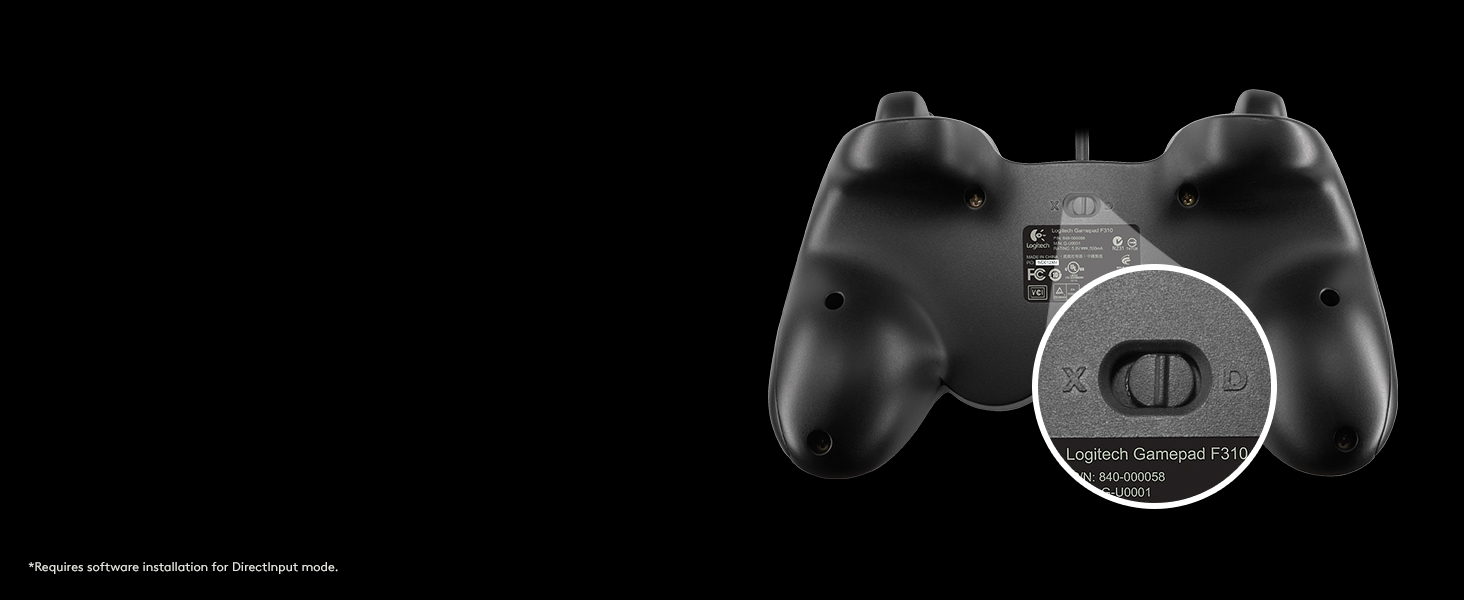


| Additional Features | Ergonomic, Rumble |
| Asin | B0757QFBRL |
| Best Sellers Rank | #8,961 in Video Games (See Top 100 in Video Games) #159 in PC Gamepads & Standard Controllers |
| Brand Name | Logitech G |
| Button Quantity | 14 |
| Color | Black |
| Compatible Devices | Android, PC |
| Connectivity Technology | USB |
| Controller Type | Gamepad |
| Customer Reviews | 4.3 4.3 out of 5 stars (194) 4.3 out of 5 stars |
| Global Trade Identification Number | 10097855066951 |
| Hardware Platform | Desktop, pc |
| Included Components | Item |
| Item Dimensions | 2.36 x 2.36 x 1.65 inches |
| Item Weight | 146 g |
| Manufacturer | Logitech |
| Manufacturer Part Number | 940-000112 |
| Model Name | F310 |
| Model Number | 940-000112 |
| Package Quantity | 1 |
| Power Source | Corded Electric |
| Upc | 097855121677 097855070050 803982738226 097855066954 801029205892 667562774536 |
D**S
Exceeded my expectations
Alright, so after a little over three years, the left joystick is starting to act up. Personally I'd say that is a fantastic statistic. Especially considering thats the only issue I've come across with this controller. I've read other reviews about this product claiming it is plug & play for Linux systems. I haven't tested this. But I can say that it works with both Windows 10 and Windows 11. I particularly like the feel of the buttons on this controller. As well as the DualShock inspired layout rather then yet anouther Xbox clone. The directional arrows, triggers, Left, Right, and colored buttons all feel responsive and are clicky. I have big hands, so having the handles shaped as they are on the bottom make the controller feel comfy in my hands. The logo button in the middle (yes, thats a button too!) is a nice addition. This controller is recognized by steam by default as well. I've trued playing many different games with the Logitech G F310. Fortnite, Minecraft, Minecraft Dungeons, Virtual Fighter 5 REVO, Sonic, Big Helmet Heros, Albion Online, and many more. They all felt great, and the controller held up through all of it without issue for over three years. I highly recommend the Logitech G F310 for anyone looking for an affordable gaming controller that works on most systems.
S**N
Excellence by Logitech
I'm a simple man, I like simple things. This controller has responsive buttons,no stick drift, long wire, and costs less than a Micky D's run. This is by far the best conyroller for the money, what more could you want? Perfect for those PC games that keyboard and mouse don't feel right.
M**N
You get what you pay for, but that's not a bad thing.
In a perfect world, I'd be able to give this product three-and-a-half stars. It's a good product, not great and not something you need to hang your hat on if given better options. However, if this was a perfect world, the balance between price and quality - notably how the former is often artificially inflated to achieve the latter - is a precarious thing to begin with, and even then it's skewed against consumers, but that's not why we're here. I'm going to go ahead and give it four because, frankly, it's cheap and good for what it is. Not to get too deep in the creek, but I recently got back into gaming after a two-decade absence and eventually purchased a PC because, let's face it, a MacBook won't cut it. I spend most of my time playing the stuff I missed, particularly games made before or around 2005. That is something to note. Quite a few if not most of your older games won't play with this gamepad - apart from some computer tinkering if one swings that way - but that's just how that is and can't be considered a mark against it. Newer stuff usually demand some sort of controller, and there was never any problem there. That all being said, when I decided to try a gamepad, I went with the F310 knowing a couple things. One, Logitech has always made quality products, in my experience. Granted, my memory may be filling in holes on its own, but I've used speakers, keyboards and other whatnot made by them over the past few years and never got less than what I paid for. Two, I quit using game controllers with the SNES and this new format confuses and frightens me. I did not want to blow 50 bucks on something I couldn't use and the 20 here was just perfect. So the purchase was made and for several months all were happy. Unfortunately, here's where we get to the three-and-a-half-not-four star business. Again, based on experience, your less expensive Logitech products aren't quite as sturdy as their pricier ones. I have a small dog who apparently thinks I like knocking this controller to the hard-wood floor and, being a good boy, he decides to help me out once in a while. Being a clumsy oaf, this thing hit the floor quite often and, consequently, nine months after purchase, it's battered to a useless degree. Being cautious and charitable, I'm erring on the side of positive because of that. Perhaps you're not a clumsy oaf. Perhaps you don't live with such a conscientious canine. This, then, might be the controller for you and you might gets years of joy and enjoyment from it. I can't say. I can say, however, that it is a solid, serviceable, affordable gamepad and a good value for its price. It'd also make a good "got a little extra cash" back up or an "Oh, drat, my old gamepad exploded and I can't afford to buy a new one for a while" last-minute thing, as well. I'm going to try something else - perhaps the slightly pricier Logitech F710 - but the F310 is most certainly a quality buy and I am a satisfied customer. For whatever that's worth. I still haven't gotten used to the new set-up.
R**H
Best budget alternative to a console controller I've found
I wanted a controller for PC gaming for the rare title where a controller is really that much better than kb&m controls, but I wasn't about to shell out $80 for an Xbox controller and the adapter needed to use it for PC. This is the one I settled on, and after at least 100 hours of gameplay use from Hades alone I can say it's a quality controller. Note that this does not have rumble capability of any kind, nor does it have some of the fancy speaker/microphone stuff Sony and Microsoft have started adding to their controllers. If you want all the bells and whistles of the expensive controllers - well, you're gonna have to buy one of the expensive controllers. But if you don't really care about that stuff and just want a well built controller with the standard modern Xbox/PS style layout, this one is a great choice. I have never had a game that supports controller input fail to map the controls correctly or anything like that. And if you install Logitech's profiler software, you can fully rebind the controls yourself - allowing you to correct annoying control setups in games that don't have built-in rebindable controller controls, or if you decide you want to use it for a game that doesn't even have controller support you can rebind the buttons to keyboard buttons so as far as the game is concerned you're just using keyboard controls. Not sure exactly how sophisticated the profiler is in terms of macros and the like because I've never bothered to install it, since this controller just works with no fuss for all the games I've tried it with. It even has a toggle switch on the back to switch to directinput if you wanna play some ancient game that lacks xinput support (if you don't know what this means, don't worry about it - xinput has been the standard for years now and any remotely modern game with controller support is gonna use it). All the buttons still feel good after 100+ hours of heavy use. I haven't noticed any issues with thumbstick drift, a problem even the "premium" controllers sometimes have. The d-pad is much higher quality than on most cheap controllers - it has 4 separate switches for the 4 cardinal directions instead of just one in the middle, so it is more reliable and feels better to use). The controller itself feels a bit lighter than an Xbox controller but still feels sturdy and durable. I'll admit I'm a big of a Logitech fan, so maybe I was biased to like this controller - but there's a reason it's one of the most common recommendations for a budget PC controller and the top seller in the PC controllers Amazon category. If you're looking for a cheaper alternative to an Xbox controller, and don't mind a wired controller or lack of rumble support, this is the product you're looking for. At full MSRP of $24.99 it's a very good deal, and if you're patient and look for deals it's not hard to find in the 15-20 range at which point it's an absolute steal. If you want a budget option that is wireless and has rumble support, look into the Logitech F710.
R**.
Great controller, frustrating clamshell
I've been playing console video games for at least 22 years, right around the time I picked up a SNES controller on the family console for the first time in the early 90s. This continued through the late nineties when my parents purchased an N64, to the early 2000s when I purchased a PS2, 2007 when I purchased an Xbox 360, and continues to this day after I purchased an Xbox One a couple years back. Why mention my extensive console gaming experience? PC gaming is a completely different animal. When you grow up on D-pads and analog sticks operated by a single thumb, trying to fit WASD into your head is a tall order. Here's a good analogy anyone can relate to: let's assume you are awesome at typing on a QWERTY keyboard, 150 WPM or some such. You get a job as a data entry technician, and when you sit down on your first day... they have DVORAK keyboards. What are the chances you're going to learn a completely new keyboard layout to do your job? None. You're gonna go to Wal-Mart on your lunch break and buy yourself a QWERTY. Which segues into why I purchased one of these. I needed a gamepad for my PC because I simply could not adjust to the completely different hand placement and movement paradigm that comes with a PC video game. I kept losing my finger positions on the keys and high-stress situations (like attempting to dodge and exchange fire with an enemy on a shooter) were really getting me in trouble because three-finger movement on WASD was taking too long to process. Adding to the complications are that my system is Linux, which is usually a no-go from the start because nothing ever seems to work on it. I decided to take a chance on this anyways because with Amazon gift cards and a Prime trial, I got it for $11. To begin with, the package this controller comes in is a nightmare. It's a clamshell with no room to maneuver a pair of scissors or a razor blade around the controller inside, so you have to use the little tab and perforations on the back. Problem is, the perforations end halfway down where the controller is contained, so your only option is to tug on both ends and send your controller flying when the package inevitably bursts open. After collecting the entire contents of the package from the floor, all that's inside is a controller and two small squares of paper. I seemed to recall the product description mentioning software, so it must be online somewhere I suppose. Either that or I really sent a CD flying and can't find it. But the moment of truth comes later, when you plug it into a PC. Does it work? As a Linux user, the answer is, surprisingly, yes. I plugged in the USB connector and nothing happened. This either means the operating system knows exactly what it is and doesn't have to do anything, or you're SOL and need a driver or something. My eyes were drawn to the little Logitech logo on the center of the controller, and I decided to push on it to see if it was a button like the XBox Guide button on their controllers. It is! Steam's Big Picture mode launched and I needed no configuration or messing around with anything to make it simply work. On a Linux system. I was amazed. So I decided to push my luck on a ROM using a program called Mednafen, which is a multi-system retro console emulator. Didn't work so well any more in Xinput or direct mode, though this is almost assuredly due to Mednafen's programming and not anything to do with the Logitech controller. I searched out the profiler software mentioned by the instructions to attempt to fix this problem, but after finding the Logitech support page I discovered that they only offer software to recent versions of Windows, so you won't get any help from them if you run another system. About 5 minutes of Google searching later and I find QJoyPad, and now everything is perfect. This controller has a total of 12 buttons (2 bumpers, 2 triggers, click analog sticks, select, start, A, B, X, Y) and 6 axes (Dpad X/Y, left stick X/Y, right stick X/Y). The Logitech logo launches Steam Big Picture for me, but I have no idea if it will work on anything else. It has a very similar size and form factor to a PlayStation DualShock controller with fatter feet on the bottom, which I like because DualShocks are bony and poke my palms uncomfortably. You'll see the form factor is very similar in the attached photos, which I also placed alongside Xbox controllers for contrast and a pack of standard playing cards for scale.
T**N
Very basic controller
I was just looking for a cheap and basic controller to play arcade games, and this works. If you're looking for a substantial controller with more features to play AAA titles, this is not the one. The body of the controller is plain hard plastic all around, it feels very light, but solid. Regular PS-style layout. One thing it lacks is touch sensitivity on the ABXY buttons - that is the one feature that I would have liked that is missing here. Touch sensitivity is on the joysticks and the lower triggers only. The triggers feel a little tight/stiff and have edges that make them uncomfortable. The cable is a little short so I have to use a USB extension to play more comfortably. Minor thing, but the color is more black than barely blue, if that matters at all to you. It serves as a basic controller to use from time to time, but there are some basic features and ergonomics that I feel should have been included for the price.
D**E
Only Controller with a Death Button
BLUF: Sturdy enough to survive one move overseas and one across the U.S. Works fine, but the "MODE" button is actualy detrimental. Cheap but suitable option to replace any other $30+ controller Sony or Microsoft charge for these things. It does't matter what game or how well I am doing. Every Cheeto-encrusted gaming session I engage in carries with it multiple risks that, like monsters beyond the edges of hte known world's borders, threaten to overtake me and drag me beneath the dark waves of the void below. Gaming addiction, vitamin deficiency, poor diet habits, sleep deprivation; the death button. It was, in my mind, clearly a Faustian trade made for the conception of an otherwise very good product. As the developers of this controller made a budget controller with the responsiveness, ergonomics, and durabiity either on par or greater than any big brand controller, the ghost in the shell of the very plastic rose from the circuitry to demand tribute for this advancement. And so the designer was driven mad, his soul given for a product that surprisingly doesn't rip you off. In the throes of his lunacy he added a final touch, the "MODE" button right below the "BACK" button. Chances are you will hit this "MODE" button when frantically hitting "START" to pause the game, or "BACK" to bring up a menu screen only to watch as your character freezes and is unresponsiveness. Why? I have no freaking clue. Look, this button obviously has a purpose but I have yet to find out what it is other than to make all the controls stop working until you turn "MODE"-mode off so there. Good controller for a fraction of the price of other ones. Dumb button.
K**Y
Spartan but high-quality, the F310 is a great budget controller.
The F310 is not the highest end gamepad, but for someone like me who uses a controller only as a backup to a preferred mouse and keyboard input it far exceeds my needs. The F310 has two flaws that I've noticed; one of these is more based on the controller's layout and necessities, namely that I find it difficult to use the right analogue stick in such a way that allows for precision while executing other inputs. I don't find it to be terribly problematic; the stick itself seems to have the precision that one would expect, and this may simply be attributable to poor dexterity. The other flaw is that the triggers and bumper buttons feel differently than they do in either console controller, and it's not necessarily a change of format that I prefer; the triggers are very wide and don't seem to be as free floating as a Playstation controller's, while the buttons don't feel like they travel very much and have a blocky form. That said, I've grown to enjoy the buttons, and the triggers don't bother me. There's some issue with the left bumper button on my controller where it seems to travel left and right a little, but it hasn't interfered with performance and seems to have come about as a result of an unscripted collision with a ceiling fan (which otherwise left the controller unharmed). The only other issue I could see with the F310 is that it lacks a vibrate function. I personally hate vibrating controllers, but if you want a controller with vibration you'll have to upgrade. There are a few things that I really like about this controller. It switches seamlessly between DirectX Input and XInput, which is useful when you use it for an eclectic range of programs as I do (I play a mix of Steam games and emulated titles on it), A mode switch button is present, and as far as I know it switches the d-pad and left analogue stick inputs, something which is occasionally useful. I haven't managed to get the profiler to work; it installs "fine", but I can't find any evidence that the installer ever did anything. However, since the main draw of the profiler is getting things to work that wouldn't out of the box, and everything has worked fine, I'm willing to let this go.
J**M
Work well
This controller works well for its price point. Happy with the product.
I**E
Buen control y excelente relación precio/calidad
Estoy gratamente sorprendido con este control, en especial con relación calidad precio. Dado que los controles originales de PS5 y Xbox Series son bastante costosos, me anime a probar este, más que nada para tener un control extra por emergencias o para jugar cooperativo local con amigos en mi PC. Pros: Buen precio en comparación con otros mandos del mercado, incluso otros third party. La calidad de materiales es buena. Los botones responden bien y no he sentido ningún tipo de latencia extraña. Los gatillos tienen profundidad y se sienten bien, incluso en juegos de carreras. No necesitas descargar ningún Software, en máquinas con Windows 10 y 11 lo detecta automáticamente como un control de Xbox 360. Excelente compatibilidad con juegos, por lo mismo del punto anterior no he tenido problemas con ningún juego, todos lo han detectado como control de Xbox a primer intento. Tener un botón para cambiar de XInput a DInput se agradece para poder usar más cómodamente software third party. El envio fue rapido y el producto llego en buen estado Contras: No es demasiado cómodo, la verdad la forma si toma un poco de tiempo acostumbrarse. La posición de los análogos está anticuada, me recuerda a controles de PS3, no es lo peor del mundo, pero no les costaba nada cambiar la posición del D-pad con el análogo izquierdo, eso lo hubiese vuelto sustancialmente más cómodo. Los análogos tienen una deadzone muy grande en ciertos juegos, esto puede variar de juego en juego, pero en general es recomendable ajustar esto ya que de inicio no es tan cómodo. Por ejemplo en Elden Ring tuve que buscar una configuración custom en el layout de Steam para mejorarlo y en Cyberpunk 2077 fue más fácil ya que el mismo juego te deja personalizar la deadzone. Ningún juego se me hizo injugable, pero si marca la diferencia en calidad entre un control genérico y uno de marca Xbox o Playstation. También mencionó que es alambrico, a mi no me molesto en lo absoluto, pero igual lo menciono por si alguien quiere experiencia únicamente por bluetooth. Así que no es perfecto, pero funciona bastante bien y es tan fácil como conectarlo y empezar a usarlo, ni siquiera necesita drivers. Podría ser más cómodo en su diseño pero en general es muy responsivo y el resto es cosa de acostumbrarse. La relación precio y calidad la verdad esta excelente, ya sea por que no quieras gastar tanto en un control de Xbox o por que quieras tenerlo para emergencia es un buen producto.
O**I
ممتاز
ممتاز
C**E
Muito satisfeito.
Bom custo benefício, eu tenho preferência por controles com cabo, além de um menor atraso nos comandos, não me preocupo com pilhas/baterias (e as vezes jogo por muitas e muitas horas). Um ponto que me surpreendeu foi o quão leve é esse controle, as vezes até dá uma sensação de que faltam peças nele, mas é de verdade e funciona direitinho sim.
G**A
Durable D-Pad. Easy Plug and Play. Best Gamepad in price range.
+ Extra modes. + Durable 360 degree rotational D-Pad (very important for soccer / combat and similar games). + Durable buttons. + Good cable length. + Easy plug and play. Nice compatibility. No additional setup needed (based on Win7). - Slight bulky but still not that big a worry. The most important feature of a gamepad is D-Pad, especially for those who don't opt thumbpad. Most of the gamepads have the center part of D-Pad inserted in the body restricting its functionality to a great extent. Logitech sure enough kept in attention this factor by putting D-Pad completely out of body that allows special moves and sequences. All buttons are very smooth and easy to calibrate with any game. Installation finished in a trice, in fact nothing to do except putting cable in USB slot and start. I got this gamepad from a friend that did last for over 1 year (others could hardly sustain 2-3 months). I again had to procure same for its stupendous performance. In my opinion this is the best gamepad under range of 1500/-. Also, Cloudtail got it delivered to me in super fast mode. Indubitably the Best seller on Amazon. ----------------------------------------------------- Corsair 300R Chassis <> Intel i7 3770 CPU <> Asus P8H77 m-pro Motherboard <> 16GB (2x8GB) Ripjaws X G.Skill DDR3 RAM <> Coolermaster TX3 EVO CPU Cooler <> Coolermaster Silent Pro m2 620w modular PSU <> Sapphire 7770 1GB DDR5 Graphic card <> ASUS DX Soundcard <> Samsung 850 EVO 250 GB SSD <> Seagate 2TB Barracuda <> Seagate 3TB Barracuda <> Seagate 1TB Expansion Plus <> Win7 Ultimate SP1 <> Audio Technica ATH-WS77
Trustpilot
3 weeks ago
2 weeks ago