

🌞 See everything, miss nothing — security powered by the sun!
The QNINE Solar Security Camera is a cutting-edge wireless outdoor surveillance solution featuring a 3MP/2.5K HD camera with 110° wide-angle lens, ultra-efficient 4400mAh battery paired with a solar panel for up to 12 months standby, and IP66 waterproof rating for year-round durability. It offers intelligent PIR motion detection with minimized false alarms, dual night vision modes including color night vision, two-way audio communication, and flexible storage options via encrypted cloud or TF card. Designed for seamless multi-user access, it ensures comprehensive home security with minimal maintenance.
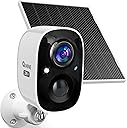


| ASIN | B0D838CYXG |
| Alert Type | Audio and Motion |
| Antenna Location | Backyard, Chicken Coop, Driveway, Outdoor Security, Porch |
| Are Batteries Required | Yes |
| Best Sellers Rank | #1,684 in Bullet Surveillance Cameras |
| Brand | QNINE |
| Built-In Media | 1 x Camera and solar panel, 1 x USB cable, 1 x Wall bracket, 9 x Screws, Instruction Manual |
| Color | White |
| Compatible Devices | Smartphone |
| Connectivity Protocol | Wi-Fi |
| Connectivity Technology | Wireless |
| Control Method | App |
| Controller Type | Android |
| Customer Reviews | 3.7 out of 5 stars 31 Reviews |
| Enclosure Material | Acrylonitrile Butadiene Styrene (ABS) |
| Form Factor | Bullet |
| Indoor Outdoor Usage | Outdoor |
| Indoor/Outdoor Usage | Outdoor |
| Installation Type | Freestanding & Screw In |
| Item Dimensions | 2.6 x 2.2 x 3.5 inches |
| Item Type Name | Wireless Camera with Solar Panel |
| Manufacturer | qnine |
| Mount Type | Wall Mount |
| Night Vision | Yes |
| Night Vision Range | 33 Feet |
| Number of Items | 1 |
| Other Special Features of the Product | 2-Way Audio, Built In Light, HD Resolution, Motion Sensor, Night Vision |
| Power Source | Battery Powered |
| Recommended Uses For Product | Backyard, Chicken Coop, Driveway, Outdoor Security, Porch |
| Room Type | Garage |
| Shape | Bullet |
| Special Feature | 2-Way Audio, Built In Light, HD Resolution, Motion Sensor, Night Vision |
| Specific Uses For Product | Surveillance |
| Unit Count | 1.0 Count |
| Video Capture Format | MP4 |
| Video Capture Resolution | 2K Plus |
| Video Encoding | MPEG-4 |
| Viewing Angle | 110 Degrees |
| Water Resistance Level | Water Resistant |
| Waterproof Rating | IP66 |
| Wireless Technology | Wi-Fi |
U**O
Good Hardware, App Could Be Improved
This camera is identical to another camera I have that was branded differently. It performs quite nicely in general, both in daylight and dark conditions. Image quality is decent and the energy efficiency is cutting edge - lasts weeks between charges, and only needs charging if your solar panel isn't receiving direct sunlight, such as would be the case with a North-facing installation (in my case). One gripe I have is how at the beginning of every recorded clip the image seems to "fade-pop" onto the screen, like having bad vision when you first wake up in the morning (since the camera is indeed waking up to make the recording after sensing a motion event). The case, styling, connections, weatherproofing, LED indicator, lenses, sensors, etc are all of high quality materials and designed with the latest stylistic sensibilities, though the mount seems outdated and generic. The biggest gripe is with the app . . . I am using the Vicohome app that I use with my other camera to keep both cameras in the same app. Installation of the app and the camera is easy and basic, but actual use of the app when trying to actually locate an event leaves out some important navigation features such as fast forward, bookmarking, etc. I can't get into all the app features that would be nice to have (like I enjoy when using my POE IP Camera System with QNAP's QVR Pro), because that would take a long time to detail. I can say however that the basics are all there in the app, and with a little (or a lot of) work, you can eventually find specific events and put the camera(s) to some good use. I just wish the software engineers had actually tested the app for usability using real-world scenarios - then they might have included a few more considerate features in the app. I don't use the subscription plan, but instead installed on-board SD memory so I can view clips up to 3 minutes long (instead of the free subscription which only offers 10 seconds). I think it is a cheap shot that some "AI" features such as zones and human/object recognition are held hostage behind their subscription paywall. In any case, the subscription seems reasonably priced, though I cannot comment about the performance of the features that are offered. For just over $50, you get a decent wireless camera with app and solar panel. Not a bad deal and not a bad kit if you're just getting starting with video security.
B**B
See Update. VicoHome App. Records withOUT WiFi on. Blurred picture when moving.
Generally speaking, how well a camera works depends in large part on the app. How well the camera triggers depends on a lot of factors as well, but I would say this one triggers well (as in more often than not). Pros: 1. Well made. Rated IP66 which is higher than the minimum IP65 rating that you would want for an outdoor electronic product. (IP is a weather rating system for proofing from dust and water.) 2. Uses Vicohome app which allows you to record video with WiFi off. This is a plus because nowadays, thieves are blocking WiFi and breaking in. Then you would have no alerts and NO VIDEO. 3. Has 2 ways to mount (see pic): there is a place to screw the camera to the mount in back and on the bottom which gives placement flexibility. 4. Video quality is good EXCEPT the parts that are moving. (see Con #1 below) 5. The app will allow up to 3 minute recordings on micro SD card if you don’t purchase cloud service, which is great, and no “cooldown” time, which is the time before the camera triggers again after the last recording. (Note that max cloud recording time is 20 seconds if you don’t have cloud service.) 6. You can replay video using standard video software available on your computer or phone. (Previously, you had to download special software.) 7. Each video will also have a picture associated with it that is some point in time during the video. This often helps if you want to see what is in the video without watching the video. 8. App is made by a Singapore-based company and the terms say that the laws of your country will govern. This is very important given the nature of the data. Because of this characteristic and #2 above, Vicohome is my go to app. I will get any camera that uses this app. 9. Doesn’t force you to provide your location. You don’t want a security camera app to have access to your videos AND your location for privacy purposes. Cons: 1. While the general picture quality is good, the MOVING parts of the video are BLURRED! I couldn’t believe it and had to check and recheck and then compare it to video from a different camera. I would provide a video, but for privacy purposes, I don’t post video with people in it, even if it is blurred. Basically, unless you know who that person is and what they look like, you won’t be able to see their features except for hair color. 2. Difficult to play back video on the mSD card. This is an app issue. Events are shown as round circles and if you don’t want to view the entire event, you have to line up the line with the end of the circle so that it will auto advance to the next event. Otherwise, if you try to line up the line with the beginning of the next event, you will probably miss the first part. 3. No way to speed up video replay. 4. No way to download video from the mSD card onto your phone or delete events, so you have to remove the card and load it to your computer (or wherever) if you want to save something. I put up with Cons #s 2 – 4, but unfortunately, Con #1 is a deal breaker. The whole point of security cameras is to catch thieves and culprits, and the only way to do that is to be able to SEE who they are! Two star ding for the blurred movement. I should ding it 3 stars because I can’t recommend this camera at this time. However, if they are somehow able to correct this problem, which to me, should be doable since every camera I have ever used, from regular camera, to cellphone camera to security camera has NOT had this problem until now, then this camera would be perfectly usable and 5 stars. : / P.S. – I noticed that one reviewer said you have to set up an account. Maybe I’m missing something but every security camera that I have gotten requires an account setup. Update: Regarding the blurriness issue, apparently this is not camera specific, but is related to the app. (I noticed that the video of the other branded camera that I was comparing this video to, also seemed to have become blurry.) The customer service manager happened to contact me and I informed her of my suspicion. She relayed my concern to the app maker. I was informed that the app maker determined that the blurriness was due to internet speed. Given the time consuming nature of testing this issue, I accepted this explanation for now even though this is the first time this has come up and I have 3 other security camera apps that I use. Although, in fairness, this is the first time that I have seen this with the Vicohome app as well. I will monitor for now and if it happens again, I will try to confirm. The video has since improved but is still not quite clear. I just don' t have time right now to compare the videos to the videos from different apps I revised my rating to 4.5 stars for now. If I do find that this is indeed an internet speed issue, which is a reasonable explanation, I will update my rating to 5 stars.
S**R
Reliable and Efficient Solar-Powered Camera for Outdoor Security
I ordered the QNINE Solar Camera for outdoor security, and I’ve been very impressed with its performance so far. The camera provides high-quality 2K-plus resolution, which ensures clear video footage both day and night. I was particularly pleased with the color night vision, which works well even in low light. Whether it’s watching the driveway or my backyard, this camera delivers crisp and detailed images, helping me keep an eye on things without any trouble. One of the features that stood out to me was the continuous power supply provided by the solar panel. Since it’s equipped with solar power, the camera doesn’t need frequent recharging, and I don't have to worry about changing batteries. Even in a high-traffic area like my porch, the camera stays fully charged, which is a huge convenience. The solar panel ensures that the camera remains operational, making it perfect for areas where you might not have easy access to power outlets. Another great feature is the motion sensor and AI capabilities. The camera intelligently distinguishes between people, pets, vehicles, and packages, which minimizes unnecessary alerts. I’ve noticed this feature in action, as I’ve received fewer false alarms compared to other security cameras I’ve tried. It’s been especially useful when monitoring the front of my house, where motion detection is crucial. The camera’s weather resistance also makes it suitable for all seasons, as it works in temperatures ranging from -4°F to 122°F, so I don’t have to worry about extreme weather conditions. Overall, this solar-powered security camera is a solid choice for anyone looking to monitor their property. The image quality, motion detection, and solar efficiency make it stand out in its price range. The app is straightforward, and the installation process was simple. While the app could use a few more features for better usability, it gets the job done. If you’re looking for an affordable, reliable, and low-maintenance security camera, I highly recommend this one.
D**N
Subscription may be optional, but setting up an account is mandatory
To set up this camera I was directed to download the app from the iOS App Store, which I did. The written instructions that came in the kit then direct you to follow the app for the rest of the set up. Once I started that process, I discovered that you have to set up an account with the manufacturer in order to access the camera at all. I could not find any way to bypass this requirement. I went ahead and set up temporary credentials in order to gain access. In my opinion, anyone who is purchasing a security camera is obviously security conscious and it seems counterintuitive to provide personal and network information to some unknown server. Anyway, the actual camera seems to be well-made with good materials. The optics are clear, and the mounting options are versatile. The mounting base has a ball head swivel, which can be attached to the back or bottom of the camera. Having a large variety of mounting options is super handy. The power port, multifunction button, and SD card slot are all accessed by removing a rubber cover on the bottom of the camera. A long press of the multifunction button powers the unit on and put it into pairing mode for the app to recognize. This power on function was not initially intuitive. The app was acting like it should be connecting, but it wasn’t, so I found another option on the screen that led to a help section. This subsequent screen had me scan a QR code on the bottom of the camera. Once this was done, everything was clear for the rest of the setup process. Once the camera was paired, the app urged me, and I truly mean URGED, to subscribe to their cloud service and offered a free trial. When I clicked on the button to opt out, I got another “are-you-really-sure” screen, and had to opt out AGAIN. Very annoying. Once I was done promising the app that I really did not want their subscription, I was able to operate the camera. The features and the options available in the app were pretty good. The abilities to control the recordings, access the two-way communication through the camera speaker/mic, turn on the light, and control what gets recognized and in what zones, are all fairly intuitive and simple to customize. The AI image and shape recognition are quite impressive features. Finally, the solar panel has an interesting look and texture to it that you don’t generally see on solar panels. Instead of the smooth surfaced grid that is most common, this panel has a rough, bumpy texture, and no visible grid (unlike the pictures on the listing). I can only assume that the little bumps have something to do with absorbing or processing light, and I would be interested to find out, but it’s kind of cool that it’s different. The mount for the solar panel is of a very cool design that I have not seen. Not only is it adjustable for tilt on one plane, but it is rotatable on another plane, so you can get the optimal angle for sun exposure at that particular location. The most interesting aspect of this mount is that it folds flat when not in use. I’m surprised that this mounting design isn’t more widely used. In conclusion, I think this would be a great little camera set up if it just wasn’t so electronically invasive.
B**.
Love it
Love this camera, one of the best that I've had. Weatherproof. Records so clearly, the sound is clear and loud. Picks up every motion, and records 20 sec automatically. Haven't had any issues.
L**R
Easy to deal with!
I let my husband handle this one and he gives it a very positive review. He was impressed with how easy this was to set up with the app as he found it straightforward and uncomplicated with clear directions. He charged it up using the USB which was also pretty quick. The hardest part was deciding exactly where we wanted to place the camera outside as we live in a condo which should have a pretty private patio area - which is what we wanted to monitor. Having installed it 10 days ago it has held full charge. I was worried that it would be too dark outside at night to register anything but, in fact, the image manages to look as though the patio is lit up. Since installing it, I'm happy to say we've only had one alert. It was in the day and we could clearly see that it was one of the landscapers walking by. I've always felt apprehensive about this area at night as we are on the ground floor but having this camera installed actually makes me feel much more relaxed. I'm really happy that we've finally found a way to address that nagging anxiety and very grateful that it turned out to be a pretty simple, straightforward solution.
O**R
Decent Camera but Glitchy and Limited Soiftware
I have had a week or so of experience now with this camera and its related VicoHome app software and my initial reaction has been decidedly mixed: Camera: Decent picture day and night: Night is B&W. Limited field of view at a listed 107 degrees which is slightly better than a quarter of a circle. Is attached to supplied solar panel and so far it seems to be keeping the battery charged. Have not had enough experience yet to see how it will do in the winter with shorter days and low temperatures. It claims performance to close to 0 F. The wifi connection has been no problem. Was fairly easy to synch with our home network and get a good strong signal and feed. With a number of clips including a couple of zone notification clips, I found the camera was slow to pick up on motion. Instead of starting when the motion is detected, it appears in some cases, to not start recording until well after the motion has started. So instead of seeing someone getting into a car and driving away, the clip shows the vehicle out in the street at a time period that has to be 30 seconds to a minute or more AFTER the motion began. The camera records audio, but the clips we have captured don't include very good audio. There is a capability to turn on a light and to communicate with someone over a built in light and mic in the camera we have not needed or used that feature. Sharing was also relatively simple. My partner downloaded the software, clicked add a camera and I then had to give her permission to add the camera in my name. Software has a lot of problems and limits: You can create zones within the overall field of view by drawing shapes to surround the zone and supposedly you can tell the software to send you notifications ONLY when it detects movement of a car or a person in the zone. (If you got a notification every time a car went by, you would be bonkers by sundown.) When you do get a zone notification it does not tell you what time the clip was taken (I have the software set to record for 20 seconds once it detects motion in the zone.) If you try to find that ZONE clip, it can be like finding a needle in a haystack. We live at an intersection in a not all that bustling neighborhood, but in a given 24 hours, we can wind up with over 100 clips on file of cars, trucks and people passing. So zone notices....the main reason we are interested in the device...do not take you directly to clips associated with notifications. You have to try and find them amongst everything. Editing: With over 100 clips a day fairly common, you need to delete old clips or you will find thousands quickly back up that need to be deleted. The software does offer a command to SELECT ALL and then you can click the trash icon and then (maddeningly) have to click on delete again to get it to actually complete the task. Trouble is, while the command says SELECT ALL, in fact it just selects 20 at a time, so if you have 100 clips to delete, you have to SELECT ALL, trash can, delete.....five times. I could find no way to either increase the number of files actually checked with a select all command or actually get it to delete them all at once. A thousand clips would require 50 separate deletion command cycles. This is an inexpensive camera and as such one does not expect a lot overall. The imagery is good and it does capture the areas I want (except for the problems with the limited FOV) but the management of clips and the utility of the supposed notification services are negatives. If we were using the camera indoors to capture things while we are away we would obviously get fewer clips, but for the purposes we wanted if has severe limits. Bottom line: The camera is OK, but the software has a lot of problems. Of course if you want more coverage, you can always add more cameras to your system since they are fairly inexpensive, but that will also mean you are generating even more clips that need to be deleted with the kludge software. In the end you have to spend a lot of time in file management.
D**A
Not bad
Easy to use and gives some peace of mind about battery.
Trustpilot
1 month ago
2 weeks ago