


Desertcart purchases this item on your behalf and handles shipping, customs, and support to UAE.
⌨️ Elevate your workflow with ergonomic precision and wireless freedom!
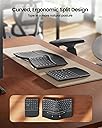
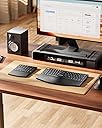
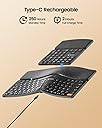
The ProtoArc EK04 Wireless Ergonomic Keyboard features a split curved keyset and hard leather wrist rest designed to reduce wrist strain. It connects via a 2.4GHz USB receiver for instant plug-and-play on Windows devices, includes a separate numeric keypad for flexible setups, and offers rechargeable lithium batteries with up to 250 hours standby after a quick 2-hour USB-C charge.






| ASIN | B0DQ8BG849 |
| Additional Features | Ergonomic, Hard Wrist Rest, Low-Profile Key, Separate Number Pad, Split Keyset Design |
| Antenna Location | Everyday Use |
| Best Sellers Rank | #1,294 in Computer Keyboards |
| Brand | ProtoArc |
| Built-In Media | Type-C Charging Cable, USB Receiver (on the bottom of the keyboard), Wireless Ergonomic Keyboard, Wireless Numeric Keypad |
| Color | Black |
| Compatible Devices | Windows Desktop, Windows Laptop, Windows PC |
| Compatible Operating System Family | Windows |
| Connectivity Technology | 2.4G USB |
| Customer Reviews | 4.1 out of 5 stars 342 Reviews |
| Enclosure Material | Leather, Plastic |
| Keyboard Description | Ergonomic Split Design, Separate Numeric Keypad, Hard Wrist Rest |
| Keyboard Layout | QWERTY |
| Manufacturer | ProtoArc |
| Mechanical Keyboard Switch Model | Scissor-Switch |
| Minimum Required Operating System Version | Windows 7 |
| Number of Keys | 114 |
| Recommended Uses For Product | Everyday Use |
| Special Feature | Ergonomic, Hard Wrist Rest, Low-Profile Key, Separate Number Pad, Split Keyset Design |
| Unit Count | 1 Count |
| Warranty Description | 1 year warranty |
K**N
Great, replaced Microsoft natural 4000
Great key placement, performance, noise. I used a Microsoft ergonomic natural 4000 for over 10 years (still going strong), but I decided to try a separate numpad. I'm loving it! The negative tilt is just right. The size is awesome. I think I am even typing better without all that extra keyboard! I can place the numpad on the other side of my mouse, and I am so much more comfortable. The numpad is not perfect for me: it's a bit wide, doesn't have 00 key, backspace or tab key. I'm still enjoying it though. The wrist pad is hard, but the leather is comfortable. I've developed a little callous on my right palm as the Microsoft has a cushioned (but worn and peeling vinyl) pad. Overall, really enjoying this keyboard! (35 hours a week)
S**R
Long battery life, good quality, good feel
Works great, love that it’s rechargeable rather than using standard batteries. Been using it for two weeks (at least 100 hours spent), and it’s still running on my first charging session from when I opened it! Love the number pad separated so I can put my mouse where I need it. Key spacing was a little different from my last ergonomic keyboard, but I adjusted pretty easily and it’s not a big deal. Quality is good. Feeling on my palms/wrists is good. No issues at all with connectivity. Very happy with this purchase and would buy again!
M**H
Incredible keyboard for the price
As an author who's been using traditional mechanical slab keyboards for literal decades, being told by my physical therapist that I had to step sideways to a raised, split keyboard was worrying. Not only was I concerned about being able to adjust to the split and front-lifted layout, the cost of some of the "better" ergonomic keyboards was intimidating. I'd never spent more than $60-$100 on a keyboard before, and even the less expensive "good" ergo keyboards were in the $150-$400 range. And after trying a Kinesis mWave, I was worried about the comfort and quality of the current generation of mechanical switches as well. Enter the ProtoArc EK04, which was recommended to me by a friend. The price was right (really right!), so I gave it a try. Then, after two weeks, I bought a second one to use at work. This keyboard really punches out of its weight class. It took me a bit of time to get used to the layout and the spread of some of the keys, but after a week my typing speed was almost back up to normal. After two weeks, some of the pain and stiffness in my hands and fingers had begun to go away. After a month, I'm back to being able to type for extended periods without the kind of discomfort I was experiencing, and my typing speed and accuracy are almost back to what they were. Additionally, I love being able to put the numeric keypad over on the left side. It took me a little while to train my left hand to work those keys, but having the main body of the keyboard centered on the screen and my mouse closer in has reduced my neck and shoulder pain, in addition to the benefits to my hands. The duplicate arrow keys and delete key are convenient, but the duplicate Print Screen key is kind of a waste (even though I use PowerToys to reprogram it...it would've been nice to have an extra key there, rather than a duplicate). Battery life seems excellent...I've only had to charge both halves of the keyboard once since buying them, and I'm not sure I really needed to. They were both fully charged within 20 minutes. Both parts of the keyboard are very responsive, with no noticeable delay when starting to type on them after they've been idle for a while. My only complaint (what cost the keyboard one star) is that the build quality feels cheap; you get what you pay for. It's all plastic, and is rather creaky, especially around the palm rest. The key action is a little too stiff, but is getting better as I break it in. Hopefully they won't get mushy over time. I'm also a little disappointed that the USB ports are for charging ONLY...the keyboard's connection to the computer is wireless only. It'd be nice if they worked plugged in, without having to rely on a dongle for the connection. But that's probably part of how it's so inexpensive. And as I noted, the 2.4GHz wireless on this is surprisingly responsive, so I really shouldn't complain about it too loudly. In the end, considering the price (I picked up both of mine for about $45 on sale), this keyboard is really exceptional. If ProtoArc made a more expensive version of this keyboard, in the same two-piece layout, but with better materials, I'd probably buy one right away. But in the meantime, it's done wonders for my carpal tunnel and I have no complaints about how well it works.
S**G
Microsoft Sculpt Replacement
I had the (now defunct) Microsoft Sculpt wireless keyboard for work for years. It was very easy on my hands and saw heavy duty use. After several years, it died and I was devastated: they don't make them any more. (It's my understanding the dongles don't mix and match, so buying used is a big gamble.) I couldn't find a decent split, thin profile keyboard other than this one. I was hesitant but also desperate, so here we are. It's great. Easy on the hands, sees at least 40 hours of use every week, each part is charged every 1-2 weeks. Wonderful substitute, my only complaint is the logoff button on the numpad. Work pc won't let me adjust definitions and so every time I bump it, there's a long process because work pc. I made a sad little cardboard cover to block it, but it slips off. Other than that, very happy with it.
J**K
Does not work reliably.
I wanted to give this a good review, it is a decent keyboard but I constantly have to plug it in, battery life is not good, I keep getting the keyboard repeating letters uncontrollably. I use it on a work computer where I cannot install anything so I cannot try to pair it with the receiver through their software, I will stick with elgo.
L**S
Solid performer, 1 year in use.
I've been using this keyboard for a year now for both work and gaming. I type quite a bit and this keyboard has worked great! The keys have a short throw (movement from top to bottom) which seems to increase your typing speed. The key resistance is really good, not too hard, not too soft and the size and key placement is good as well. I actually just leave it plugged in all the time to a USB hub to keep it charged since I'm not moving it from my desktop, so I can't comment on battery life. I do wish that the function keys defaulted to the function keys instead of defaulting to the special (sometimes rather odd) things they do and you have to hit the Fn key to get the actual functions, but that seems to be common with keyboards now. Overall, it's been a really solid and reliable keyboard and their customer service has been excellent!
L**R
Working out so far
Working out so far. Not nearly as ergonomic as I'd like. I would really like i the keyboard to be split into three pieces, out at least to have the split going down the middle of the letters. I do like that the numpad is separate, I can use it when I need it and set it aside. I would like if the letters were split as well. I also prefer wired, but I'm also not paying exorbitant amounts for a keyboard. No way in hell in paying $100+ for a keyboard. Anyways this is working out so far, the jets make some noise but it's not ridiculously loud. The actuating distance is a bit short, there are still mistyped characters from neighboring keys. This keyboard can take some force on the keys, so you don't have to be super light on the keys. I found using a little more force helped with accuracy.
I**R
!!! You need not look any further, this is the perfect ergonomic keyboard.
This keyboard is amazing!! Especially for lefties like me, the separate number pad is a lifesaver. And with it separate, if you have a small work space, you can put it in a drawer easily, even a shallow one. It's very comfortable. The keys are quiet, soft touch, and not too touchy or hard-strike. This is really the Goldilocks of keyboards. If all you've used before is a straight keyboard this will take getting used to, but that's just the nature of the beast; ergos take getting used to. But absolutely, if you're looking for an ergo, and especially if you're left handed, buy this one!
A**.
Not ideal
Not most typing friendly. Missing Martian regular keyboard keys, not ideal for Mac users.
D**G
Perfectly balanced Ergo keyboard with a brilliant split keyboard approach for easier mousing
Finally, real engineering thinking went into an ergonomic keyboard. I love this. It's the right price. The reason I bought this one was the price, but I was hoping for the best. The simple design logic of splitting the main keyboard from the extended numbers pad is brilliant. It seems so obvious. First of all, people hunting for ergo keyboards also use keyboard trays to make sure their elbows at the right height -- and most of these aren't that wide. This design solves the problem by splitting off the numbers pad -- now you can move it in when you need it without forcing your mouse hand far to the right in an bad ergonomic zone. Simple, right? So why don't more keyboard makers do it? I bought their matching "handshake" mouse as well (the vertical kind -- it's very good too.) Is it ergonomic? It is for my hands (normal sized male hands). I saw one person complain about keyboard click, but I don't notice anything. I have mechanical keyboards, which are far noisier. This one is slightly clickier than a logitech, but way quieter than a mechanical. It's perfect for me. The keyboard layout is good, except I'm a Mac user, so the Windows key I had to train myself to think of it as the Mac Command key -- I just had to force myself to use it. It's counter-intuitive. I like that it's rechargeable on USBC -- charged quickly, and havent' had to recharge so far in heavy use (I type about 10,000 words a day). Highly recommended. I like the faux leather hand rest better than a spongy memory foam style (like Logitech's ergo keyboard, which I have as well -- those foam ones are softer but get dirty from sweat, cat hair (in my case, since my cat likes to sleep on keyboards), etc. I like the faux leather feel and style. Thumbs up all round, except the stupid Win Key, and I think it's a mistake to have the power button on the bottom (Most people probably don't turn off keyboards, but I do, otherwise my cat will be sending emails to people.) .
M**L
It's great! For my use case at least
Ergonomics: 10/10 Portability: 10/10 Modularity: 10/10 MAC/PC compatibility: 10/10 Connectivity: 7/10 - no bluetooth connection unlike the EK01, this needs dongle connection Button feel: 7/10 - the EK01 feels so much smoother to press. This feels like a silicon-based keyboard, leaving it feel a bit cheap. Why did I choose it over the EK01? Because the first 4 of the metrics mattered more to me. If you have table room to spare and don't mind the size, EK01 is definitely the better choice. I, on the other hand, am used to TKL keyboards, so I prefer this one despite the drawbacks. You just got to find what works for you.
S**S
Fantastic keyboard at a great price.
From opening the well designed, high end packaging, to usage, I am extremely impressed with this keyboard, especially at such a low price point. Connection is seamless with the included dongle (no Bluetooth) and the keys have a satisfying sound. Having a separate numpad with its own arrow keys is a great idea and allows for your mouse to sit closer to the keyboard in addition to providing space on smaller keyboard trays. I would definitely recommend this keyboard for those looking to improve ergonomics. My only critique is the fact this specific model does not connect via Bluetooth, but it is available on other models.
V**A
Pourquoi je ne l'ai pas acheté avant!?
Je regrette d'avoir passé toutes ces années sans. Bien qu'une adaptation pour réapprendre à taper est nécessaire, la position des mains est tellement plus naturelle et cela enlève beaucoup d'inconfort et de tension. De plus, avec le clavier numérique séparé (que je me sert constamment) je peux le placer de l'autre côté de ma souris et c'est merveilleux. Ce n'est plus a moi de me déplacer pour travailler confortablement. Aucune difficulté a faire fonctionner ça a été du "plug and Play", la batterie sans fil dure très longtemps. Et évidemment l'ergonomie est respectée. Un investissement qui vaut la peine sans aucun doute pour ma part.
Trustpilot
2 days ago
2 months ago