

Buy anything from 5,000+ international stores. One checkout price. No surprise fees. Join 2M+ shoppers on Desertcart.
Desertcart purchases this item on your behalf and handles shipping, customs, and support to UAE.
💼 Own your data, share your world — the smart NAS for the modern professional.
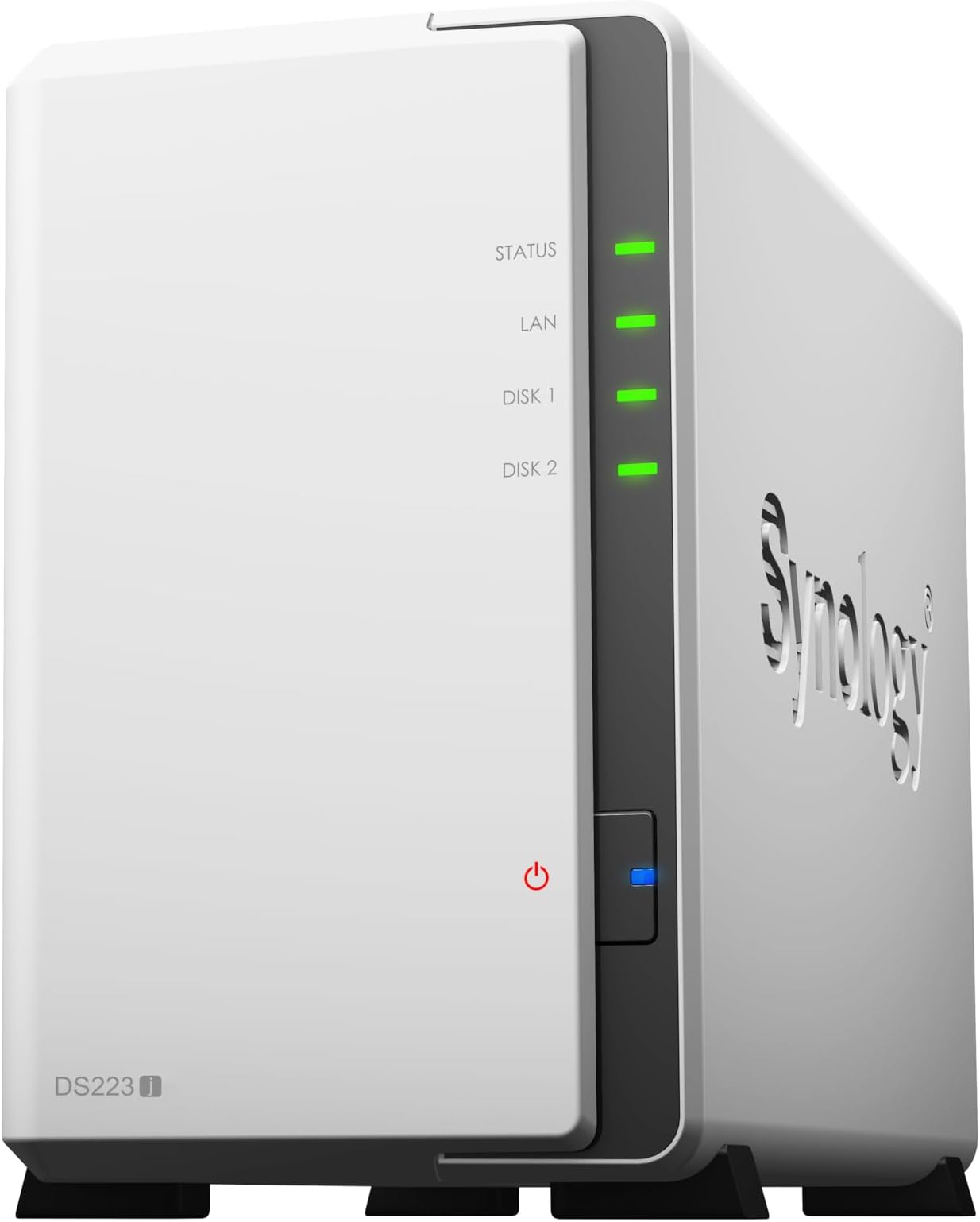
The Synology DS223j is a beginner-friendly 2-bay NAS designed for personal and home use, featuring a quad-core Realtek CPU, 1GB RAM, and 1Gbit LAN connectivity. It supports up to 36TB of storage, enabling secure, multi-platform access and advanced data protection through RAID and snapshot technologies. With Synology's intuitive DSM OS, it offers seamless file management, backup, and sharing across devices, making it an ideal private cloud solution for professionals seeking reliable, scalable storage.


| ASIN | B0C8814GKB |
| Amazon Bestseller | #16,367 in Computers ( See Top 100 in Computers ) #12 in Network Attached Storage (NAS) Enclosures |
| Brand | Synology |
| Color | white |
| Compatible Devices | Desktop |
| Customer Reviews | 4.5 4.5 out of 5 stars (796) |
| Global Trade Identification Number | 00846504004768 |
| Is Assembly Required | Yes |
| Item Dimensions D x W x H | 226D x 100W x 165H cm |
| Item Weight | 0.87 Kilograms |
| Manufacturer | Synology |
| Mfr Part Number | DS223j |
| Model Number | DS223j |
| Mounting Type | Tabletop |
| Size | 165 mm x 100 mm x 225.5 mm |
| UPC | 846504004768 |
| Warranty Description | 2 years |
H**O
シンプルかつ充実したサービスが魅力の安定NAS
人生で初めて導入したNASが突然一切通信不能になってしまい「HDDは壊れてないのに実質データを消失する」という悲しい目に合う羽目に…。ちゃんと安定したのが欲しいと強く思い選んだのがこちらのNAS。 最初のNASは導入時点でHDDが2台入っていましたが、こちらはHDDは別売りのためNAS用のHDDを合わせて購入しました。 ハードウェア設定には少し手数を要しますが、付属のマニュアルが丁寧なのでその通りに進めればOK。私はデータ保護に重きを置きたかったのでRAID1構成にしましたが、他にもいくつか構成を選択できます。最終的にNAS内に専用のOSをインストールして無事導入完了しました。 NAS内のOSにはブラウザを通してアクセスでき、様々な設定を行えます。一方でNASの主目的であるバックアップを行うにはバックアップ元のOSにクライアント用ソフトを入れる必要があります。私はWindowsとUbuntu両方にソフトを入れ、特定フォルダを毎日定期バックアップしています。ソフトを通して現在のバックアップ状況やログの閲覧など行えるので便利です。何か起きた際にはNAS内OSに設定したメールアドレスに報告が飛びます。家のネットワークの調子が悪い時に一度メールが届き、クライアントソフトを通して手動で再バックアップを取る事ができました。 NASを通してやりたい事がNAS内のOS用に提供されているパッケージで実現できるので、シンプルに使いたい人はシンプルに、色々凝りたい人はパッケージをドンドン導入して豪華にと、使う人の技量や要求に合わせた使い方ができるのが素晴らしいです。UIも非常に丁寧に作られていて、使い手にちゃんと目が向いているのが良く分かります。 導入して本当に良かったと心から思える製品でした!
A**R
OS, ソフトウェアがこなれていて使いやすい
他社製品と迷いましたが、他の方のレビューなど参考にして購入。満足しています。OS, ソフトウェアがこなれていて使いやすいです。(一部わかりずらい所もありますが、Web情報で補完。)個人利用では満足感高いのではないでしょうか。自分の反省ですが、購入前に何を実現したいか目的を再確認し、ベイの数、HDDかSSDか、RAIDとバックアップの構成は何が適切か、をもっと考えておけば良かった。(無理にSSDにしなくともHDDで速度、信頼性も十分だった。)
K**O
ド安定NAS
1年以上使ってるが対応ドライブさえ使っていれば何の問題もなし。非常に安定していて良い製品。当初は非対応SSD使ってトラブルがあったが、自己責任と考えている。 なお、メモリがもう少しあったらdockerなどで色々動かしてということも可能だが、1GBではやれることは限られるので留意すると良いと思う。
K**K
音は気になるが許容範囲
設定は思っていたより簡単でした。 たまにウイーンという音は聞こえてくるので寝室には置かない方がいいかな…。 写真管理に今後使いたいです
ド**ン
安価NASの最高峰
素晴らしいNASです。設定も楽 しかし、HDDの抜き差し間違いのランプはありませんのでHDDにNOを記載して組んだ方が良いです
A**ー
流石、シノロジー
2代目のNASです。 2ベイですが、WD REDPLUS2TB1台で運用しています。 前は120jで、メモリー量が少なくレスポンスが悪かったので、この製品は、ストレスなく動いてくれます。 PCのバックアップと、防犯カメラの視聴、録画に使っています。 無料で2台まで、常時視聴、常時録画でき、稼働音はあまり聞こえません。 思ったとおりの動きをしてくれているので、2ベイ運用と、カメラ視聴のライセンスを追加購入しようかと、思っています。
ゅ**ぁ
最高
セットアップからPlanex USB-LAN2500R2で2.5GBEにして使用。 認証系とかいろんな機能があるので色々遊ぼうかと思っているけど今のところは普通のNAS使用のみ。 静かだし安定してるしで最高ですね。 あっという間に9ヶ月経ちました。このまま10年くらい使いそうです。
T**S
ハードは良いけど、Synologyのクラウドサービスなどはよくできてないし、サポートは存在してない。
ネットワークスペシャリストには役に立つかもしれないが、一般のユーザにはお勧めできない。 インターネット環境によっては、エラーメッセージが頻繁に表示され、ファイルを開けなかったり、ダウンロードできなかったり、また非常に遅い時も多い。 iCloudまたはGoogle Driveの使いやすさとは比べ物にならない。 サポートはメッセージでのやり取りしかなくて、役に立たない。
L**1
Gut
Gutes NAS . Leicht einzurichten. Bisher ohne Probleme .Kein Zwang zu Cloud .
C**E
Does exactly what it should, straight out of the box, painlessly.
This is the least painful setup / configuration experience I have had with any product (including Apple devices) in my entire life. After tossing two SSDs into the internal drive bays, closing it up, plugging it in and pressing the power switch, the DS233J detected both drives, and proceeded to initialise and configure itself pretty much on auto-pilot (while still providing lots of options to fiddle with, if desired, along the way). The web-based setup assistant is idiot-proof (witness myself; exhibit A!), and the only extra step involved in my particular case, was quickly installing the Media Server app from within the web-based management environment (said installation took around 5 seconds, total), at which point, my smart TV immediately recognised the DS233J as a valid input source, and away it went, streaming movies, photos, etc. Network access to the RAID array in the NAS was seamless, from all devices in the house (Chromebook, Mac, Windows PC), and everything functioned as expected, without any further config. hurdles. This thing is small, lightweight, very very quiet (it does have a fan, but it's barely audible even up close), and the setup process and management software are absolutely superb. Even if you barely understand anything about NAS's, filesystems, RAID setups, or DLNA servers, you can have this device up and running within just a few minutes. Basically, it does exactly what it's supposed to, and does it in a way that should make Apple jealous.
W**N
Up up and away!
Finally took the plunge into getting a more solid backup solution. I have been backing up stuff for YEARS due to a heavy lost back in the 90's. So since then I've started to back up religiously!! The sad part is back in the 90's the HD was like what... 3GB maybe 6GB. Now you got TB's. Well more stuff on 1 disk, but if that disk dies or fails.... you are SOL right. Well, I've been just backing up from drive to drive piggy backing if you will and finally I decided to try a better solution with this drive/backup system. It was recommend by someone in IT as pretty decent and it didn't break the bank! So I got it, came pretty fast I think 4 days max along with a 14TB drive (different order) this thing doesn't come w/ a drive just so you know. Setup was pretty easy, but the interface is something I was not familiar with, so it took a little bit to get use to it, but now after a month or so its just doing its thing since I have it setup. PRO's - Nice design (looks nice), easy to open/close get your drive in etc. It also has USB port in the back which is excellent! I hooked up all my (old drives to be backed up) and once setup, I was able to transfer easily from those drives to my big 14TB. So pleased with that. The webpage/browser access is ok, lots of stuff which I have no clue how to use or why I would use it... Just wanted a drive that I could "share on network" without having to have it hooked up to a pc/laptop running 24/7. This does the trick as it has a network cable and is accessible without a PC being hooked up to it. *Although I haven't figured out how to access it lol* But hey any access I need I am at home so all good for me. For your techies you can probably figure out the offsite access fairly easy I am sure. Ohhhh one feature I did understand and was able to setup really easy is this power on/off of the drive. You can setup a power off and power on time, which is cool and I think that helps because I have it turn off like midnight and then back on around 7am. So it gets a little breather..... as I am sleeping. hahahahaha CON's - Hmmm the software is bit complicated for my taste, but maybe these types of setup are ALL like this so it may not be a huge CON if that makes sense. The stuff I needed to figure out and to use I did, so if you are along my speed (know enough to be dangerous) you should be fine. The only CON and its not huge, but it drives me crazy is this one. So when you plug in a USB drive to the system.... it calls the drive USB SHARED 1. I'd like to change the name to something I can remember... so my naming convention was out the window and luckily I still had my old laptop hooked up to figure out what drive what was so I could AT LEAST keep the (drive letter) the same. That I was familiar with so a little pain, but workable. Overall.... SOLID! I'd get this again for sure! If you don't have the $$$ for a larger drive system (like 4) then this TWO drive system is affordable and solid so far. I think there is even a RAID function for cloning drives in the system if you want to do that, but for me I just wanted to backup the other USB drives I had to another drive and I've done that. So I have 1 slot open for a drive to expand when the time comes. Maybe when I get bored I will look into the webpage "apps" and see what all I can do. There are photo apps and things which I think will let you share photos.... its basically like your "own" personal cloud although I don't have it setup for access like that it would seem. I did however get my PLEX stuff over to the drive and so that's cool! Hope this is somewhat helpful for at least those who may now be as knowledgeable like myself with these setups. :-)
V**T
Synology DS223J NAS: A Compact Powerhouse
The Synology DS223J NAS impresses with its swift performance and user-friendly interface. Its dual-core processor and intuitive DiskStation Manager software ensure smooth operation for tasks like multimedia streaming and remote access. The sleek design, multiple connectivity options, and built-in applications add to its appeal. While expandability options could be more robust, the DS223J remains a top choice for home and small office environments, offering excellent value and reliability.
T**.
Compact, stable, app easy to use, happy with it
Used for a week, it is good and performs as expected. Phone wireless backup is easy to set up and works smoothly, take a bit of time for first upload a few hundred GB of media. The app is user-friendly, making setup and file sharing simple. App will stop when you use the iphone even focus mode enabled. That can be improved though. Overall, it’s smaller and better than expected for daily home use. I’m using normal older HDDs and it still runs well. There is a bit of noise when it’s running, but it’s acceptable.
Trustpilot
1 month ago
1 day ago