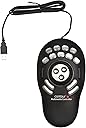
ContourDesign ジョグホイール/プログラマブルショートカットボタン Shuttle PROv2 輸入品 [並行輸入品]
Product ID: 733989881
Details
- ブランドContour
- 動き検出技術光学
- 接続技術USB
- 特徴ワイヤレス
- 色ブラック///ホワイト
🔄Dual jog/shuttle rings
🔌Stable USB wired connection
🎛️15 programmable buttons
Desertcart purchases this item on your behalf and handles shipping, customs, and support to UAE.
🎬 Edit like a pro, control like a boss.
The ContourDesign Shuttle PROv2 is a premium left-hand controller featuring 15 programmable buttons and dual jog/shuttle wheels for precise timeline navigation. Designed for video editors, animators, and audio producers, it offers robust USB wired connectivity for stable performance and supports customizable profiles across Mac and Windows platforms. Its ergonomic, ambidextrous design has made it a trusted tool for over a decade, streamlining complex workflows and boosting creative productivity.

| ASIN | B0032XQP1K |
| Amazon 売れ筋ランキング | パソコン・周辺機器 - 126,869位 ( パソコン・周辺機器の売れ筋ランキングを見る ) プリンタ用トナーカートリッジ - 5,476位 携帯電話・スマートフォンアクセサリ - 125,152位 |
| EUスペアパーツの入手可能期間 | 1 年 |
| GTIN (Global Trade Identification Number) | 00743870004982 |
| OS1 | Macintosh |
| UPC | 743870004982 795327721270 191120090443 |
| おすすめ度 | 5つ星のうち4.2 699 レビュー |
| カラー | ブラック///ホワイト |
| スタイル名 | Controller Pro。 |
| ハードウェアプラットフォーム | デスクトップパソコン |
| バッテリー付属の有無 | いいえ |
| パターン | 無地 |
| ブランド | Contour |
| ブランド名 | Contour |
| ボタンの数 | 15 |
| ボタン数 | 15 |
| ムーブメント検出技術 | 光学 |
| メーカー名 | IM/SP2 |
| メーカー型番 | 00498-0 |
| モデル名 | SPROV2 |
| ユニット数 | 1 個 |
| 互換デバイス | Mac, Windows, パソコン |
| 仕上げ | マット |
| 利き手 | 両利き |
| 動き検出技術 | 光学 |
| 商品の寸法 L x W | 19.6長さ x 2.9幅 cm |
| 商品の推奨用途 | Animation, Audio Mixing, Coding, Video Editing, オフィス |
| 商品の追加説明1 | ワイヤレス |
| 商品の重量 | 0.55 オンス |
| 型番 | SPROV2 |
| 必要な最小オペレーティングシステムバージョン | Mac OS 14 Sonoma, Windows 11 |
| 必要電池数 | いいえ |
| 接続技術 | USB |
| 特徴 | ワイヤレス |
| 色 | ブラック///ホワイト |
| 通信・接続インターフェース | USB |
J**N
最高!!
使いやすいデザイン! キー割付設定はちょっと…(英語マニュアルなので…) 動画編集がすごく楽でイチオシアイテムです。
ら**ら
左手デバイスで一番好きな製品
商品の良さの割にレビューがあまりにも少ないので応援レビュー。 もう10年近く左手デバイスといったらこれです。手に馴染む自然なデザイン。二重リングは中はジョグ、外はシャトル。15個のボタンがあります。有線接続ですがその分安定していて、長らく使ってますが故障してません。 設定アプリはやや古臭いですが、柔軟性は十分で、キータイプ・コマンド、ホールド、モディファイアキー、プロファイル切り替え、クリックなどを仕込めます。アプリケーションごとに複数のプロファイルを設定可能です。 動画や楽曲制作であればタイムラインの操作や擬似スクロール、イラスト制作なら拡大縮小とブラシサイズ変更など、創作ツールでよく使う機能を簡単にアサインできます。(設定ツールが英語なのがややハードルでしょうか) 最近は多種多様な左手ツールが出ていますが、結局これがベストでした。長く売れ続けているだけの価値があると思います。
D**.
Awesome equipment
nothing to dislike, I use this with Software Defined Radio application SDRuno RSPDX and makes using this application a breeze.
V**I
Estensione della tastiera/mouse con funzioni programmabili per montaggio video e audio
Il fatto che questo prodotto sia presente in commercio da circa 20 anni la dice lunga sulle sue qualità e utilità. Orientato ad un uso per il montaggio video con software professionali, il software di controllo lo rende utile anche su altri software, dove si sono consolidati l'uso di mouse e tastiera. Interamente programmabile con opzioni fini e precise lo uso in ambiente Mac con Final Cut x e devo dire che mi aiuta molto, bisogna prenderci la mano ma poi diventa uno strumento indispensabile, preciso e funzionale. i 15 tasti sono programmabile a propria discrezione come le due rotelle che personalmente uso per muovere la timeline a destra e sinistra e il cursore in modo molto preciso al fotogramma. I 9 tasti superiori possono essere personalizzati anche con una cover, fornita con il kit; i driver di controllo vanno necessariamente scaricati dal sito della Countour ma pesano circa 30mb. Nel mio caso ho notato che il coperchietto trasparente di questi tasti tende a venarsi, quindi ho contattato il supporto tecnico che si è prodigato a spedirmene di nuovi. Si sono accertati del numero di serie del prodotto (riportato sotto la base) e dove fosse stato prodotto poichè pare che alcuni di questi Made in China, abbiano i copritasti difettosi......(appunto). L'importante è avere il supporto e devo dire che sono stati immediati, gentili e precisi. Per chi fa montaggio video, audio anche con moviemaker o iMovie, Logic Pro x lo consiglio.....
K**A
Speed up editing
Wow. Only had this for a day and really impressed. Once the software is downloaded it works with most programs out of the box effectively. The software detects the current software in use and automatically maps the keys according to presets. I use for Davinci Resolve 16 and its brilliant. There are pre-named button labels included and also blanks so you can name them yourself. It has really speeded up my editing in Davinci already and i'm not used to it so looking good for the future.
R**G
Muy buen producto.
Excelente para edición en Final Cut
M**Z
Una herramienta utilísima
Empujado por la experiencia de un amigo con un dispositivo destinado al mismo fin, me decidí por éste, al ser directamente dedicado para la función. Todo un acierto. La experiencia ha sido tan satisfactoria que solicité otra unidad para casa. La ergonomía, en mi caso,la encuentro sobresaliente, mucho más favorable que con los teclados gaming que se dedican a estas tareas mediante Paddy. Los materiales son de calidad pero el acabado en gris de una de las unidades, no está tan bien rematado por la parte que se apoya en la mesa y la superficie de contacto con la mano, es más delicada y proclive a sufrir algún arañazo.De hecho,la segunda unidad que solicité, en color gris, llegó con un par de arañazos en esa zona debido seguramente al contacto con el cartón protector, que lo inmoviliza perfectamente pero parece resultar demasiado duro y contundente para el fin que se le supone. La funcionalidad y configuración posible, me ahorra muchos minutos en la ejecución de lotes de procesado en LH, tareas en PS, video con Vegas, y operaciones con el explorador de archivos de Windows. Al principio, es un poco engorroso de programar pero una vez lo realizas, todo se facilita y aceleran las operaciones de una manera notable. Totalmente recomendable.
Trustpilot
2 weeks ago
3 weeks ago