

DS425+
Product ID: 737045433
Details
- BrandSynology
- ColorBlack
- MaterialMetal Plastic
- Product Dimensions8.78"D x x
- Size166 mm x 199 x
⚡278 MB/s blazing speed
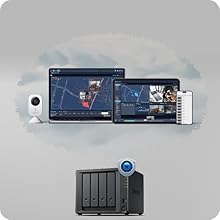
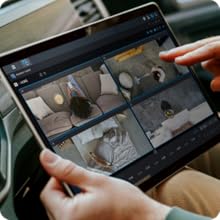
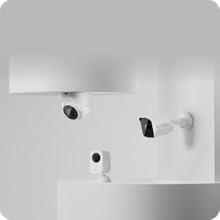
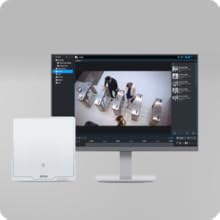
📡Supports 30 IP cameras
🛡️Multi-layered data protection
Desertcart purchases this item on your behalf and handles shipping, customs, and support to UAE.
🚀 Elevate your office cloud game with Synology DS425+ — where speed meets security!
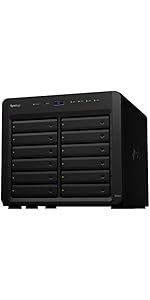
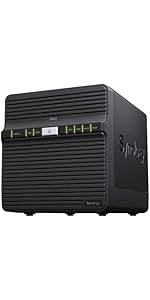
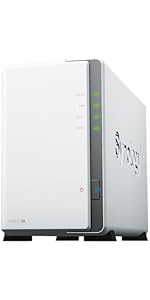
The Synology DS425+ is a compact 4-bay diskless NAS designed for professional environments, delivering up to 278 MB/s transfer speeds via built-in 2.5GbE networking. It supports concurrent access from over 10 users, offers multi-layered data protection with RAID, automated backups, and snapshots, and doubles as a surveillance system supporting up to 30 IP cameras. With seamless RAID migration, centralized file sharing, and a 3-year warranty plus enterprise support, it’s the ultimate private cloud media server for modern offices.



| ASIN | B0F895RV3K |
| Best Sellers Rank | #6 in Network Attached Storage (NAS) Devices |
| Brand | Synology |
| Color | Black |
| Compatible Devices | Android, Desktop, Laptop, Server, iPhone |
| Customer Reviews | 4.6 out of 5 stars 93 Reviews |
| Enclosure Material | Metal, Plastic |
| Item Dimensions D x W x H | 8.78"D x 7.83"W x 6.54"H |
| Item Weight | 2180 g |
| Manufacturer | Synology |
| Material | Metal, Plastic |
| Mfr Part Number | DS425+ |
| Model Number | DS425+ |
| Mounting Type | Tabletop |
| Number of Items | 1 |
| Number of Packs | 1 |
| Product Dimensions | 8.78"D x 7.83"W x 6.54"H |
| Size | 166 mm x 199 mm x 223 mm |
| Storage Volume | 80 TB |
| UPC | 846504005994 |
| Unit Count | 1 Count |
| Warranty Description | 3 |
B**T
Effortless upgrade and great performance
I upgraded my 13 year old DS213+ 2-bay NAS with the DS425+ 4-bay NAS. I simply transferred my two (6 year old) WD Red Plus 8TB drives into the new bays after first creating a full backup and verifying the backup. When I powered the 425+ up everything "just worked". It recognized that it needed to migrate my RAID drives; I said OK. The migration only took a few minutes and then I was able to log in using my credentials from the older NAS, which means it also automatically migrated all of my configuration data (accounts, passwords, SMB shares, backup tasks, etc). I couldn't be more pleased with the whole upgrade process. My older NAS was still fully functional but at 13 years old it was not compatible with some of the newer software features I wanted. I have to say, over those 13 years my DS213+ was rock solid, which speaks well of Synology's hardware and software. I didn't have to touch it for 13 years other than twice upgrading the drives to larger drives to get more capacity. The last drive upgrade cycle was to a pair of 8TB drives in 2020. I had previously upgraded my home network from 1Gbps to 2.5gbps, which was another motivating factor for upgrading to the DS425+. Prior to the NAS switchover I did some benchmarking using the 2.5Gbps network. Note, however that the DS213+ was still connected at 1Gbps as it didn't support 2.5Gbps. I copied a 20GB folder of folders/files to my laptop SSD in 5:16 and a single 12GB video file in 2:30. Once I had the drives moved over and the DS425+ was all settled (there was a prolonged period of building thumbnails for my photo library), I repeated the test, with the new configuring taking 2:24 (more than 2X the speed) and 1:12 (also better than 2X faster) respectively. I also benchmarked writing the same files. The 425+ was about 50% faster than the 213+. Remember, this is with the exact same drives (WD Red Plus @5640 rpm), in a RAID 1 configuration (mirrored). If/when hard drive pricing ever gets reasonable again I will add another 8TB drive. With Synology's SHR (hybrid RAID) technology that will double my available storage while also providing a doubling of speed, all while maintaining the ability to tolerate a single drive failure without data loss. I was also very impressed with the latest version of DSW. They have really beefed up security, while also making it easier for me to access my files via the internet. Highly recommended.
A**R
Upgrade from DS218j. Love it!
This was a bug purchase for me. We have over 550 movies and over 200 tv show episodes in our Plex library. We badly needed an upgrade to our server. Set up was simple and transitioning was done in a day. Plex was a pain but that wasn’t the server’s fault. Its a great set up and a bast improvement over the DS218j we had.
F**H
Great box, good price
This is my fourth Synology DS. Works very well and this one is a distinct performance upgrade from the others DS2 series. Currently loaded with three 12TB drives, room for adding the fourth later. Very happy and recommended. Later added two 512 GB ssds for read write cash, learned latest Synology OS does not like non-Synology drives, although this can be sidestepped with the proper command line script thru telnet login. Transfer speed now limited to ethernet line speed.
J**B
Good Media server
Well-designed and integrated. I love the DSM admin features, which highlight basically everything you need to do and make the tasks easy. The only thing I'd like would be a terminal window built into the DSM interface. This is still a Linux-based system, and you might need to get under the hood (it does however, have ssh running by default). The processor's on the old side, but it's up to hosting a media server, especially if you enable the hardware acceleration with the integrated GPU
T**S
3x-10x upgrade from my DS416Play
Migrated from 11 yr old synology 416Play, wow what an upgrade. Highly recommend getting the extra 6GB memory DRAMM and also the SSD (for read cache). Note that synology no longer restricts drives to their brand only, I have 4 Seagate Iron Horse 20TB drives. Performance is just insane, a 3x-10x improvement particularly for synology photos and media server, but also for index/search. A few things to note, it takes time to migrate 12 TB (my old synology). Given the 416Play only has 1GB/S ethernet my faster network meant nothing so 120MB transfer speeds are typical. The migration timeline was quite a bit longer than I anticipated. 1.5 days for disk parity check (you can run concurrently w/ migration), 2.5 days for migration assistant to complete. Migration assistant made the move flawless, but THE MOST IMPORTANT thing to know is that when you migrate the credentials you initially set up for admin on the NEW drive go away and you must log in with your OLD CREDENTIALS. this is the one thing I wish they documented better. My SSD is a Samsung 990, and this was not on the compatability list, but a quick change to the compatability check fixed this. It required an SSH into the server and a quick command to turn off compatibility check. That may not be something your confortable with then buy the synology brand SSD.
M**N
Dependable Powerhouse with a Catch
The Synology DiskStation delivers exactly what you'd expect from a top-tier NAS: reliable performance, intuitive setup, and a stellar suite of software options. From seamless file sharing to powerful backup tools and media streaming apps, its ecosystem feels both robust and user-friendly. Ideal for home users and small offices alike. The DiskStation Manager (DSM) operating system deserves special praise. It’s sleek, responsive, and packed with features that make storage management feel almost elegant. App integration is strong, with options for surveillance, virtual machines, and cloud syncing that rival full-scale servers. However, there’s one notable caveat: hard drive compatibility. You're locked into using Synology-branded drives. While these drives are optimized for performance and integration, it limits flexibility for users who may already have high-quality third-party HDDs. I have 2 Seagate IronWolf Pro, 16 TB, Enterprise NAS Internal HDD –CMR 3.5 Inch, SATA 6 Gb/s, 7,200 RPM, 256 MB Cache for RAID Network Attached Storage, and they do not get picked up. If you're okay with that trade-off, the DiskStation remains one of the best NAS solutions out there. Once they update to clarify that they do not support other drives, I will give them a 5 star.
J**6
More Setup Than I Expected, but Worth It for Centralized Storage
I bought the Synology DS425+ because my files had become scattered across multiple external drives connected to my Mac Mini. I’ve also had several external drives fail over the years, so I wanted something centralized, redundant, and expandable. I started with two 12 TB Seagate IronWolf Pro drives using SHR and Btrfs. One reason I chose the four-bay DS425+ was that I can add capacity later without replacing the NAS. Setup wasn’t completely smooth. Initially, the Synology didn’t recognize my IronWolf Pro drives, which was concerning given Synology’s emphasis on its own drives. Fortunately, a software update fixed that and the drives have worked properly since. DSM is probably the biggest reason I’m happy I chose Synology. I’ve created separate shares for music, movies, TV shows, photos, documents, books, home videos, and private files. I particularly like the ability to create an encrypted share, hide it from network browsing, and still mount it directly when I need it. There is a learning curve. Synology creates folders for some of its applications, and initially the home, homes, photo, video, and other shares were confusing. I’ve also had a couple of occasions where my Mac stopped mounting the SMB shares even though the NAS was still running normally. Restarting services or the NAS solved the problem, but it was frustrating. I’ve now moved my large music collection onto the NAS while keeping the Apple Music database on my Mac. I’ve also moved my photo storage, and I’m beginning to explore Plex and other server applications. Synology isn’t the cheapest way to buy four drive bays. I considered UGREEN, TerraMaster, Buffalo, and other Synology models before buying this. What sold me was the software ecosystem, and after using it, I think that was the right decision. The DS425+ has replaced a collection of USB drives with one organized storage system that my Macs and Windows computers can access. More importantly, it gives me redundancy and room to grow. It took more work to get everything configured than I expected, but now that it’s running, I’m very happy with it. Pros: * Excellent DSM software and application ecosystem * Four bays provide plenty of room to expand * SHR makes adding redundancy relatively straightforward * Excellent control over users, shares, permissions, and encryption * Great central location for media and household files * Much more capable than simply attaching another hard drive to my Mac Cons: * More of a learning curve than I expected * Initial third-party drive recognition required a software update * Synology-created folders can initially be confusing * I’ve experienced occasional SMB mounting problems with my Mac * Not the cheapest NAS hardware available Star Rating: 5 stars Star Rating Guideline: • 5 stars – Product is excellent and exceeds expectations. There could be minor issues or stylistic/personal preference mentioned in the review. • 4 stars – Very good product. There could be minor issues, but overall this meets expectations. • 3 stars – Average. The product works as expected, but does not stand out in any way. I still recommend the product for those that agree with the review and the value the product brings. • 2 stars – Significant problems or poor design. Might work for some, but overall not recommendable. • 1 star – Serious issues, does not function as expected, misleading, or potentially unsafe.
K**O
I should have got one years ago!
Set up was very easy. 3.5in drives snap right in. Once you power it on you just need to install the DSM and go through the screens. Support software is very capable for what I wanted to do. Strong recommend.
H**H
amazing product overall
amazing product love it just wow
S**A
最新には注意
423では他社HDD認識したんですが 425ではsynologyしか認識しなかった
K**J
Excellent software, legacy hardware
The Synology DS425+ continues to deliver the kind of polished, reliable NAS experience that Synology is known for, but not without a few caveats. At the heart of the experience is DSM (DiskStation Manager), which remains one of the best NAS operating systems available today. Its clean interface, app ecosystem, and stability make everything feel simple . Whether you're a beginner or someone running a more advanced homelab setup, DSM strikes a good balance between ease of use and powerful functionality. Features like Hyper Backup, and built-in monitoring tools make it incredibly versatile and dependable for both personal and small business use. Performance-wise, the DS425+ holds up well for typical workloads like file serving , and backups. It’s efficient, quiet, and integrates smoothly into an existing network setup.i would NOT recommend using any NAS as a plex server, though synology hardware is older than the competition from ugreen or asustor. Having said that, as a NAS this device shines for storage, backup and access control. However, one of the biggest downsides is Synology’s increasingly restrictive hardware compatibility particularly with NVMe drives. The system does not fully support non-Synology NVMe SSDs for storage pools, limiting them primarily to cache use (and even then, with warnings or restrictions). This feels unnecessarily restrictive, especially for users who want flexibility in choosing cost-effective or higher-performance third-party drives. For a device in this price range, this lack of openness can be frustrating. Overall, the DS425+ is a strong performer with best-in-class software, but loses points due to Synology’s tightening ecosystem controls and dated hardware. If you’re already invested in Synology and value DSM’s polish, it’s an easy recommendation but power users who prioritize hardware freedom may want to think twice.
M**W
Quality local backup solution with polished interface + app universe
I bought this one and did my research about Synology. Bought for a home backup solution. I am satisfied and happy to have bought drives before they went through the roof. This is the "+" version you might have heard some pushback on. If not, the corporation *tried* to lock down the drives to its own ones. Classic. They relented: you can use non-synology drives. I bought two 16TB Ironwolf Pro. The machine reminds you the drives are not on a compatibility list. So what. It's fine. But you should be using proper NAS drives. Which, because data centers, getting ridiculous. I haven't tried a non synology nvme drive. That might not work. YMMV. Don't complain to me. The setup is easy enough. I found the installation of the drives easy. The plastic key thing feels like easy to strip / damage. Go slow. You'll want gigabit ethernet and a UPS too. So you might need to do a lot of pre-work. The initial uploading is slow. You'll want to use ethernet cables where possible. There is an app store ("package manager"). This NAS has options for things like photos or plex or tailscale or pdf viewers etc. I back my mac up via time machine to this box.
S**S
Synology startet den Closed Shop - völlig unakzeptabel und sehr schade
Bisher habe ich alle Server von 4-bay bis 8-bay bei Synology gekauft - guter Support, gute Technik, relativ einfache Handhabung. Ein Server (DS420Plus) hatte nun Probleme und bevor ich irgendwelche Datenverluste riskiere, tausche ich lieber den NAS-Server aus. Interessant war für mich die neue Generation DS425Plus, da dieser Server endlich mal einen 2,5 GB-Port hat. Auf Nachfrage beim Support hießt es, dass eine Migration der HDDs problemlos möglich ist, auch wenn die Festplatten nicht in der Kompatibilitätsliste von Synology stehen. Ich setze Helium gefüllte Festplatten ein (Toshiba NAS300 12TB), also genau auf NAS-Betrieb optimierte, gute HDDs. Die Migration funktioniert einwandfrei, auch wenn ich danach alle Synchronisations-Jobs zu anderen Servern neu aufsetzen muss. Dann sehe ich die Information des DS425Plus-NAS, dass die eingebauten Festplatten sofort gegen Festplatten in der Kompatibilitätsliste ausgetauscht werden müssten. Soll ich jetzt mehrere einwandfrei funktionierende NAS-Festplatte entsorgen, nur weil Synology die Firmenpolitik ändert? Zusätzlich die Anzeige, dass die in der DS420Plus vorher installierten Cache-Speichermodule von Crucial in der DS425Plus nicht akzeptiert werden – also auch in den Müll müssen nach Ansicht von Synology.. Ein Blick in die Kompatibilitätsliste von Synology zeigt, dass nur noch Komponenten von Synology selbst (Festplatten und Cache-Speicher) von ihren neuen NAS-Servern akzeptiert werden. Natürlich kann Synology versuchen, für ihre Geräte einen "Closed-Shop" einzurichten und nichts mehr zuzulassen, wo nicht Synology draufsteht. Ob sie damit Kunden behalten werden, wage ich stark zu bezweifeln. Ich lasse mich jedenfalls von niemanden in einen Closed-Shop zwingen und die nächsten NAS-Server werden daher ganz sicher nicht von Synology sein. Es gibt vergleichbar gute Produzenten von NAS-Servern (wie QNAP), die noch ein ungestörtes Kunden-Lieferanten-Verhältnis haben. Vorläufig setze ich nun noch eine nachgekaufte DS420Plus ein, um sicherzustellen, dass nicht nach einer Wartefrist nach der Migration meine Festplatten von Synology einfach abgeschaltet werden. Echt schade - Synology stellt richtig gute Produkte her - aber so geht man nicht mit Kunden um!
Trustpilot
3 weeks ago
1 month ago