Buy anything from 5,000+ international stores. One checkout price. No surprise fees. Join 2M+ shoppers on Desertcart.
Desertcart purchases this item on your behalf and handles shipping, customs, and support to UAE.
🎶 Unlock your beat-making genius with Maschine Mikro Mk3 — small device, massive impact!
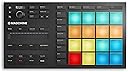
The Native Instruments Maschine Mikro Mk3 is a compact, USB-powered drum controller that combines 16 highly responsive pads with powerful, integrated software. It supports four input modes—drum, keyboard, chord, and step sequencer—offering versatile music production workflows. Compatible as a plugin with all major DAWs, it includes a 1.6GB professional sound library and is designed for seamless integration, making it the perfect tool for millennial producers seeking hands-on creativity and streamlined beat-making.


| ASIN | B07GY8C68J |
| Additional Features | Compact |
| Best Sellers Rank | #8,910 in Musical Instruments ( See Top 100 in Musical Instruments ) #26 in DJ Controllers |
| Brand | Native Instruments |
| Brand Name | Native Instruments |
| Compatible Devices | USB-compatible devices |
| Connectivity Technology | USB |
| Connector Type | USB |
| Control Method | Touch |
| Control Type | Percussion Controller, Keyboard Controller |
| Customer Reviews | 4.4 out of 5 stars 1,588 Reviews |
| Global Trade Identification Number | 04042477257071 |
| Hardware Interface | USB 2.0 |
| Hardware Platform | PC/Mac |
| Human Interface Input | Buttons |
| Instrument | Drum |
| Instrument Key | Any |
| Item Dimensions D x W x H | 12.6"D x 6.9"W x 1.7"H |
| Item Type Name | Electronic Drum Controller |
| Item Weight | 1.12 Kilograms |
| Manufacturer | Native Instruments |
| Manufacturer Part Number | 25707 |
| Material Type | Stainless Steel |
| Model Number | Maschine Mikro MK3 |
| Model Year | 2018 |
| Outer Material | Metal |
| Platform | Mac, Windows 10 |
| Product Dimensions | 12.6"D x 6.9"W x 1.7"H |
| Product Style | Drum Controller |
| Special Feature | Compact |
| Supported Software | Ableton Live, Pro Tools, FL Studio |
| Total USB 2.0 Ports | 1 |
| Total USB Ports | 1 |
| Unit Count | 1.0 Count |
| Warranty Description | 1 year warranty. |
S**Q
Best bang for the buck.
I was looking for a new way to approach tune making. This device shines with its Machine DAW software and the ability to customize it with the configuration software. You can view many Youtube videos demonstrating its capabilities, so I will summarize here: The Maschine software is a DAW that can use existing VSTs and any of the NI expansion packs to create songs. Maschine software is based on the concept of building blocks for your composition...build a beat or phrase, chain beats and/or phrases and link them together. This is not how I create music but it's very useful, nonetheless. I love the key and chord modes that allow great experimentation. You configure your scale and base key and pretty much can't go wrong with the pad strikes. There's many different chord types and scales to choose from which really opens up the experimental aspect. I use Cubase and Reason and it integrates perfectly as a VST instrument in both cases. Many instances can be opened, so you can create a song using your favorite DAW and using the Maschine as an instrument for each track. This is what works best for me. Additionally, it is easily set up in MIDI mode by pressing (SHIFT + project) and using the configuration software, the pads can be adjusted to match your favorite drum machine. The config software allows you to adjust pad colors in MIDI mode. Maschine works really well if you have another NI keyboard. I have a Kontrol S61 and it can be used to browse and play harmonic notes right alongside the pads. Lastly, Maschine hardware seems really well built and has fantastic tactile response. Everything is downloaded from NI. The software, owners' manual and all the other documentation is well written, straightforward and do a good job explaining all the concepts they dicuss.
U**D
The pads are amazingly sensititve, build quality excellent. Read my notes for Windows/Ableton use.
Truly an expressive instrument for tapping out beats. The pads are god-tier in my book. Let me know if there are better pads out there please. I use mine as a midi controller for Ableton on Windows 10. Workflow there is to first start the included pad programming application which can put it into midi mode. Then starting Ableton. Another thing you will experience is this device is an octave or so up from where Ableton usually has drum triggers. You can add an Ableton midi effect to lower the notes that are input from the Mikro, or in the programming app, you can edit each "group" of pads use a lower octave. You have to edit each note individually. This was tedious but it worked best for me. Now I don't need to add midi effects in Ableton. I used the Mikro's Groups feature to have 4 sets of pads, each on a different midi channel. That way, I enable all 4 of drum instrument tracks in Ableton for recording (ctrl-click) and then I can switch tracks that I am triggering by chaging groups on the Mikro. It's super cool. You'll want to order a Decksaver poly-carbonate cover too. I bought mine direct, shipped from UK with no issues to USA and much cheaper than on Amazon. Feedback for NI: If I could ask for one major thing, I would want a firmware upgrade to allow using the hardware buttons to set to midi mode. Or, just boot to midi mode if that was the last operational state. Next... in my own utopia, a Mikro Mk4 would come eventually out with hardware midi ports :) You guys built an incredible instrument. Make a version that is more optimized for use with generic midi so it may be used with a wider array of studio setups.
A**R
A rugged headache and solid group of one set of 16 pads
It’s looks good, too many proprietary buttons when it’s in midi mode but the pads are the star of the show. I just wish there was a simpler option.
M**R
BUY THIS USED !!!
Got it it used works great the touch sensitivity A1 quality you just plug and go lights on point the whole experience just feels premium to the point where I think they sent me the brand new one since everything was in place and in order not even a single scratch or any type of damage BUY THIS USED is basically a free discount while giving you the same experience as the brand new one it comes straight from the manufacturer to (referred to the listing company native instruments) get you a machine best thing for my music and production.
A**S
Pro tools user- DO NOT BUY.
Audio engineer and studio veteran. If you want just a midi controller you can drum on superior drums, or XO, or pro tools (anything OTHER than maschine) then go with something else like the akai mpc studio! 1. Mine did not come with maschine software. 2. It only works with maschine software 3. You will have to buy it to see if this will work. The digital download maschine software is non refundable. 4. You’ll pay $99 for it and find out it still doesn’t work. 5. If you’re on a Mac, the maschine software works on osx 13 and above. 6. If you’re on a Mac with Samsung m.2 SSDs installed, you’ll be please to know that for this $200 controller, you’ll lose access to your m.2 drives by upgrading to osx 13 to use the maschine software. 7. After all is said and done, it still didn’t operate as a midi controller for any of my instruments. Today I wasted a total of 7 hours and $500 (this controller, maschine software which I will never use, and a new SSD to do a time machine back up to hopefully save my computer and revert back to OSX 12, all because of this POS. Pro tools users - avoid at all costs.
C**5
Must Understand The Product!
Upon purchase I was sceptical to how I would use this piece of kit in my work flow, and when I realized it was only compatible with it's own software I freaked a bit, but it's easy to learn, and works as a vst in your main daw , plus the kit is fun to use, and in my case the workflow is much more fun than the click and drag, if you already have midi keyboards, synths, and other hardware and are looking for an integrated drum machine this is honestly probably not your product, but if you are currently using a mouse, and software, this is a great product, something to default to wether it be a melody, drum pattern or chord progression, if you've already used a DAW extensively you can master the software in about a day, really a small learning curve, and if your brand new expect It to take 1-3 months to know what "most" stuff is, either way I won't tell you to by it or not, just leaving my thoughts for you!
S**I
Many improvements have been made!
So. I wrote a fairly negative review when this thing first came out, but I need to update my review now because things have changed. My workflow is as such: I use FL Studio as my DAW, because it's what I've been using for almost two decades. I make some symphonic stuff with drums and some other hybrid sounds, and am classically trained in music. I was originally pretty upset because the functionality of this device with FL Studio was very limiting. Here is what has changed: 1) They added MIDI mode to the Mikro Mk3. This is great. Now I can use the pads to trigger all of my percussion VSTs outside of Maschine. Mapping the touch strip to any control in the host is as easy as two mouse clicks and touching the strip. We still cannot re-map the notes of the pads in MIDI mode in the Controller Editor, but it's easy enough to do that in the VSTs themselves so that they match with the layout of the Maschine pads. 2) Way more instructional videos and forum posts exist on the internet now than they did when the Mikro Mk3 was released. This means that if you need to figure out how to do something, you have a much better chance of finding how someone else did it. This was extremely useful for me as it allowed me to learn how to do items #3 and #4 in this list, which for me were the main purpose behind getting this thing. 3) You can create an instance of Maschine, put the pads in 'Note' mode, assign whatever Mode you want such as D Dorian or C Aeolian, record a pattern into Maschine and then drag the MIDI notes into a different VST in your DAW. This is a game changer, because it allows me to humanize instruments that I may want to further tweak in my DAW rather than tweaking them through the instance of Maschine I have in there. 4) You can use the pads to overwrite the velocity of notes you have created by mouse in FL Studio. Since I write a lot of melodies by mouse, the biggest drawback to this is humanizing velocity. There is something special about using your hands to hit something and having that translate to the velocity of each note. Ok. So you can just put the thing in MIDI mode, hit one of the pads to the rhythm and velocity you want to overwrite in your mouse-programmed-part, save that to an untitled .fsc (score), then load that .fsc as a QUANTIZATION template and use only the velocity. It's a little bit of work, but a total game-changer for someone like me who can write faster with a mouse than anything else. The only reasons I give this less than five stars are: 1) The Native Instruments software used to download and install everything can be a bit buggy on some computers. You may have to disable your Windows firewall and run the application in compatibility mode for Windows 8. 2) I have to be a little hacky (like in items 3 and 4) in order to get this thing to work in my particular workflow, which admittedly is different from the majority of people who would use such a device.
G**G
Excellent drum pad
I tried quite a few cheaper drum pads to use with my DAW but the touch sensitivity is lousy with those. I tried you tube hacks with electrical tape and that made the Akai pads OK but not great. These are the real deal. Its a lot of machine and software just to be a drum trigger but its hefty, well made and the pads are great, perfect touch sensitivity. Its a little pricy but worth it. Great addition to my arsenal. I use it with Addictive Drums 2 and Studio One 5. The pad mapping works great.
B**U
Enjoyable
I LOVE THAT MASCHINE
H**H
Maschine Mikro Mk3
USB eingesteckt und dann ein kurzes Aufflackern und das war es. Ging leider wieder zurück.
M**H
It's so good product...
I love maschine... maschine is one of best product from. Native Instruments company.
D**3
Si quieres comprar un Maschine ya sabes lo que estás comprando
Excelente en todos los aspectos. El único problema que yo le encontré es que al ponerlo en modo midi para controlar otros instrumentos dentro del DAW, no es posible cambiar la octava, estás atorado en la octava del C4. Una súper regada de Native Instruments y si estás pensando en comprarlo como único controlador no te va a funcionar; sin embargo, si ya tienes un controlador general y lo quieres usar como drum pad y sacarle todo el jugo al software de Maschine, pff, te va a encantar.
L**A
Buona macchina per musica elettronica.
Ottima macchina per la creazione di loop e brani interi focalizzati sulla musica elettronica. Io la sto usando principalmente per techno trance e dark techno. Non proprio immediata da usare, ha mille funzioni e un manuale in PDF scaricabile da 825 pagine😅 Assistenza ottimi: ho contattato NI per un piccolo problema e in 24 ore mi hanno risposto e risolto il problema. Consigliata. Sempre che abbiate tempo da dedicarci.
Trustpilot
2 days ago
2 weeks ago