Buy anything from 5,000+ international stores. One checkout price. No surprise fees. Join 2M+ shoppers on Desertcart.
Desertcart purchases this item on your behalf and handles shipping, customs, and support to UAE.
🎮 Dominate your desk with precision and power — wireless never felt this unstoppable!
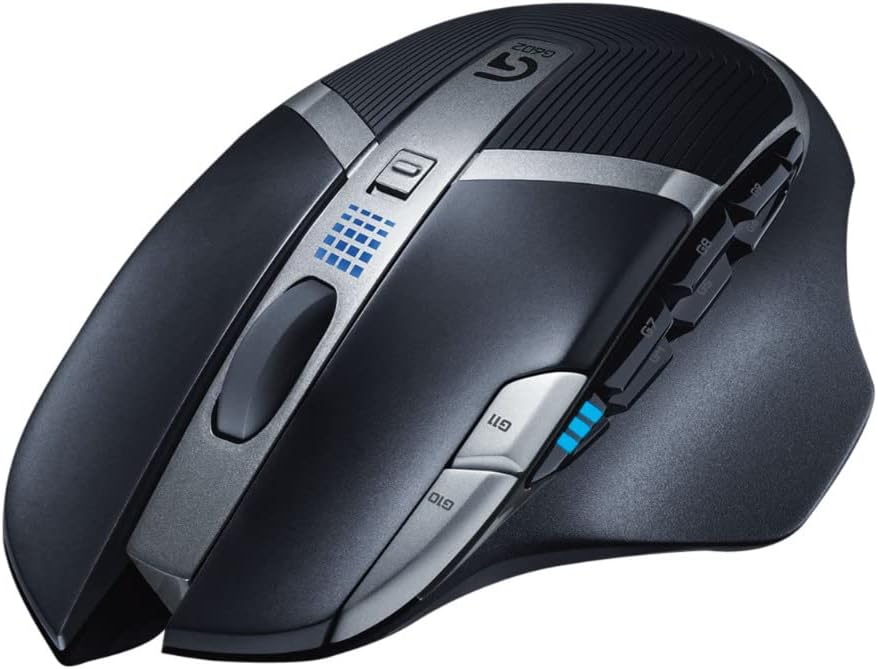
The Logitech G602 is a wireless gaming mouse engineered for professionals and gamers seeking ultra-long battery life (up to 250 hours), high-precision 2500 DPI Delta Zero sensor tracking, and 11 fully programmable buttons. Its lag-free 2.4GHz wireless connection and durable design with 20 million click-rated buttons make it a reliable, customizable tool for both intense gaming and productivity tasks across Windows and Mac platforms.
| ASIN | B00E4MQODC |
| Additional Features | Wireless |
| Antenna Location | Gaming |
| Are Batteries Included | Yes |
| Are Batteries Required | Yes |
| Battery Average Life | 250 Hours |
| Best Sellers Rank | #10,731 in Video Games ( See Top 100 in Video Games ) #300 in Mac Accessories #454 in PC Gaming Mice |
| Brand | Logitech |
| Built-In Media | Mouse |
| Button Quantity | 6 |
| Color | Black |
| Compatible Devices | Personal Computer |
| Connectivity Technology | wireless |
| Customer Reviews | 4.4 out of 5 stars 14,179 Reviews |
| Enclosure Material | Unspecified |
| Global Trade Identification Number | 00012303251201, 00097855098498, 00978550984982, 10097855098495 |
| Hand Orientation | Right |
| Hardware Platform | PC;Mac |
| Item Dimensions L x W | 5.47"L x 3.27"W |
| Item Type Name | Logitech Gaming Mouse G602 Mouse 2.4 Ghz (910-003820) |
| Item Weight | 0.37 Pounds |
| Manufacturer | Logitech |
| Mfr Part Number | 910-003820 |
| Minimum Required Operating System Version | Windows Vista |
| Model Name | Logitech G602 Mouse |
| Model Number | 910-003820 |
| Mouse Maximum Sensitivity | 2500 Dots per Inch |
| Movement Detection | Optical |
| Movement Detection Technology | Optical |
| Number of Batteries | 1 CR2 batteries required. (included) |
| Number of Buttons | 6 |
| Operating System | Windows 10 |
| Power Source | Battery Powered |
| Range | feet |
| Special Feature | Wireless |
| Style Name | G602 |
| UPC | 012303251201 611104407154 978550984982 803982729200 097855098498 097855098726 |
| Warranty Description | Limited warranty - 3 years |
B**R
Worth it
Been using this mouse for awhile now and will compare it to the Logitech MX1100 it replaced... ---First, my stats--- Primary use: Photoshop, video editing, internet, etc... (not a gamer) Usage: 9 hours a day Hand size: 7-7/8" base of palm to tip of middle finger, 9-1/2" thumb to pinky stretched Height: 6' ---Comfort--- The MX1100 is one of the very first mice I thought Logitech nailed in terms of comfort (larger/taller mouse than most). I've never had any fatigue or issue with the MX and loved how well my hand conformed to the shape of it. Once I received the G602, I knew it wouldn't be as tall, it has a shorter profile so that you lay your hand flatter instead of cupping it like the MX. The G602 is good/great in terms of comfort but not as good as the MX which I would consider fantastic. The wing extending on the left side is a good length and my thumb rests very well on it. The texture of the wing is a textured soft-touch material that has some grit to it, some say it's like a sandpaper or rough surface but I don't find that to be the case at all. Although this mouse is geared towards palm-grippers, I find that claw-gripping it isn't an issue and would be fine for most however I haven't used it in this regard for extended periods of time. I tend to palm-grip my mice but at times will have a hybrid grip between the two and have had no issues or discomfort. ---Buttons--- The left/right click buttons are very sensitive compared to the MX1100. It barely takes any force to register a click, took me a little bit to get used to at first (maybe 10 minutes), but have always wanted mice to be this sensitive so this is a big plus for me. Button placement for everything is near perfect for my hand size (see stats above). I can reach every button with ease along with being able to distinguish each of the 6 thumb buttons. The thumb buttons are stiffer than the typical forward/back buttons of most mice to ensure you don't accidentally press something. Wish this mouse had the hyper scroll feature at least, but understand why they didn't as it would take sales from their flagship G700s mouse. However, the scroll wheel is fairly decent even though it doesn't have hyper scroll. It will scroll pages based relative to the speed you use, so if you scroll fast it will scroll more of the page but if you go slower it will scroll at a slower rate to give you more finite control. Took a day to get used to compared to using the MX1100, I still find the hyper scroll the superior scroll wheel to use but since this is geared towards gamers, I don't think this is much of an issue. ---DPI/Tracking--- Tracking has been spot on, haven't had any issues to date. I tend to use the 2500dpi which has been my preference for awhile. If you need more than that you can always increase the setting in your OS to make it more sensitive, I doubt anyone would need to max the dpi and the OS setting and feel they needed more. One of the biggest issues I had with the MX1100 was that the tracking wasn't precise at times. In photoshop, there were numerous times it would skip pixel increments when trying to drag an object or create something to be a certain pixel amount (ie: make a box 250px, but cursor would go to 251px or 249px and never 250px). The G602 does not have this issue. ---Construction/Weight--- The mouse seems to be very high quality as most of the better Logitech mice are. I can imagine over time the rubber palm/grip area will get gunked up from use and will be more of a pain to clean but time will tell. The materials seem to be a step up from the MX1100, but only slightly as the MX was already nice to begin with. The G602 with both batteries is lighter than the MX1100 and is noticeable. I've always liked heavier mice and even though this is lighter than what I was used to, it still has a nice weight to it. You can always just use one battery to help lighten it if you prefer it to be lighter. Between the two, I prefer the weight of the G602 as it seems perfect. ---Modes/Battery life--- When doing an A/B comparison between performance and endurance mode, there seemed to be slightly better tracking movement in performance mode, but it was so minor that this was the only way for me to notice a difference between the two. This may be more noticeable in games as I'm sure it reduces the polling rate from 500hz to 125hz, I left it on performance. Battery life is very good and although some people prefer having the ability to connect a usb to charge a mouse so they can continue to use it (like when gaming), I much prefer to swap batteries out (have spare eneloops ready all the time) as it isn't that often you need to. ----------------------- Overall I think this is a great mouse compared to the MX1100 for what I use it for and want it to do especially considering I don't use it for gaming. There are some little minor things I wish it had like the hyper scroll wheel and to be slightly taller like the MX, but this is a gaming mouse and understand why they didn't go that route.
J**F
Is it possible for a mouse to be immortal?
I bought this mouse about 5 years ago here on Amazon and have used it almost daily for that entire time. It is not unusual for me to use it for several hours at a time. This has got to be the absolute most amazing mouse I have ever purchased. I've been buying them since 1989 and I've never had one nearly as good as this one is, not even close. I even invented one that went to market some years ago, but not one of them could hold a light to this one. I typically sit on my couch and use a circle of plywood for my mousepad. If I told you how many times I've dropped this mouse and watch the battery compartment door come off and the batteries go flying, you really wouldn't believe it. I've dropped it on hardwood, vinyl, carpet, just about every type of floor you can imagine. It's been dropped from as high up as about 4', but more consistently from about 2' high. I'm using it right now with my laptop, and so far I haven't dropped it today, but there's another hour or two of the day left. There's still time. While I don't use all of its capabilities, all of the buttons still work despite a LOT of use. When I use AA Lithium Ion batteries in it, it lasts so long that I can't remember the last time I changed the batteries. The USB broadcaster is still the original. I plug and unplug it every day and it stores in the battery compartment. For that, I'm grateful because I'm sure it would have been lost by now during any one of the times its been dropped. The broadcaster has never failed, and the Bluetooth connectivity is working well. The gliding pads on the bottom are worn, but are extremely resilient. They have many years of service to give. The ribbed, soft rubber wrist pad shows some wear now, but it is still quite comfortable and has a lot of years left to go. Ok, ok, so yes, there is something that is disappointing, but only slightly so. The mouse uses two AA batteries, but due to the way they are positioned, on rare occasion the batteries will drop just a little bit, just enough for the mouse to stop working. However, a quick removal of the battery compartment door, snapping the batteries back in securely, then replacing the battery compartment door, I'm back in business. Would I buy this mouse again? Absolutely. It looks like it is a bit expensive to get hold of one these days, but there's a good reason why. The absolute best, most reliable piece of computer hardware I've ever bought. And I may never have to buy it again. I've never even been tempted to say that about anything computer related before in the last 36 years. That should account for something.
D**D
Good precision, large size, lots of buttons!
Finally found a suitable upgrade to my $9 TechNet mouse from earlier (https://smile.amazon.com/gp/product/B013WJRG5C). That mouse was good for the price, but I wanted something a little larger. At first I tried a different Logitech mouse, but for some reason that one had worse precision than the TechNet. Finally went for this model as the reviews were good and it was said to be larger than most mice, which is nice as all the ones I've tried previously were a bit too small -- at least when using it for hours for focused gaming, as it tires your hands to grip a small mouse tightly. (The other things I liked were its 6 side buttons, and the advertised long battery life.) I'm happy to say that the precision on this model is good, I'd say ~30% better than the TechNet. I think there is still some room for improvement (probably -- it's possible it's due to just shaky hands or a bad mousepad), but I don't think there are many models that will outdo it for under the $36 I paid. Another thing I like is that the DPI setting is controlled by the two buttons near the left-click. This means you can change the DPI up *or* down, instead of having to cycle through all 5 presets. Also, it displays your current DPI level using that LED in front of the side-buttons, which is nice for confirming you have the correct preset instead of having to cycle through while wiggling the mouse to find the one you want (like I had to do for the TechNet whenever I'd accidentally press the DPI-change button, or when I wanted to change DPI). Moving on, the side buttons work fine and are nice, but the battery life isn't quite up to what they claim. That's probably due just to my using my computer for longer periods than most people. Anyway, for my high computer use, I got a "5% battery" warning today, and I've had the mouse for about 2 months. That's actually still pretty good for 2 AA batteries, but wanted to note that it might not last as long as it says, depending on your usage. (if that "5%" ends up lasting significantly longer than the current 2 months, I'll update this review later to say how long it really lasted) Anyway, overall I'm quite pleased with the mouse, and it's currently the one I recommend for someone who's willing to pay more than the ~$10 for the cheaper (but also pretty good) TechNet model linked above. EDIT: Okay, the battery just ran out. This means that, for my usage, the battery lasted for 2 months and 13 days (74 days). I thought the product page listed more than that when I bought it, but on referencing it again, my results are actually in-line with the description. They say 250 hours in performance mode, or 1440 hours in endurance mode -- 1440 hours would be 60 days vs my 74. However, two things could disrupt the simple comparison: 1) I think I've actually had my mouse in performance mode the whole time. Thus, it should have only lasted for 250 hours, *if used continuously*. Which brings to point #2. 2) I don't use my computer every day. So here's what I'm guessing: * The "1440 hours in endurance mode" (unlike the "250 hours in performance mode") represents how long it will last if you use the mouse in a normal way -- for everyday tasks, and some bursts of activity like when I'm gaming or programming. * The reason having it in performance mode didn't reduce it from this estimate much, is that I don't use it too frequently, so most of the drain was just from the passive "no use" reduction rather than active reduction. Anyway, to sum up my not-that-thorough analysis: For normal usage, it seems the battery lasts for about 2.5 months, whether you have it in performance or endurance mode. Which seems pretty good to me. Feel free to augment my results with others though. I'll also see for myself if the next session lasts as long. (maybe I just used it even less than I thought I did during the period, idk)
S**R
Magnificent wireless mouse, but...
It isn't perfect. When shopping for mice I was looking at either the G502 or this 602. As a long time proponent of wired mice I always opposed wireless. So often times I'd see batteries dying and players in my guilds/etc having to stop and change batteries. It was annoying to the point I'd question the validity of even buying one. However, if you are questioning between these two mice like I was, take a trip over to a local retailer that sells them and see them in person. This made the difference for me. When I held the 602 at a BB store, I found it fit better in my hand. The 502 was good but it is narrower. It isn't much but enough where I noticed. But that isn't enough to decide. The 502 still had key features for me like the customizable weights. As one who has used heavier and lighter mice, I can attest to the difference weight makes on your physical body. Studies even state that if you want to avoid carpel tunnel, you go with a heavier mouse. My original mouse was an MX500 which had a weight in it. Then I went to a 518 and started having wrist pain. It was then I discovered that Logitech had removed the weight. However, they didn't remove the mounting bracket so I just swapped in the weight from the 500 and the problem vanished. The weights in the 502 were interesting because you could change the distribution. I thought this might be a nice feature but when searching reviews, I came across owners of both mice who attested the weight difference wasn't that much and that the 602 with batteries roughly did the same thing. So now the weight concern is dealt with and I can attest that the 602 with batteries doesn't weigh much more than my old MX500. Its very comfortable. The question then came down to battery life. With 250 hours, even if actual use was under that, it is still a lot of life. However, one must take into account the cost of batteries. Since Logitech used AA batteries for this mouse, the cost of buying a special battery for this is gone. I elected to go with the well known Eneloop rechargeables and so far they are holding up extremely well. But keep in mind, for a charger + 4 AA kit you are adding another $20 to the bill unless you catch a sale. With the Eneloops in mind, both 502 and 602 mice come in at the same price or roughly around that. I actually ended up getting the 602 on a little bit of a deal and saved about $5-10 on it but it is still close. So what was the deciding factor? Simple, when I tried out the 502 in BB, I found the feel of the mouse was very flimsy. The scroll wheel on that has two functions, a high speed mode, and a regular mode. When you feel how fast the wheel can turn in the high speed mode you instantly see how quickly the mechanism could break. This decided the purchase. The build quality of the 502 just brought up red flags whereas the 602 didn't. However, the 602 isn't without it's problems. From usage I've seen some negatives which I feel bring down the rating to 4/5 if not 4.5/5. For starters, the Logitech software is so-so. It doesn't accurately tell you how much power is left in the battery. Then besides that, what literally happens is the mouse is the little RF device and it is setup as a 3 button mouse scheme with extra buttons being added. However, you have to set up all the combinations and you have to set up profiles for each game/program. This is stupid. Traditionally I've found these multi button mice make it simple by listing all the buttons as [Mouse] 1 (2,3,4,5,6...etc). I'd much rather Logitech just listed all the buttons or at least allowed you to list up to 9 or 11 as mouse buttons. Games instantly can recognize and register commands in game to those mice without extra software. Logitech for some reason doesn't do this. They only give you 4 buttons linked for mouse use. Then the rest are based off of key commands which you have to manually enter. This caused a lot of frustration and confusion early on because the manual tells you nothing. Then next, the side buttons are a bit tough to the touch. They require more pressure to press. While this might be standard for a lot of MMO mice, I found it to be a little uncomfortable. You get used to it but there is extra movement on the mouse caused by your finger pressing that I didn't have in the past. Lastly there is a switch on the top of the mouse that you can see in the pictures of it. It lists it as a performance/endurance switch but there is no documentation that tells you what it does or how to set it up if you want to change the profile. You cannot select it in the mouse software. So whatever Logitech has it set to, its there to stay. Ultimately this was a good purchase. I take back some of what I said about wireless mice. But if a wired mouse offered the same features for a competitive price, I'd buy that over this. That was another problem. I was looking at Corsair, Gigabyte, TT, you name it. Each of them had things I liked, and then something I didn't. I could find a mouse with weights but then it wouldn't have the buttons I wanted. Or if I found the right combination, it was in an overly priced mouse. There was no reason companies couldn't deliver the options in a sub $80 mouse, they just decided not to. The 602 provided the buttons I wanted with features I enjoyed from the 518. The only thing I had to give up was the wired connection and so far with this huge battery life and ease of use, I really didn't have to give up much. The mouse is responsive, has all the buttons I want, and weighs perfectly. After the negatives I ran into, I'd still likely end up buying it again.
P**Y
First day at the bat, and it has been amazing!
This mouse has been great, just lovely as far as aesthetics, comfort, tracking, wireless connection, and overall functionality go. I bought this on a random whim, because I collect keyboards, mechanical and hybrid and I figured why not try another mouse for my more hotkey spellbound games. I looked into many mice, but there was one I kept going back to and this was the mouse. I currently use a Deathadder 2013 and was using a QcK mouse pad(cloth). Now, I happen to love my DA 2013 optical mouse, though I may not care for Razer, but I was looking to try something new for certain games and applications. This wireless optical mouse is one of the best things Logitech has come out with imo, and has been one of nicest mice I have had the pleasure of using other than the DA 2013 and the C.M Spawn(for when I want a claw grip). I have used many mice and keyboards, and took me a very long time to find a keyboard(which cost wayy too much money, but would buy again in a second) ended up getting a topre keyboard which is ergonomic and responsive. I am looking for the same with my mice, and if you are concerned about the wirelessness of the G602...I would not be so far it has been super responsive and comfortable to boot! I Believe I prefer my DA 2013 for strict fps games, but I definitely could play those types of games with this mouse in close second. I also preferred this mouse with my rpgs, mmo's, and other adventure action games. I receive a razer sphex mouse pad today as well and in comparison with that and my cloth QcK in terms of this mouse...I would have to go with the Sphex(which surprisingly razer has good pads) which with this mouse was awesome smooth glides, yet with the lower dpi, and I was still in control. If you are on the fence with this mouse because of the wireless connector I wouldn't be, because it has been pretty flawless and the Logitech software( if you want to set your own dpi settings this is needed) was a breeze to use. I highly recommend this mouse (especially with harder pads that are not cloth if needing faster smoother glide) I will update if I run into any problems with this mouse and the sensors UPDATE I have had this mouse for a month now, and I just wanted to say that it is easily one my favorite mice of all time for any wireless and or wired mouse. I have been using only one AA battery in to lessen the weight of the mouse for when I am playing fps games or the like of them, and it is running strong after a month. I also still think the button placement was wise and that the overall size, texture, and traction of this mouse is one of the best I have seen and or used. The only other mouse I would say I feel is as comfortable as this is the Death Adder 2013 and the CM spawn for those of you who use claw grip. I am a very pleased by the experience that I am having with this mouse so far, and I use it for all types of application from general use to mmo rpg's and even fps and games in that category. I am a strong believer in buying quality, ergonomic, and classy components and peripherals. I use a Leopold fc660c keyboard(topre switches) and paired with this mouse and the pad(razer sphex) it has been the best peripheral set up I have had to date. I have gone through, have tried, and do own many different keyboards mechanical and non, mice optical mostly but I do own a laser or two, and different texture surfaces from cloth to hard pad. This mouse is the first one I would recommend to anyone who wants a fantastic mouse with or without a wire. It is just that nice to use, and the on the fly dpi to 2500 with 5 lvls of changeability is just an extra bonus for those who will be using this for more than just games. Very satisfied customer all around, and will update again only if some failing on the mouses part. I say buy this mouse if you are on the fence and give it a week if you do not love it instantly after first use.
E**I
Very comfortable with great battery life, but it's wireless
I originally wrote a review for this mouse criticizing it for some flaws and performance. I have since returned it and I got a replacement. Thinking maybe it was just a bad one. I do have to tell you I was right in that thinking. I did not spend enough time getting used to it either. I found this mouse to actually be very comfortable. It seems that I need to hold it just a bit differently. If I hold it straight up and down there's a little discomfort but if I hold it every so slightly angled left it is perfect. In my search for the perfect mouse I've been forcing myself to hold every mouse the same way. That does not work. Each mouse is different. All in all, it preformed well. I didn't notice a difference between it or any wired mouse. The side buttons did in fact execute as I wanted them to on the mouse the second time around. The side bottoms are Comfortable minus the back two. However, they are not any less comfortable to press than other mouses like the G600 or Razer Naga. I own both a Naga 2014 and 2012 and a G600. Great mouses, but the G600 feels a little wide with that side button and the Naga has an awkward ring finger rest. I found this to be something you just need to get used to. Some may prefer it and some may never like it. Why shouldn't or should you get this over other comparable mouses? Particularly the G502, G600, G700, or Naga? -G502 This is the newest mouse out by logitech. It is a great mouse with fantastic percision. However, it is small and lacks what the G602 brings when it comes to buttons and comfort for large hands. -G600 The G600 has more buttons and a sift button. If you prefer the grid of buttons and need those extra ones then by all means go for it. However, this makes it wide and your thumb will rest on the button grid. -G700S Both are wireless and the G700 has a higher pulling rate. The G700 does so at 1000 MHz where the G602 does it at 500 MHz. It also has just as a couple more buttons on it. However, the buttons as mushy and don't provide good feed back. In wireless mode the thing burns through batteries very fast. I'd say if you game for roughly 5+ hours a day expect to change the batteries every day. You can plug it in however the cable is quite thick and defeats the purpose of wireless. -Naga Very similar to the G600 when it comes to the grip and the grid button layout same flaws but isn't as wide and uncomfortable. Feels cheaper though. Why would you prefer the G602? What does it do right? Let me tell you. It is very comfortable especially for medium to large hands. The G700S is the only one of those above that comes close to it in comfort. The buttons are above where you have your thumb. No having the thumb sitting on the buttons if you happen to no need to use them. This makes it a much better multipurpose mouse. You can use it for all game types. Anymore than 6 or so buttons on the side and you are going to accidentally push them or have to sacrifice precision so you wont. It absolutely crushed the G700S in battery life. Logitech decided it rather have a pull rate of 500 with 250 hours while in performance mode. As much as I don't like sacrificing performance, I don't see a serious draw back. No noticeable one at least. I can change the batteries maybe once every month or so instead of every night. Pros: Big and confortable(great for larger hands), wireless (if you can't stand a cable), great for many game genres. Cons: Had to turn off the dpi buttons or change them as the G11 button was so sensitive that if you touched it without applying pressure it should actuate. No side click on scroll wheel. I've owned all of the mouses stated above or tried them for a period of time.
P**S
Photo retouching
Photography is my career, it’s how I make my living. While this is a gaming mouse, I became interested in it because several trusted professional photographic sources listed it as one of the best choices for photo editing and retouching. They also addressed the most obvious question why not use a graphics tablet. I do but like so many other photographers I don’t always find a graphics tablet natural or intuitive to use for certain tasks. WHAT TO LOOK FOR Gaming mice have at least two features that can make them a good choice for photo editing. One is precision, have you ever tried to draw a circle with a mouse? Drawing a circle freehand isn’t easy anyway but it’s a good test if a pointing device can move with precision. This one is one of the best I’ve tried for being able to move it precisely. One of the other top characteristics a mouse needs is low lag, which also happens to be a key feature for gamers. The cheap wired mouse that came with my computer has less lag than any wireless mouse I’ve owned. This one is impressive, it doesn’t need to “wake up” when you start to move it. Having multiple macro buttons is an advantage as well, although not a necessity. WHY LOGITECH Or I should say why not Logitech. I’ve owned at least 10 Logitech mice and have a love/hate relationship with them. They generally feel the best physically in-hand and have a solid construction. But they are legend for not lasting long and some of the most rock bottom customer support I’ve ever encountered, and of course being expensive. I fought getting this one but switching brands wasn’t working out for me either (I’ve bought 5 mice just this year). The only reason I gave in is for whatever reason they had it priced down with the cheapies so if I didn’t like it I wouldn’t be out much. DOES IT WORK How well it works is subjective. I understand that the typical person reading this is more likely to be a gamer and I’m not one, my entire evaluation is based on how well it works for photo editing. As mentioned it feels good in the hand, neither too small nor too large. The shape of the lip on the left side gives it a good sense of control and the shape of the L/R buttons helps reduce one of the most common issues of accidentally pressing them. That lip actually serves two purposes, one is to use my thumb to vary the amount of downward pressure on the mouse which can be very helpful in keeping it from skidding when I’m making very tiny moves. The other is that using that same thumb I can lift up on the mouse to reposition it, which is almost impossible with any mouse that’s shaped like a beetle – I have one mouse that falls out of my hand whenever I try to lift it. Being able to change resolutions instantly is a big plus for editing tasks and I find I am doing just that several times while working on a project. While researching pro photographers preferences I also found that the SteelSeries mouse pad SteelSeries QcK Mini Gaming Mouse Pad was one of the top choices so I got one at the same time, and it’s true, a mousepad makes a lot of difference and this one works perfectly for smooth precision tracking and minimizing lag. It’s available in several large sizes, a benefit for graphics work. I can’t think of any downsides yet. I’ll keep my expectations low of it lasting more than a year but if it does I’ll be happy.
D**R
Great mouse... not sure if gaming is it's main purpose
I don't have any issues with how it works. It works fine and battery life seems pretty good. Additionally, i like the fact that you can switch to 1 battery if you don't like the weight of it. Clicks felt sturdy, sensor seemed accurate, and just feels like the build quality is overall solid. I keep my computer near the floor and didn't have any receiver issues with the mouse and never had the jumping that often accompanies wireless mice in general. I have a few gripes with this product, some are objective and some are subjective. So let's start with the objective.. Objective gripes: I'm not sure if this is a limitation of PC's in general but only one of the side buttons are assigned as a "mouse button", other buttons need to be programmed to other key strokes. I'm coming from a G402 which only has 2 side buttons but both those side buttons would be designated as "mouse4" and "mouse5". Given how the side buttons are labeled as G4, G5, etc, i expected to see the same when i went to program those buttons in a game (i.e. if i wanted to change my reload buttons to G5, that when i went it it would name it G5...this was not the case it was labeled "mouse4" and G8 was labeled with "2" and all other were not programmable unless assigning a keystroke to the G button through the logitech software). When trying to designate the remainder (outside of mouse4) of the buttons to "p", "[". It just seems like a clunky way of doing things. Another gripe is 2500 dpi just seems a little slow for a gaming mouse. I have 2 "gaming mice" the G402 my daily mouse (maxes around 4000 dpi) and a back up evga torq x10 (maxes at 8200 dpi). Both seem to track and be more fitting for sensitive movements than the G602. I think i have my G402 set around 3000. Subjective Gripe: This is a pretty large bulky mouse. Maybe some people like this type of mouse, but for me it was just a little too big. I would recommend that people try this mouse somewhere else before buying it, because it really has a lot of heft to it. I think it's really ergonomic and will probably use as a mouse for my daily work, but for gaming it was just too big. I used it for about a week and it wasn't getting any better so i reverted back to my trusty 402. Most of the side buttons are really hard to. If you look at the pictures of the side buttons they're pretty small compared to the mouse itself and stick out like tabs more than buttons. It really made pressing these buttons hard to get to unless you have an extra large and dexterous thumb. i only found 2 of the buttons easily accessible (the G5 and the G6 buttons), the rest of the buttons were not easily accessible, and probably would have been better to just leave those to keyboard shortcuts. I think Logitech even came to this conclusion as the latest G603 mouse has 2 large buttons rather than being a direct successor with 6 side buttons.
B**Y
La meilleur souris que j'ai eu.
J'en ai acheté plusieurs. Cette super souris a pleins d'avantages : le design, la recharge par pile AA (j'ai pris des Jugee AA rechargeables). Cette souris a des drivers compatibles avec à peut près tous les systèmes !
S**N
Fantastic Gaming Mouse
This is an awesome mouse so far. It's my very first gaming mouse, and I was definitely not disappointed. I used to use a very small palm mouse, so the transition has been a bit weird for me. I believe relative to most normal sized mice, this mouse is decently weighted, but for me it felt a little heavy. However, there were absolutely no issues with comfort. My hand fits perfectly on the mouse, and the extra buttons are surprisingly very easy to use. I've never used extra buttons before, but after about two days of practice with it, it's almost become natural to me now. Logitech provides a software that allows you to map virtually anything to the buttons. If you're using the mouse's on-board memory, then you are limited to only binding keystrokes, and mouse functions. Otherwise, you can bind a lot of things to the mice. They have a macro recorder that allows you to setup and customize macros very easily. They also provide a scripting option, which really opens up the doors and allows you to set up almost any type of macro you can think of. Just some examples: - When I hold down a button in a specific game, it will spin my mouse very rapidly around the centre of the screen - When I click a button, it will continuously simulate a specific key press, and when I click it again it will stop - When I hold down one button it will continuously put my volume up, and holding another button will put it down It's very easy to setup different profiles, and it bases the profiles off of the specific exe file for the game/program. This means that your profiles do not only have to be limited to games. I have different button profiles setup for when I'm using chrome, when I'm simply on my desktop (default profile), when I'm in VLC player, etc. This makes my general computer usage much more efficient. Finally, of course, the mouse itself works beautifully. It has two modes: performance and endurance. As the names imply, one probably improves the responsiveness of your mouse, while the other is for battery life saving. I haven't noticed too many differences between the two in terms of actual performance, but I'm not a very hardcore gamer (I don't even know that much about DPI), so I'm probably not noticing things that regular gaming mice users would notice. Also the battery life on this mouse seems to be amazing. Nearly two weeks, and I think I still have plenty of battery life left in it. Overall, a fantastic mouse. If this is your first time getting a gaming mouse, then I highly highly recommend this one. From what I've read, as a gaming mouse it is still considered very high tier, and for the price, I'd say it's amazing. It was very easy and intuitive for a novice such as myself to use. There is literally nothing bad I can say about this mouse.
O**H
Awesome and a very comfortable mouse!!!
This is a very comfortable and an awesome mouse. The mouse has 11 programmable buttons and a switch for two modes 1. Endurance mode 2. Performance mode. When Web browsing,etc use it in endurance mode which will help save the battery and when gaming use it in performance mode which makes the mouse even more responsive. U can download the logitech gaming software on ur mac or windows pc for customising the 11 programmable buttons. The mouse automatically goes to sleep when not in use for sometime. It has the battery indicator near the switch. U can adjust the dpi (dots per inch) i.e the sensitivity of the mouse on the fly. It's been a week or so I am using the mouse and it just works awesome. I use it for video editing and playing games like fallout 4, Doom 4, cs go, etc and it works awesome. It is one of the best mouse I have ever used. It is worth every penny. U even get a wireless receiver a.k.a wireless dongle and a cable for increasing the range of ur mouse. Just close ur eyes and go for it.
C**R
Excelente mouse
Es uno de los mejores mouse que he usado. El poder meterle macros ayuda muchísimo tanto en juegos como en trabajo. No solo eso sino que también puedes crear diferentes perfiles para usarlos en aplicaciones o juegos dependiendo de la situación. Puede ser usado con una sola pila para reducir el peso del mouse o con dos para hacerlo más pesado. (Usando una pila el tiempo de la batería se reduce a la mitad). En cuanto a la batería esta si dura mucho, con una sola pila me dura como 2 semanas y luego solo le pongo otra y ya. (Recomiendo usar baterías recargables como yo). Hay unos leds que indican la batería restante y además el software te avisa si ya está muy baja la batería. Esto ayuda mucho a no quedarse sin batería en sesiones de juego. En cuanto al lag o latencia la verdad es que todo bien. Lo uso para juegos en línea y no noto la diferencia con uno con cable. El tamaño para mí es el adecuado ya que tengo manos grandes. Es muy cómodo y ergonómico. El sensor que usa la verdad que muy bien ya que no he tenido problemas en casi cualquier superficie plana. (no funciona en vidrio). El dpi máximo es de 2500 dpi. Esto puede asustar a muchos, para mí está bien ya que lo uso en 1700 de todas maneras). En general lo recomiendo ampliamente siempre y cuando se agarre a buen precio.
I**M
Don't waste it
I'm going to say anything but thus mouse is great and It really help me not in gaming only
Trustpilot
2 days ago
3 days ago