Buy anything from 5,000+ international stores. One checkout price. No surprise fees. Join 2M+ shoppers on Desertcart.
Desertcart purchases this item on your behalf and handles shipping, customs, and support to UAE.
⚡ Capture Every Frame, Own Every Moment
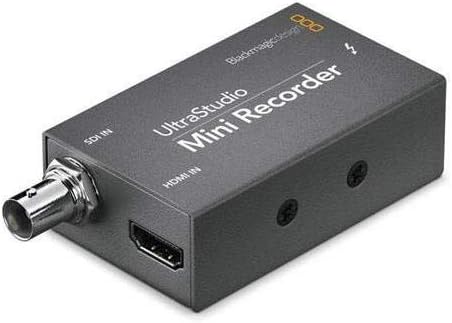
The Blackmagic Design UltraStudio MINI Recorder is a compact, Thunderbolt-powered video capture device delivering ultra-fast 10 Gb/s connectivity. It supports both compressed and uncompressed video formats, ensuring professional-grade quality for everything from commercials to feature films. Compatible with all major editing software via open-standard DPX and QuickTime formats, it includes a developer SDK for custom workflows. Lightweight and reliable, it’s designed to handle extended recording sessions without overheating, making it the go-to choice for millennial pros demanding speed, versatility, and seamless integration.
| ASIN | B009D91314 |
| AV Output | MPEG-4 |
| Antenna Location | Video Recording |
| Best Sellers Rank | #857 in Video Converters |
| Brand | Blackmagic Design |
| Built-In Media | Blackmagic Media Express |
| Compatible Devices | Laptop, Personal Computer |
| Customer Reviews | 4.3 out of 5 stars 930 Reviews |
| Global Trade Identification Number | 00531479667215, 09338716001846 |
| Hardware Interface | Thunderbolt |
| Item Dimensions | 5.2 x 5.2 x 1.6 inches |
| Item Weight | 8.48 ounces |
| Manufacturer | Blackmagic Design |
| Mfr Part Number | 001846 |
| Minimum System Requirements | Windows 7+ or Linux, Thunderbolt port, Decent CPU, 4GB RAM |
| Model Name | Ultrastudio MINI Recorder |
| Model Number | 9338716001846 |
| Operating System | Windows, Linux |
| Other Special Features of the Product | TV Input |
| Platform | Linux, Windows |
| Recommended Uses For Product | Video Recording |
| Special Feature | TV Input |
| Tuner Type | ATSC |
| UPC | 780746824015 531479667215 695637340744 |
| Unit Count | 1.0 Count |
| Video Capture Resolution | 1080p |
F**N
Download the current Desktop Studio software from Blackmagic Support page.
So I bought this on Amazon in 2015, I really never used it. I bought for a specific job and didn't need it I didn't have the time to learn it - until now June 2020. My company had a huge live streaming show to make. We had up to 40 different phones from all over the world feeding into a switching truck. My boss asked me to get a device that we can capture the live feed that was going to YouTube. The truck gave me a feed with all the graphics just like the stream. Previously I downloaded the latest Desktop Studio (11.5.1) and installed it. Blackmagic uses this software for many of its capture devices. I was using an older Mac Pro "the trashcan" it was great for this because it has the Thunderbolt 2 connections which are the same as the Mini Recorder. Install the software before you hook up the Mini Recorder so when you connect it can find it. When you plug in the T-Bolt cable you will see a little light on the box. That is the power indicator. I had to give the Mac permission to install as the Sys settings were set semi tight. The drive I was using for capture is a small 2 - 2.5" SSD drive enclosure that has a hardware RAID. I opened the utility and change the setting from HDMI to SDI as that was my feed. I left that window open just to always confirm it hadn't changed. Connected the box, added the SDI cable, and the drive. There is a simple piece of software in the install that you can use, Blackmagic Media Express, this will allow you to do a capture of the feed. In BM Media Express preferences, pick the Capture Video format you want, and the destination disk the files go to. That is about it, I had a couple of days to practice because the tech team did rehearsals. It is tricky in this program to name the files but I finally found the answer buried in BM support forum. The name is a combination of the Description, Reel all the things below name. You hit the little plus sign to the right of these choices and it populates the name. You can't just type the name, I kept it simple. It was frustrating and took me a while to find the answer. You are welcome. There isn't much documentation on this software. But it works really well, it did for me. Our 2 day program was divided into 6 events 3 a day. So I just made sure I hit capture before the show started and then stopped it by hitting capture again to stop it recording. Practice with it so you know it works before showtime. One annoying thing is you cannot monitor the audio while recording (if somebody can do this - post it please). But I did so many tests that I knew the embedded audio was there on the recording. Make sure to check your Mac audio input System Preferences to make sure the BM box is selected. I wasn't fed timecode but if I was it was supposed to be in the feed as well. So the 2 day show was streamed live and I found out after the first event my recordings were the source of the posted videos. Our editor took the files and trimmed stuff they didn't need and prepped them for YouTube upload. So these event recordings have been watched by over 100K of people. It worked really well. Only other thing is after I got familiar with the capture utility, I started using the box with - BM Davinci Resolve 16. It is more complicated than the included app, but that is what I used. I like the naming workflow better. The picture looked the same after I dialed in Resolve, but Resolve has way too many settings for someone starting out. Oh yes one of the captures was over 2.5 hours long and the Mini Recorder never overheated. Not super simple but it worked really well.
M**H
Works excellent, use quality equipment and cables always.
This is an update after my review below. Customer support evaluated the unit, it was working fine all along. Sometimes you test cables and other equipment and it stuff stops working, that's what happened, it worked well and support confirmed it wasn't their product at fault. So it's back and does work with new equipment. Also, support did excellent and was very helpful throughout the process, which was quick. Good job Blackmagic! OLD REVIEW: Very disappointing, only lasted 6 months of weekend use. So that's like 30 days of use. It does get hot. We tested the cables and other macs and determined this unit just flat out died. Will be working on returning for refund or exchange. Only gets a star because it worked very well. But not cost effective, maybe we got a bad unit. I hope Black Magic can restore faith in this product. OLD REVIEW, SEE UPDATE ABOVE.
S**E
Impressed
So I'm no cinematographer, let alone know what the devil I'm looking at when it comes to buying tech these days. Which is sad, but that's not what we're here to talk about. In an attempt to get some YouTube footage up, I went and bought a Canon t6i. Well, due to INTERNATIONAL REGULATIONS AND TARIFFS, these kinds of cameras are only allowed to shoot 30 minutes at a time. Being naive, I tried plugging the cable it came with into the laptop and if you know anything about recording, you're already smugly laughing at my pitiful attempt to remedy a much more complicated problem. Friends, the very little I know is that you need something to process the data coming from your camera and into your computer so you can record/livestream. I spent days looking at reviews, how-to's, the whole nine yards, and there's a handful of products out there with an even wider array of opinions on what works best. Here's what I've learned after making his purchase: THE DEVICE WORKS GREAT, but you might have to READ a little bit to understand what you're doing. It may be plug and play for some people, but you're dealing with something a little more complicated than slamming a USB stick packed with vacation photos of your dog into the side of your MacBook. If you're looking to livestream or get longer videos from your DSLR, this is a great choice. Make sure you get the right cables/adapters to run from your camera- to the Blackmagic- to your computer. DEFINITELY recommend.
S**.
Superb device, great quality for the price - but with one very minor limitation
This is a superb piece of engineering, with excellent picture quality. The fact that the drivers make it available as a standard QuickTime-compatible video/audio source is fantastic! Love it! I would give this a solid 5-out-of-5 except for one _tiny_ issue... its lowest capture resolution is 720p. You might think "who the h*ll uses HDMI for a signal less than 720p" and that's what I used to think too... until we tried using these to capture HDMI from laptop computers that were only able to do 1024x768 to a projector during conference presentations. It's obviously not the fault of Blackmagic; it was the fault of the laptops that couldn't send at least 720p out to projectors that did support that input resolution. However, I'm very surprised that a video resolution such as 1024x768 can be carried in the first place by HDMI, and displayed via the many different projectors we used at that conference, but this Blackmagic device couldn't capture it. I do feel a bit bad that the reason I can't give this device 5 stars is because of a problem with the input signal that wasn't up to this device's minimum resolution and therefore isn't really the fault of this device. However I do feel that it is a tiny limitation of the device and therefore I can't whole-heartedly give it a perfect 5 rating. If I could give it 4.5 stars I would, but since I can't I'm stuck giving it 4 stars.
M**Y
HDMI/Thunderbolt ingestion was easy and smooth
I am preparing to do a weekly live-streaming event for my organization. We're on a shoestring budget (who isn't in the NPO world?), and we're still evaluating streaming providers. The only hardware encoder under $500 is tied to a specific provider, which would simplify our setup but would tie us to that provider. (No, thanks.) The Blackmagic UltraStudio Mini Recorder was an intriguing, low-cost solution for interfacing our HDMI camera with a MacBook Pro we already own. This device allows us to put more of the encoding chain into software, giving us a choice of encoders and providers. I purchased it along with an Apple MD861ZM/A Thunderbolt Cable - 2.0 M (NEWEST VERSION) . Thanks to the experiences many other reviewers have shared here, I knew to download the software directly from BMD, and installed it before plugging in any devices. The version current at this writing (Blackmagic Desktop Video 10.3.7) also installs four applications: * Blackmagic Disk Speed Test * Blackmagic LiveKey * Blackmagic Media Express * Blackmagic Multibridge Utility LiveKey and Multibridge Utility don't seem to apply to this device at all. Disk Speed Test is what it sounds like, performing a "stress test" of write and read speeds to evaluate which video formats your current setup is likely to support. Media Express can capture, log, and play back video from the Mini Recorder and other devices. My experience with the Mini Recorder (interfacing a Canon HDMI camera to my MBP, and feeding it to Wirestream for a test YouTube live video event) was almost painless. I did not have a huge bundle of choices, but rather the format being ingested from HDMI. So, from my perspective, it really WAS "plug and play" with video and audio feeding from the camera into Wirestream. The box itself is both improbably small and unbelievably heavy. The outer shell seems to be 1/32-inch steel, and acts as a heat sink in operation--it does get uncomfortably warm. A single white LED next to the Thunderbolt port indicates output. The input ports are BNC and full-size HDMI (a good match for the HDMI/mini HDMI cable supplied with my camera). There is no power cable or adapter. I am quite impressed with the BMD Mini Recorder, and can say it has already earned a place in my setup.
J**L
Glitched Up Every Day. Can't Write Video. Livestream OBS Worked Sometimes.
EDIT: I moved to the Thunderbolt Intensity Shuttle. MiniRecorder did not work for me. I also tried the Magewell. I felt the video quality, build, price, and lag on Magewell to be inferior to Black Magic products. Black Magic has more professional support, more software, and an OBS driver that stays synced. I had a bunch of odd errors on an i5 2011 Mac Mini w/ Radeon 6630M with the MiniRecorder. I could not use it. This device got hot connected to this machine. Device and video froze completely. Had to unplug it a lot. I had to restart the mac (had a total system crash). The Disk speed test says I should be able to capture ProRes 422HQ in Black Magic Media Express, but it won't. I can capture video with QuickTime compressed. I can't use the supplied software. The quality button in the program is greyed out. Video blinks to black and I had to restart Media Express program sometimes. My monitor video (HDMI) started getting interrupted hours after live monitoring in their software, maybe due to thunderbolt heat or noise. This could be Apple's fault. I'm using brand new cables from Apple and monoprice. Video resolutions are correct and my software is up to date and set properly. I was able to do some live streaming with OBS for a few hours. I suspect this device or Thunderbolt getting hot causes everything its connected to glitch after some period. The product page doesn't seem to list what macs it can work with. I assumed it would work because I have a thunderbolt port and an i5 and my software is updated. I wouldn't get this. It let me live stream (sometimes) but I get DIFFERENT glitches every day I've used it. I don't want to have a problem with my system so I've going to stop using it and return it. I have to find a completely different system and brand of capture device.
R**B
Flawless video streaming
I bought a refurbed macbook pro ($650) to live stream high school football games on facebook live. The blackmagic mini recorder and mac thunderbolt cable is the perfect combination for streaming. In the past we used windows based laptops, ustream, and other devices but it was always iffy whether or not we could have a flawless broadcast. Three games into our season and we have had no issues what so ever. No drop outs, no buffering etc. On away games we use a Verizon hot spot and to my surprise, no difference in quality from our direct Ethernet connection when we are shooting home games. Facebook live is the only way to go for streaming. Our broadcast has never looked so good. We use the audio from our local radio station broadcast mixer direct to our audio board and the audio is wall to wall. Don't skimp on your streaming equipment if you want to produce a good broadcast.
K**.
I had to read the manual over and over again to get the settings right andwatch several YouTube videos to make heads & tails of
It does what it says it does, but is far from a simple "plug and play device". After 5 hours trying to make it work, and having to contact Blackmagic for support, I finally got it to work, but I am still having many issues with the unit, and sorting out all these caveats takes time and the technical knowledge I do not posess. In the end I am sure I will sort out these problems, but I wasn't prepared for the long, long hours invested into this "little magic box" when no tangible results have come out of it yet, and the longer hours I will still have to invest on this gadget. As for the software, I had to read the manual over and over again to get the settings right and watch several YouTube videos to make heads & tails of this thing. Finally, be advised that the video you record on your hard drive through this device is completely uncompressed, so it'll eat up your hard drive space in no time; you may have to consider using a fast and hefty 1TB / 2TB external device to store your footage and if you don't happen to have one then... well... there's another extra expense you probably were not prepared for. I kind of regret I bought this, it wasn't cheap at all either.
L**O
A savoir !!
Super produit on s’en sert pour une utilisation professionnelle intensive et aucun souci. On en a un sur un gh5 en hdmi c’est parfait et un pour une Sony fs7mII en sdi et franchement ça envoie grave bon par contre faut prendre le temps de tout régler mais c’est top nous streamon avec obs qui reconnaît directement les boîtiers. Par contre nous sommes sur Mac et câble Apple obligatoire car on a tester avec d’autre et de notre côté cela ne fonctionnait pas mais avec les câbles Apple c’est ok ça fonctionne nickel chrome. Attention aucun câble n’est fournis. Voilà de notre côté c’est 5 étoiles.
O**N
Kleine Wunderkiste
Für vergleichsweise kleines Geld bekommt man einen super verarbeiteten Digitalrecorder. Er ist sehr klein und braucht nicht mal einen Stromanschluss weil er vom Thunderbolt gespeist wird. Ich verwende ihn um von einer Nikon D800 das unkomprimierte Videosignal direkt auf dem MacBook Retina aufzunehmen, was reibungslos klappt. Die mitgelieferte Software ist auf Profi-Niveau. Als einzigen Kritikpunkt habe ich vorzubringen dass der Recorder ziemlich warm wird; also nicht Richtung Finger verbrennen, aber schon ordentlich. Das mag allerdings auch an Thunderbolt liegen, denn die beiden Stecker des Thunderbolt-Kabels werden ebenfalls ziemlich warm. Daher kein Abzug in der Bewertung. Ich habe in den Einstellungen gesehen dass er wohl auch in Echtzeit SD-Material hochskalieren und HD-Material herunterskalieren kann. Dazu kann ich aber nichts sagen da ich diese Funktionen nicht nutze. Noch ein Tipp für jemanden, der ihn auch mit einer DSLR benutzen will: Man muss anfangs etwas herumprobieren bis man funktionierende Einstellungen für die Bildwiederholrate gefunden hat, wobei ich nicht herausfinden konnte, ob das an der Kamera oder am Recorder liegt Ich würde ihn jederzeit wieder kaufen.
R**Y
Great product, great support
I bought this so I could use my HD camcorder for Facebook live. It works as advertised. If you're using a Mac, just make sure you go into Settings > Security & Privacy, and "Allow" BlackMagic after installing the software but before launching it. I didn't do that at first, and it was their customer support that told me about that. They answered within a couple of hours of my inquiry...and on a Sunday! Great product, great service.
A**O
Backmagic una garanzia
ottimo prodotto, subito configurato su mac book, collegamento con telecamera HD perfetto. L'ho utilizzato con diversi software e tutto ok. L'ho preso per utilizzare la diretta streaming di youtube e funziona bene
T**I
シンプルな機能で信頼できる製品
SDI映像信号-->本製品-->Mac miniのThunderboltポート と入力させるために2014年に1台目を購入し、本製品を6年利用したところで故障したため、今回は2台目を交換目的で購入しました。 今回の交換のタイミングでMac miniも買い替えたことで、Thunderboltの規格が2から3(USB-C)に変わっていたので、併せてApple純正のThunderbolt2-->Thunderbolt3(USB-C)変換アダプタも購入しました。 要するにSDI映像信号以降はすべて交換した形ですが、何のフラストレーションもなく接続が確認できました。 シンプルゆえに故障するとメンテナンスがお手上げとなってしまいますが、その分おかしな挙動や周辺機器とのコンパチをあまり気にする必要がなく、代えのききづらい製品だと思います。
Trustpilot
3 weeks ago
3 weeks ago