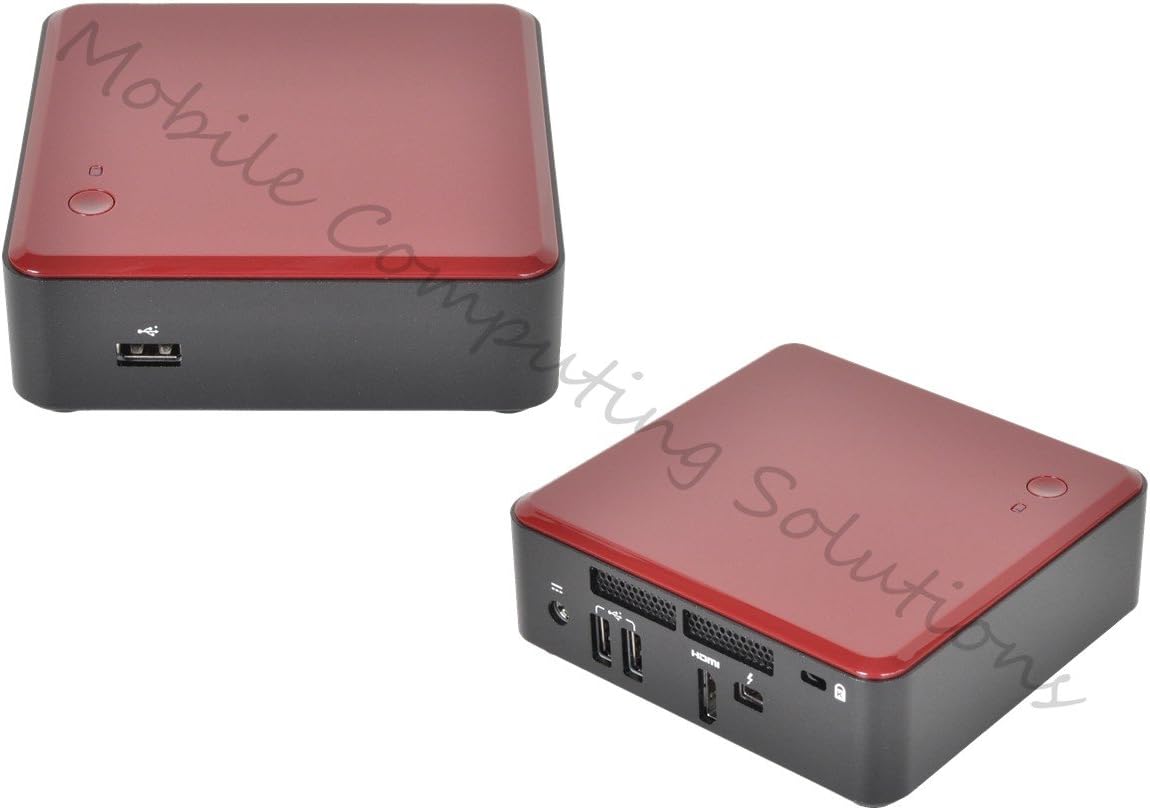
Intel Next Unit of Computing Kit with HDMI, Thunderbolt, Core i3-3217UDC3217BY
Product ID: 1202834
⚡Thunderbolt 2.0
📺HDMI 1.4a
🖥️Intel 64-bit
🚀 Power Meets Portability: Unleash Your Creativity Anywhere!
The Intel Next Unit of Computing Kit (DC3217BY) is an ultra-compact computing powerhouse featuring a Core i3-3217U processor, HDMI 1.4a, and Thunderbolt connectivity, designed for seamless multitasking and high-speed data transfer, making it perfect for both home and office use.
| ASIN | B0093LINT2 |
| Additional Features | Microphone |
| Brand | Intel |
| Color | Black |
| Connectivity Technology | HDMI, Thunderbolt |
| Customer Reviews | 4.1 out of 5 stars 116 Reviews |
| Global Trade Identification Number | 00735858253086 |
| Graphics Coprocessor | Radeon HD |
| Graphics Description | Dedicated |
| Hard Disk Interface | USB 2.0 |
| Hardware Interface | HDMI, Thunderbolt |
| Human-Interface Input | Buttons |
| Item Dimensions | 4.59 x 4.41 x 1.54 inches |
| Item Weight | 2.45 Pounds |
| Item width | 11.2 centimeters |
| Language | English |
| Manufacturer | Intel Corp. |
| Memory Storage Capacity | 16 GB |
| Model Number | BOXDC3217BY |
| Model Year | 2012 |
| Native Resolution | 4k |
| Processor Brand | Intel |
| Processor Count | 1 |
| Processor Series | Core i3 |
| Processor Speed | 1.8 GHz |
| RAM Memory Technology | SO-DIMM |
| RAM Type | DDR3 SDRAM |
| Specific Uses For Product | personal |
| Total Usb Ports | 3 |
| UPC | 132017746449 172302615531 735858253086 163120528202 |
| Video Processor | Intel |
| Wireless Network Technology | Wi-Fi |
| Wireless Technology | Wi-Fi |
5**S
Wow. Forget a full-size PC or laptop, this is the PC for you
My setup is as follows: NUC 4GB Crucial 1333 DDR3 SODIMM (1 stick) 120 GB Crucial SSD What you need: Wifi card - get one of the suggested ones - I am sure I saw a $10 dual-band wireless-n from Intel for the NUC. Wireless keyboard with touchpad (already had). All told, this box cost us a total of about $320. I had a USB network (ethernet) adapter lying around, so that didn't cost me anything extra. I would probably get a Thunderbolt ethernet adapter, if I didn't have the other one lying around. In fact, I might get one anyway, since the throughput would be much fast than USB and I'll never use the Thunderbolt (mini display port) port for anything else, anyway. Really impressed with Intel's design. And let's talk about that. Right now I am watching recorded TV via XBMC (.wtv files) - using a USB-ethernet adapter, streaming 1080p. No hitches, no wacky audio sync. Perfect playback. I am not sure I would use one of these to replace a Windows-based HTPC, but you could certainly set it up that way. Couldn't get at the performance with Windows 7, but may give it a try, just to see. With Win7 professional, you're adding another $150 to the price tag, though. Installed Kubuntu without a problem and it runs fast - very snappy performance. And this is a very small box. My wife actually wanted to confirm that the little red square was what was running our home theatre at the time. The ports are easy access and no frills. memory and mSATA SSD pop in easily. The bottom cover comes off without any issues. If you have a few extra dollars, set this up with Kubuntu, Steam and XBMC and you have a great, cheap Xbox 360 replacement that still functions as a complete computer. I really can't say enough positive things about this product - really worth the minor extra effort to pop in memory, wifi and SSD and install your own OS. Powerful elegant and small. Make sure you have a wireless keyboard/mouse combo, or wireless keyboard with touchpad.
D**N
Suprisingly good.
Installed an Intel 72xx series ac/Bluetooth wireless adapter (Works in Windows 7 and 8.x) and a stick of 1600MHz memory and the thing comes up. Added a 128GB mSSD I had around and the thing is unusually fast. Using it with one of those Logitech keyboard/glide-point wireless keyboards with the nano adapter. No problem. Thundebolt/DP port works with HDMI adapter. Plays 4K video at 1080p with no problem. No native 4K, though. Windows Server 2012 R2 installed as a DC but the intel 72xx NIC does not work. Switched to a Raitek I had. Problem solved. Too bad it doesn't support GBE or USB 3.0. Quiet but get a little warm.
M**L
Expensive once you buy everything, impresses with it's size
So I bought this and love it. I got it sale, but it was over $500 to complete. Having the ram, wireless, cord, and windows copy lying around, made it worth it. But you need: windows ($100+), ram (4GB $40), wireless ($20ish), msata ssd ($100 for 128gb), and a "mickey mouse" style power cord ($5). (it comes with the ac adapter but not the cord that goes from the ac adapter to the wall) So if you need all this, add $300 to what you paid for this! There are overheating complaints. Intel released firmwares to try and fix this and finally updated the product. The newer versions have a rubbery heat drawing block under the ssd. The cpu doesn't overheat, but the ssd stacked on the wireless causes the ssd to overheat. The airflow is on the opposite side of the motherboard so there is no airflow to draw heat from the ssd. If you did not get the rubbery heat block, you can get it for free from Intel. I just ordered it in November 2013 and didn't get the heat blocks. Intel sent them to me very quickly and I haven't had issues yet. I never tried it without the heat blocks. This is a great tv box or mini-desktop. If there was a 2.5 slot and usb3, it would be perfect. There are other NUC versions closer to perfect, and there's a slower cpu one coming with a 2.5 slot, but the low price of this version made it right for me. So I love the size--just an handful, even smaller than I thought. I love using it with my tv for streaming from the internet and from my Synology. It works. The two year Intel warranty seems nice--I just hope I don't need it!
H**B
not functional
1 wifi card wasn't working, thus updating the drivers was impossible. No offline drivers available. Both on win 7 and win Vista there where no compatible drivers foind, mor installed upon installation 2 bluetooth had a <1 ft range 3 hdmi was not compatible with my 720p Optoma projector. Device wouldn't even want to boot up. Bios did not allow me to select 720p resolution on a spare projector I had where it was compatible with. So at 1024 pix 3/4 resolution it worked fine, but only by re plugging the projectors mid way. No audio out. Sucks. I spent about 2 weeks waiting for all my stuff to arrive, ssd and memory, win 7 dvd, and wifi card. now I can ship back everything! Most discouraging 2 weeks of my life!
W**T
doesn't work well with the 7260 Wifi half mini card.
Bought this along with the dual-band Intel 7260 Wifi Half Mini card to run XBMC. It works great, but only EVERY OTHER REBOOT. I have to reboot twice, no matter what, to get the wifi card to work. I don't know if the issue is the wifi card or the NUC, but they are both going back. FYI: I tried updating bios, updating drivers, and a different OS. I have had problems with other buggy Intel hardware before, so not entirely surprised. Note: I bought two NUCs and two wireless cards at the same time, and they both exhibited the same issue.
M**E
Good and affordable computer for home labs
I like this third generation model due to the affordable price. I bought one with 480GB SSD, 16GB memory and a wireless card. I intended to use this to install VMWare vSphere hypervisor 5.5. However, I got a flattened screw on the wireless card slot, and I cannot fixate the wireless card. I tried installing backtrack 5.1 but the software cannot recognize the Intel wireless card. So I switched to installing Mavericks MacOS. The installation is smooth but it does not recognize the wireless card again. I had no luck in installing vsphere. It hanged up after the initial load page (probably due to missing drivers). I really liked the form factor. I may just have bad luck with the wireless card screw. Amazon kindly accepts my return.
3**G
works with my 80" TV just fine HDMI 1920x1080 at 10' away
this is a DIY computer - so if you are not sure what you are doing - move on and save the headache. but if you do know or you are willing to learn - it's a nice little computer - everything you need to run your TV, or whatever - this one didn't have a Ethernet but for about $30 you can add wifi/Bluetooth- I chose an USB wifi - which works - but the internal one is probably better and frees up a USB port. added the 128 Gig drive most people suggest. fast and silent - not sure but probably pulls about 40watts. Add a wireless keyboard/mouse too. I've installed Windows 8 and I've even install Hyper-V to play with Linux while I watch Scooby Doo reruns - (pure bliss). again not for everyone but if you know what it is or think you know - you want it.
G**Y
Great liitle device
I bought this for my wife to replace her dead laptop as the kitchen computer. I love the size and speed of the unit. It boots Windows 7 Ultimate 64-bit in 20 seconds and shuts down in 5 seconds. I would have used Windows 8.1 but the laptop had Windows 7 and wanted to just duplicate what she had. Intel Network 7260.HMWG WiFi Crucial M500 240GB mSATA Crucial 8GB Kit (4GBx2) DDR3 1600 Viewsonic 23" LED IPS display
C**E
Parfait en HTPC
J'ai acheté ce PC avec un disque Kingston SMS200S3/30G mSATA , un barrette de RAM Transcend JM1333KSN-4G et un clé WIFI Intel Centrino Advanced-N 6235 Je l'utilise uniquement avec ma TV en lecteur multimedia. J'ai testé windows 8 avec succès, mais prend trop de place sur le SSD, j'ai donc opté pour Kodibuntu. J'utilise le dongle FLIRC avec une vieille télécommande, c'est parfait.
S**N
Muy util como HTPC
Lo compré hace unos meses. Le puse 8Gb de RAM y un SSD de 128Gb para el SO (instalé w8.1) Lo uso mayoritariamente como HTPC para el salón. Con XBMC funciona perfecto y es capaz de reproducir sin problemas archivos mkv a 1080p de resolucion. La unica pega es que no tiene puerto ethernet, pero con una buena tarjeta wifi (yo le puse la Intel ® 6235AN.HMWWB) se consiguen buenas tasas de transferencia.
M**H
Love this
My grandmother (who is now into her tenth decade) suddenly decided she was missing out on this internet malarkey and asked me to advise her on getting a computer. I didn't want anything that could confuse her too much (no need for an optical drive or other bells and whistles) and didn't want to break the bank in case she couldn't get the hang of it and it ended up collecting dust. Also, it was important (since my father and I are both mac users) that it be able to run OSX so that we could support her remotely via logmein, since she lives a good hour's drive away from is both. This ticked all those boxes. Coupled with a Crucial 120GB mSATA, the Corsair Vengeance 8GB pair and a WiFi card ripped from a broken laptop at work, installing Mavericks on it was an absolute breeze (tonymacx86 method - there's a guide for this exact model on the site), and the install was rock-solid stable, with unbelievably quick boot time. I then added a Logitech wireless mouse/keyboard combo and we began the process of teaching her email, iPlayer, YouTube, online shopping and banking. The built-in HDMI meant I could plug it into her TV in the lounge and leave it tucked away almost out of sight, while the sleep button on the keyboard meant she'd never even need to get up to switch it on. Four months later and she's getting better by the day, firing emails left right and centre and showing off her prowess to her friends. Occasional calls to 'tech support' family members can be easily fixed via remote login, and she seems to be very happy with the system. I'm even happier, going so far as to build another clone to use as a HTPC (with the addition of Apple's Thunderbolt>Gigabit Ethernet adapter, it's wired up to my NAS and runs XBMC Frodo flawlessly, even with full HD video streams). If you want to use it as an HTPC I do recommend going after the adapter as it gets quite warm and the positioning of the SSD and WLAN cards on top of one another means it gets quite warm and some people have reported it crashing, but I've had no such problems. Ultimately I was very skeptical about this 'Next unit of computing' PR, but while this will never replace my main rig (and Intel may want to rethink the bunk-bed card placement), this is truly an amazing piece of kit. Also, my grandmother is very happy indeed!
E**H
Ideal als XBMC Media-Center
Ich habe das NUC seit ein paar Monaten als Media-Center mit XBMC im Einsatz und bin restlos begeistert. Das System reagiert nicht nur schnell, sondern ist auch noch sehr leise, so dass es selbst bei Stille kaum wahrnehmbar ist (wenn ein Film läuft sowieso nicht mehr). Der einzige, aber vorhersehbare Kritikpunkt ist das Fehlen einer LAN-Buchse, so dass nur eine WLAN-Anbindung möglich ist. In Verbindung mit der Intel 6250 WLAN-Karte ( Intel 6250 WiMax WiFi Half Mini Wireless Karte | Intel Centrino Advanced-N + WiMAX 6250, Dual Stream, Dual Band ) stellt aber auch das Streamen von HD-Filmen kein Problem dar. Wer aber Probleme mit dem WLAN-Empfang hat, sollte lieber auf eine der anderen NUC-Varianten (mit LAN-Buchse) zurückgreifen. Neben der Funktion ist im Wohnzimmer ja auch das Äußere entscheidend und hier muss man das NUC mit seinen kompakten Abmaßen und der edle Optik garantiert nicht im Schrank verstecken! Warum allerdings kein Netzkabel zum Netzteil beigelegt wird, oder zumindest eine normale Kaltgeräte-Buchse verbaut wird, ist mir schleierhaft? Folgendes Kabel ist z.B. geeignet: Wentronic Netzkabel (Schukostecker auf IEC 320-C5 Buchse) 1,8m schwarz
P**R
Four Stars
nice computer i use with kodi on my home theater
Trustpilot
3 days ago
2 months ago