Buy anything from 5,000+ international stores. One checkout price. No surprise fees. Join 2M+ shoppers on Desertcart.
Desertcart purchases this item on your behalf and handles shipping, customs, and support to UAE.
Type Your Way to Comfort! 💻
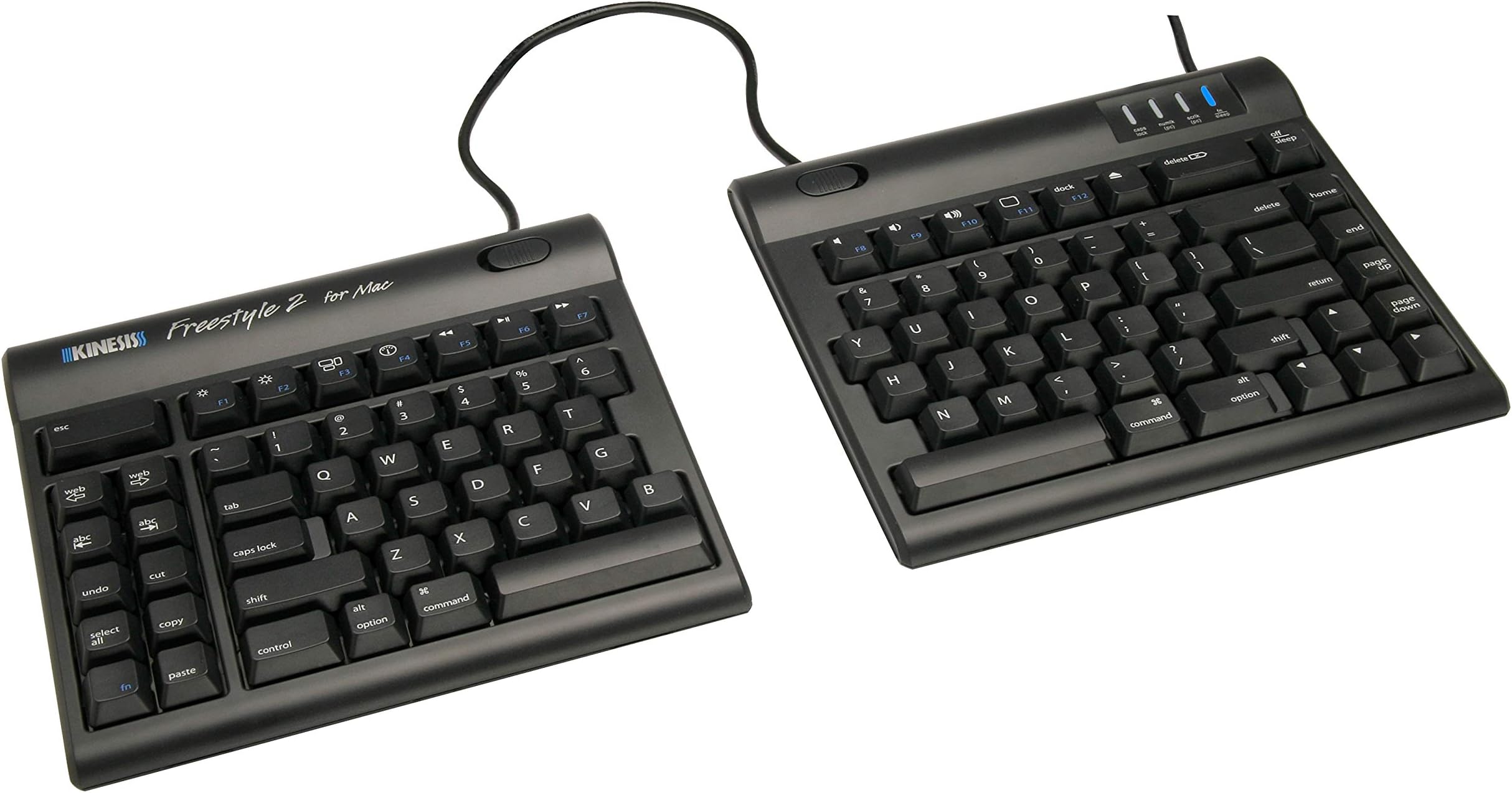
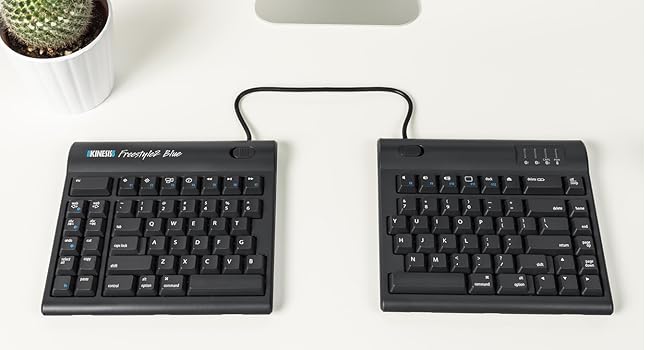
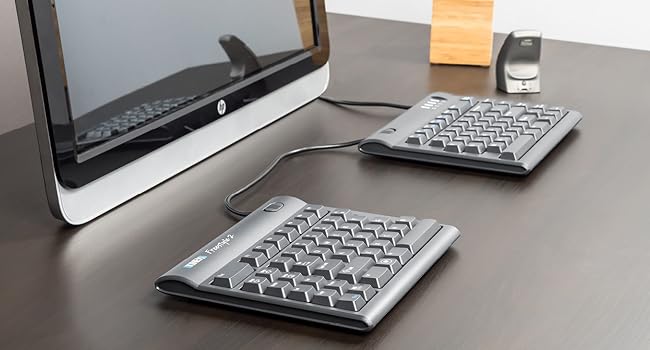
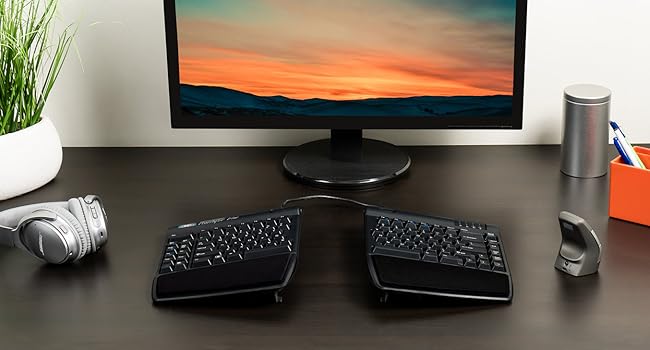
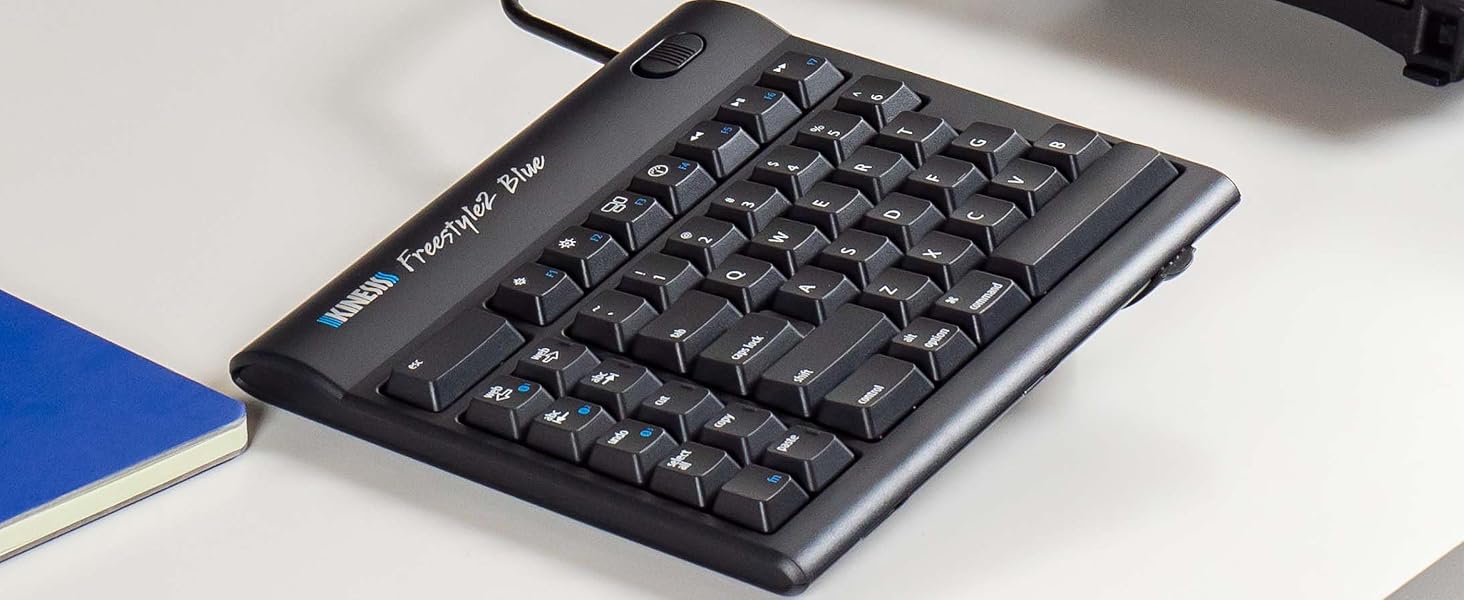
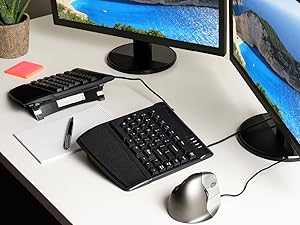
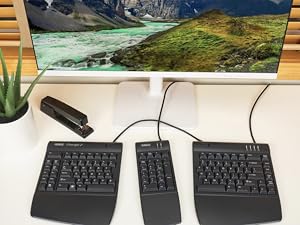
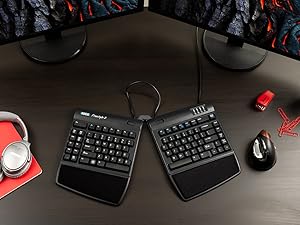
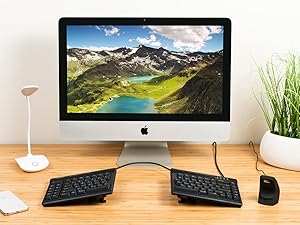
The KINESIS Freestyle2 USB Keyboard for Mac features an award-winning split design that allows for customizable separation up to 9 inches, ensuring optimal ergonomic positioning. With a standard Mac layout and low-force key switches, this keyboard enhances productivity while minimizing finger fatigue. It's plug-and-play compatible with Mac OS X 10.4 and newer, making it a hassle-free addition to your workspace.


| ASIN | B00ADNBXE6 |
| Additional Features | Ergonomic |
| Antenna Location | Office |
| Best Sellers Rank | #656 in Computer Keyboards |
| Brand | KINESIS |
| Built-In Media | USB Cable |
| Button Quantity | 10 |
| Color | Black |
| Compatible Devices | Mac OS X 10.4 or newer Apple iOS Devices (iPhone, iPad) USB |
| Compatible Operating System Family | MacOS |
| Connectivity Technology | USB |
| Customer Reviews | 4.2 out of 5 stars 432 Reviews |
| Enclosure Material | Metal, Plastic |
| Global Trade Identification Number | 00607998800027 |
| Hand Orientation | Ambidextrous |
| Item Weight | 0.9 Kilograms |
| Keyboard Backlighting Color Support | Single Color |
| Keyboard Description | Multimedia |
| Keyboard Layout | QWERTY |
| Manufacturer | KINESIS |
| Mfr Part Number | 0607998800027 |
| Minimum Required Operating System Version | Mac OS X 10.4 Tiger |
| Model Name | Freestyle2 for Mac |
| Model Number | RGOKB800HMB-us |
| Number of Keys | 94 |
| Number of Sections | 2 |
| Power Source | Corded Electric |
| Recommended Uses For Product | Office |
| Special Feature | Ergonomic |
| Style Name | Contemporary |
| Switch Type | Tactile |
| Total USB 2.0 Ports | 2 |
| UPC | 607998800027 |
| Unit Count | 1.0 Count |
D**R
Saved my career!
I'm a graphic designer and an author; I spend hours in front of a screen every day. Over the years, I've had to address repetitive stress problems: neck pain (fixed with memory foam pillow wedged between shoulders and headboard), elbow pain (lowered the keyboard with a keyboard tray), and most recently pain in the forearms and wrists. I also play guitar (gypsy swing style) and the tendonitis caused by my work was making it painful to play percussive jazz rhythm. I had a lot at stake; losing my writing, my design work, and my music would have ended not only my income producing ability, but also three things that give me great enjoyment in life. I'm not a doctor, but I've had luck tracking down the sources of stress injuries by observing how my work posture varies from a natural, relaxed position. Sit straight in your chair with your hands below your elbows on an imaginary keyboard. Relax. That's it. A bit more. Good. Your hands are now down near your lap and your hands are angled with the thumbs slightly upward. Now design a keyboard that fits your relaxed hand position. You'll end up with the Kinesis ergonomic keyboard. It's split with the halves angled up at the center. Add a "vertical" ergonomic mouse based on the same principle and you'll remove a ton of stress from your arms and hands. I am not a touch typist, but even with my unorthodox technique, I had no trouble adapting. My pain is gone and my guitar playing is swinging along again. I'm giving the Kinesis keyboard five stars because the results are a game-changer for me, but I'd like to see a few small improvements made: 1. the actual keys are quite traditional with a throw (up to down) distance of about 3/16 inch. I'd love to see a mechanism more like the Apple keyboards where throw is inside of 1/8 inch. 2. The Kinesis has blue LEDs that indicate whether caps lock or the function key have been engaged. These lights are in the far upper right corner of the keyboard, about an inch above the top keys—in an area likely to be hidden by the desktop if the keyboard is on a keyboard tray beneath the desk surface. I'd like to see the lights installed in the keys themselves. 3. Black is sexy, but many artists work in dark rooms. A white keyboard with black glyphs on it would be more visible in these viewing circumstances. 4. A numeric keypad would make the right half of the keyboard wider than the left, thus screwing up the symmetry of the angled halves. I'd like to see a numeric keypad option that attaches to the right side but floats about an inch above it so it can also angle down—a "stepped" arrangement. 5. The wrist rests are good but not great. I'd like to see an option to add foam or gel that's about an inch (or even two) thick to encourage higher wrist position relative to the keys. 6. Wireless? I think there's a model that is wireless and I can live with the cable (and the extra USB ports), but Bluetooth or some sort of USB keyboard "antenna" are more or less standard today. The Kinesis keyboard is worth the cost—it's a lifesaver—but it will work best as part of a suite of solutions. Lower it down with a keyboard tray. Add an ergonomic mouse and a wrist rest. Adjust the height of your chair. Make sure you sit with proper posture. If your work ergonomics are out of whack, don't expect the Kinesis keyboard to make much difference (and likely, this is the root cause of any negative reviews; the Kinesis works best under the right circumstances). If your keyboard is angled, but your mouse is not, you'll likely see less improvement in your "clicking hand." Flat mice cause the same body stresses as flat keyboards. The keyboard is not cheap, especially when you add the (essential) accessory package that includes the wrist rests and the braces for angling the keyboard halves. I imagine this keyboard is a hard enough sell without having to explain, "by the way, you also need x,y, and z," but if you work with your fingertips as I do, the money you spend on an ergonomic setup is a small investment to make in preserving and prolonging your productive life, and reducing pain. I'd like to see the Kinesis folks make that clear. Though the added investment will scare away more prospective customers than the already high price probably does, the magic of the Kinesis keyboard works best in a larger context. Yes, it does work, and in context, the cost of a well-designed work environment is a lot cheaper than the alternative. Spend two or three hundred bucks and fix your workspace—a bargain.
A**R
Not perfect, but still really good and worthy of 5 stars.
The Kinesis Freestyle2... Pros: The 20" split is wonderful for sitting at a desk. You can put the laptop in the middle, and connect up the keyboard at shoulder widths. I never would have thought shoulder-width typing would be as comfortable as it is! Key action is really quiet for office work, but not super mushy. They just do a good job of connecting the rubber membrane to the plastic keys, so it doesn't make noise when you type, yet still feels like a decent typing surface. Cons: Some of the UI buttons are out-of-date and don't work. A few of the non-typing keys are in weird places, like the escape & delete keys. A 10-key would be really nice. I had to tape a separate 10 key pad to the right side. Having a bar for cut / copy / paste / etc is nice, but a 10 key would have been much better. Even longer than 20" would be better, for cable management purposes. As much as the Kinesis has some cons, the pros are really nice. The typing action is decent and really quiet, the split feeling is amazing, and in general it's just a joy to type on. Now, I did immediately turn around and pick up a V3 kit for the additional comfort of the tilt. And there are a few clear ways to make it better (full wireless, including the center wire? Updated or remappable function keys? A 10 key?). But until those future updates happen, this clearly will be my favorite keyboard.
S**J
Very good ergonomic keyboard
I love my MacBook Pro, but using it on the desk with the Apple keyboards has taken a toll on my wrists and hands. They are simply too small for a full size adult in my opinion. After months of “stiffening” wrists and hands, I started realizing the forced/clenched position of my hands while typing all day was a gnawing pain along my pinky fingers & palms. Clearly, something had to be done. The Microsoft ones I have never cared for, and they don’t work with a Mac anyway. Ergonomic keyboards for a Mac seem to be few and far between, everyone seems to just assume people will be enamored with the aluminum stuff. Scanning Amazon off & on for weeks, I appeared to have 3 choices - super cheap and not suitable for someone that writes hundreds of pages a week; the Kinesis; or $350+ for a keyboard. Based on the decent reviews, I picked the Kinesis and I’m happy with the choice. Quality is top-notch and it’s a good typist keyboard. It reminds me somewhat of the IBM click/chiclet keyboards of hold that I miss dearly. A few things I don’t care for - the cable between the two haves is functional, but it looks weird. Seems like it would make more sense if it was coiled (and a little longer). Second, the many function keys are “functional”, but I’m a touch-typist, I’m not going to ever use them. Some may have other opinions, but I would have rather had a numeric keypad built in. Clearly, it’s not built for business - but that would be the primary buyer of a $100+ ergo keyboard, not the teeny boppers playing iTunes all day. And last, the “6” key is on the wrong side - touch typists will use the right hand for the #6, it’s an odd stretch from the left side. I’ve been slowly adapting, but it forces moving the hand to reach it, and is incorrect. The big positive, spreading my hands/shoulders/forearms out has completely eliminated the pain I was beginning to experience several years ago, so it does it’s job and I’ll continue to use it.
S**A
This keyboard has changed my life.
I don't typically write reviews, but this product has changed my life for the better. I've been in various roles in IT over the last 10 years and I've always had a mechanical keyboard with Cherry MX blue switches. Over the past year or so I've taken on a Software Engineering role which means I've been typing more than ever. In the last 2 months or so I was developing wrist pain in my left wrist. I thought maybe it was from playing guitar too much, but I came to realize the reason for my wrist pain was because of the angle at which my arms and wrists were when using a keyboard. I'm 6'4" and broad shouldered, which means my wrists on a normal keyboard are almost at a 45 degree angle. Combine that large angle with excessive typing and it's no wonder I developed problems. So, I began my search for a more ergonomic keyboard, particularly one that separated in the middle, but didn't have a drastically different layout (looking at you Kinesis Advantage and TruErgo) and so I found this and bought it sight unseen. I was leary at first of the membrane switches but they do feel well and don't require much pressure to activate. I must say, they don't feel "mushy" either (a good thing!), but obviously the biggest bonus here is that the keyboard is separated which allows me to sit with my shoulders at a comfortable width, and allows my wrists to stay nearly straight when typing. A week later, and my wrist pain is all but a memory. I will definitely use this until it breaks, and I will buy again! Good: - Split keyboard design that retains a (mostly) standard key layout - Handy shortcut keys on the left side - Feels good to type on, even for a membrane keyboard. - 20" separator instead of 9" on the standard split keyboard. - 'Delete' key is now right about the 'Backspace' key. I was always bad at hitting the small Del key on a keyboard, but now it's much easier. Bad: - Function key is a toggle key (think like the Numlock key). - alt/option and command keys are small. I would have preferred a smaller spacebar on the left side to make those keys bigger. I've since remapped my Caps Lock key to Command and I'm no longer struggling to hit the command key now. Otherwise: - Esc key is now a little farther than normal, but it's also 3x as a big, so that's a bit of a wash. - The VIP3 Accessory kit is useless for me. I find this keyboard much easier to type on without the kit. I will be sending mine back.
M**K
Great Beginner Ergonomic Split Keyboard, Cheap Production
This keyboard is a great ergonomic split keyboard for beginners who are transitioning from a traditional keyboard. It did not take me long to learn how to use the keyboard and learning did not slow my workflow down much. Once I got used to the keyboard it felt much better on my wrists. The problem with this keyboard is that the electronics seem to be cheaply made. I've had 5 of these and the ones that worked, I've had to replace them every couple of years. I had one or two that I needed to ship back right away because they didn't work. I'd recommend people use this one to see if the keyboard works for them and then buy something nicer once it inevitably breaks.
D**N
holy crap this is amazing
My first impression is... holy crap this is amazing. WHY are split keyboards not the standard? Regular keyboards, in comparison, make me think of Chinese foot binding. Right away, I'm typing at normal speed. I haven't gotten used to the layout of the extra/function keys, but then again I only just started using it. I do like the Mac-specific keys so far, though. I'm glad I picked this up instead of the PC version, since I'm on a Mac. I wasn't sure if the Mac product was inferior or something, but I don't see any evidence of that. Solid product so far. I imagine the keys could be better, but honestly... I just came from a Microsoft Sculpt and this keyboard feels way better. More accurate. More responsive. Since it's wired, I don't have to worry about wireless interference. The keys are not too light nor too stiff or noisy. Pretty quiet overall. Even compared to a Microsoft Natural Ergonomic 4000, the keys feel better. I can't emphasize enough how awesome the split aspect of the keyboard is. It took me no time at all to fall back into my normal typing rhythm. I was expecting an adjustment phase, similar to the Kinesis Advantage, but because it's still a flat keyboard without the funky key wells of the Advantage, it's easier to get used to. With other keyboards, the armrests on my chair make absolutely no sense, and in fact bother my elbow quite a bit due to repetitive irritating pressure. However, this keyboard lets me pull my shoulders back (which is super critical for good posture and warding off shoulder problems) and actually line my arms up with the armrests. It's not this often that I'm this happy with a product. There's always something wrong. I'm sure I'll notice something wrong soon enough. But my first impression is a high A grade. I am interested in the tent things, but at first glance it costs ~$50. Not too enthused about that, but I get that it's a specialty product. Kinda wish the tents came with. I could see that being a very good thing.
L**N
Terrible quality
Initially I had high hopes for Kenesis Freestyle, the innovative split keyboard deisgn conceptually seemed to make a lot of sense, but the quality for Kenesis is poor. The keyboard I got, the 'U' key was not working 75% of the time, and it was very frustrating. The keys also have a high profile so difficult to type on (like a traditional typewriter). I would say for those who are lucky enough to get one that works, it would takes a bit of getting use to. Surprisingly the arms don't feel relaxed when the two side are apart due to the fact that the keys are still aligned horrizontally, you have to place them quite far frm each other for the fingers to align. The trade of though is your hands need to be farther away from your body, and that's not a natural resting position for most people.
W**.
Comfortable for everyday use, comes as advertised, suits my personal needs
So far, this keyboard has been exactly what I have been looking for and is as advertised. The low force keys remind me of the low intensity I need for use of my Macbook keyboard. The 9 inch separation between the right and left sides has done wonders for my shoulder, chest, upper back, and neck tension. I wish this keyboard came with palm supports/palm pads, which is the only reason I gave it a 4 out of 5 for ergonomics. It is still incredibly comfortable and easy to use, but typing for hours each day would be even more enjoyable with the supports/pads. They are available on the Kinesis website and Amazon, so I might purchase them. I bought the Kinesis Freestyle2 keyboard (USB Version) instead of the bluetooth version because the bluetooth one seemed to have connectivity issues (based on some reviews I read). The Macbook USB version is "plug-and-play" and doesn't require drivers to use the keyboard, which is super convenient. I also appreciate the additional buttons that aren't on my Macbook (e.g. delete, abc -->, copy, paste, etc) because they reduce the keyboard shortcuts and mouse clicks I need to use. I never use my keyboard away from my desk, nor do I move my keyboard around, hence why I didn't need the bluetooth version. This keyboard is perfectly suited to my everyday needs. As long as they keep making this, I don't think I would buy another one.
C**S
it meets my expectations
The keys work great and the touch they have is really nice. It is super similar to the regular apple keyboard but more ergonomic.
D**R
Ruined by keyboard layout
Not sure why they decided to break with the standard layout and put a set of keys on the left side of the keyboard. If you touch type you will keep accidentally hitting these keys. My solution was to cut out and gaffer-tape a piece of card over them. Not very elegant and after two years of having to re-tape the card I am now searching for another brand- A split keyboard that sticks to a standard layout. If you need to look at the keys when you type you might find these extraneous keys useful.
P**Z
Extremely hard to get used to this if you are used to a mac keyboard
Extremely hard to get used to this if you are used to a mac keyboard. Is just a split windows keyboard. And is even harder if you dont buy the "Kinesis Freestyle2 VIP3 Accessory Kit-Black" Personally dont see any advantages to be used on with a mac.
R**C
Exactly what my shoulders needed
After having increasing shoulder issues, I decided to give this a try (along with the recommended Kinesis Freestyle Vip3 (V-Lifter and Integrated Palm Supports) for Freestyle2). It took a few days to get used to the keyboard - initially keeping the keyboard together, then pivoted, then gradually moving the two sides further and further apart. It took me a couple of weeks to get to the full distance but couldn't be happier and my shoulders are so much better. Highly recommend but it does take a little patience to get the full benefits. Love the fact it was "plug and play" with my Mac. No loss of functionality.
M**O
Solved my wrist pain!
A bit of a learning curve as the B is the on the opposite side I used to use, but other than that being able to spread and fan the two halves of the keyboard into an ergonomic position has saved me from a lot of wrist pain.
Trustpilot
1 day ago
3 weeks ago