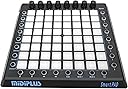
🎶 Unlock your studio’s secret weapon—affordable pro-level MIDI control at your fingertips!
The midiplus Smartpad USB MIDI Controller is a budget-friendly, compact MIDI device featuring 25 velocity-insensitive pads, 8 encoders, and 8 buttons. Designed primarily for Ableton Live but compatible with any MIDI software, it offers flexible control with USB connectivity and LED feedback, making it ideal for millennial producers seeking versatile, portable music production gear without breaking the bank.


| ASIN | B00WU6FDNG |
| Additional Features | MIDI Compatibility |
| Best Sellers Rank | #138,242 in Musical Instruments ( See Top 100 in Musical Instruments ) #450 in Computer Recording MIDI Controllers |
| Brand | Midiplus |
| Brand Name | Midiplus |
| Color | Black |
| Compatible Devices | Laptop, Desktop (Mac OS), Ableton Live |
| Connectivity Technology | USB |
| Connector Type | USB |
| Control Method | App |
| Control Type | MIDI Controller |
| Customer Reviews | 3.7 out of 5 stars 616 Reviews |
| Global Trade Identification Number | 04713809431017 |
| Hardware Interface | USB |
| Hardware Platform | Macintosh (x86-64) |
| Human Interface Input | Buttons |
| Included Components | USB Cable, User Manual |
| Instrument | Keyboard |
| Instrument Key | Any |
| Item Weight | 0.97 Kilograms |
| Keyboard Description | Ergonomic |
| Manufacturer | midiplus |
| Manufacturer Part Number | Smartpad |
| Model Name | Smartpad |
| Model Number | Smartpad |
| Number of Keys | 25 |
| Platform | Mac |
| Product Style | Modern |
| Special Feature | MIDI Compatibility |
| Supported Software | Ableton Live |
| Unit Count | 1.0 Count |
| Warranty Description | 12 months. |
M**R
100% no-brainer for the money... Unless you need plug-n-play with Live, then feel free to spend 2x+ more on a "real" Launchpad.
Easy 5 stars due to insane low price. I don't use Live, so if you're hoping for a plug-n-play with Live, maybe you'll be sad.. But for a general midi controller that I can use with iPad apps, my DAW (Reaper) other hardware (etc), this thing is great! There's no way to configure or assign controls, midi note numbers, etc. in the unit so you'll most likely need to do mapping in software or with something like Bome on PC or Midiflow on iPad. But if you need want pads, plus encoders, there's basically no other option. The 8 buttons on the left will change the CC's assigned to the 8 encoders. A cool feature that's in hardware and not device dependent is when you press the rightmost button on the bottom (SET), the top-most 4 left controller types are settable and viewable as vertical light rows on the pads. In other words, you've got 4 banks of virtual "sliders." Seriously, for the money, etc. there's no way this is worth less than 4 stars. One "bug" I can't figure out is when I send midi notes BACK to the unit to light up pads (which you can do... They light up RED), when it gets a note off, the pads stay lit BLUE... Can't figure out how to turn them off... Only thing that seems to work is sending an all notes off midi message... Weird... There's gotta be some combo of midi messages that get sent by Live etc. that turn them on/off...
D**J
See review for Ableton setup
Actually a pretty good, budget, controller. It does everything I expected it to. Setup could be better explained, but once its setup, it works like it should. To set up in Ableton (windows 10) go to preferences>midi link, then in controller surface drop down select KEYPAD, input drop down select SMARTPAD, output drop down select SMARTPAD, beneath that where it says midi ports on the rows for input AND ouput (both should say smartpad) turn track and remote on for both rows. Thats the "factory" midi setup. For clip (session) mode, to launch audio clips add them to whatever column, click midi in the top right corner highlight a clip and press whichever pad you want to launch it...rinse...repeat...click midi again to exit mapping, you should now see the pads controlling the clips turn blue and red once they're triggered. Overall, I'm satisfied. It would've been great for more control over LED's and if the pads were velocity sensitive, but I knew all that before I bought it.
L**R
Buggy - Conflicts with my logitech mouse
I spent a lot of time experimenting with this unit. I was on the edge of keeping it for a scene changer in OBS, when I found out that certain combinations of keys when pressed at the same time as my mouse actually change colors on some keys in ways that aren't helping and actually conflicting with my preferred work mode. Buttons should randomly change color just because I also clicked my mouse. Clearly there are still some bugs to be worked out on this machine, both in its physical architecture and its firmware. I can understand not having velocity sensitive keys at this price point, and I like the substantial heft and seeming durability of the unit. I don't expect to have to press the keys that hard to get a reaction. I should be able to touch them gently to get a note-on and note-off, even if velocity is always 127. Midiplus needs to address these issues in order to make this a workable option: 1. Make keys more touch sensitive, even if they aren't velocity sensitive. 2. Fix the bugs. 3. Make a fully addressable mode where I can assign whatever I want to any button, dial or key. Period. 4. Firmware update required asking permission in Google Drive from the owner. This is unacceptable. Just let us download the firmware. 5. A technical video available from "midiplus.com" links to a Chinese YouTube-style website that requires you to log in to view the video. That is not acceptable. Just let us view the video. Put it on YouTube for English-Speaking audiences. Things that could make this better: 1. Give us a full spectrum of 256 colors. 2. Give us practical video examples of how to use this with existing software like MidiKey2Key, Cubase, FL Studio, and Ableton on how to set key colors. 3. Make this device more user-friendly for people using OBS or SLOBS, and show us how to use it. This device could be such a useful tool at a third the cost of an Elgato StreamDeck. Seriously. 4. Include a software bundle for use with OBS or SLOBS. For noobs, 32 example hexadecimal numbers recognized by midi: 01 02 03 04 05 06 07 08 09 0A 0B 0C 0D 0E 0F 10 11 12 13 14 15 16 17 18 19 1A 1B 1C 1D 1E 1F 20 64 color addressable keys are numbered this way: 00 01 02 03 04 05 06 07 | First Row 10 11 12 13 14 15 16 17 | Second Row 20 21 22 23 24 25 26 27 | Third Row 30 31 32 33 34 35 36 37 | Fourth 40 41 42 43 44 45 46 47 | Fifth 50 51 52 53 54 55 56 57 | Sixth 60 61 62 63 64 65 66 67 | Seventh 70 71 72 73 74 75 76 77 | Eighth There are seven colors tagged as velocity, numbers 1 ~ 127 in hexadecimal (two characters only) 01 - 10 hex | light pink (supposed to approximate white) 11 - 20 hex | orange 21 - 30 hex | teal 31 - 40 hex | magenta 41 - 50 hex | blue 51 - 60 hex | green 61 - 70 hex | red 71 - 80 hex | also same red Set key colors by this six-character by sending this midi code: XXYYZZ XX = command type , 90 = note on, 80 = note off. Typically send a note on, so "90" YY = which keypad number, for example "00" ZZ = hexadecimal color assignement = 1 ~ 80 hexadecimal Set the left column button to "vol". Set the bottom row button to "mode 1". To set the top left most key (00) color to blue (41), send this midi code to the smartpad: 900041 Using a midi test bed software, these commands sent together show the first four colors across all 64 keys. 900001 900102 900203 900304 900405 900506 900607 900708 901009 90110A 90120B 90130C 90140D 90150E 90160F 901710 902011 902112 902213 902314 902415 902516 902617 902718 903019 90311A 90321B 90331C 90341D 90351E 90361F 903720 904021 904122 904223 904324 904425 904526 904627 904728 905029 90512A 90522B 90532C 90542D 90552E 90562F 905730 906031 906132 906233 906334 906435 906536 906637 906738 907039 90713A 90723B 90733C 90743D 90753E 90763F 907740 These commands sent together show the last three colors across all 64 keys. 900041 900142 900243 900344 900445 900546 900647 900748 901049 90114A 90124B 90134C 90144D 90154E 90164F 901750 902051 902152 902253 902354 902455 902556 902657 902758 903059 90315A 90325B 90335C 90345D 90355E 90365F 903760 904061 904162 904263 904364 904465 904566 904667 904768 905069 90516A 90526B 90536C 90546D 90556E 90566F 905770 906071 906172 906273 906374 906475 906576 906677 906778 907079 90717A 90727B 90737C 90747D 90757E 90767F 907780
S**B
It's almost what you think it is.
Firstly, you get what you pay for. You've heard that before, now hear it again. This WILL work with many different DAWs and will "technically" function. It has functions that mimic some Ableton hardware. I was able to get it to work with Ableton Live Lite and FL Studio 20. I was also able to download the firmware update (V0.15_2017_11_03) and get that to install. Follow the directions exactly, don't skip anything, and you can do it yourself. The firmware version I got did the LED sweep from corner to corner when you turn it on. I did the update, now it does a spiral when you turn it on. This update addresses some different functionality requests, including the changing LED color issue. Files to look for are on midiplus.com. There is also a reddit post: "Midiplus custom mapping in FL Studio". This post has custom firmware (KikPad and open-cleverpad) and extra info for the brave and the knowledge hungry. If you're convinced you can buy it and make it work, go for it. Maybe you can do something I can't. That said, my experience is mixed. Ableton Live Lite sees this pad (midi setting is keypad > smartpad > smartpad). Choose clip mode. You get blue pads for inactive tracks with red pads that are activated. Scene buttons launch as expected. Top dials change your volume, pan and sends given the top left active dial channel. Is there more to it? Probably, but I'm done messing with it. It's good enough. FL Studio 20 sees this pad when you activate perform mode. Choose clip mode. You get a blank slate until you hit a matching pad, then you get a matching color for pre/active/post performing track. Then you get a white-ish color, and the color is stuck there. Choose more1 or mode2 and back to clip, back to the clean slate. Something to do with FLS not sending the midi "note-off" signal. There's probably a way to fix it, but I'm not the programmer I once was, just more the musician. In both cases, it functions. But, these visual flaws take away from the experience of using the pad, and my mind won't let go of it, so it becomes a distraction and takes away from the flow. Until there is a proper set of scripts for the DAWs, moderately extensive tutorials for the original firmware or the custom firmwares, and practical visual cue-ing from and for the device, it will remain a toy I might mess with once and again. I decided to go with the Akai APC Mini which comes up used for 60-90 dollars here on Amazon once and again. I'm not saying this doesn't work, because it does. But the kid in me wants the full light show without any fuss, and he's probably the one pushing all the buttons anyhow. Maybe one day I'll have the gumption to write function scripts and dust off some of that python programming I once knew a little about. Until then... back to writing music instead of figuring out how to make this thing blink pretty colors. UPDATE: After quite a bit of dabbling in musical toys on the software side, I was able to get this to function in one more place. Owners of the raspberry pi will appreciate the musical usage of Patchbox OS, and their Pure Data and MODEP modules. I can't speak much on Pure Data, but MODEP is awesome to me as a guitarist. A full board ready for tons of pedals which include MIDI sound generators. The Smartpad easily becomes a harmony board and 64 knobs, a lot of which you will need. MIDILearn works, the pads work as a chromatic keyboard either going down by chunks in clip mode, or in mode1 it goes bottom up four wide on the left, then on the right. It seems to work better with amsynth. I'm sorely tempted to go diving into Ubuntu Studio and see where I can make it fit. Slowly but surely, it's becoming one of my favorite toys.
D**U
Works, but is kind of flaky and under supported
The biggest problem is that the online manual needs to be translated from "English" to English and is mostly useless. I don't use Ableton, so I plugged it into a MIDI monitor to find out how it works. However, if you aren't plugged into Ableton, the arrow keys won't be enabled. To fake being in Ableton, send the system exclusive stream "F0 26 65 01 11 02 F7". As a public service, I'll talk about some of the codes it sends. The device has 64 pads with LEDs under them, which can light up in different colors if you send note-ons to them with different velocities. Sending Channel 0 and the note number addresses the pad, velocity in groups of 16 sets the colors: black (0-15) , white (16-31), yellow (32-47), aqua (48-63), purple (64-79), blue (80-95), green (96-111), red (112-127) Once set, they have to have a note-off (any velocity) sent to it to reset it otherwise they ignore new colors sent to them. Sending on other channels is more primitive, it just makes anything on channel 2 blue, anything on channel 3 green. In "Clip" mode, and the top left hand button active, the top row will send Channel 1 note on 0 through note on 7, with velocity of 127. Releasing the pad sends a corresponding note off, velocity 0 . The Next row down sends note on 16-23, and so on. The way you get to note ons 8-15 is by "scrolling" over with the arrow keys at the bottom, so by tapping the right arrow 8 times, you get to the missing 64 codes. Similarly the knobs are Channel 1 CC 0 to 7 and scroll over just like the pads do to get to cc 8-15. The down arrow will also reassign the knobs to the next bank of CC's (16..31) etc. And the down arrow affects the pads by revealing new rows as well, on channel 5. The row of buttons on the right side sends Channel 3 note on 112 -119 and continue going to 127 via the down button. Mode 1 divides it into two wide columns, sending on channel 2 , mapped like this pretty good for a melodic instrument. 80 81 82 83 | 48 49 50 51 76 77 78 79 | 44 45 46 47 72 73 74 75 | 40 41 42 43 68 69 70 71 | 36 37 38 39 64 65 66 67 | 32 33 34 35 60 61 62 63 | 28 29 30 31 56 57 58 59 | 24 25 26 27 52 53 54 55 | 20 21 22 23 Mode 2 is a little too complicated to describe here... it might only make sense to Ableton. Set Mode treats the pads as presets for the knobs (which you can further tweak by turning them). The left-right arrows can set other CC's, and the first four buttons on the left will change to the next bank of 16 CC's: pretty nice! Anyway, it kind of works, there's new firmware that I would like to load in, but can't because I have a Mac. There might be some way to do it, though.
A**R
Many functionalities, Cheap, but Not Beginner Friendly!!!
This controller is great. I think all the bad reviews are coming from people who have zero experience or knowledge when it comes to midi interfaces, or midi in general. The functionalities combined with the extremely low price make it a great addition to any music production endeavor. I use this as a drumpad, FX controller, performance mode controller, sampler interface, light show gizmo (you can program the lights for individual L.E.D's), and sometimes as a guitar multi effects pedal. The possibilities are endless if you have the experience and knowledge or are willing to learn. Not a begginer friendly product, but this thing is cheap and awesome !!!!
P**K
Nice product for the price... I will be buying another one.
Packaging is real neat. Everything came real snug and braced in box. Made from typical plastic in which most midi controller are made. It comes with no software and you will need to spend about an hour or two manually mapping it (which is fine by me because i like full control) In the box with the controller there is a pamplet with a website to download instructions and also the usb to micro usb power cable. Very basic hardware but considering the price it's a steal in my eyes. I bought this as a gift for a coworker but I will probably buy a second one soon and I will upload a video.
H**R
Randomly quit working.
Purchased for use with Traktor. Could not program light feedback with hsb. Device randomly quit working; I would be learning buttons, then they wouldn't work anymore.(A mode change was not the issue.) I had to unplug USB and plug it back in. Very little documentation online. Very little support. There is no controller editor. Manual was not included, you download it from website, and was very basic and very Ableton specific. Nice in design, but needs a jailbreak.
S**A
It's cool, that's it.
It's smart. And a Pad. You can also use it as cool decoration and pretend you're one of the "cool",talented people ; when in reality you just use it as a light. Fun fact: Pretending you're on a spaceship will bring you loads of fun.
K**B
Brilliant
I ordered the controller and it arrived in no time. Also it was great quality, so overall it was a great service and an excellent product A+++++++
I**O
Smartpad
Pour mon garçon, il est très satisfait et content. Merci.
G**P
Perfetto
All’inizio mi ero fatta un po’ scoraggiare dalla recensioni negative ma ho fatto bene a dargli fiducia~
A**.
Excelente calidad y relación precio
Excelente uso en Ableton Live! Es necesario mappear todos los pads y knobs uno por uno es un poco tardado pero una vez que lo haces, es excelente y fácil de usar. Para configurar, busca en YouTube el canal oficial de MIDI PLUS ahí están los videos con instrucciones en inglés.
Trustpilot
5 days ago
1 month ago