Desertcart purchases this item on your behalf and handles shipping, customs, and support to UAE.
⌨️ Elevate your Mac setup with wired precision and backlit brilliance!
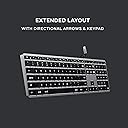
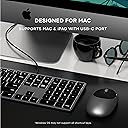
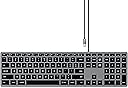
The Satechi Slim W3 Wired Backlit Keyboard is a Mac-optimized, full-sized wired keyboard featuring a USB-C connection for instant plug-and-play use. It offers 104 keys including a numeric keypad and MacOS function keys, housed in a sleek aluminum frame. Adjustable backlit keys with three brightness levels enhance visibility in any lighting, while included rubber risers provide ergonomic typing comfort. Compatible with a wide range of Apple devices and backed by a 2-year warranty, it’s the perfect blend of style, function, and reliability for professionals who demand more from their workspace.


| ASIN | B08Q67XPFT |
| Additional Features | Backlit |
| Antenna Location | Everyday Use |
| Best Sellers Rank | #778 in Computer Keyboards |
| Brand | Satechi |
| Built-In Media | User Manual |
| Button Quantity | 104 |
| Color | Space Gray |
| Compatible Devices | MacBook Pro 14/16-inch (2026 M5/M3/M2/M1), MacBook Air 13/15-inch (2026 M5/M4/M3/M2/M1), MacBook Neo 13-inch (2026), iPad Pro 11/13-inch (2025 M5/M4/M3/M2/M1), iPad Air 11/13-inch (2026 M4/M3/M2/M1), iPad Mini (A17 Pro/6), iPad (A16/10th Gen), iPad Pro 12.9-inch (6th/5th/4th/3rd/2nd/1st gen), iPhone 17, iPhone Air, iPhone 17 Pro, iPhone 17 Pro Max, iPhone 16/15/14/13/12 Series, Mac Mini (2024 M4/M2/M1), iMac (2024 M4/M3/M1), Mac Studio (2025 M4/M3/M2/M1), Lenovo ThinkPad, Microsoft Surface, Google Pixelbook, Google Pixel Pro 8/9, Samsung S24/Z Flip 5 Compatible Devices MacBook Pro 14/16-inch (2026 M5/M3/M2/M1), MacBook Air 13/15-inch (2026 M5/M4/M3/M2/M1), MacBook Neo 13-inch (2026), iPad Pro 11/13-inch (2025 M5/M4/M3/M2/M1), iPad Air 11/13-inch (2026 M4/M3/M2/M1), iPad Mini (A17 Pro/6), iPad (A16/10th Gen), iPad Pro 12.9-inch (6th/5th/4th/3rd/2nd/1st gen), iPhone 17, iPhone Air, iPhone 17 Pro, iPhone 17 Pro Max, iPhone 16/15/14/13/12 Series, Mac Mini (2024 M4/M2/M1), iMac (2024 M4/M3/M1), Mac Studio (2025 M4/M3/M2/M1), Lenovo ThinkPad, Microsoft Surface, Google Pixelbook, Google Pixel Pro 8/9, Samsung S24/Z Flip 5 See more |
| Compatible Operating System Family | iPadOS |
| Compatible Tablet Computer Models | Acer Iconia One 8, Acer Iconia Tab 8, Lenovo Yoga Tab 11, Lenovo Yoga Tab 13 |
| Connectivity Technology | USB-C |
| Customer Reviews | 4.1 out of 5 stars 414 Reviews |
| EU Spare Part Availability Duration | 2 years |
| Enclosure Material | Aluminum |
| External Testing Certification | 16364859011 |
| Global Trade Identification Number | 00879961009083 |
| Hand Orientation | Ambidextrous |
| Item Dimensions L x W x H | 16.65"L x 4.49"W x 0.43"H |
| Item Highlight | USB-C connection, works with MacBook Air/Pro/Neo, iPad Air/Pro, iPad Mini, Mac Mini, iMac |
| Item Weight | 429 g |
| Keyboard Description | Wired |
| Keyboard Layout | QWERTY |
| Keyboard Plate Material | Aluminum |
| Manufacturer | Satechi |
| Mfr Part Number | ST-UCSW3M |
| Minimum Required Operating System Version | Mac OS 10.12 Sierra |
| Model Name | Slim W3 Wired Backlit Keyboard with Numeric Keypad |
| Model Number | ST-UCSW3M |
| Number of Items | 1 |
| Number of Keys | 104 |
| Number of Packs | 1 |
| Number of Sections | 2 |
| Recommended Uses For Product | Everyday Use |
| Special Feature | Backlit |
| Style Name | W3 |
| Switch Type | Membrane or Rubber Dome |
| Theme | Modern Technology |
| UPC | 879961009083 |
| Unit Count | 1 Count |
| Warranty Description | 2-year limited warranty |
A**R
Great keyboard with a minor backlight issue
I put my laptops in vertical stands and was looking for a replacement keyboard. I have both a Mac and Windows PC. First I tried a mechanical keyboard, the the Keychron C2 with the blue switches and that was loud. It’s a really high-quality keyboard and I’d highly recommend it if you don’t mind the click-y noise of a mechanical keyboard. Then I tried the Cherry 6000 which was quieter but made a tinny noise when I typed. It was a good keyboard for typing and seemed to be well-made, but the noise was annoying. Maybe it was just defective, I don’t know. Finally I tried this one and I really like it. Its solid and has all a full keyset, but it’s a compact form factor, so it fits on my desk really well. It’s flat and heavy and I don’t mind the risers for a little angle. It’s very quiet and the key action is really good—it’s great for typing on. The only minor issue is the backlighting. The light is really bright under the top rows of keys and bleeds through under the key caps. It also flickers randomly when the computer is asleep, which is kind of weird. (This doesn’t happen if you keep the backlighting turned off, which I do, unless I really need it late at night.). The keys are very easy to see, even in low light. Bottom line: I’d definitely buy this keyboard again and would recommend unless the backlight is really important.
Z**C
Excellent alterative to Magic Keyboard.
Excellent keyboard. Feels very much like Apple's Magic Keyboard. I actually prefer typing on this keyboard more than Apple's keyboard, and I love that I don't have to worry about batteries or annoying Bluetooth notifications. Keyboard lighting also works great. My only complaint is that it doesn't have a dedicated Launchpad button, like Apple's keyboards. Unless this one thing is a big deal to you, save yourself 70%, and buy this keyboard.
R**T
Great but Satechi needs to make a couple of small adjustments
Overall very happy with the keyboard, but there are two points of pain that Satechi needs to address. Both have to do with the backlight. First, they need to lower the keys. With the light on, and the keyboard laying flat, the backlight is glaring under the function keys. One should not see the lights coming from under the keys. It does ruin the aesthetic and is annoying at times. The second item is the backlight timer. Satechi needs to make a small change in the firmware to either allow control over the backlight from the system (macOS) or have an 'always on' option mechanically. Nothing more annoying than to have your backlit keyboard go dark after just a few minutes. It's wired, so energy should not be a worry. Beyond those two things the feel is good, looks good, and so far I have had no issue with response or function in the myriad of things I do at the keyboard.
Y**.
Great quality and Exceptional Value
I write a lot of automation scripts and needed something that: 1. A bit more reliable than Bluetooth / RF wireless connectivity --> Wired 2. True Mac keyboard layout and not repurposed Windows / Android keyboards --> correct key locations (Alt and CMD) 3. Has white backlit. I am not a gamer. --> Good consistent white backlit 4. Not cheap plastic ---> Quality Aluminum chassis that is exact same Space Gray color as my work Mac 5. Not $149 ---> got it for $70 6. Not the same keys as the Mac keyboard or Macbook. Although mac keys are easier to type with I prefer sort of longer traveling keys (Compared to mac) for my desktop. I am using this happily with my Ubuntu desktop build system. Have no flicker issue. I am not paid to write this :) This is a great keyboard and if your need almost matches mine you should definitely give this a try.
V**R
Not fully compatible with PCs
I've got the model wide W3 w/numeric pad, grey color, backlight feature. The Pros: The touch and the material are great, the feel, the color, the font size and boldness on the keys are great. The Cons: This KB is not fully compatible with a PC, you cannot use it from right out of the box, you need to get a USB-C to USB interface, not a big deal but if you don't have it at hand, I have just one USB-C port in my PC but I'm using it for an external SSD drive, The Windows key is next to the space bar, on both sides, so if you're used to use the Alt key you're going to have to get used to that, or you can use the PowerToy tool from Windows to switch them but it doesn't work for all the commands (as Win+R for running commands, etc.) but it'll work for switching between windows and menus short-cuts. One of the problems I had also was that the Num keys from the right side didn't work (I almost return it because of that), they run like the cursor arrow keys, as when you have Numlock Off. I changed the regedit to have the NumLock On, it didn't work, and I did it also on the BIOS/UEFI screen but it didn't work either, but I call to Tech Support to see if they have a solution, otherwise I'd return it, (the people of Tech Sup attended me quite well), so they told me to go to On-Screen keyboard and enable it there, and it worked!, it is a good product, great if you have a Mac but for a PC you'd better think it twice, because it is not cheap. Other thing is that the light underneath the key glares higher than the keys, so if you used to work in a dark room could be a down side, you have to have the keyboard at an angle about 90-110 degrees from your face so the glare does not affects you. For me the solution is simple, to make a PC layout keyboard
S**N
It's fine
After using this keyboard for 4 months, I'm noticing it's "budget" nature. I'm a big fan of the Apple low-profile keyboard, I have used them for years and have gotten very used to them in keyboard shortcut workflows and I rarely have had to wait for them to keep up or go back and repeat a shortcut due to a mis-stroke. I used this model Satechi keyboard in another studio and liked it enough to purchase my own, but on this particular unit keys occasionally stick and require some solid repeated strokes before registering. With the increased use of the same few keys with keyboard shortcuts, particularly modifier keys cmd, opt, ctrl and shift, the lack of registering strokes on this keyboard gets disappointing and frustrating, especially by the end of a long day or under a deadline. Additionally, the metal shielding that wraps over the USB C connector has already pulled off. Nothing a dab of Gorilla Glue couldn't fix for now, but that's the main point of contact when connecting / disconnecting the thing. To have it come apart in your hand inside of 4 months is another strike against it. I appreciate the keyboard's light weight, the low-profile nature, the rubber feet, and the backlight keys. It's not a perfect backlight, but when working in dark rooms day or night, it's more than suitable. As I often have to travel with my system, I purchased a RAIACE Hard Storage Case Compatible with Apple Magic Keyboard + Magic Mouse from Amazon and it fits perfectly and offers good protection while packed. However, I will look into another keyboard and relegate this one to backup status.
A**B
Great product!
I am so thankful that I found this keyboard! I looked through so many different options both on and off Amazon, and I’m very happy I went with this one. I recently purchased a MacBook Air M2, and although the keyboard works perfectly, I have long, fake nails and needed a keyboard with a little “deeper” keys (hopefully that makes some sense). It connected seamlessly to my MacBook when I plugged it in, and I can type so much easier on it with my nails. It’s not the most ergonomic keyboard, it’s just flat, but nothing a padded mousepad can’t fix. It’s very sturdy and solid material. I love that it has 10-key ability too. I guess I didn’t pay close enough attention to the attachment cable, and I thought I’d have to purchase an adapter for it to plug in to my laptop, but thankfully, that wasn’t the case! Highly, highly recommend.
T**U
Had problems since the beginning and died after 6 months
From the very beginning I was having issues with this keyboard where it would randomly output 2 keystrokes when I only pressed a key once. This was happening intermittently and Satechi support was unable to help me with the issue. Today it completely died. Some keys are not working at all, while other keys output multiple keystrokes and some keys also simultaneously trigger function keys (like volume up and down). Really disappointed with this keyboard and will not buy it again to replace the broken one. Expected a lot better at this pricepoint.
G**G
Excelente
Excelente porém achei que era sem cabo kkkk
B**U
An excellent keyboard
This is a very high quality, great keyboard. Having tried both the X3 and the W3, I would say this (the W3) is just slightly worse than the X3 (the bluetooth version) in a couple of ways, but is definitely better in one way. In terms of ways in which the W3 is (slightly) worse, firstly the W3 has only 3 brightness levels where the X3 has 10. (However, they 3 levels are still well chosen, and the darkest is not too bright.) Secondly (and slightly weirdly), on the W3 then £ and # symbols are printed the wrong way round on the 3 key. (Since this is basically a US layout keyboard, the # symbol should be printed at the top of the key, not to the side, corresponding to the symbol accessed when pressing shift, as is done on all the other numeric keys on this keyboard, and indeed as is done on the 3 key on the X3, which has the same layout!) Related to this, I (again, only slightly) prefer the X3's key labelling, where they just haven't bothering to include the ALT (€ and £) symbols on the 2 and 3 keys at all, I prefer this as it makes the keyboard look slightly neater and less cluttered. Nevertheless, if you're only going to use the keyboard wired, I'd still get this one, even though the X3 can be used in wired mode. In particular, and one key reason why the W3 is better, if you're the kind of person who regularly uses Del/F2/F12 to break into the BIOS menu, then definitely get this wired model, the W3, as *even when used wired* the X3 cannot consistently do this, and (not always, but often, half the time or more) causes the BIOS to report that there is no keyboard attached. To point out another (very minor) imperfection shared by the X3 and the W3, the lighting on these keyboards is just not quite as beautiful as the lighting on a real Mac laptop keyboard - specifically, there are small overly bright spots here and there around the keys, where the light shows through too much, rather then the really uniform lighting around the keys on real Mac laptop keyboards. Nevertheless in build quality, in looks, and even in the above-mentioned quality of the lighting, this and the X3 are _way_ better than any of the (several) other illuminated external keyboards for the Mac which I have tried recently. Finally, the X3 booklet documents this, but the W3 booklet does not: fn+ESC is the way to swap the default behaviour of the function keys, between multimedia key or function key behaviour. The same key combo works on both keyboards.
D**A
zeer mooi maar anders
Het toetsenbord is zeer mooi en tot mijn grote spijt in QWERTY. Ik had hier jammer genoeg over gekeken. Ik heb het dus maar teruggestuurd.
L**L
Stille tikplank.
Prima toetsenbord, artikel is zoals beschreven. Goed verpakt geleverd.
M**L
Clavier de très bonne qualité
Trustpilot
2 months ago
2 weeks ago