


Desertcart purchases this item on your behalf and handles shipping, customs, and support to UAE.
🎨 Unlock your digital masterpiece with precision and speed!
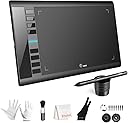
The Ugee M708 V3 is a professional-grade graphics drawing tablet featuring a large 10x6 inch active area with a papery textured surface for a natural feel. Equipped with an 8192-level pressure-sensitive stylus and 8 customizable hotkeys, it offers precise control and enhanced productivity. Compatible across multiple operating systems including Windows, Mac, Android, Linux, and Chrome OS, it supports a wide range of creative software. Designed for both left and right-handed users, it includes a pen holder, extra nibs, and easy USB-C connectivity, making it ideal for artists, designers, and digital creators at any skill level.


| ASIN | B07P82FSFW |
| Active Surface Area | 10 inches x 6 inches |
| Best Sellers Rank | #154,909 in Computers & Accessories ( See Top 100 in Computers & Accessories ) #595 in Graphic Tablets |
| Box Contents | Glove, Pen Holder, USB Cable |
| Brand | Ugee |
| Brand Name | Ugee |
| Colour | Black |
| Compatible Devices | Personal Computer |
| Connectivity Technology | USB |
| Country of Origin | USA |
| Customer Reviews | 4.4 out of 5 stars 6,045 Reviews |
| Global Trade Identification Number | 00703363411864 |
| Item Dimensions L x W | 21.1L x 36.1W Centimeters |
| Manufacturer | Frunsi |
| Manufacturer Part Number | F-UGEE-M708-old |
| Model Name | M708 |
| Model Number | UGEE M708 V3 |
| Native Resolution | 1920x1080 |
| Network Connectivity Technology | USB |
| Number of Items | 1 |
| Number of Packs | 1 |
| Operating System | Android 10.0 or later), Chrome OS 88 (or later), Linux, Windows 7 (or later), mac OS 10.13 (or later) Operating System Android 10.0 or later), Chrome OS 88 (or later), Linux, Windows 7 (or later), mac OS 10.13 (or later) See more |
| Pressure Sensitivity | 8192 Levels |
| Product Features | Stylus |
| Screen Size Unit of Measure | 6 Inches |
| Software Update Supported to Date | unknown |
| Special Feature | Stylus |
| Specific Uses For Product | Drawing,Painting |
| Target Audience | Teacher |
| UPC | 703363411864 |
| Unit Count | 1.0 Count |
K**I
very good think
very Good
A**R
Très bon investissement
Votre produit est d'une excellente qualité/prix. Super génial.
R**D
Delightful and easy to use
I have largely given up doing art because I have parented young kids for over a decade and it is difficult to do with kids grabbing at the tools. I have used this tablet for a short time but appreciate that even if a kid gets their hands on the stylus there is no mess and marks made can be easily undone. I am new to digital art so I started using the paint application on my computer and coloring page. It was pretty fun being able to draw and color in a way I had never been able to do before. Of course I realized quickly I was missing out on the pressure sensitivity and got a new application to utilize that feature. I'm still getting used to the digital art and although the feeling of a stylus differs greatly from brushes, pastels, and even pencils, it is very delightful to be able to engage in art in a way I was unable to for a long time. My older child took a try as well and found it satisfying to use. Based on my current experience I would recommend it. I haven't tried other similar devices but I can't imagine anything could be done better. Pros: *Quick and easy set up *Easy to program shortcut buttons on tablet and pen *Can be used with our without pressure sensitive application *Pressure sensitivity is awesome- this is really where there is phenomenal opportunity to make art Cons: *Pencil shortcut buttons get in my way. My pencil grip is not standard so I accidently press the shortcut buttons while drawing. These are easy to disable and may be super useful for those with a standard grip *It took a little bit to get used to drawing on the tablet and watching to screen for feedback, an issue I would have for any drawing tablet that isn't directly on a screen. *The shortcut buttons on the tablet are easy for my kids to push while I draw although they are discreet enough that my kids aren't drawn to them. *There is a lag between the drawing on the tablet and the response on the screen with quick movements. I believe this is likely due to my computer specs and limitations rather than the tablet.
U**A
Equipamento excelente.
A mesa foi para minha mulher, ela disse que atende perfeitamente todas as necessidades dela. Nosso único problema foi com a transportadora. Mas isto não é o caso aqui.
P**A
Fantastic value starter drawing tablet that feels truly professional
I was looking for a dedicated drawing device after getting into digital art recently, and the UGEE M708 caught my eye. At £39.99, it looked like a solid way to test the waters without spending a fortune. Just to be clear, this isn’t a standalone tablet that you draw directly on. It needs to be connected to your computer or laptop via USB, and you draw on the tablet surface while your artwork appears on your screen, so this does NOT have it's own screen. The good news is that you can connect this to either a Windows machine or an Apple MAC desktop or laptop. Once connected, it feels natural very quickly. The 10x6 inch drawing area gives you plenty of room to work, and the slightly textured surface gives a pleasant paper-like feel. The pen doesn’t need charging, which is a big plus, and it responds instantly with no lag. The 8192 levels of pressure sensitivity make sketching, shading, and detailing smooth and accurate, reacting beautifully to light or heavy pressure. The eight programmable shortcut keys on the side make the workflow much faster. I set mine for undo, zoom, and brush size, which saves a lot of time once you get used to it. Installation was simple on my Windows laptop, and it works with all the main creative software I’ve tried so far, including Photoshop and Krita. The beauty of it is that you’re not tied to one app - it works with pretty much any drawing or design software that supports these devices. That means you can pick the right software for the person’s age or skill level, and just change the software as your skills progress rather than having to buy a new tablet. Overall, this is a brilliant option for beginners looking to explore digital art seriously without breaking the bank. The build quality feels sturdy, it performs far better than expected for the price, and it’s made digital drawing genuinely enjoyable.
1**E
Muy buen producto
Es la primera vez que uso una pero esta es muy buena
Trustpilot
1 month ago
1 month ago