


Buy anything from 5,000+ international stores. One checkout price. No surprise fees. Join 2M+ shoppers on Desertcart.
Desertcart purchases this item on your behalf and handles shipping, customs, and support to UAE.
🎨 Draw Your Dreams into Reality!
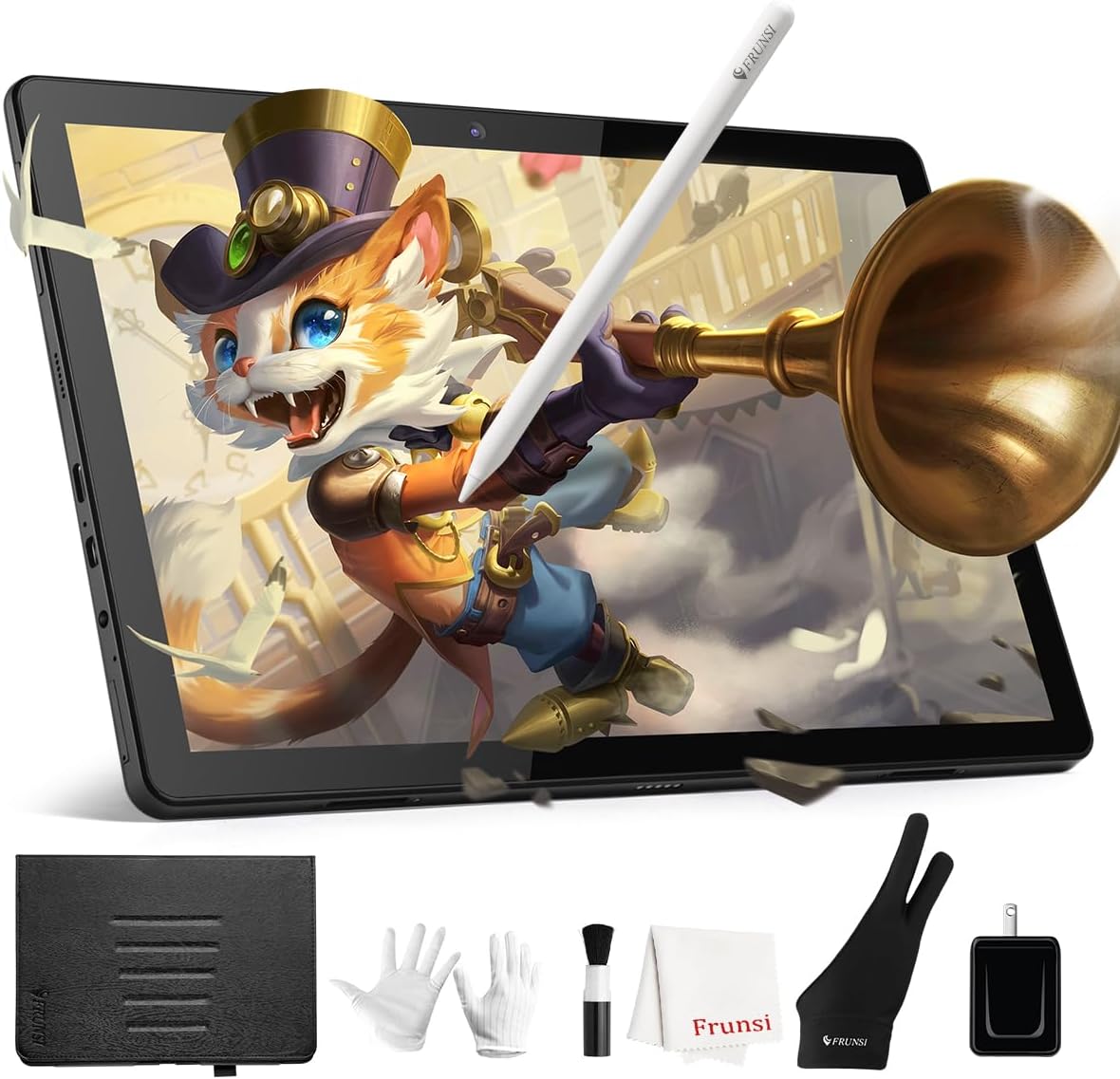
The RubensTab T11PRO is a standalone drawing tablet featuring a 10.1-inch FHD screen, powered by an octa-core CPU with 4GB RAM and 64GB storage. It runs on Android 12, allowing users to install various drawing applications directly from the Play Store. With a long-lasting 5800mAh battery, adjustable stand case, and palm rejection technology, this tablet is designed for both beginners and professional artists seeking a portable and versatile digital art solution.


| ASIN | B08G1B3H5V |
| Active Surface Area | 52.57 square inches |
| Additional Features | pen |
| Best Sellers Rank | #38 in Computer Graphics Tablets |
| Brand | Frunsi |
| Built-In Media | 1 x Digital Pen, 1 x Stylus, 1 x Gloves, 1 x Cleaning Cloth |
| Color | Black |
| Compatible Devices | Tablet |
| Connectivity Technology | USB |
| Customer Reviews | 4.5 out of 5 stars 658 Reviews |
| Display Type | LCD |
| Item Dimensions L x W | 7.87"L x 6.69"W |
| Manufacturer | Frunsi |
| Mfr Part Number | 56458465012 |
| Model Name | RubensTab |
| Model Number | RubensTab |
| Native Resolution | 1920*1200 |
| Operating System | Android 12 |
| Pressure Sensitivity | 1024 Levels |
| Screen Size | 10.1 Inches |
| Special Feature | pen |
| Specific Uses For Product | Drawing |
| Target Audience | Teacher |
| Warranty Description | 1 |
A**.
Amazing starter tablet with quick learning time, long battery life, great device feedback!
I’d like to give my honest review on this tablet and company. I’d like to first point out I’m a traditional medium artist, digital is a tough conversion for me so i typically end up forgetting about digital work until I get bored. I bought this intending to give the digital medium another go. But i also don’t make a ton of money and can’t splurge on the high end tablets that cost an arm a leg and a soul to buy, for the specs it offers this is a fair price range. Boy am i glad i took the chance!! So the battery life is amazing, and start up is quick. I don’t need to wait minutes to load my drawing program. The art program offered is comparable to procreate and easy to use. Honestly the UI made it very easy for me to pick up and play with settings without worry. It’s been a surprisingly short amount of time to adapt to this medium and i do feel the tablet itself is a reason for that. Flow is great, great feedback between pen and tablet. I have yet to charge the tablet but even at about half power it doesn’t lag. This i appreciate a ton as i don’t have many opportunities to charge it with my work life. But on that note, it comes with a case and it’s durable. I can out this in my purse easily or just look cool holding it. The screen does light up very nicely and i can see it on a sunny day, but it does seem to drain the battery faster if left at full brightness. But it’s a very small difference! I’m very happy with my purchase! My first frunsi tablet (years ago) compared to this model is a huge jump! It’s definitely worth it if you travel for work and are looking for an option comparable to a high end tablet but with a low end price! Edit: I want to amend my review. Now, we’ve all had negative customer experiences, and usually that’s what people write about. Today I wanna write about the exemplary customer service I have received at the hands of this company. I’m honestly in shock that I had this experience, because so many companies don’t give the level of care and customer satisfaction that Frunsi has gone to show me. I specifically want to mention the customer service representative Sally. She has worked with me through this entire process of the tablet, and customer care. This woman goes above and beyond for her customers, and to show the grace of this company, that it reminds me of another time in life that companies cared more about the customer than profit. This is one of those companies. They have earned a lifelong customer with the experiences I’ve had with them. You can do no wrong with ordering, I can guarantee you you will have the best experience, regardless of what you were expecting.
R**O
this tablet and customer service ate awsome great value and great functionality
the customer service with this company is top notch very courteous and professional to your needs. the tablet is awsome has sharp colors easy functions great screen quality all around great value. also easy and comfortable to use the built in drawing programs greatly help the kids with drawing techniques.i would recommend Frunsi Ruebens tab to anyone .
D**S
Solid standalone drawing tablet for beginners and casual use
I picked up the Frunsi RubensTab T11 Pro mainly for my daughter to explore digital drawing, and it’s been a good fit so far. The fact that it’s a standalone tablet—no computer required—is a big plus. It runs on Android 12 and comes with several pre-installed drawing apps like Sketch, which made it easy to get started right away. The screen is clear and bright, and the 10.1" size works well for sketching or note-taking. The stylus does require a battery (included), and it’s responsive enough for casual drawing. It’s not as sensitive as some higher-end options (1024 pressure levels), but for beginners, it’s perfectly usable. Battery life is decent—around 5 hours per charge—and it charges via USB-C, which is convenient. It also comes with a few extras like a stand case, glove, and pen, which help round out the package. Performance-wise, it handles basic drawing apps just fine, though it’s not built for heavy multitasking. If you’re looking for a simple, portable drawing tablet for learning or light creative work, this is a solid choice. It’s not a professional-grade device, but it does what it promises at a fair price.
R**H
Good Budget Tablet
I ordered this for my 11yo son 5 months ago after spending some time researching. We wanted something nice, but not crazy expensive. This one works great so far. I set up all the parental controls which I like, although I really wish I had the option to completely remove his access to the internet. He still has the Google bar and Play Store etc available to him. My kids are not allowed on the internet at all. We only wanted the tablet for his art. I like that I was able to set a timer for when he can access his tablet and I get notifications of his activity. My son's only complaint is that it is only possible to draw a straight line with the ruler feature. Otherwise, the line comes out shakey. No major problems. It's nice and simple. I love the case. We have had to contact customer service twice (user errors, nothing wrong with the product) and they have been fantastic! Very informative and quick to respond. We are very happy with this purchase.
S**Y
A fantastic Digital Drawing Tablet: Rubens Tab T11Pro! Worth Buying!!
Rubens Tab T11 Pro – A Fantastic Drawing Tablet for Digital Artists The Rubens Tab T11 Pro is an incredible drawing tablet that delivers both power and precision at a price point that makes it stand out from many competitors. After spending time with it, I can confidently say it’s an excellent choice for both beginners and experienced digital artists. Design & Build Quality The tablet feels premium right out of the box. It’s slim, lightweight, and sleek, with a well-thought-out ergonomic design. The screen gives a paper-like drawing experience while reducing glare and fingerprints, which is a huge plus point for long sessions. Stylus Performance The stylus is fantastic—battery-free, lightweight, and highly responsive. With 1024 levels of pressure sensitivity and tilt support, strokes feel natural and expressive. Whether sketching, shading, or working on fine details, the line quality stays consistent without noticeable lag. Display & Colors The 10.1 inch laminated screen is stunning. Colors are vibrant, crisp, and accurate—perfect for illustration, concept art, and design work. The full lamination eliminates parallax, so what you draw is exactly where the pen lands. Performance & Compatibility The Rubens Tab T11 Pro connects smoothly with Android devices. It’s easy to set up and works seamlessly with popular programs like, Krita, and Adobe Sketchbook. The shortcut buttons and customizable keys make workflow faster and more intuitive. Adobe Sketchbook and Krita are already installed in the drawing tablet and that’s great! It’s an android device so many drawing apps like medibang, ibis paint can also be used in it effectively! Convenience & Extras Frunsi packs in thoughtful extras—glove, pen spare nibs, cables, and even a stand—so you’re ready to create right out of the box. The setup process is simple, and users can install and transfer data without hassle. Final Verdict The Rubens Rubens Tab T11 Pro hits the sweet spot of affordability, performance, and design. It’s reliable enough for professionals and user-friendly enough for beginners who want to dive into digital art without compromises. If you’re looking for a tablet that combines smooth performance, premium build, and a natural drawing experience, the Rubens Pro is a fantastic investment. Happy Drawing
R**D
Nice Stand Alone Drawing Tablet
This tablet is fun. I was expecting to have to buy another program to use this in a meaningful way for me but the included program is plenty for an amateur like myself. I was looking for something that was entry level that could be dedicated to art. This tablet can be used beyond art which I did not expect to use but I found my artistic child loves it. She was modifying on paper by painting or drawing on magazines and pictures but is now about to import images from the internet to modify. She is a perfectionist and is in love with being able to delete mistakes. My child had never worked with layers in art programs before so that was a change for her but she acclimated quickly. It is hard to pry her hands off of it for my own enjoyment. The only negative I have is that there is a slight lag between drawing and the line appearing on the screen. For the tablet price point I find it great and the lag isn't a big enough to be distracting. I loved that this came with everything you needed to start right away between the gloves, pen, case, and included drawing program. I can't compare this to other portable art tablets since I haven't had the opportunity to use them but compared to my mobile phone this is phenomenal. The screen is a decent size and easy to interact with. The camera makes it fun option for selfies converted into self portraits. The pressure sensitivity and ability to change it is nice. I have some hand difficulties and my grip and pressure has changed over time and with this I am able to adjust the pressure sensitivity so that the line is thicker without as much pressure.
M**S
Best Ipad ever!!!!!
I lovw this Ipad i use it everyday! It is so useful. I can do my school work and i can text my friends through messenger. It is the perfect tablet for someone who is looking for a cheap but very good ipad. You can get any app and you can have any parental controls you need. There are two things about this iPad ever feel better like you cannot get rid of Google on YouTube. Also the screen protector that comes with is like $5 so it is does not do anything the first day I got it I had not even dropped it and the screen protector have crack in it the iPad was not harmed though. Make sure to buy a screen protecter with the purchase of this iPad if you choose to do so. I love this iPad that you can also put timers on the apps so that you can limit your screen time if you feel like you need to. It also is a great drawing iPad I use it for sketching and it comes with pre-installed apps. Battery life lasts about like a day. To use this iPad constantly the pen needs batteries like every 4 days so that kind of sucks but you can also get any stylus pen and use it on this iPad I highly recommend this iPad. So you know the screens size is 10.1 can't share any photos because I am using this iPad right now but I love it. 10 out of 10 best iPad I've ever had
A**R
Okay in a bind
It's okay in a bind, but I don't think anyone will be picking it over an iPad or anything. Product description doesn't seem to include palm rejection though the manual does. It says the pen needs to hover a moment over the tablet before palm rejection in initiated or something. It does work... for that one stroke. If you're good at drawing without ever lifting the stylus then this works well for you. For everyone else though, even the glove provided does no good at preventing the screen from registering your palm. I used a different art program than provided and find that the pen nib is not quite accurate to screen, but maybe thats just me. Pen requires triple A batteries which can get drained even when pen is not in use Battery life seems okay. I watched a few hour long episodes of a show on it and still had some charge after, though not much Over all I prefer my PC/chromebook over this but if you need something smaller for traveling it's not bad. Comes with a lot of extras too like a protective case, aforementioned glove, batteries, and a few other things that Im not sure what they're for.
Trustpilot
2 weeks ago
1 month ago