Buy anything from 5,000+ international stores. One checkout price. No surprise fees. Join 2M+ shoppers on Desertcart.
Desertcart purchases this item on your behalf and handles shipping, customs, and support to UAE.
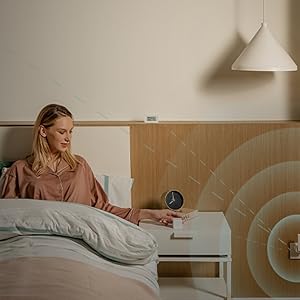
🏠 Elevate your smart home game with Aqara Hub E1 — small hub, massive control!
The Aqara Smart Hub E1 is a compact, USB-A powered smart home gateway supporting Zigbee 3.0 and 2.4 GHz Wi-Fi. It connects up to 128 Aqara devices and integrates seamlessly with Apple HomeKit, Alexa, Google Assistant, and IFTTT. Its flexible design and dual repeater functions enhance network stability and coverage, making it an essential hub for millennial professionals seeking sleek, reliable smart home control.


| ASIN | B09BJCNCKM |
| Antenna Location | Home |
| Antenna Type | Internal |
| Best Sellers Rank | #41,082 in Home Improvement ( See Top 100 in Home Improvement ) #87 in Smart & Remote Controlled Plugs |
| Box Contents | Instruction manual |
| Brand | Aqara |
| Brand Name | Aqara |
| Colour | White |
| Compatible Devices | Desktop |
| Connectivity Protocol | Wi-Fi |
| Connectivity Technology | USB, Wi-Fi |
| Control Method | Voice |
| Controller Type | Google Assistant |
| Coverage | Limited indoor coverage |
| Customer Reviews | 4.3 out of 5 stars 1,687 Reviews |
| Data Transfer Rate | 2.4 GHz |
| Frequency | 2.4 GHz |
| Frequency Band Class | Single-Band |
| Is Modem Compatible | No |
| Item Dimensions L x W x H | 10.8L x 3W x 0.8H Centimeters |
| Item Type Name | Smart Hub |
| Item Weight Unit of Measure | 0.84 Ounces |
| LAN Port Bandwidth | 2.4 ghz |
| Manufacturer | Lumi United Technology Co., Ltd. |
| Manufacturer Part Number | E1 |
| Maximum Upstream Data Transfer Rate | 600 Megabits Per Second |
| Model Name | HE1-G01 |
| Model Number | HE1-G01 |
| Number of Ports | 1 |
| Operating System | Zigbee |
| Other Special Features of the Product | WiFi Mesh |
| Security Protocol | WPA2-PSK |
| Special Feature | WiFi Mesh |
| UPC | 192784000007 |
| Voltage | 5 Volts (DC) |
| Wi-Fi Generation | Wi-Fi 4 |
| Wireless Communication Standard | 802.11n |
| Wireless Compability | 802.11n |
C**I
bardzo dobry
polecam
A**A
Aquara una buona scoperta
sono possessore di alcune altre periferiche smart e questo prodotto Aqara si é aggiunto alla collezione. Facile da installare a patto di avere una presa USB dedicata per l'alimentazione. Sono riuscito ad installarlo ed a collegare il sensore temperatura, comprato sempre su amazon, senza la necessità di consultare il manuale (oltretutto scritto con caratteri microscopici); necessario installare l'app per avere un controllo totale sull'hub e sulle periferiche ad esso collegate. Per chi usa homekit di apple l'app diventa superflua nell'utilizzo quotidiano, e l'integrazione é perfetta. La periferica é orientabile ed utilizza il protocollo zigbee per connettersi con i vari componenti della famiglia Aqara. Tradotto : non pensate di installare troppo lontano i vari componenti o potrebbe perdersi il segnale. In ogni caso i 10 metri di distanza li regge tranquillamente, anche con qualche muro non troppo spesso nel mezzo. Consiglio quindi l'acquisto se si vuole un hub economico altrimenti se siete interessati ad avere anche una telecamera di sorveglianza vi consiglio di comprare Aqara Camera Hub G2H Pro che fa anche da hub. Costa di più ma avete due funzioni integrate. L'ho regalato e sembrare funzionare bene
A**A
Small but very reliable!
Great little smart hub easy to set up and connects quickly with all my Aqara devices. The compact size is perfect and fits neatly into any USB port. Works smoothly with Apple HomeKit and automations run without delay. A solid choice if you’re building a smart home on a budget.
J**L
Très pratique
Il me fallait un 2e hub car le signal de celui du salon n’arrivait pas à atteindre les accessoires de la cuisine, celui ci était le moins cher et ne nécessitant pas de prises de courant en plus d’être très compact il convient parfaitement à mon utilisation. De plus la clé sait se faire discrète. Excellent produit et excellente marque que je recommande
C**R
Read before iPhone set up
In the end - it worked! Yet was very unnerving to set up on iPhone. Tip: when you set it up for the first time, to anvoid time out errors, always accept the name suggested by the system and hit enter quickly. Only after I did that, I was able to set it up, and then renamed at a later stage.
Trustpilot
2 weeks ago
4 days ago