Desertcart purchases this item on your behalf and handles shipping, customs, and support to UAE.
🚀 Elevate your tablet game—turn heads and get work done in style!
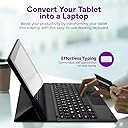
The Fusion5 Universal Docking Keyboard is a sleek, ultra-slim accessory designed exclusively for 10.1" Windows 11 Fusion5 tablets (excluding rugged models). It instantly converts your tablet into a laptop with an 80-key QWERTY layout, offering plug-and-play convenience without any setup or drivers. Lightweight at 277g and built for travel, it provides a stable, ergonomic typing experience backed by a 12-month US warranty.


| ASIN | B09W33CPY8 |
| Additional Features | Travel |
| Antenna Location | Office,Travel |
| Best Sellers Rank | #153 in Tablet Keyboards |
| Brand | Fusion5 |
| Built-In Media | USB Cable |
| Button Quantity | 80 |
| Color | Black |
| Compatible Devices | PC, Tablet |
| Compatible Operating System Family | Windows |
| Connectivity Technology | USB |
| Customer Reviews | 3.8 out of 5 stars 1,114 Reviews |
| Enclosure Material | Plastic Or Polycarbonate |
| Generation | [INF] |
| Hand Orientation | Ambidextrous |
| Item Weight | 277 g |
| Keyboard Description | Compact, Docking Keyboard |
| Keyboard Layout | QWERTY |
| Manufacturer | Fusion5 |
| Mfr Part Number | FWIN232S3DOCKING |
| Minimum Required Operating System Version | Windows 11 |
| Model Number | FWIN232S3DOCKING |
| Number of Items | 1 |
| Number of Keys | 80 |
| Number of Packs | 1 |
| Number of Sections | 1 |
| Recommended Uses For Product | Office,Travel |
| Series Number | 232 |
| Special Feature | Travel |
| Style Name | Contemporary |
| Theme | Computing |
| Unit Count | 1 Count |
| Water Resistance Level | Not Water Resistant |
K**H
Love It – Turns My Tablet into a Real Laptop!
This keyboard is exactly what I needed. It connects perfectly with my 10.1" Windows tablet and instantly makes it feel like a full laptop. Typing is smooth and comfortable, and the slim, stylish design is easy to carry around. It’s well-built, responsive, and has made working on my tablet so much easier. Love it — highly recommended for productivity on the go!
W**Y
Works ok, but...
Not as solid as I would have liked. The stand itself is hard to keep in position. What concerns me most is the connection between the keyboard and tablet. It does not always connect well. That's especially a problem as the keyboard wears. The gap between the connection and keyboard flexes and can disconnect. Otherwise, when connected, the keyboard is solid works as advertised.
W**D
Works great with the Fusion 10.1 computer
I wanted a small tablet sized computer that I could use for going to meetings. I bought a Win 11 based Fusion 10.1" along with this Fusion5 Universal Docking Keyboard for All 10.1 Windows Tablet Models" to make a very useable and portable computer.
K**R
Turn off touchpad, not for lap use, don't be too rough with it. UPDATED 11-30-2022
11-30-2022 The original keyboard stopped working a year ago and I decided against replacement. I purchased this replacement when I read another review stating the keyboard was better now. Its a different keyboard than the original. It feels more sturdy and the touchpad seems a little better. There's also a convenient new key to quickly turn the touchpad on/off. Time will tell how this one fairs. Original Review: I like having a keyboard case that is not dependent on bluetooth connectivity and doesn't use one of the 2 USB ports on the tablet. But this case comes with a few caveats: 1)THIS IS THE BIG ONE: The touchpad uses generic Windows 10 drivers and the edges of the touchpad correspond to shortcuts built into Windows 10. So swiping from the edges can cause windows to minimize or the settings screen to show up. From all my research the only fix is a custom driver from the manufacturer that would allow these settings to get turned off. I end up turning off the touchpach and using the touch screen and occasionally a usb or bluetooth mouse. 2)this case is designed to be used on a desk. It has no hinge. The back folds into a kickstand and the angle of the tablet is not adjustable. But it works. 3)While trying to use this on my lap, on the couch i would pick the tablet and case up a lot to adjust and move around. I think that leaving the keyboard to dangle from the case too often loosened the connection to the connector inside. i now get connection hiccups and have to press down on the connector a little and then I'm good. But I'm concerned that overtime, removing the tablet a lot, will pull on the connector too much since the magnet that hold it the tablet is pretty strong.
P**O
Poorly designed
The cover just flaps loosely with nothing as a clasp. The scrolling is poor. I must use a stylus pen with this keyboard. It is easy to accidentally scroll when keying, causing data entry errors. Unfortunately there is no way to attach a stylus to the cover. The gritty surface is also very annoying to me and slides easily, so I had to place a silicone mat under it. The power cable connection is at the top of the screen.. another poor design feature. I will have to use a wireless keyboard at home. UPDATE: after two weeks with my tablet always in this... my screen is scratched near where the space bar is located. I am returning this and the tablet. Both were a waste of money... but more seriously of my time and attempts to find ways around the deficiencies of the tabet and this keyboard. This is the last Fusion product I will ever purchase.
J**Y
Great tablet for the money
They have different models to chose from and this one is well built. I even let my son try it for his job. He's picky and he liked it. I may get it back, time will tell.
P**R
Brick after a few weeks
Excited about tablet. Seemed to work ok. Office works. Wsl needed and setup. A little slow but worked fine. After a few weeks wouldn’t start. Total blank screen. Blue / red light works as expected. Plugged into monitor and no change. Had to return. Very disappointed
J**G
attaches easuly
keyboard attaches easily. if held above the pins magnets pull it into place. keys are easy to see with white letters on a dark gray background. Works best on a table or desktop. its hard to keep the keyboard attached while using on your lap
M**N
Livraison rapide. Beau design de la tableyte
J’aime le Windows 10 que procure la tablette
J**T
Good quality & value for money keyboard for tablet users
My Fusion tablet (FWIN232 Pro N5 model) fits easily onto the keyboard. I switched on tablet and keyboard works instantly, typing on it now ! I also like the touch pad which allows you to control the mouse. The quality and appearance is good and it responds instantly when using the keyboard and touchpad. Great value for money. I would recommend this keyboard for 10.1 Windows tablets especially Fusion 5 ones
J**E
n'est pas stable
Faut que le support repose sur un endroit stable difficile de s'en servir sur nos genoux par exemple
K**R
Be aware its an American keyboard
Nice firm connection to the fusion tablet seemed at first at bit sluggish but as the tablet was charged and settled down much more responsive. Be aware though you may select uk keyboard its actually American . So £ sign missing for example and @ is not above the 2 easy fix with some replacement stick on keys . BUT be careful some English sticker sets on prime are American as well
G**S
An excellent match for anyone looking to boost their Fusion5 tablet’s versatility
Easily turn a tablet into a mini-laptop with the Fusion5 Universal Docking Keyboard. Designed to fit all 10.1" Fusion5 Windows tablet models, it’s a simple yet effective accessory that adds real productivity. The keyboard clips securely into place, giving a sturdy connection that feels reliable when typing. Keys are well spaced and comfortable, making it suitable for longer writing sessions, whether for work, study, or browsing. The built-in touchpad is a welcome feature, enabling smooth navigation without relying on the touchscreen. Another strong point is portability. The slim, lightweight design makes it easy to carry around, and once attached, the tablet folds neatly like a laptop. It also doubles as a protective case, keeping the screen covered when closed. Overall, the Fusion5 Docking Keyboard is a practical and affordable way to maximise the capabilities of your tablet. It transforms everyday use, making typing faster and navigation easier, while adding that extra layer of convenience and protection. An excellent match for anyone looking to boost their Fusion5 tablet’s versatility.
Trustpilot
1 week ago
2 weeks ago