Buy anything from 5,000+ international stores. One checkout price. No surprise fees. Join 2M+ shoppers on Desertcart.
Desertcart purchases this item on your behalf and handles shipping, customs, and support to UAE.
⌨️ Elevate your iPad Pro game—type smarter, work faster, and never miss a beat!
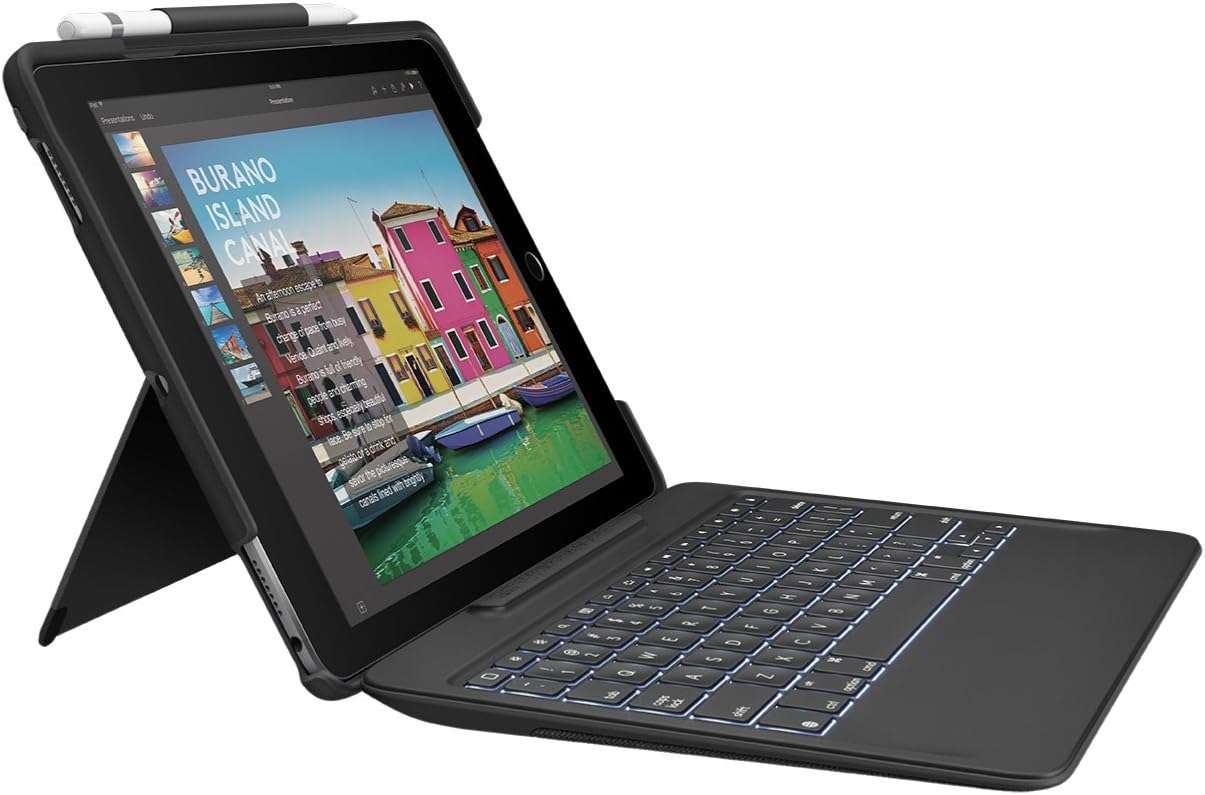
The Logitech Slim Combo for iPad Pro 10.5-inch is a premium keyboard case featuring a detachable, backlit keyboard powered by Apple’s Smart Connector for instant, battery-free connection. Designed for professionals on the go, it offers 4 versatile use modes, spill-resistant PU-coated fabric, and an integrated Apple Pencil holder, combining durability with sleek functionality to enhance productivity in any environment.
| ASIN | B0753223KN |
| Additional Features | Backlit |
| Antenna Location | Office |
| Best Sellers Rank | #2,393 in Tablet Keyboard Cases |
| Brand | Logitech |
| Built-In Media | Case with detachable keyboard, user guide |
| Button Quantity | 78 |
| Color | Black |
| Compatible Devices | iPad Pro 10.5-inch, A1701, A1709, A1852 |
| Compatible Tablet Computer Models | Apple iPad Pro 10.5-inch |
| Connectivity Technology | Smart Connector |
| Customer Reviews | 4.2 out of 5 stars 1,588 Reviews |
| Enclosure Material | Plastic, Polyurethane (PU) |
| Generation | 2nd Generation |
| Global Trade Identification Number | 00097855128966 |
| Hand Orientation | Right |
| Item Dimensions L x W x H | 10.16"L x 7.24"W x 1.06"H |
| Item Type Name | Logitech 920-008420 iPad Pro Keyboard Case SLIM COMBO with Detachable, Backlit, Wireless Keyboard and Smart Connector, 10.5" (Black) |
| Item Weight | 1.15 Pounds |
| Keyboard Backlighting Color Support | Single Color |
| Keyboard Description | Multi Functional |
| Keyboard Layout | QWERTY |
| Manufacturer | Logitech |
| Mechanical Keyboard Switch Model | Cherry MX |
| Mfr Part Number | 920-008420 |
| Model Name | Ipad Prok 10.5 Slim Combo |
| Model Number | 920-008420 |
| Number of Keys | 78 |
| Number of Sections | 78 |
| Power Source | Smart Connector |
| Recommended Uses For Product | Office |
| Special Feature | Backlit |
| Style Name | iPad Pro 10.5 Keyboard + Case |
| Switch Type | Mechanical |
| Theme | Office |
| UPC | 097855128966 |
| Unit Count | 1.0 Count |
| Warranty Description | 1-year Limited hardware warranty |
| Water Resistance Level | Water Resistant |
L**A
Hard wired connection, NOT Blue Tooth.
I dont understand the poor reviews I see for this item on Amazon. True, there can be SOME bad ones out of the factory or, maybe the supplier got knock offs infiltrated into their supply. However, the one I just got works and functions very well. The complained about kick-out that holds the IPad up appears to be well made and is quite sturdy. The IPad itself snaps into the case and protects it very well. The keyboard connects to the IPad in the EXACT same way as the Apple version does. Its magnectic, so dont expect to hold the keyboard in your hand and then swing it violently around, its not designed for that, however, it “Sticks” very well while in use on your lap or on a table (as DESIGNED TO). FUNCTIONALITY: The Apple keyboard does NOT have the following keys, but this one DOES: Decicated keys: Arrow, brightness, speaker volume, reverse, forward, desktop reveal, lock and others which are not on the Apple version. I cant understand why anyone would want any other keyboard. This one connects to the IPad electronicaly, hard wired, not via Blue Tooth. How long will this unit last??? I’ll use it daily and after 6 months, I will come back and update this review. .
F**L
Perfectly done, even better than Apple's Smart Keyboard
Love it! I looked at loads of cases and keyboard choices before settling on this one, and it has more than lived up to my expectations. I just finished a two-day workshop using it all day as a pseudo-laptop for note taking. Features I love about it: * Keyboard is easily removable when I don't need it, but re-connects with a single click when I do * Folds up (with keyboard connected) to create a hard shell case to protect the iPad * Apple Pencil loop included, positioned so it works whether or not the keyboard is attached * Slightly raised edge on the iPad half keeps keyboard keys from pressing into the screen * Kickstand on the iPad half is adjustable and works with or without the keyboard * Keyboard uses the smart connector, not Bluetooth, so it works even in airplane mode * Keyboard is wireless so I can use it even while charging the iPad (vs. usb keyboards that need the same port as the charger) * Cheaper than the Apple Smart Keyboard and much cheaper than that keyboard plus a case, since this is really both (although would be my choice even if the price were the same) * Perfect keys for typing -- natural size and shape, satisfying amount of click/rebound (I'm very picky about that), but also quiet enough not to annoy the people around me in a workshop or seminar, exactly right
J**O
Pretty good quality 2 years later, just some disconnecting issues.
I bought this product June 21, 2018. I liked it because I love the typing feel on this keyboard, and it is backlit if you need to see the keys in the dark. It still types nicely and none of the keys have flattened dramatically (just your typical wear and tear, you won’t notice unless you’re looking for it). You can adjust the hinge in various angles. Other reviews are correct, it is a little uncomfortable to type on your lap with this because once connected, it’s just a piece of flimsy material that connects the iPad to the keyboard. I give it an overall 3 stars because recently, the keyboard has began to disconnect randomly. I think it has something to do with the wiring. It still works most of the time, but I assume it’ll stop working completely with continued use. Update: I changed it to 4 stars because it has lasted me 2 years! i don’t use my ipad as a laptop anymore but this keyboard was really amazing!! it still does disconnect sometimes which is a bummer, which is why it’s not 4 stars, but it doesn’t happen too often. It is inconvenient to have to keep snapping it off and on to reconnect, but it doesn’t require a battery which is nice. the only con is you can’t adjust how far you want your ipad to be because it has to be connected. If you are having trouble with some of the keys not working or typing correctly, you need to change it in languages. I don’t remember exactly how, sorry!! I remember I googled it and it showed up in some forum. I don’t think it’s on logitech’s part, but maybe apple developers unknowingly making the keyboard incompatible with the device. But a simple language change fixed it.
J**S
Great keyboard and cover for the new iPad Air Gen 3.
Just received my new iPad Air Gen 3. Needed a new keyboard and cover. Loved the one I had for my previous iPad (also from Logitech) so I gave this a try. Though the product description only mentions the iPad Pro and does not mention the iPad Air, this fits perfectly on/around the iPad Air Gen 3. As others have noted it’s a little bulkier than I would have liked and a little bulkier than the one for my previous iPad, it still fits easily in the backpack sleeve that the other fit in. So, no complaints. As I’ve only had it for a day I can’t speak to the long-term sturdiness of the product, but it feels quite durable. I like that the keyboard draws its power from the actual iPad. Now I don’t have to charge two devices, only one. I’ll have to see how that affects battery consumption during long days of note taking. The only downside (as others have mentioned) is the flip-out kickstand. The previous keyboard cover had a full base which allowed it to balance easily on my legs when used in places where I didn’t have access to a desk. This kickstand configuration is not as easy to stabilize on my legs as the previous. That’s the only knock I can see.
E**R
Just About Perfect!
After using a cheap, though mostly useful case with Bluetooth keyboard, I ordered this. The previous case had two issues: 1. The Bluetooth connection would not consistently pair after resuming the iPad from sleep or restart. It was an easy fix - just turn off the keyboard Bluetooth, and turn back on. I think it was an issue with updated iPadOS and Bluetooth version, but as a the keyboard was an cheap Jelly Comb brand, I didn't even bother investigating, because ... 2. The kickstand broke and there was no way to repair it. So I searched for suitable replacements. While the Logitech was more expensive than other options and there were a few negative reviews, I have never had an issue with Logitech, and have owned many different products over many years. First, the case itself. This thing is VERY sturdy. The construction is top notch. I have actually dropped it, with iPad installed, of course, a couple of times. On one occasion it slid across a hardwood floor. I can't find a single scratch on the case, and of course there was no damage to my iPad Pro. Second, the keyboard itself works very well. It is full featured except that it doesn't have an actual DELETE key. The Key labeled Delete is a backspace key. Yes, I know that is the way Mac keyboards are configured. However, the cheap Jelly Comb keyboard had both, and it was very convenient. First world problems - I'll live. The key spacing and action are both good, and from the feel I would guess it will last a long time. The ONLY niggle I have is weight. This adds considerable weight to the iPad. Of course, the weight contributes a lot to the protection the case provides - I get that and prioritize protection and durability. Weight is important for me as I need to minimize weight when I travel. Using a lighter material with the same level of protection would, I am almost certain, elevated the price to a point that the product wouldn't be profitable. I am very satisfied with this keyboard case and can highly recommend it.
W**H
Several issues with an otherwise very good product
Several issues with an otherwise very good product: CONS: 1. Can’t read serial number, can’t register for warranty, so warranty useless. 2. iPad keyboard too Heavy. Three time the weigh of my Apple iPad keyboard 3. Keyboard Falls off too easy due to heavy weight if you pickup by iPad 4. iPad falls off every time if you pickup by keyboard, be careful not to damage iPad 5. Smart connector frequent disconnects 6. Keyboard not recognized, have disconnect and reconnect then it works 7. Not a lap keyboard, has to be on a stable surface 8. Very difficult to remove iPad from the protective cover 9. Not found any documentation, so trial and error to figure out the special keys WORKAROUNDS: 1. Gaffer tape keyboard to iPad so they don’t fall apart and damage iPad or keyboard 2. Work only on a desk PROS: 1. Better typing experience than Apple Keyboard 2. Backlit keys are very Helpful 3. Kickstand adjusting viewing angle very nice vs. Apple keyboard only one viewing angle. 5. Half the price of the Apple Keyboard that I replaced as it stopped working after 2 years of use. 6. Good iPad protection when cover and keyboard in place
C**J
Solid choice - wish the hinge was a bit more robust
Decent keyboard with good feel, and good key travel. As others have stated however, The attaching point is held only by the magnetic connection and it is very flimsy. Too bad a more robust hinge couldn’t have been incorporated. Others have mentioned getting this because they didn’t like the feel of the apple keyboard cover but I think the keys feel just fine, it is much lighter, seems more protective of the front, so this purchase was simply down to price. The lighted keys and lower cost were the deciding factor here. That said, the back half is very rigid making snapping the iPad into it quite difficult. I was actually afraid of breaking something the fit was so tight. Haven’t tried removing it and not sure I ever will. Adds a significant amount of weight for hand held operation. A screen protector is a must with this as I expect much of the time will be spent sans keyboard, leaving the screen exposed. As a Smart Cover, its rather flakey. Almost wishing I had just spent the money and got the apple version.
A**R
Great Case!! especially if you like to disconnect the keyboard.
I like many try to find the best case with a keyboard and jump from Zagg to Logitech constantly looking at pros and cons. I went with the Logitech slim combo and boy am I happy. I’ve had it now two months. A lot of reviews described the weakness between the magnetic connector, saying that it falls off easily. I will say it easily comes off, but not to the degree of a nuisance. I mean I don’t know what they are doing with their iPad but unless you don’t throw it around like a frisbee you should be ok. The keyboard has a great response and click feel to it, and the quick access buttons on the top are a nice touch. HANDSDOWN!!, the best thing I love about this case is that I can quickly snap the keyboard off and hold my iPad on its own, set it up for FaceTime, or use it for streaming. It the best and biggest difference it has with the zagg cases. I can leave my keyboard at home and just take my iPad out if I choose. Highly recommend this case!
G**C
Rear cover to use with screen protector - keyboard an accessory
Here is my use case. I actually don’t consider the case a (rear+front) case, rather as a rear case with a keyboard option. I use the back cover permanently and I have a screen protector on (tempered glass). It’s also much more practical that way. Just grab the iPad and go. I have the keyboard stored separately (in my briefcase) and if I need to type a document I’ll click it in. The keyboard is excellent. Feels good, the keys travel deeply, it is large enough for my XL hands and it is backlit. Since it uses the smart connector on the side of the iPad Air 2019, it turns on right away, there is no pairing needed, no battery to charge, no latency when I type. It is just like a laptop keyboard. The keyboard isn’t really meant to stay on in my opinion. It’s clicks in magnetically and stays on while you type, but would likely come out in a fall. Keep in mind the portable aspect of things too. I have an iPad Air 2019. With the back cover on you are looking at a weight of 754g. Add the keyboard and you’re at slightly over 1kg. For comparison’s sake a MacBook Pro 13 weighs 1.35 kg for a lot more functionality and screen space. For anyone used to the field, weight matters a lot. For reference I used a Tocol tempered glass screen protector. 100% compatible with this case.
L**E
IPad Air (3rd Gen) works great
Fits my IPad Air (3rd Gen) well. Slightly on the heavy side but it provides good protection for the ipad. Smart connector works perfectly and all the keys work.
W**E
Another good product from Logitech
This is a solid well constructed unit from Logitech. The fact that it is backlit is also excellent. Connectivity via the Smart Connector is super easy and the pencil is easily stored in its holder. The only issue I have is that I keep forgetting that the keyboard is detachable and I have dropped it a couple of times. However, the keyboard has been robust enough to cope with that.
A**R
Really amazing. Seller- 5 star for such a high level ...
Product-Making iPad pro the most powerful device on planet. Really amazing. Seller- 5 star for such a high level of customer service. The only seller I have met, after delivery of the product, frequent feed back calls like working of device, timely delivery. Impressive.
M**E
La mejor funda, práctica y versátil.
Me llegó antes de la fecha estimada por Amazon, la compré para el iPad air 3a generación y le queda muy bien. Las teclas son muy comodas para escribir, y la retroiluminación del teclado está excelente. El único pero que le pongo es que la tapa trasera es algo gruesa, me hubiera gustado que fuera más delgada. Por todo lo demás es muy cómoda, ya que al quitarle el teclado se vuelve mas versátil y la puedes poner en el ángulo que más te acomode.
Trustpilot
3 weeks ago
4 days ago