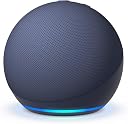
Two years have passed since I reviewed the Amazon Echo Dot Gen 4 and now we have the new Echo Dot Gen 5 so it’s time to revisit the world of Alexa. If you’re familiar with Echo and Alexa, you’ll only be interested in the first part of this review and you can ignore everything after my device appraisal. I’m sure, though, that many people may be new to smart speakers so I’ve also added sections on how to install the Alexa app, how to set up your new speaker and what you can subsequently do with the Echo Dot. My apologies for going over things that you might already know and a lot of this repeats from my previous review, but there will be for which this is new territory. The Device: The Echo speakers have been around for many years now, and despite the best efforts of Google and Apple, Amazon’s Alexa still remains the smart assistant of choice. The most popular of all smart speakers is the Echo Dot. Other bigger and better sounding speakers are available including Amazon’s own larger Echo, but the Echo Dot has always hit a nice sweet spot of performance and affordability. The first couple of generations of Echo Dots were clearly toes in the water to see if we were ready for smart assistants. They gave us a glimpse of what could be achievable, but they didn’t sound particularly good. We’ve still got a couple of Generation 2 Echo Dots that live in the garage and shed, and they really do sound tinny and weak. That changed with the Generation 3 Echo Dot, of which we have seven around the house, as they sounded so much better. The sound was deeper and the volume could go much higher before losing fidelity. The microphone was also improved, and the entire experience with using Alexa made a big step forward. Two years ago I bought an Echo Dot Generation 4 on release day, and shortly afterwards followed that up with the larger Echo. And today, the Generation 5 arrived. I’ve spent several hours since then playing with it, testing it out alongside my existing speakers and the very similar Generation 4. So, what’s different between the Gen 4 and 5? Well, visually, not very much. The only real difference I could spot was the loss of an auxiliary port from the rear of the new device. Beyond that, no difference at all. I read from the press releases that the 5 is sonically much improved over the 4, but in side-by-side testing I struggled to see much difference between the two. If anything, I felt that Alexa’s voice when she’s talking to you seems like she’s stood a little further away. But it still sounds great. Not just great for the money, but great in general. We have much bigger and better speakers in our house, but when listening to music we almost always play it through the Echo Dots. I’ve got a Bose speaker right next to the Dot in my office, but always use the Dot for music. I work from home and I’m in my office 9-16 hours per day, and the Echo Dot is on for most of that time. If you want the absolute best sound, you’re likely to want to spend much more on a dedicated sound system, but for general, everyday use, the Echo Dot is brilliant. Sound remained stable even at maximum volume, and just as good I found Alexa was able to hear my commands despite cranking the volume up. Something new to the Generation 5 is the introduction of “tap to pause”. A quick tap on the dome of the Echo will pause your music. A simple addition, but so welcome. When someone rings me when I’m working a quick tap is so much better than yelling at Alexa to shut up before I can accept the call. Another tap will resume the music. I have to say, even two years down the line, I still prefer the shape of the Echo Dot Gen 3. I just preferred the puck-shape, and it sat lower to the ground so didn’t obstruct the view of the monitors on my desk. The buttons for volume, action and turning off the microphone are on top of the globe are raised characters resembling a games controller. The status light is around the base of the speaker rather than the top on Gen 3 and earlier devices. Setting up the Echo is, as usual, very simple. If you have a previous Alexa system them it connects straight to your existing network with no input at all. If it’s your first Echo device and assuming you have the Alexa app you go to Devices, Add, Amazon Echo, and wait for it to connect. The work of moments, and then it’s ready to go. Like the Gen 3 and 4 it uses its own power cable rather than a USB cable as the Gen 1 & 2 used. So, the verdict? The RRP, and reviewed price, is £54.99 which is £5 more than the outgoing Gen 4. The tap to pause feature almost makes up that £5 for me. I read in early press releases that the new Gen 5 can also be used as a Wi-fi repeater in compatible mesh systems such as the Eero range, but I didn’t see anything further mention that in the Amazon sales page and I’ve not been able to test that out. Just like the Gen 4 before it, the Gen 5 will almost certainly become the biggest selling smart speaker on the market. I’ve been more than happy with it in my early time with it and find it to be a great albeit minor evolution of the previous Dot. Once again though, the only real competition to Echo Dot is its own predecessors. The Gen 3 Echo Dot is still available at the time of writing. It’s almost as good to listen to, and I think looks nicer. It’s also quite a bit cheaper. Is the Gen 5 that much better than the Gen 3 to warrant the price premium? I’m not so sure, but I do like to keep up with the latest releases where possible. Taken in isolation, the Gen 5 Amazon Echo Dot is an excellent smart speaker. I gave the Gen 3 and Gen 4 a five-star review, and the Gen 5 gets the same accolade. It will undoubtedly go on to be the best-selling product of its type. How to set it up you Echo device: If you’re new to the world of Alexa then you may be wondering how easy it is to set up an Echo device. If you’ve ordered from Amazon, they’ll helpfully email you a guide to setting it up. You’ll need the Amazon Alexa app, available from both the Apple App Store and Google Play Store. Download and wait for it to install, and then open it up. The app gives help on various subjects if you tap the question mark in the top right corner of the home screen. The guide on setting up your new Echo Dot is found in this area by selecting Alexa Devices, then Echo Dot, and Set Up Your Echo Dot. As a quick overview though, plug in your Echo Dot (after a short period the status light will turn orange to show it is in Setup mode) and then open the Alexa app. On the bottom menus select “Devices”. On the Devices screen, tap the “+” button in the top right and choose “Add Device”. Select “Amazon Echo” and then “Echo, Echo Dot, Echo Plus and more”. Assuming your Echo is plugged in and the status light is orange, select “Yes”. The app will then search for your new Echo Dot and complete the setup. The whole process takes only a few moments, and then you’re ready to get creative with Skills and Routines. What you can do with Alexa: A smart speaker is actually quite dumb to start with. It’s when you start adding things that it becomes truly smart in my view. On its own, you’ll be able to ask Alexa questions, play a few games, set up alarms and reminders and get a weather forecast; the general things you’d expect from a home assistant. Remember to always begin every command with the wake word, “Alexa…”, which can be altered to “Amazon”, “Echo” or “Computer” if you wish. To do certain things and play games you need to enable “Skills & Games”, which is found in the “More” menu at the bottom of the app. In there, you’ll find hundreds of things you can do with Alexa. For example, I regularly play the BBC quiz shows Pointless and Tenable. “Alexa, what is the weather forecast” or “Alexa, give me a ten-minute countdown” are examples of simple commands. As I say though, the Echo is just the gateway to a vast array of smart applications. How smart it goes depends on how far you want to go and how much to spend. What starts out as a single Echo device can quickly expand to a device in every room, attached to smart devices such as light bulbs, sockets, central heating and cameras. The first thing you may wish to use your speaker for is playing music. Echo is compatible with most of the main music streaming services such as Apple and Spotify, and of course Amazon Music. With your Echo you get access to Amazon Music’s free service, which is actually pretty good. It is limited, and you won’t find all of your favourite artists, but I recommend you try it out for a week or two as it might be good enough for your requirements. If not, I do highly recommend upgrading to Amazon Music Unlimited, or better still Amazon Music Unlimited Family which can be shared with multiple family members (not necessarily in the same household). I’ve not encountered many songs that aren’t on there. I used to have my iPhone full of mp3 music, but now I stream everything. “Alexa, play some 80’s rock” and I’m good for hours. If you have multiple speakers you can have the music played to one, many or all of them for house-wide coverage. Philips Hue lightbulbs are fantastic devices. They’re very expensive compared to a standard LED bulb, but once you buy one and use it in conjunction with Alexa voice control you soon become hooked. We’re up to 30 Hue bulbs now, and I don’t regret a single purchase. Smart sockets, such as Amazon’s own models or the TP-Link Kasa models, that I recommend, are great for controlling things like Christmas lights and lamps. Your central heating can be controlled by Alexa if you have a suitable smart thermostat. I can ask “Alexa, what’s the temperature in the house?”, and having determined that it’s too cold, if my wife not wrapped head to toe in fleece blankets wasn’t enough, I can then say “Alexa, set the house to 20 degrees”. Some door bells and cameras, such as Ring products, work with Alexa voice control also. “Alexa, show me the front door” and she’ll bring up live video on a suitable device like a Fire tablet or an Echo Show. Many televisions also have Alexa integration too. Our LG OLED can be controlled by its built in Alexa. A comprehensive smart home/automation is expensive, I’m not going to sugar that pill, but if it’s something that interests you then look out for these extra products on Black Friday deals would be my tip. All the devices I’ve mentioned and shown on my reviews were purchased from Amazon. I’ll leave it there though as I’ve waffled long enough. I hope you consider giving the Echo Dot a try. I’m of the opinion that the worth of a gadget is in how much you use it, and we use our Echoes and Alexa frequently every day.