

Desertcart purchases this item on your behalf and handles shipping, customs, and support to UAE.
⚡ Power up your precision with smart Bluetooth multimeter mastery!
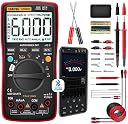
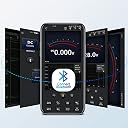
The ANENG Bluetooth Multimeter AN9002 is a professional-grade, pocket-sized digital tester featuring True RMS 6000-count auto-ranging for precise AC/DC voltage, current, and resistance measurements. Equipped with Bluetooth connectivity for seamless mobile integration, it supports a wide range of tests including temperature, capacitance, frequency, and continuity. Designed for ease of use with a large backlit LCD, adjustable kickstand, and auto shut-off, it’s ideal for both automotive troubleshooting and household electrical diagnostics.


| ASIN | B0BH4B56N4 |
| Batteries | 2 AA batteries required. (included) |
| Batteries Included? | Yes |
| Batteries Required? | Yes |
| Battery Cell Type | Alkaline |
| Best Sellers Rank | #387,072 in Tools & Home Improvement ( See Top 100 in Tools & Home Improvement ) #668 in Multi Testers |
| Color | Golden |
| Customer Reviews | 4.4 4.4 out of 5 stars (147) |
| Date First Available | October 3, 2022 |
| Included Components | / |
| Item Weight | 1.15 pounds |
| Manufacturer | ANENG |
| Measurement Accuracy | 1.0% ± 5 digits |
| Package Dimensions | 8.58 x 5.94 x 1.93 inches |
| Part Number | AN9002 |
| Power Source | Battery Powered |
| Style | Professional |
R**W
Works as advertised and great value
It works as expected which is all you can ask for with this type of equipment. I verified a few measurements with a Fluke and they were very close. The bluetooth range is good, about 75 feet indoors. Some things you may want to know: 1. The LCD is large and easy to read. The backlight works well. 2. Has some useful features I didn't expect such as Relative and Min/Max readings. 3. The case is not covered with a shock absorbing cover, just hard plastic. It slides off the bench easily. 4. The leads are a little short, about 30". The are pretty flexible, but not as much as a Fluke. 5. The alligator clips do not connect to the probes, but it comes with a second set of leads that they screw onto. Changing leads to just the alligator clips is not convenient. 6. I haven't had it very long so I can't say anything about battery life.
C**G
Good Bluetooth DMM app for multiple meters readings
Previously I left a long review for this meter. I just bought a second meter on Amazon Prime day to test out the Bluetooth DMM app connecting to multiple meters. The app is well designed for multiple meters ( up to 4 ). There were a couple of problems during setup I would like to share here: -The app is no longer on Play Store and the QR code in the listing is not working. I Google search the app and found a website with the apk file for the app . Later I accidentally found that there is a QR code at the back of the meter and which points to a download site of the app for both IOS and Android version. - During setup ( press the yellow button while turn the meter power on to disable auto shutoff, long press the Hz% to turn on the bluetooth function of the meter, click one of the Bluetooth symbol in the app to establish first time connection) , the app has a minor problem: it keep showing scanning until you click on the corresponding line " Bluetooth DMM Disconnected " , then it changes to "Connected", and the bluetooth symbol on the meter stop flashing. Once setup, the Bluetooth connections are done automatically after you turn on the bluetooth function of the meters. I like the customize function, which will do real time mathematical calculation of the readings of the meters ( and plot out in a graph ). For example, if you measure voltage R1 with meter 1 , and current (R2) with meter 2, you set up a formula R1xR2 , the customize function will display the power.
B**R
Bluetooth is working with iPhone ...
For anyone having trouble connecting to an iPhone: this device appears to use Bluetooth Low Energy (BLE), which doesn’t appear in the regular Bluetooth list under Settings → Bluetooth. Instead, it connects through the companion app (download it from the App Store). Before opening the app, go to Settings → Privacy & Security → Bluetooth and make sure the app’s switch is turned ON — that gives it permission to see the meter. Tip: If you have a newer MacBook with an M-series chip, you can install the same iPhone app from the Mac App Store and use it there too. On macOS, the app usually has Bluetooth permission enabled by default. (And just like on iPhone, you won’t see the meter listed under the standard Bluetooth settings — that’s normal for BLE devices.)
R**.
Quirky Bluetooth
I like a lot of things about this meter, the variety of functions, large display (with backlight), ergonomic shape that fits nicely in your hand, the stand on the back and of course the BT capability which is what tipped the scales to buy it for me. However as other reviewers have noted the Bluetooth meter App can only be used in "Visitor" mode and I am assuming that is why the remote commands don't work. The App will read the meter values, but I cannot get the meter to switch modes with the App. In order to register you must enter a code that is sent by email. By the time you get the code the App has timed out. This time-out needs to be increased to at least 5 minutes. Most secure sites the use a code allow 10 - 15 minutes. More comprehensive instructions would be a plus so that you are not left guessing and experimenting. I have the same issue as another reviewer trying to download the App. I'm reading the on-line instructions and trying to read the QR code didn't work. That's when I realized the QR code on the back of the meter is the one to use. It would be nice to be able to use the QR code in the on-line instructions as well. Once I go the App it was a little confusing at first to get it connected, but once working it is a nice way to remotely view the readings. Again a little more information in the instructions would help greatly.
A**R
Solid hobby meter that's hard to beat for the price
Perfect for my hobbyist needs, replaced an an8008 that worked just as well as this (unit was lost, not replaced due to failure). The meter reads reliably, main leads are decent and comes with a cheap bag to keep everything together. For the price, it's a great meter that's hard to beat. I don't use the app or Bluetooth functionality. Only thing I will note that isn't an issue for me but may be for you, there aren't any rubberized edges so the unit would probably a pain to use primarily as a handheld meter without some tape or something.
J**S
A multimeter with bluetooth data logging!!
I recently had to undertake a project that required me to log voltages over a period of time with a multimeter. Initially, I was under the impression that my only option was to buy an expensive Fluke meter that cost almost $800. Fortunately, I discovered a much cheaper multimeter that had all the features I required. It has been two months since I began using it, and I have found it to be absolutely indispensable. However, the meter does not come with a protective rubber outer casing, so it requires careful handling. We tested its accuracy against a desktop HP multimeter and found that it was just as precise. In my next project, I plan to buy two more of these multimeters so that I can log three voltage readings simultaneously with my iPhone. I would like to express my gratitude to the ANENG engineers for their innovative work.
N**G
A big disappointment.
I'm not very impressed with this meter at all. First, the battery compartment is a cluster of bad. The screw is not self holding, so if you're not careful, you'll launch the screw and never find it again. Fortunately I found the screw after a bit of crawling around on my hands and knees. Then getting the covers (yes 2 of them) back over the compartment took some almost breaking of the cheap plastic. Next, the backlight is terrible. Too bright on the right side of the display. And it should be a hard switch on or off, not a long press on a button, which is annoying. Then, the display does NOT have a wide angle of viewability. You have to look at it near directly on or it will wash out and you can't read it. Also, the display is very slow. Readings take up to a couple seconds to show up, and the lag on the LCD makes it annoying to watch. Overall, I'm not impressed at all with this multimeter. Likely going to send it back.
S**Y
Forget about the bluetooth app
The bluetooth app from the QR code no longer is there however I was able to side load the app using Aptoide which then lets me use it in "visitor" mode which none of the app's buttons work because the app is handicaped in that way. I tried to register so that I can have an account and use the buttons etc. however to register it requires that you verify with a code they email to you BUT... they only give you three seconds to do the verify however it takes five seconds for the email to show up and some time to type the number in so basically it is impossible to register. The manual has nothing about the bluetooth and so this is just a marketing gimmick. For the price the meter is great without the bluetooth app. Just too bad they really messed that bluetooth up and so I can only give it three stars.
X**R
¿Quién instalaría una app china de dudosa procedencia en su teléfono?
06/0823: Ese es el problema de este multímetro: todo bien hasta que llega el momento de instalar la app. ¿Quién es el valiente que instalará una app china en el dispositivo en el que lleva su vida? La app no es de ANENG, es de un tercero. El multímetro es barato, los accesorios son baratos y se siente barato; sin embargo, en pruebas preliminares la exactitud y precisión son muy buenas, cero quejas en este punto tan esencial. No trae funda de silicón, así que si se te cae se te va a partir en pedazos. Y por el precio debieron usar baterías recargables. LA APP NO ESTÁ EN LA APP-STORE DE ANDROID, sino que hay que descargar un archivo apk de un dudoso sitio chino con instrucciones en chino; desde ahí empezamos mal. Luego vienen los PERMISOS: ubicación, fotos y audio, ¿para qué? Lo que hice fue instalar la app en un teléfono FUERA DE LÍNEA, sin acceso a la red celular ni al wifi. Existe un grupo de hackers haciendo ingeniería inversa a la app, y más adelante voy a preguntarles si observaron algún tipo de problema con la seguridad, mientras tanto lo usaré fuera de línea. TIP: Si fuiste lo suficientemente valiente e instalaste la app, NO TE REGISTRES, entra en el modo visitante. La app sirve a dos propósitos: es una extensión del display y puede guardar datos. Como extensión de la pantalla te menciono que no se puede personalizar, viene fijo y debes vivir con ello. No obstante, la gráfica tipo osciloscopio puede ser de ayuda en muchos procesos lentos, como carga de baterías o control de temperatura. Así mismo, el almacenamiento de datos puede ser de bastante utilidad en este mismo tipo de procesos para llevar a cabo un análisis a posteriori. En el mercado existen muchos multímetros con conexión RS-232 o USB a una computadora; sin embargo, los programas son para Windows y yo soy usuario de Linux, por lo cual no me servirían y por eso opté por la conexión inalámbrica, aunque intuyo que será muy latoso generar los datos y luego pasarlos a la PC; pero bueno, así es la vida en Linux =) No lo voy a devolver, pero es una lástima que un producto tan innovador sea opacado por una situación tan delicada como una dudosa app.
Trustpilot
3 weeks ago
4 days ago