Desertcart purchases this item on your behalf and handles shipping, customs, and support to UAE.
🚀 Elevate your Windows workspace—because one screen is never enough!
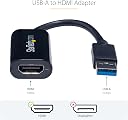
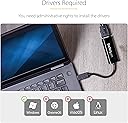
The StarTech USB-A to HDMI Converter is a compact, USB-powered adapter designed exclusively for Windows users. It delivers crisp 1080p resolution at 60Hz, enabling seamless desktop extension for enhanced productivity. Compatible with all major Windows platforms and requiring driver installation with admin rights, this adapter is ideal for professionals seeking a reliable, travel-friendly solution to expand their display capabilities without extra power supplies.

| Asin | B00H91BQ7Y |
| Best Sellers Rank | 4,964 in Computers & Accessories (See Top 100 in Computers & Accessories) 138 in Adapters |
| Brand Name | StarTech |
| Colour | Black |
| Compatible Devices | Windows® 11 Windows® 10 (32/64) Windows 8 / 8.1 (32/64) Windows 7(32/64) Windows Vista (32/64) Windows XP (32/64) |
| Connector Type | USB Type-A, HDMI |
| Country Of Origin | Taiwan |
| Current Rating | 1 Amps |
| Customer Reviews | 4.5 4.5 out of 5 stars (3,205) 4.5 out of 5 stars |
| External Testing Certification | RoHS |
| Global Trade Identification Number | 00065030854887 |
| Importer Contact Information | ATM RETAIL 1st Floor Beside P and T Building Lakdi Ka Pul Hyderabad Telangana 500004 |
| Input Voltage | 30 Volts |
| Item Dimensions | 19.1 x 2.5 x 1.3 centimetres |
| Item Type Name | A/V Adapter |
| Item Weight | 0.03 Kilograms |
| Manufacturer | StarTech.com |
| Manufacturer Part Number | USB32HDES |
| Model Number | USB32HDES |
| Number Of Items | 1 |
| Number Of Ports | 1 |
| Package Quantity | 1 |
| Power Plug Type | No Plug |
| Product Finish Type | Plastic |
| Product Warranty | 2 Year |
| Specific Uses For Product | External Video and Graphics Card |
| Unit Count | 2.0 count |
| Upc | 065030854887 |
| Warranty Type | Limited |
User
It works on USB 2.0!!
It's expensive but works - so worth it to me!! I got a cheaper one that didn't work. I wasn't sure if it would work on USB that wasn't 3.0 (ie not the blue ones) - but really pleased that it does. My work computer and home computer only had the one hdmi port plus USB. Only scored a 4 for gaming as I don't game so can't say. Scored 4 for value because it is a lot for a an adaptor (paid less than £10 for other ones in the past), but not found any other USB to hdmi ones that work. It was plug and play for me - Recomended 100%
User
Good FVM, adding an 'emergency' extra screen was easy!
I'm shortly about to change my PC as it won't support Windows 11, conversely being a top of the line unit back in the day it is still pretty usable now. It supports 2 monitors natively but I needed a third.Enter this unit which allowed to do that in seconds. I have written a dissertation and now ordered a new PC. This is a handy unit to have, though. As long as you install the drivers from the website BEFORE plugging it in, I was up and running in seconds.
User
It works!
Having been burnt buying a cheaper (non-functioning) alternative, I was reticent about buying this product.However I trusted the reviews, and in spite of its price, I took the chance. It's great. Downloading the drivers was straightforward, following the instructions inside the box, and once that was done and Windows restarted it worked like a charm the first time I plugged in.I use this to drive a third external display from my laptop (in addition to USB C and HDMI monitors). I've not noticed any significant lag or image quality issues.Can't really comment on durability since it was only bought last week, but it feels alright.The only downside is the hefty £60 price tag, however the cheaper alternative I had tried previously not only did not work, but the included/linked drivers appeared to be malware.So, I would say whilst this product is expensive it is worth it for something that is from an apparently reputable manufacturer with functioning up to date drivers available.
User
Good product, but driver doesn't work with blue light filter
This is my second USB 3.0 to HDMI adapter...the first one was a different brand. I bought this one, which was far more expensive hoping that it would be better quality....I would say the build quality is definitely better, I'm not sure there is such a big difference in the working quality...it might be a little better than the previous one. Either way, it has been working well so far. The quality is still not the same as a real graphics card HDMI port in terms of lag (I run an i7 laptop with 16 GB RAM, SSD, with two graphics cards - motherboard graphics + a separate 2 GB AMD Radeon graphics card as well), but it's very good for what I need it for (office work, studying, research, mostly - I need lots of desktop space, hence working with laptop+2 monitors).One of the reasons I'm giving it 4 stars and not 5 is that the driver doesn't interface with blue light filters (neither the built in Windows 10 blue light filter, neither with F.lux). I use two Dell UltraSharp U2419H monitors, which are really good quality and are kind to my eyes. The monitors come with software to let me control settings through Windows. Unfortunately, the adapter driver doesn't interface with that either and Windows can't detect that the monitor through the adapter is present, only the one connected to the laptop HDMI is detected. This is frustrating for me because I really want the filters to run properly since I spend so much time in front of screens.
User
Just worked. Easy, no driver needed (on Win 11), even copes with a monitor in portrait mode.
Excellent! Plugged it into Win11 system, and it just worked. No driver installation needed. It was also fine with the fact that my 2nd monitor is in portrait orientation.(This is much better than the generic unbranded device I tried before, which wouldn't work in portrait mode, despite the resolution being in spec, and which required a driver to do anything.)
User
Startech Slim USB3 to HDMI External video - Perfect companion for your old laptop that doesn't have HDMI capability.
Lovely piece of kit. supports 1900x1200. It doesn't say it supports XP specifically but it does! Works with XP Professional 32 bit on my old Toshiba laptop perfectly.Make sure you do what Startech recommends and install the drivers AND REBOOT BEFORE you attempt to plug the device in.A startbar starttech icon gives you the customization to set target screen monitor resolution and whether you want to use their adapter to MIRROR the laptop screen, EXTEND or act as the PRIMARY screen. You don't need to go into the windows monitor settings. PRIMARY worked perfectly for me and used all the 1900x1200 res of my dell monitor to display the 1400x1200 native res from the laptop and retained the HxW relationship perfectly as well without distortion. Installing drivers from cd was silky smooth. Fully up and working within 5 mins.Highly recommended.
User
Make sure to install the drivers before connecting it.
Works well:Bought to add an extra display on a new HP pavillion laptop. Laptop had one HDMI and a USB-C that didn't support display output. Did some research and this Startech device looked suitable.Unboxed and downloaded the drivers utility from the website as per the instructions in the box. Rebooted connected the device to the laptop and second monitor and it worked straight away.Does exactly what it's supposed to.
User
Good Value and Easy to Set Up
This is very easy to install (so long as you follow the setup procedure and download the latest drivers). Bought this as the HDMI port on my Dell gave up. I had tried other USB to HDMI drivers and they had been of limited use. This gives 1920 x 1080 video nice and clearly. Only just bought this so can't tell how long it will last, but it appears well put together. All in all great value for mony.
User
Works like magic
Incredible that this works! Minor issue is that it sits a little lose in the USB port which temporarily makes it lose connection if I bump it. I angled the computer away from me to avoid touching it.
User
Sehr guter Adapter: Flüssige Video-Wiedergabe in voller Auflösung unter USB 2.0!
Ich war sehr neugierig ob der Adapter brauchbar ist. Ich habe die USB-A Variante, die übrigens USB 2.0 kompatibel ist! Für mich der Haupt-Kaufgrund, da ein Austausch der Kabel durch Wände mit entsprechendem Aufwand verbunden gewesen wäre.Bezüglich USB 2.0 muss man wissen, dass die Auflösung von 1920 x 1200 (nicht wie im Titel angegeben 1900 x 1200!) die Grenzen schon sehr ausschöpft. Nach offizieller Meinung ist sogar schon bei 1920 x 1080 Schluss.Was soll ich sagen, ich bin sehr begeistert. Ich verwende es unter Windows 11 und musste keine Treiber nachinstallieren. Einfach nur eingesteckt, das Gerät wurde automatisch erkannt, die Treiber wurden automatisch installiert und alles funktionierte auf Anhieb. Die Leistung ist erstaunlich gut: Flüssige Video-Wiedergabe in voller Auflösung ist überhaupt kein Problem.Ich kenne keinen vergleichbaren Adapter für diesen Preis (auch wenn der Preis von manchen als teuer empfunden wird). Man darf ihn nicht mit USB-C Adaptern vergleichen, die einfach nur das Videosignal des USB-C Ports über HDMI ausgeben. Der hier vorliegende Adapter ist eine komplette USB-Grafikkarte. Deshalb wird er auch entsprechend warm, das ist normal. Durch die Abwärme könnte allerdings die Lebensdauer etwas kurz kommen, das wird sich zeigen.
User
Good Quality Adapter
works perfectly.
User
perfect, need drivers
worka perfect, you need.to install the drivers but its easy
User
LA SOLUCIÓN DEFINITIVA PARA HACER DUPLICADOS DE PANTALLA POR CABLE
La solución al problema de reproducir en la TV la pantalla del ordenador. Tengo un ordenador con Windows 11 y suelo conectarme a través de VPN por cuestiones laborales. El problema surge cuando pretendes reproducir o duplicar en una pantalla extra, TV o monitor, lo que aparece en la pantalla del ordenador ya que cuando usas VPN ya no estás conectado a la misma red en uno y otro dispositivo por lo que es imposible hacerlo. Solo hay dos soluciones, o excluyes de la VPN una conexión concreta o conectas por cable pero ahí surge otro problema. El ordenador medio suele tener solo una salida HDMI directa (en ocasiones hay otra pero está "de adorno" y no conectada. Pues aquí llega este artículo. Si dispones de una salida USB 3.0 o superior (la 2.0 funciona pero al tener menos velocidad de transferencia puede haber momentos de imagen congelada, saltos y falta de calidad de imagen) lo conectas y ahí puedes enchufar un cable HDMI hasta el TV o monitor. Se ve sin pérdidas, sin cortes y con calidad 1080. Totalmente aconsejable cuando es imposible duplicar o reproducir pantalla.
Trustpilot
2 months ago
2 weeks ago