Desertcart purchases this item on your behalf and handles shipping, customs, and support to UAE.
⚡ Power up your mobile workspace with angled precision!
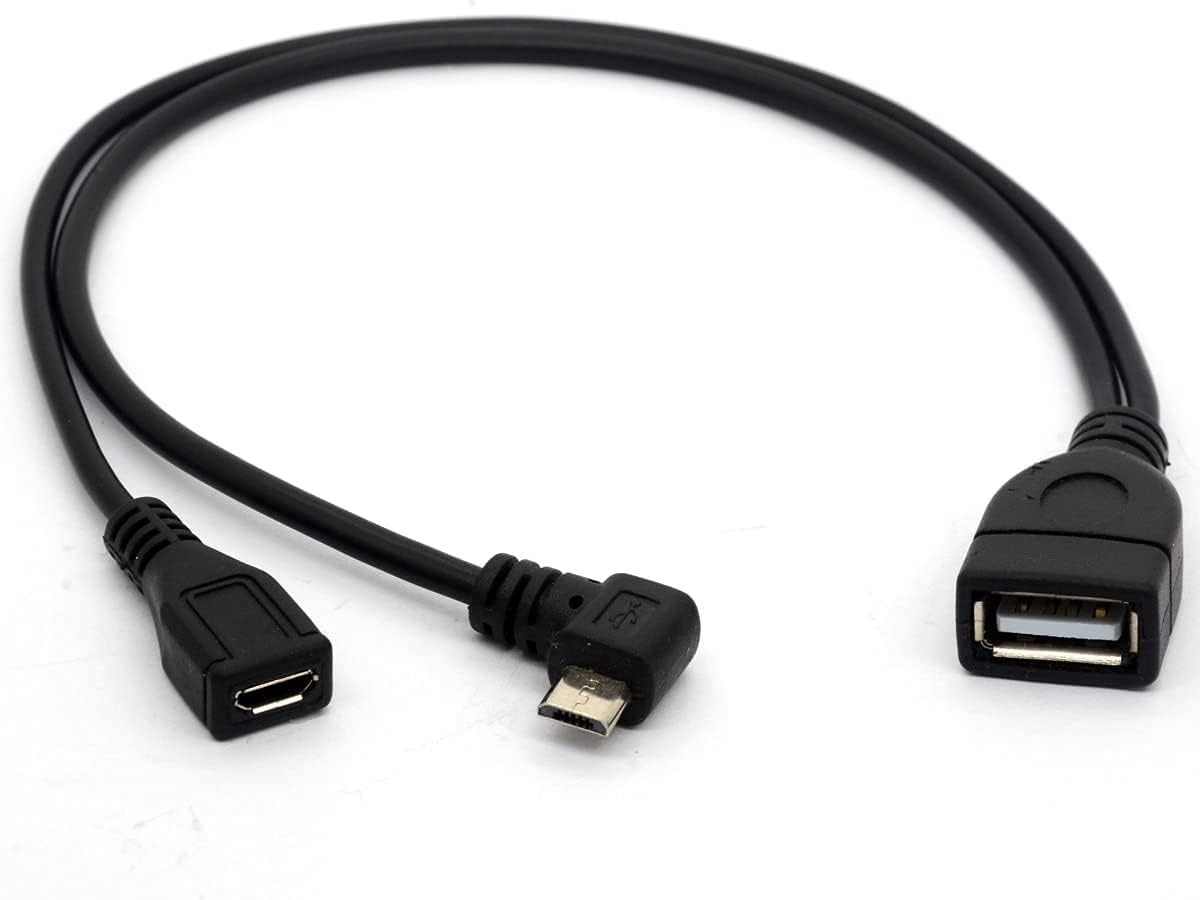
The Angled Micro USB Y Splitter Cable is a versatile USB 2.0 OTG adapter featuring a 90-degree Micro USB male connector, a straight Micro USB female port for power input, and a USB Type-A female port for connecting external devices. Designed for Android smartphones, tablets, and Fire TV devices, it supports up to 2 Amps charging and enables simultaneous data transfer and power supply, making it ideal for expanding storage or connecting peripherals in compact setups.
| ASIN | B078SVB1RV |
| Best Sellers Rank | 45,632 in Computers & Accessories ( See Top 100 in Computers & Accessories ) 869 in USB to USB Adapters 42,643 in Mobile Phone Accessories |
| Box Contents | cable |
| Brand | HUHANGGod |
| Brand Name | HUHANGGod |
| Colour | Micro Male 90Degree |
| Compatible Devices | Tablet |
| Compatible devices | Tablet |
| Connector Type | USB Type A |
| Connector type | USB Type A |
| Country of Origin | China |
| Current Rating | 2 Amps |
| Customer Reviews | 4.4 out of 5 stars 4,907 Reviews |
| Finish type | Matte |
| Item Weight | 0.02 Kilograms |
| Manufacturer | Tomost |
| Manufacturer Part Number | Usb2.0ToMicroMaAndFe20cmUK |
| Model Number | 785197863767 |
| Number of Items | 1 |
| Number of Ports | 3 |
| Package Quantity | 1 |
| Power Plug Type | No Plug |
| Product Finish Type | Matte |
| Specific Uses For Product | USB Devices |
| Specific uses for product | USB Devices |
| UPC | 785197863767 |
| Unit Count | 1.0 count |
C**H
works to extend storage on Fire TV stick 4K
I'm using this on a Fire TV 4K stick to extend the (ridiculously low) storage. Sadly a lot of storage hungry apps can't actually be moved to external storage, but that's not the fault of this adapter! It works, the USB port on the stick is rated to USB 2.0 speeds as far as I know, so the rating is right for the job. There is a way of getting the Fire TV stick to treat an external USB drive as internal storage to make better use of space, but it's not that simple and I haven't tried it yet.
A**R
Works with Firestick 4K and external USB 3.0 flash drive
Confirming works with Firestick 4K and external storage such as a USB 3.0 flash drive. Initially I thought it wasn’t working with my SanDisk 126905 Ultra Flair 32 GB USB 3.0 Flash Drive. Then I tried with a USB 2.0 drive which had a physical light and I could see the drive was being read. My mistake with the USB 3.0 drive was pushing it firmly into the OTG cable. When my particular USB 3.0 drive is pushed all the way into the OTG cable the Firestick doesn’t mount it. If I withdraw the 3.0 drive a few millimetres it then mounts okay. Firestick are limited to USB 2.0 speeds but are able to use USB 3.0 drives just at the slower USB 2.0 speeds. Also useful is an app called ES file explorer which is available on the Amazon Firestick App Store for seeing if the drive physically mounts.
D**L
Practical and cost effective
For the project I used this for it works perfectly media project, clearly this could have many uses for phones etc but that is not what I purchased for so could not comment, cheap, practical, and does as good as high end cables
M**R
Didn't do what I wanted...
Bought this hoping to be able to add a USB keyboard to my Amazon Echo Cube with an Ethernet adaptor. Suffice to say, I plugged it in and it didn't work. Compatibility issue or faulty? I have know idea right now but either way I can't be asked to send it back... so it'll just end up in the bottom of that drawer of useless cables that I have amassed over time! On the positive side, it does appear to be reasonably well made and wasn't crazy money. ** EDIT - 08/12/2019 ** After some strenuous process-of-elimination testing... turns out I'd wrongly blamed the cable when it was in fact the ethernet adaptor... and now it works... so, five stars.
K**I
Add USB Memory To A Fire Stick
I have a Fire Stick 4K and wanted to be able to use a USB memory stick with it so I can view my own videos, play a bunch of MP3's or view images etc. This cable makes it happen. 1. Turn off the Fire Stick, unplug the power supply cable from the Fire Stick's micro USB port. 2. Plug this cable's male micro USB plug into the Fire Stick's micro USB port, where the power cable was. 3. Plug the Fire Stick's power supply cable into the female micro USB port on this cable. 4. Plug your USB stick into this cables female USB A port. 5. Fire up the Fire Stick, go to the apps library and in the Entertainment section find and install VLC Player for Fire Stick. 6. Happy viewing! I've read you can also use it for keyboards and mice etc. For best results for all USB devices, use the Fire Stick's power supply plugged into the mains rather than getting power from a TV USB port etc.
J**N
Does it's job well, but keeps power going after switch off
The cable is easy enough to install, fits correctly and is currently providing additional storage to Sega Megadrive mini. However one strange quirk I have noticed is that after powering off the Megadrive mini the power still flows through the device. Aside from that all good.
S**S
Micro USB Splitter Cable OTG short cable USB 2.0 for Firestick
Plugged in to my Fire stick and worked perfectly! Plugged my Wireless Logitech Keyboard/Mouse dongle in & External 2TB (Samsung) Hard-drive and they both worked/work flawlessly. Note: this adapter is for, only 1 USB device, you'll need to get a double USB adapter to use 2 devices at once. I have purchased one and they also work well with the Fire Stick.
C**S
Good for firesticks or I thought
Used on my firestick to load roms for emulators. After a new firestick update this is now not possible to select from the dashboard. Still can be used as storage for apps.
D**Y
Handig kabeltje
Super handig om tussen je Firestick of XIAOMI stick te doen om je eigen video of foto’s af te spelen via media app. Ook handig om gedownloade APPs (APK’s) op deze stick te zetten of zelfs een toetsenbord aan te sluiten op deze kabel / stick.
G**I
Funziona perfettamente per lo scopo: connessione via cavo alla Amazon Fire TV stick
Appena ricevuto: 1) staccato la spina microUSB maschio proveniente dall'alimentatore della Fire stick da quest'ultima e l'ho connessa a alla presa microUSB femmina di questo adattatore; 2) ho preso un adattatore di rete USB3-Gigabit della Startec che avevo a casa e l'ho connesso alla porta femmina USB-A (quella grande, standard per intenderci) di questo adattatore; 3) ho connesso la porta maschio microUSB di questo adattatore direttamente alla Fire stick (invece che quella che veniva direttamente dall'alimentatore). In un niente ho avuto la Fire stick connessa via cavo invece che via wifi. La Fire TV si e' accorta da sola della connessione via cavo, ha configurato l'indirizzo di rete automaticamente (via DHCP, ma si può anche configurare manualmente se lo si preferisce) e soprattutto ha da sola spento la connessione via wifi (inutile adesso). Tutto perfettamente funzionante: ottimo ! Nota: la Fire stick in mio possesso, la versione più recente con riconoscimento vocale ma non 4K, non supporta velocità gigabit via cavo. Non mi e' chiaro se sia "tappata" ai 100 mbps o se supporti la velocità massima della porta USB 2.0 (che potrebbe arrivare fino ai 300-400 mbps), ma in ogni caso la connessione sarà sempre e comunque più stabile via cavo, e non sarò costretto a tenere wifi accesa per la Fire TV se non mi serve per altro, né ad avere un apparato wifi in più che fa traffico se posso ottenere un risultato migliore via cavo.
A**9
o.k.
passt, gerne wieder
J**S
Cable-Adaptador micro-USB con función OGT para Tablet Samsung Galaxy A6
Llegó en la fecha prevista, bien embalado y sin desperfectos. Funciona perfectamente conectando un disco duro externo Western-Digital de 460 mgB. Como pega hay que decir que solo le da corriente de carga al disco duro y no a la Tablet, por lo que, hay que estar pendiente de que no se agote la batería. Por otro lado, para que funcione y reconozca el disco duro hay que formatearlo con la Tablet. Previamente, hay que salvar los datos que se tengan en el disco duro, porque al formatearlo se perderá el contenido del disco duro. Una vez conectado el cable con la Tablet ,el Disco duro y la fuente de alimentación se pueden ver, copiar y enviar datos dese la tablet al disco sin problemas mediante la aplicación Mis Archivos (que es el explorador de archivos que viene con por defecto con la Tablet, sin ningún problema. Buena relación Calidad-Precio. Buen Vendedor.
Z**A
ottimo
Ho utilizzato questo cavo per collegare una tastiera e un mouse al mio telefono cellulare. Il cavo ha funzionato perfettamente e non ho riscontrato alcun problema. Lo consiglio vivamente a chiunque abbia bisogno di collegare dispositivi USB a un dispositivo mobile con porta micro USB. dispositivo che consente di collegare un dispositivo USB a un dispositivo mobile con porta micro USB. Il cavo ha una porta micro USB maschio su un'estremità e una porta USB 2.0 A femmina sull'altra estremità. Pro: Funzione OTG: Il cavo supporta la funzione OTG (On-The-Go), che consente a un dispositivo mobile di agire come host USB. Ciò significa che è possibile collegare dispositivi USB come tastiere, mouse, unità flash USB e dischi rigidi esterni al dispositivo mobile. Alimentazione: Il cavo fornisce alimentazione al dispositivo USB collegato. Ciò significa che è possibile utilizzare dispositivi USB che richiedono alimentazione, come dischi rigidi esterni, senza bisogno di un alimentatore separato. Trasmissione dati: Il cavo consente la trasmissione di dati tra il dispositivo mobile e il dispositivo USB collegato. Ciò significa che è possibile trasferire file tra i dispositivi o utilizzare il dispositivo USB per controllare il dispositivo mobile. Contro: Compatibilità: Il cavo non è compatibile con tutti i dispositivi mobili. È necessario verificare la compatibilità del dispositivo mobile con la funzione OTG prima di acquistare il cavo. Velocità di trasferimento dati: La velocità di trasferimento dati del cavo è limitata alla velocità USB 2.0. Ciò significa che il trasferimento di file di grandi dimensioni potrebbe richiedere del tempo.
Trustpilot
2 months ago
2 months ago