









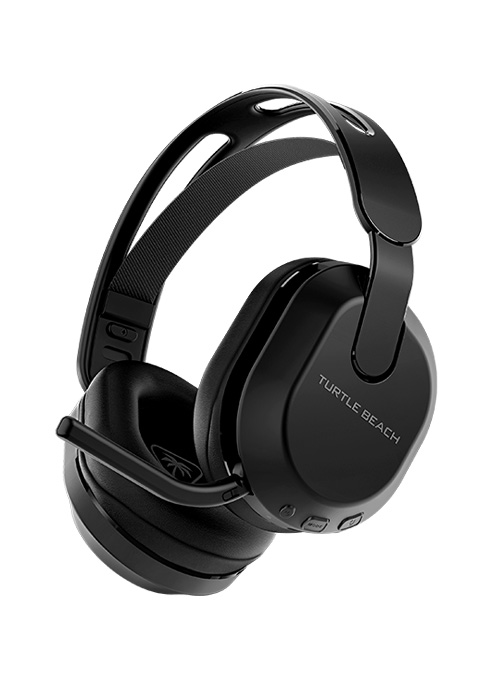
Turtle Beach Atlas Air, Black
Product ID: 642642465
Details
- BrandTurtle Beach
- ColourBlack
- Ear placementOver Ear
- Form factorOver Ear
- Impedance32 Ohms
🎧40mm high-fidelity drivers
📱Dual wireless + Bluetooth
🔋50h battery life
Desertcart purchases this item on your behalf and handles shipping, customs, and support to UAE.
🎮 Elevate your game with Atlas Air — where comfort meets cutting-edge wireless freedom!
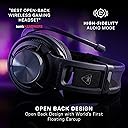
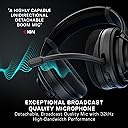
The Turtle Beach Atlas Air is a premium open-back wireless gaming headset featuring 40mm high-fidelity drivers, up to 50 hours of battery life, and dual wireless connectivity via low-latency 2.4GHz and Bluetooth 5.2. Designed for PC and multi-platform use, it boasts the world’s first floating earcup for exceptional comfort, a flip-to-mute noise-reducing mic, and advanced audio customization through the Swarm II app. Lightweight and glasses-friendly, it’s engineered for extended gaming sessions with immersive sound and seamless device switching.


| ASIN | B0D13VX3S6 |
| Additional Features | Lightweight, Microphone Included |
| Age Range Description | Adult |
| Antenna Location | Gaming |
| Audio Driver Size | 40 Millimeters |
| Audio Driver Type | Dynamic Driver |
| Audio Latency | 50 Milliseconds |
| Battery Average Life | 50 Hours |
| Battery Charge Time | 50 Hours |
| Best Sellers Rank | #3,075 in Videogames ( See Top 100 in Videogames ) #6 in Xbox Series X & S Accessory Kits |
| Bluetooth Range | 60 Feet |
| Bluetooth Version | 5.2 |
| Brand | Turtle Beach |
| Built-In Media | Cable |
| Cable Features | Tangle Free or Retractable or Detachable |
| Carrying Case Material | Fabric/Nylon/Leather |
| Color | Black |
| Colour | Black |
| Compatible Devices | Laptops, Cellphones, Tablets, Desktops, PS5™, PS4™, Nintendo Switch™, Some Gaming Consoles |
| Connectivity Technology | Wired, Wireless |
| Control Method | Touch |
| Control Type | Touch Control |
| Customer Reviews | 3.8 out of 5 stars 671 Reviews |
| Ear placement | Over Ear |
| Earpiece Shape | Over Ear |
| Enclosure Material | Plastic |
| Form factor | Over Ear |
| Frequency Range | 20Hz - 40kHz |
| Headphone Folding Features | Over Ear |
| Headphone Jack | 3.5 mm Jack |
| Headphones Ear Placement | Over Ear |
| Impedance | 32 Ohms |
| Is Autographed | No |
| Item Weight | 297 Grams |
| Manufacturer | TURTLE BEACH |
| Model Name | Atlas Air PC Black |
| Model Number | TBS-5101-05 |
| Noise Control | None |
| Noise control | None |
| Number of Items | 1 |
| Specific Uses For Product | Gaming |
| Style Name | Gaming-oriented |
| Theme | Video Game |
| Total USB 2.0 Ports | 1 |
| UPC | 731855051069 |
| Unit Count | 1.0 Count |
| Water Resistance Level | Not Water Resistant |
| Wireless Technology | Bluetooth |
T**T
Unnecessarily complex connection that tries too hard to be clever but falls flat on its face.
This headset uses wireless and Bluetooth to connect with the pc and for the last few weeks I have been struggling with trying to make it work. The manual tells you to look at the dongle's led lights to help diagnose any issues. Great choice unless you install it on the rear USB ports. The audio status messages are only half as helpful as you might think because there are 3 buttons and it's difficult to know what you are pressing unless you like to take off the headset every now and then to see what you are doing. The headset disconnects or enters some kind of sleep mode when there's no audio playback for a while and it doesn't tell you until you play a video and you hear nothing then you have to fumble with the buttons to get it to work again. Just tonight it was on Bluetooth mode when it suddenly switched to wireless mode for no reason. Buy this if you love troubleshooting every day and at surprise intervals and playing a game called "Guess the connection used" everytime.
O**N
Software ein kleines Elend
Geniales Set, wenn es läuft – klare Empfehlung mit kleinen Tücken bei Updates Bewertung: 4,5 von 5 Sternen Seit 2024 täglich mehrere Stunden im Einsatz und insgesamt sehr zufrieden. Tastatur, Maus und das TB Atlas Air liefern zusammen ein starkes Gesamtpaket: tolles Tippgefühl, präzise Maussteuerung und ein Headset mit gutem Klang. Wenn alles läuft, ist das Set einfach genial. Hinweis: Bei Firmware-Updates am besten jedes Gerät einzeln aktualisieren und den Rechner jeweils neu starten. Mit der Swarm Software hatte ich gelegentlich Probleme, etwa kurze Funkabbrüche oder dass das Headset nicht erkannt wird. Die Tastatur lief dagegen immer reibungslos. Mit der Update-Routine und etwas Geduld ist das Setup aber stabil und absolut empfehlenswert. Fazit: Top Hardware, die im Alltag überzeugt. Mit einem sauberen Update-Prozess und gelegentlichem Neustart steht dem Genuss nichts im Weg. Bravo! Langfassung Titel: Starkes Trio für den Alltag – großartige Hardware, Software mit Luft nach oben Ich nutze Tastatur, Maus und das TB Atlas Air seit 2024 praktisch jeden Tag für mehrere Stunden. Mein Gesamtfazit fällt sehr positiv aus: Die Hardware ist hervorragend und macht im täglichen Einsatz richtig Spaß. Was mir gefällt Tastatur: Zuverlässig und präzise, bisher ohne Aussetzer. Angenehmes Tippgefühl, wertige Verarbeitung. Maus: Sehr präzise und ergonomisch, ideal für lange Sessions. TB Atlas Air: Kräftiger, klarer Klang und gute Sprachverständlichkeit. In Kombination mit dem Rest ein echtes Highlight. Gesamtpaket: Wenn alles läuft, ist das Set einfach genial und erhöht die Produktivität spürbar. Was man wissen sollte Firmware- und Software-Updates: Ich empfehle, jedes Gerät einzeln zu updaten und nach jedem Update den PC neu zu starten. So vermeidet man die meisten Stolpersteine. Swarm Software: Hier kam es bei mir wiederholt zu kleinen Problemen, z. B. Funkabbrüche, Headset wird nicht erkannt oder Mausverhalten ist kurzzeitig auffällig. Mit der oben genannten Update-Routine und einem gelegentlichen Neustart hatte ich danach aber Ruhe. Stabilität: Die Tastatur war bei mir durchgängig unauffällig und stabil. Die meisten Themen betrafen Headset oder Maus in Verbindung mit Swarm. Praxis-Tipp Update-Routine: Gerät 1 updaten, PC neu starten, Gerät 2 updaten, neu starten, Gerät 3 updaten, neu starten. Danach läuft es bei mir zuverlässig. Wenn es kritisch ist: Keine Updates unmittelbar vor wichtigen Terminen einspielen, solange alles stabil läuft. Fazit Hervorragende Hardware mit einem sehr guten Nutzwert im Alltag. Die wenigen Software-Tücken sind mit einer sauberen Update-Routine gut beherrschbar. Unterm Strich eine klare Empfehlung. Bravo an die Entwickler für das starke Set! Ein Tip: Empfehlungen vor und während Updates Nur ein Gerät zur Zeit: Headset, Maus, Tastatur nacheinander. Nach jeder Aktualisierung einmal vollständig neu starten. Direkt am Mainboard anschließen: Dongles und USB-Kabel ohne Hub/Monitor-Hub, ideal an USB-Ports hinten am PC. Andere Funkquellen kurz deaktivieren: WLAN auf 5 GHz belassen, 2.4 GHz möglichst vermeiden; Bluetooth-Geräte in der Nähe kurz ausschalten, um Interferenzen beim Pairing zu vermeiden. Shutdown statt Neustart: Vor dem nächsten Gerät einmal richtig herunterfahren und kalt starten (kein „Schnellstart“). Swarm-Version prüfen: Vor Update die neueste Version installieren; bei Problemen erst Swarm sauber entfernen und frisch installieren. Stabilitäts-Checkliste nach dem Update Windows-Energieeinstellungen: USB-Selektives Energiesparen ausschalten: Systemsteuerung > Energieoptionen > Erweiterte Einstellungen. In Geräte-Manager unter „USB-Controller“ und „Mäuse/Tastaturen“ bei den Energiesparoptionen Häkchen „Computer kann Gerät ausschalten“ entfernen. Dongle-Management: Headset-Dongle allein einstecken und koppeln; danach Maus-Dongle; zuletzt Tastatur. Wenn möglich, mit Abstand zwischen den Ports. Wenn das Headset gelegentlich „nicht erkannt“ wird: Dongle kurz abziehen/anstecken, dann nur die Headset-Software öffnen und warten bis die Verbindung stabil ist. 2.4 GHz-Störungen reduzieren: Router auf 5 GHz bevorzugen oder 2.4 GHz-Kanal wechseln (z. B. auf Kanal 1, 6 oder 11). Metallische Objekte/Monitore direkt neben den Dongles vermeiden; Dongle möglichst „frei“ platzieren. Treiberbereinigung: Geräte-Manager: Ansicht > Ausgeblendete Geräte anzeigen; alte Instanzen der Headset/Maus/Tastatur entfernen, anschließend neu verbinden. Chipsatz- und USB-Treiber aktualisieren: Aktuelle Mainboard-Chipsatztreiber von Intel/AMD sowie USB-Controller-Treiber installieren. Firmware-Rollback als Test: Wenn ein bestimmtes Headset-Firmware-Update die Aussetzer verursacht, prüfen, ob der Hersteller eine Vorversion anbietet und testweise zurückgehen. Spezifisch zum TB Atlas Air (Headset) Pairing-Reset: Headset und Dongle gemäß Herstelleranleitung neu koppeln (häufig: Dongle in Pairing-Modus, Headset-Tasten-Kombination zum Pairing). Modus fix wählen: Wenn verfügbar, bevorzugt den 2.4 GHz-Dongle-Modus statt Bluetooth für geringere Latenz und stabilere Verbindung. USB-Port wechseln: Insbesondere für den Headset-Dongle einen anderen Port testen (USB 2.0 vs. 3.0 kann Unterschied machen).
J**X
Auriculares abiertos inalámbricos muy recomendados.
De lo mejor que puedes tener en auriculares ABIERTOS inalámbricos. Para los que buscan un sonido más amplio y sin sentirse aislados del mundo, totalmente recomendables. Tienen muy buena batería, la calidad de los materiales está a la altura y tienen una funda muy práctica. No son recomendables si hay mucho ruido donde los uses.
T**A
Amazing gaming headset!
Really impressed with the Turtle Beach Atlas Air. The sound quality is excellent, it’s comfortable to wear for long gaming sessions, and the wireless connection works great. I also love the open-back design it feels much more natural and spacious. Definitely recommend!
K**8
Atlas air
Niveau prix je peux vous certifié qu’il est le most sur ps5 . Qualité son vraiment au top . Batterie il me reste à voire et qualité du matériel le top léger et très agréable à porter avec lunette . Je recommande pour tout possesseur ps5 . Aller y 👌
Trustpilot
2 weeks ago
1 month ago