Buy anything from 5,000+ international stores. One checkout price. No surprise fees. Join 2M+ shoppers on Desertcart.
Desertcart purchases this item on your behalf and handles shipping, customs, and support to UAE.
🚀 Tiny Frame, Titan Performance — Power your creativity and productivity like never before!
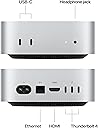
The Apple 2024 Mac mini with the revolutionary M4 chip packs a 10-core CPU and GPU, 24GB unified memory, and 512GB SSD into a sleek 5x5 inch chassis. Designed for professionals and creatives, it offers blazing-fast performance, seamless integration with iPhone and iPad, and versatile connectivity including front and rear Thunderbolt and USB-C ports. Carbon neutral and built for Apple Intelligence, it’s the ultimate compact desktop for the modern multitasker.


| Brand | Apple |
| CPU Model | Apple M4 |
| CPU Speed | 1 |
| Graphics Card Description | Integrated |
| Graphics Coprocessor | Apple Integrated Graphics |
| Memory Storage Capacity | 24 GB |
| Operating System | Mac OS |
| Personal computer design type | Mini PC |
| Ram Memory Installed Size | 24 GB |
| Specific Uses For Product | Business, Education, Everyday Use |
P**O
Great Price and Blazing-Fast Performance in a Compact Design
The Apple 2024 Mac mini Desktop Computer with M4 Pro is an excellent little powerhouse. The price was really good for the performance you get, and it runs incredibly smooth and fast. Everything loads quickly, multitasking is effortless, and it stays quiet while working. I’m very happy with it — compact, powerful, and works perfectly for my needs.
C**E
The 2024 Mac Mini M4 Pro is an Absolute Beast!
I picked up the 2024 Mac mini with the M4 Pro chip and honestly, this little machine blew me away. The performance is absolutely insane for something this compact — the 12-core CPU handles everything I throw at it without breaking a sweat. Video editing, photo processing, running multiple apps at once — it just flies through all of it. And the 16-core GPU makes graphics work feel buttery smooth. The form factor is so clean and takes up almost no desk space, which I love. Setup was super easy, and it runs whisper quiet even under heavy load. If you've been on the fence about upgrading your desktop setup, the 2024 Mac mini is 100% worth it. It's easily one of the best tech purchases I've made. Highly recommend!
K**N
I'm a very pleased new macOS convert! Mac mini M4 pro is an excellent piece of technology!
I have only had this Mac mini M4 Pro (it's the 2024 version) for about two months but I have been very happy with my purchase so far. I've had Windows for several decades and just finally got fed up with Microsoft 365 and Microsoft downward spiral and customer service and all the issues I had with authentication so I finally decided to cut the apron strings" and convert to the macOS and hardware. I have an iPhone and an iPad and I thought maybe it was time to just go ahead and get a Mac desktop that would be well integrated with my other devices and have much better customer service with Apple. I've not been disappointed. I have learned a couple of things as a new Mac user. The first one I actually should've already known from common sense and experience. That is, it's best to not just immediately upgrade to the latest OS the first date it's introduced. The prudent thing is to actually give it at least a few weeks and better a few months so that Apple can work out the inevitable bugs and issues with any new release. This Mac mini shift with sequoia, which they had had for a while and seemed to be pretty solid. However, I was excited about the new features that would be coming with the new macOS 26 Tahoe that was released September 15, 2025. That very day I upgraded sequoia to Tahoe. Well, I quickly started having various annoying little issues – nothing big but just the annoying stuff that takes a few months to get completely ironed out after a new release often times. I think if I was back at that juncture again I would probably just stick with sequoia maybe through the end of 2025 and then upgrade to Tahoe after it had a few patches end upgrade revisions. But I don't really fault Apple or even Tahoe for that. It really is to be expected and if somebody can't have the patience to wait while it gets used out there on mass market for a while then you just kind of get what you have coming when you join the masses to the guinea pigs testers for a new software release. The other thing I learned is that you have to be very careful when you go to buy any peripheral hardware, even if it claims to be Mac compatible in the description. I have found out the hard way that Mac is not especially fond of the "display link Driver" software that shifts with mini docking stations. After several wasted hours of fooling around I finally just sent that dock back. But I should've known to just stick with "plug and play" Hardware and just walk away from anything that says that there will be drivers involved. Mac has Long been rather suspicious of display link software and has resisted letting it enter in to the Mac ecosystem within any sort of endorsement or welcome. That may have changed now but my experience is they must not have the issues ironed out and Mac probably had very good reason for not wanting to accommodate "display link." I've also had three different mice, all of which claimed to be Mac compatible but none of which actually worked out of the box for the extra buttons other than the left and right button and scroll wheel. I think it's a pretty good idea to mostly stick with software available through the Apple store where there's more vetting that takes place and mostly avoid going out and bringing in third-party software. And that would include third-party Hardware that requires third-party software. If you do want to take the risk and purchase hardware that is not specifically Apple Hardware then by all means try to be very diligent about nailing down the fact that it is "plug and play" with the macOS. Walk away from any talk of Drivers to make the Hardware work with macOS. I'm not saying it can't be done and hasn't been done I'm just saying I did not find it worth the hassle when there are good options out there that are truly plug-in play. I guess I said all this in the context of the Mac mini just so that you know that the Mac mini itself seems like a very excellent piece of Apple level saw Hardware but buyer beware when you venture out of the Mac ecosystem to try to bring in foreigners! Something I would perhaps do different if I were making the purchase again is I might spend a few hundred more to get a version of the Mac mini M4 Pro that has four instead of three thunderbolt plugs on the back and a couple of USB type a plugs on the back instead of none. Don't get me wrong. This Mac is generously equipped with ports that are cutting edge and high speed at the thunderbolt four level and you get what you pay for I'm just saying that if you're making a purchase decision and you have the cash you might consider trying to find the Mac mini M4 pros if they're still available that have a few more ports. It will cost you more but it may help you avoid spending another $250 like I just did for a "pluggable" Docking Station to give me extra connectors. Also, it only has one HDMI port and I was running dual monitors and needed another HDMI port. Because I needed to get another hub dock anyway to get at least another HDMI port I got a pluggable brand dock that has two HDMI ports and now I can actually run my main monitor and two other monitors one on each side as an extended display. Decent monitors(like 32 inch view sonic that I just bought for $318) are out there and it's a relatively inexpensive upgrade to buy an extra monitor or two if you have the desk space for it and would like to be able to have lots of open windows spread out across your workspace monitors or if you're into gaming and would like to have your game area spread over a wide vast real estate of gameplay surface. Maybe you don't think you want extra monitors right now but if you get a Mac with two HDMI ports if they're still available or a dock or hub that have HDMI ports you can upgrade by adding a monitor or two later. Another thing I learned along those lines is that if you get a bus powered hub – that's one that doesn't have its own AC plug-in but just relies on drawing power off of the Mac, you may have underpowered issues if you load up all the ports on the bus powered hub. They're probably cheaper on average but getting one that has its own electrical AC plug does not use that much more electricity and just make sure that all your peripherals that rely on power through the ports as well as data transfer will have enough power to work properly. I first bought a bus powered hub and had to give that up because when I connected a couple external drives to it they were underpowered from the bus power hub and didn't get recognized on my Mac properly. They just wouldn't appear in Finder or even in the Disk Utility app. Connecting those drives directly to the thunderbolt ports on the Mac fix that issue but if I had had a self powered AC powered do to begin with it would not have been an issue. So that's why I recommend maybe looking for a version of the Mac mini that has two HDMI ports if you can find one like that and maybe four thunderbolt ports instead of three and maybe a couple USB type ports to accompany the USB type C3.0 ports that are on the front. But yes I gave this purchase five stars cause I believe it deserved it and I hope you were able to learn a little bit from my experiences if you are a new Mac user like I am
B**N
Small and Powerful. Nice Mac Option.
The Mac Mini M4 Pro is small yet powerful. I am a professional Application Developer. I've run Python using VS Code, Java Spring Boot using Jetbrains Intellij IDEA Community, Android Mobile apps with Android Studio, XCode for Swift UI IPhones, PostgreSQL and MongoDB and more. Apple TV runs great with it. My device came with 24GB works well for running all items mentioned. 512GB RAM for me but I upgraded with an OWC Express M1 2T 80gb/s external SSD. Hook it up to 2 monitors. For me I work from home and this is perfect. Takes up less space.
A**F
Two computers in one small box
If you already have a monitor, mouse and keyboard and maybe an external test drive, this is the best computer for the money that is available right now. If you have a Windows machine, you can buy a virtualization program like Parallels that will allow you to run Windows faster than on your old Windows PC. We have the far less cluttered and invasive ARM version of Windows that runs on this Apple m4 chip an order of magnitude faster than anything Intel even dreams about, especially if you also consider power efficiency and little heat. With this set up we can run Mac applications and Windows programs on separate screens and switch back-and-forth instantly between them. The whole computer works with both programs and data can be sent back-and-forth between the two operating systems. This computer is physically very small and can be hidden away behind a monitor, so that a casual observer won't even know whether you're running a Mac or or a regular Windows PC.
M**.
Easy to set up with monitor & external speakers & connect to another local Mac
What a great Lil’ Mac computer! Easily hooked up to a monitor & speakers & connected easily to my old Mac Pro Desktop via AirDrop. I also got a matching stand for it that has a cutout to access the ‘on/off’ button as well as having more ports, ‘just in case’ I add more external drives etc. what a Gem!!( See review of stand as well) MB
E**.
Powerful.
Pro level performance, Mac quality. I've had it about a year and it delivers. Another banger of a product from Apple.
G**M
Fast
Very fast, amazingly small
Trustpilot
3 weeks ago
2 months ago