


Desertcart purchases this item on your behalf and handles shipping, customs, and support to UAE.
📈 Elevate your office game with speed, clarity, and effortless organization!
The Canon ImageFORMULA R40 is a high-performance duplex document scanner designed for busy professionals seeking fast, reliable digitization. With a 60-sheet automatic feeder, 600 dpi optical resolution, and compatibility with both Windows and Mac, it transforms paper clutter into searchable digital files using bundled advanced software—perfect for home offices and corporate environments alike.
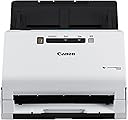


| ASIN | B07YNK4S9Y |
| Amazon 売れ筋ランキング | パソコン・周辺機器 - 474,809位 ( パソコン・周辺機器の売れ筋ランキングを見る ) ドキュメントスキャナ - 487位 |
| GTIN (Global Trade Identification Number) | 00013803328530 |
| UPC | 013803328530 |
| light_source_type | LED |
| おすすめ度 | 5つ星のうち4.3 2,145 レビュー |
| グレースケール深度 | Grayscale:- Simplex: Up to 40 ppm ; Duplex: Up to 80 ipm |
| スキャナータイプ | 領収書 |
| ブランド | キヤノン |
| ブランド名 | キヤノン |
| メーカー名 | Canon |
| モデル名 | Canon imageFORMULA R40 Office Document Scanner |
| ユニット数 | 1.0 個 |
| ワット数 | 22 W |
| 光学センサー採用技術 | CCD |
| 同梱商品 | 商品 |
| 品目の寸法 (D x W x H) | 25.1奥行き x 29幅 x 24.4高さ cm |
| 商品の寸法 | 25.1奥行き x 29幅 x 24.4高さ cm |
| 商品の重量 | 6.17 ポンド |
| 型番 | Canon imageFORMULA R40 Office Document Scanner |
| 接続技術 | USB |
| 推奨メディア/file | 写真, 名刺, 領収書 |
| 最小システム要件の説明 | この製品はWindowsおよびMacシステムと互換性があり、オペレーティングシステムのバージョンに応じて特定の要件があります。 システムの例としては、macOS 10.15 Catalina、OS X 10.9 Mavericks、Snow Leopard、Vista Home Basic、8、8.1などがあります。 |
| 標準入力シート容量 | 60 |
| 色彩深度 | 8 bpp |
| 解像度 | 600 |
| 通信・接続インターフェース | USB |
K**Z
Excelente
Excelente producto, llego en tiempo establecido
J**V
Great little home scanner. Worth the price if you have a lot of scanning to do. Back up to 5 stars
My old laptop died that I used to use this scanner on with no issues (I think it was originally Windows 7 that was upgraded to Windows 10). My new desktop has Windows 11 and each time I want to use the scanner, I have to re-install the TWAIN software to get the scanner to work as the software 'forgets' what scanner is attached to the computer. After I finish using the scanner and some unknown amount of time passes, the software 'forgets' again what scanner it is connected so and I have to re-install the software the next time I want to use it. Totally unacceptable and no workaround seems to be available from Canon other than to keep reinstalling the software each time I want to use the scanner. I would have returned the scanner if this has happened from the word go. Put the rating back up to 5 star after I deleted the Canon scanner software on my computer and re-installed it completely. Voila, no more losing the connection between the software and the scanner. Yeah, for all the years I've been using computers, I should have thought of removing and re-installing the software. With that issue gone, it's a really nice scanner especially for scanning significant numbers of pages. I was looking for a printer so I could put several boxes of old engineering paperwork into electronic format. So far, I've been really impressed with the R40. I can scan with my current printer but it's sloooooow, noisy and less than stellar quality. Definitely not a candidate for what I wanted to do. Setup was easy. You have to download the software which is 525 Mb. I missed the note on the download page directing US customers to an download link. My download speeds weren't great but it did come down. Installation went with no problem. Pros 1. Fast. The first time I ran about 4 or 5 pages through it, the scanner was set on 200 dpi greyscale and the pages just whipped through the feeder. I thought both sides could not have scanned but everything was there. Even on 300 dpi color it's pretty fast (max is 600 dpi). Compared to the scanner built into my printer, it's another whole other level of speed. I can't prep the next batch in time to keep up with the scanner. 2. The scanner says it will rotate pages into the correct orientation and overall it does a really good job. I finally found the section in the scanner software that allowed me to rotate a page that scanned in the wrong orientation (having it worked into a right mouse click with some other options would be useful Canon). I want to do some more testing but a couple of tests I did with flipping some pages or putting all the pages in upside down had them all come up in the right orientation (as mentioned, I had some early problems with some scans but that doesn't seem to be an issue now). 3. Handles flimsy magazine paper with no real problems. Ragged edges don't appear to be a problem but any amount of glue from the backing left on the pages and they don't feed properly causing a jam. Any amount of glue is bad. If you run your fingers down the edge and can feel bumps, remove it, trim the edges, whatever. If you can see a flat line of glue, trim it off. Sometimes it will feed, sometimes it won't. 4. Compact, nice small size. With the document feeder installed and extended as well as the output tray, it's about 12" high by 15" deep by 11" wide. Remove the feeder the retract the tray and the dimensions are about 7.5" high by 6.5" deep by 11" wide. 5. All necessary cables are provided. Small point maybe but there's nothing more annoying than getting a new toy and finding out you need to go out for a cable. While many of use have boxes of old cables, that doesn't mean we will have the right one. 6. Return shipping is included if I need to return it or don't like it, I don't think that's going to be an issue. Return shipping can be a nasty surprise. 7. The power supply handles 100V to 240V, doubt I will take it on a trip overseas but it's a nice feature to have. Cons: 1. The software version of the manual is useless. I had pages that were upside down and do you think 'rotate' or 'rotate pages' came up with useful information? If you said yes, you be wrong. 2. I finally figured out how to scan and then get the file written to my hard drive by setting up a one-touch button. Before that, sometimes when I hit 'finish', the file would write to my hard drive, other times it would not or I had no clue where it went to. Drove me crazy at first and really slowed down the overall speed. 3. Does an okay job on pictures but if I was going to scan a lot of pictures, this would not be the scanner I would pick. I didn't take anything off my rating as that was not my purpose in buying this scanner but I'll note it. 2023 comment Last point I'll add is when we came back from a 6 month cruise I decided to save all the daily cruise reports just in case I wanted to go back some time and see what we did on some day. It didn't take very long to scan that many pages, even less when I changed from full color to greyscale which was more than adequate for what I wanted. Full color looks good but does make some big files though that's not much of an issue given the multi Tb hard drives that you can get now.
P**E
A VERY GOOD SCANNER , I LIKE IT .
ITS A VERY NICE SCANNER, I USE IT FOR MY PHARMACY IN CANADA. VERY FAST OR IT COULD BE LITTLE SLOWER TO SCAN IF WE NEED HIGHT QUALITY IMAGE. SCANS ON BOTH THE SIDES, THESE ARE THE PROS AND THE CONES ACTUALLY MY SYSTEM IS FILLWARE AND THEY DON'T CONSIDER IT AS THE BEST SCANNER FOR THEIR SOFTWARE, IT WOULD GLITCH SOMETIMES AND NEED TO CALL MY HARDWARE GUYS TO FIX IT. SO FAR IF IT IS USED FOR HOME OR SMALL BUSINESS , I WOULD RECOMMEND IT.
K**G
Work as expected and there was no issues. Managed to scan 6 books and no error encountered
Small size and works with Mac OS!
G**.
Equipo muy efectivo
El escaner es muy eficiente y rápido, lo mejor es que escanea por los 2 lados al mismo tiempo, y no pierde el tiempo girandola u acomodandola.
Trustpilot
1 week ago
4 days ago