Desertcart purchases this item on your behalf and handles shipping, customs, and support to UAE.
🚀 Elevate Your Storage Game with Speed, Scale & Cool Efficiency!
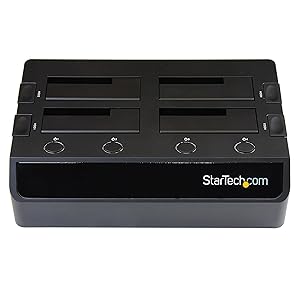
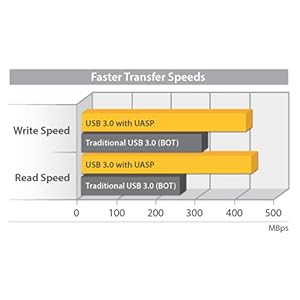
The StarTech.com 4-Bay USB 3.0 to SATA Hard Drive Docking Station is a professional-grade external dock that supports up to four 2.5" or 3.5" SATA III SSDs/HDDs simultaneously. Featuring USB 3.2 Gen 1 connectivity with UASP for accelerated data transfer speeds up to 5 Gbps, it enables hot-swapping with independently powered bays and dual cooling fans to maintain optimal drive temperatures. Its tool-less, top-loading design with LED activity indicators ensures effortless operation, making it ideal for IT professionals and power users requiring fast, reliable multi-drive access backed by a 2-year warranty and lifetime technical support.


| ASIN | B00MA1N8GA |
| Best Sellers Rank | #615 in Internal Hard Drives #9,688 in Computer Internal Components |
| Brand | StarTech.com |
| Built-In Media | USB 3.0 4-Bay 2.5/3.5" SATA SSD/HDD Dock |
| Color | Black |
| Compatible Devices | PC; Mac |
| Connectivity Technology | SATA, USB |
| Customer Reviews | 4.1 out of 5 stars 85 Reviews |
| Data Transfer Rate | 6 gigabits_per_second |
| EU Spare Part Availability Duration | 2 years |
| Enclosure Material | Plastic |
| Global Trade Identification Number | 00065030857932 |
| Hard Disk Form Factor | 3.5 inches |
| Hardware Interface | USB 3.0 |
| Hardware Platform | Mac, PC |
| Item Dimensions L x W x H | 11.2"L x 6.7"W x 3.3"H |
| Item Type Name | Drive Dock |
| Item Weight | 4.54 g |
| Manufacturer | StarTech.com |
| Material | Plastic |
| Mfr Part Number | SDOCK4U33 |
| Model Number | SDOCK4U33 |
| Number of Items | 1 |
| Number of Packs | 1 |
| Product Dimensions | 11.2"L x 6.7"W x 3.3"H |
| Supported Devices Quantity | 4 |
| UPC | 065030857932 |
| Unit Count | 1 Count |
| Warranty Description | 2 Year |
R**T
Best hard drive dock I have ever used.
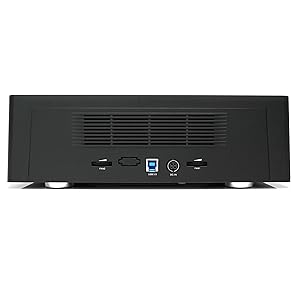
This is one of the best hard drive docks I have ever used. I have been through dozens of docks and I have a pile of them I have stopped using for a variety of reasons. Here are a few reasons why I recommend this dock over others. 1. Separate power buttons for each drive. Each drive can be powered on individually and ejected individually from within Windows. This is a big deal. I have several multi drive docks from other manufacturers where you have to load and eject all drives in the dock as a set. 2. Cooling Fans. This is a must. Without active cooling, drives will get uncomfortably hot. The operating temperature of most drives should not exceed 50 degrees Celsius. In docks without any type of cooling, I've seen drives regularly exceed 50 degrees with extended use. There are 2 cooling fans in this dock. One for the left side and one for the right. Each cooling fan has an adjustment control on the back of the unit to adjust the speed of the fan or turn it off completely. Both fans will automatically turn off if all drive bays are off. 3. UASP support. UASP stands for USB Attached SCSI Protocol. UASP support will ensure you get the best possible performance out of your hard drives. 4. Reliability. This is the most reliable USB 3.0 hard drive dock I have ever used. I have several other less expensive USB 3.0 docks that have cost me dozens of hours doing data recovery because they would stop responding during long file transfers I have not experienced a single drop-out while using this dock. I have a single complaint about this unit, it is not enough for me to lower my rating, but it is something I would like to see improved in a future model. This unit automatically turns off both cooling fans when all drives are turned off. If I only have drives in the left side of the unit, it would be nice if only the left cooling fan turned on and vice-versa.
G**R
Expensive but good
This dock just works. I've tried other brands, but often either: a) there is not enough power to support 4 drives simultaneously; and/or b) you must restart all drives to restart one; and/or c) you must restart your PC to have new drives placed in the dock recognised This unit suffers from none of those problems. I would say it is overpriced for what it is, but with built in fans and the ability to individually power on/off any of the 4 drives, it is in my opinion the best 4 bay drive dock you can buy. Works seamlessly in Windows 10. The LED lights are also very useful - they tell you when each of the 4 drives is powered on and also when each drive is being accessed. Worth the money if you need access to at least 4 drives.
J**R
Functionally this unit is nearly perfect.
The StarTech - SDOCK4U33 .com 4 Bay USB 3.0 hard drive docking station is functionally nearly perfect. It operates seamlessly with Windows 10 even when connected to a USB Hub. My only thought about its function is that the fans that cool the unit seem to operate whether or not the unit is connected to the computer. I would have liked the fans to cease when the computer is off, but alas they run anyway. I get complete control over the individual drives as I expected, good input and output via USB 3.0. I found the unit somewhat over-priced, and I hope I'll be satisfied a long time later that the higher price was worth it. I had no issue with installing or using the dock. I replaced separate Thermaltake BlacX docks.
R**H
Great Four Disk Docking Station!
I am a full time computer tech and have been for over 20 years. I bought this specifically to erase hard drives and solid state drives. I put in up to 4 drives, and can erase them all at the same time using Active@Killdisk. The drives are easy to recognize in the program because the are preceded by ASMT so there is less chance of erasing the wrong drive. I also use them to transfer data from one drive to another. Since it is USB 3 the process is very fast. Another great feature is that you can safely eject each drive separately. So if you have multiple drives in it, and you just want to swap out one of them, you can safely eject that one and the others stay online. I have used the StarTech bays for years. I replaced a perfectly good StarTech USB 2 two bay with the USB four bay for the extra capacity AND the faster USB 3 speed. I purchased the USB 2 two bay drive in September 2013 and it is still working fine, so the brand hold up.
Q**O
One year later - too many problems
This product has been a disappointment all around and I'm done with it. • I had to return two of these before getting this one, pre-tested by Startech. It is pretty reliable ONCE THE DRIVE CONNECTS. But initial connection is unreliable. Something is wrong with the controller design. It will sometimes take 5 minutes or more for a 4TB NTFS drive to connect. The same drives, with the same USB3 cable, going to the same USB3 computer port, will connect immediately in a cheap dual dock. I really wanted to like this but it's been such a hassle, so many times, that I regret ever getting involved with it. • The construction is very cheap. They took materials and techniques barely adequate for the $25 docks and just made it all bigger. The plastic is thin and every mechanical part bends, moves crookedly, or goes 'sproing'. The fan control knobs are bad. The fans are small and noisy. The (unnecessary) drive ejection paddles are particularly bad. Drives tend to vibrate and rattle, having no damping material. Much of the box is simply empty. These aren't QA issues; rather, every penny was saved in materials and construction. For the $150 market, this should be much more solid and intelligently designed. That's five times the cost and more than twice the size of a decent USB3 dual dock which works as it should. Startech does stand behind their products, meaning very good tech support and replacement policies. But they don't always design it well in the first place. This one is really regrettable since (A) it's expensive and (B) there's no competition / alternate choice. Somebody should make a good quad deck with individual controllers and power switches. This isn't it.
I**G
It has decent USB 3.0 speeds and serves ok as a external drive system - update Sept 9 2020
Since I always need more drive systems available I researched long & hard to find a perfect USB 3.0 external removable system for my library of hard drives. I bought this a while back and now (Aug 2018) I finally decided to do a review of it as I am pleased that it has lasted me this long. It works perfectly with every SATA harddrives though you need to be careful with the Toshiba drives as they have a bit of trouble getting out of it. I am getting good speeds copying data back & forth from it and I average between 50MB-60MB/sec with the 7200 RPM drives. Of course if you are using slower drives you will experience slower speeds. Every now and again I get the bit of vibrations noises from the drives & the unit, but this is easily remedied with a small cloth (or a 15"x15" microfiber towel) on top of the drives and put 2 hard drives on top of the cloth. Very simple noise dampener. Additionally I have this plugged into a separate 4 port USB 3.0 PCI card in the computer so as to not overwhelm the USB bus on the system and that works very well. The 4 blue LED lights are bright so you may want to put something over them if the bright lights are too much for you at night. Lastly, I strongly advise you to get a small fan to be blowing directly over the unit esp if you have all 4 bays filled up. For the 4 7200rpm drives I have in it, I see that the temps can run to 47C and higher very easily. With the fan blowing over it, the drives temps are ranging from 28-34C. ---------------------------------------------------------------------- Update Sept 9 2020 - as I've been using this these 3 yrs now I've only been accessing 2 or 3 of the drive bays and I thought that 1 of my hard drives had died, an older Seagate 2Tb. However I just bought 2 HGST 8TB drives and tried initializing them and I confirmed that its the rear left drive bay is now dead! I swapped around the drives while having Crystaldiskinfo, Drive Manager and Windows File Manager open as the drives are removed and re-inserted; So it lasted about 3 yrs and I just need to figure out how to work with 3 of the 4 drives. I'm now in the process of initializing and doing my Acceptance Tests for these hard drives that I just bought. They are HGST 8Tb drives I got off Ebay and they are pulled out of old servers that has something like 22,000 hrs on it (3+ yrs). Crystaldiskinfo is only showing 11 Power Ups cycles on them so that confirms that they were used in Dell Servers and I got a decent $$ on them.
S**W
Prone to overheating
I was using this to farm Chia plots (it's a crypto google it or don't) and in any temp over about 70 degrees ambient constant the whole device will overheat and somehow send a signal that crashes your USB drivers. I tried this on 3 different computers and one of them wasn't even able to recover after the crash. (making me have to hard power it down cause the mouse and keyboard were powered off) This happened with two separate units, so I know it wasn't just one isolated failure. (running 8 drives). On the whole good for short term use, but I'm not really sure why you'd need to use 4 drives for short term. Okay long term as long as you keep it temperature controlled. It might have killed a drive though, so ymmv. No such problems with the 2 HDD version. Maybe it runs cooler with fewer drives idk.
E**I
Fit for purpose, five years of daily use
After five years of heavy use I decided to do a write up on this. This is a four-bay USB 3.0 docking station which at any given time I have three SATA drives docked in it. I rarely have it disconnected but I do have it connected to a USB 3.0 hub and sharing other devices on that hub. I typically get between 100-150 MBs transfers from it and I use it primarily to store videos and photos which I create as well as storing data for numerical analysis. Unlike some other reviews, I am not hearing a lot of fan noise. You should be familiar with initializing hard drives on your system before using this device under windows. I have used it under windows 7 & 10 without issue. I have powered it down via its front four harddrive buttons and had my workstations power interrupted while it has been active and I have not seen any issues other than restarting a copy process with the individual hard drives. I am not saying to do a power down during processing, it is never recommended, but it does not appear to have any more issues than having an internal hard drive to lose power. I have used a combination of Seagate, Toshiba, and Western Digital drives of various sizes 1Tb, 2Tb, and 4Tb. I have heard from others that it does well with larger drives but have not tried them out yet. Having used it for five years I have noticed that dust can get inside an open socket, be sure to use compressed air to blow it off of the connections in dusty environments.
Y**S
Probably the best $$/performance external drive bay on Amazon. And reliable.
I tried an inexpensive Sabrent 4-unit external drive bay, but began having drive access errors and USB disconnections, while fully-loaded with HDDs that were >75% filled. The drives were pulling more power than the little unit (and it's power supply) could handle. But this StarTech unit is almost perfect. A little big, but has a large capacity power supply, and a very sturdy drive bay assembly. And two analog-control (dials) fans to keep it cool, even though the unit seems to power down the drives, as well. I have not encountered any issues with drive access, and the USB connection is stable. The independent on/off button for each drive is very useful, especially to power down an HDD drive before removal (hot-swapping an HDD when the drive is spinning should be avoided).
A**R
USB2 plugged into computer for 3no 3Tb 3 1/2" hard ...
USB2 plugged into computer for 3no 3Tb 3 1/2" hard drives for CCTV, has been doing the job some year/monthsr. used to utilise and read old PC hard drives, bought the 2 1/2" hard drive caddy.
T**M
Sehr empfehlenswert - Ware (+ Verpackung) sehr gut (Dockingstation offen 4fach).
Die Dockingstation (4fach) funktioniert sehr gut + ist wie beschrieben + abgebildet! Preis + Qualität stimmt! Kompatibilität mit Windows 8, 10, 11 optimal + ohne Fehler. Auch ein zu schnelles pausieren ist nicht der Fall. Ausserdem sind alle Festplatten einzeln schaltbar + die Lüfter einzeln regelbar (Lärm minimierung). Die Verpackung war stabil, neutral, effektiv. Lieferung erfolgte schnell. Also alles sehr empfehlenswert. Gern wieder! - *)Lieferant mißhandelte das erste Paket. Nach Rücksprache wurde SEHR schnell und unkompliziert die Ware abgeholt + erstattet. Die anschließende Neulieferung erfolgte blitzschnell ! Vielen Dank, gern wieder!
M**V
maandagmorgen product??
met uitpakken had ik sterk het vermoeden dat ik niet de eerste was die dit deed... ventilatoren maken best een hoop herrie, en koelen voor geen meter, na een uur copieren was de snelheid dramatisch teruggelopen, van 120/140 mB/s naar 4 mB/s, later dezelfde test gedaan met een andere connector, zelfde data en schijf en hier bleef alles wel stabiel. voor mij een reden om te retourneren.
C**E
Matériel éfficace - utilisation enfantine
Matériel éfficace et très simple d'utilisation - sélection individualisée ou complète de tous les empacements - pratique Utilisé uniquement pour visualiser la bibliothèque et collections de films numérisés.
Trustpilot
3 days ago
5 days ago